This topic describes how to view and modify the parameter configurations of a data migration task.
View parameter configurations
You can view the parameter configurations of a data migration task in the Configuration changing, Running, Modifying, Integrating, Completed, Ending, or Ended state.
Log on to the
ApsaraDB for OceanBase console.In the left-side navigation pane, choose Data Transmission > Data Migration.
On the Migration Tasks page, click the ... icon next to the target task and select Settings.

You can also click the name of the task to go to its details page. Then, click the ... icon in the upper-right corner and select Settings.

On the Settings page, view the parameter configurations of the current task.
Modify parameter configurations
You can modify the parameter configurations of a data migration task in the Not Started, Stopped, or Failed state.
Log on to the
ApsaraDB for OceanBase console.In the left-side navigation pane, choose Data Transmission > Data Migration.
On the Migration Tasks page, click the ... icon next to the target task and select Modify Parameter Configurations.

You can also click the name of the task to go to its details page. Then, click the ... icon in the upper-right corner and select Modify Parameter Configurations.
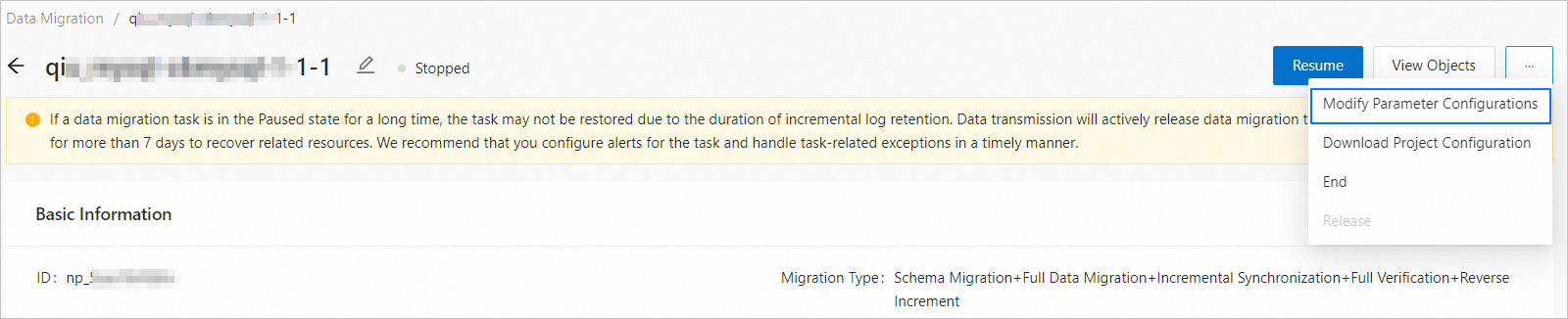
In the Modify Parameter Configurations panel, modify the parameter configurations as needed.
Full migration
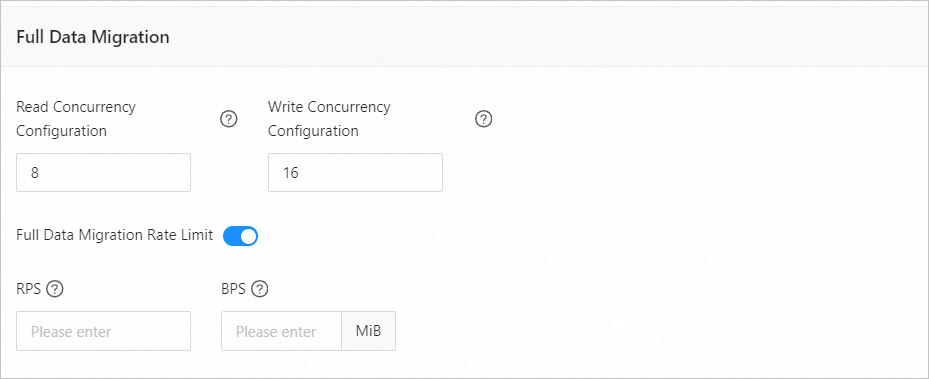
The following table describes the parameters for full migration, which are displayed only if you have selected Full Migration on the Select Migration Type page.
Parameter
Description
Read Concurrency
The concurrency for reading data from the source during full migration. The maximum value is 512. A high read concurrency may incur excessive stress on the source, affecting the business.
Write Concurrency
The concurrency for writing data to the target during full migration. The maximum value is 512. A high write concurrency may incur excessive stress on the target, affecting the business.
Full Migration Rate Limit
You can choose whether to limit the full migration rate as needed. If you choose to limit the full migration rate, you must specify the records per second (RPS) and bytes per second (BPS). The RPS specifies the maximum number of data rows migrated to the target per second during full migration, and the BPS specifies the maximum amount of data in bytes migrated to the target per second during full migration.
NoteThe RPS and BPS values specified here are only for throttling. The actual full migration performance is subject to factors such as the settings of the source and target and the instance specifications.
Incremental synchronization
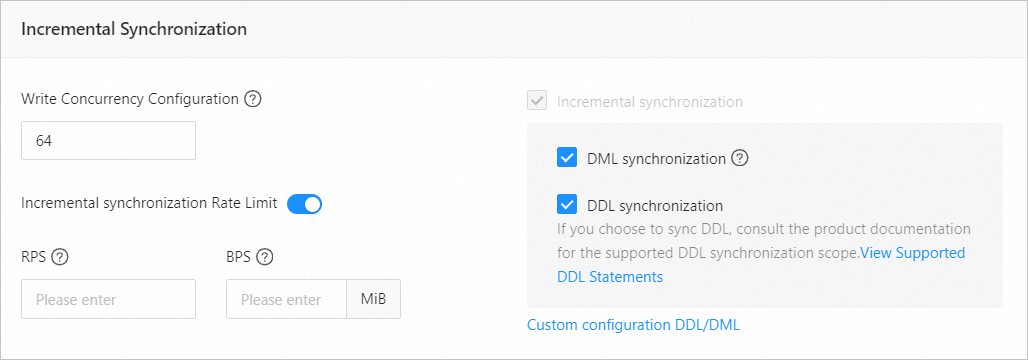
The following table describes the parameters for incremental synchronization, which are displayed only if you have selected Incremental Synchronization on the Select Migration Type page.
Parameter
Description
Write Concurrency
The concurrency for writing data to the target during incremental synchronization. The maximum value is 512. A high write concurrency may incur excessive stress on the target, affecting the business.
Incremental Synchronization Rate Limit
You can choose whether to limit the incremental synchronization rate as needed. If you choose to limit the incremental synchronization rate, you must specify the RPS and BPS. The RPS specifies the maximum number of data rows synchronized to the target per second during incremental synchronization, and the BPS specifies the maximum amount of data in bytes synchronized to the target per second during incremental synchronization.
NoteThe RPS and BPS values specified here are only for throttling. The actual incremental synchronization performance is subject to factors such as the settings of the source and target and the instance specifications.
Incremental Synchronization
Options for Incremental Synchronization are DML Synchronization and DDL Synchronization. You can select operations as needed. For more information, see Configure DDL/DML synchronization.
Reverse increment
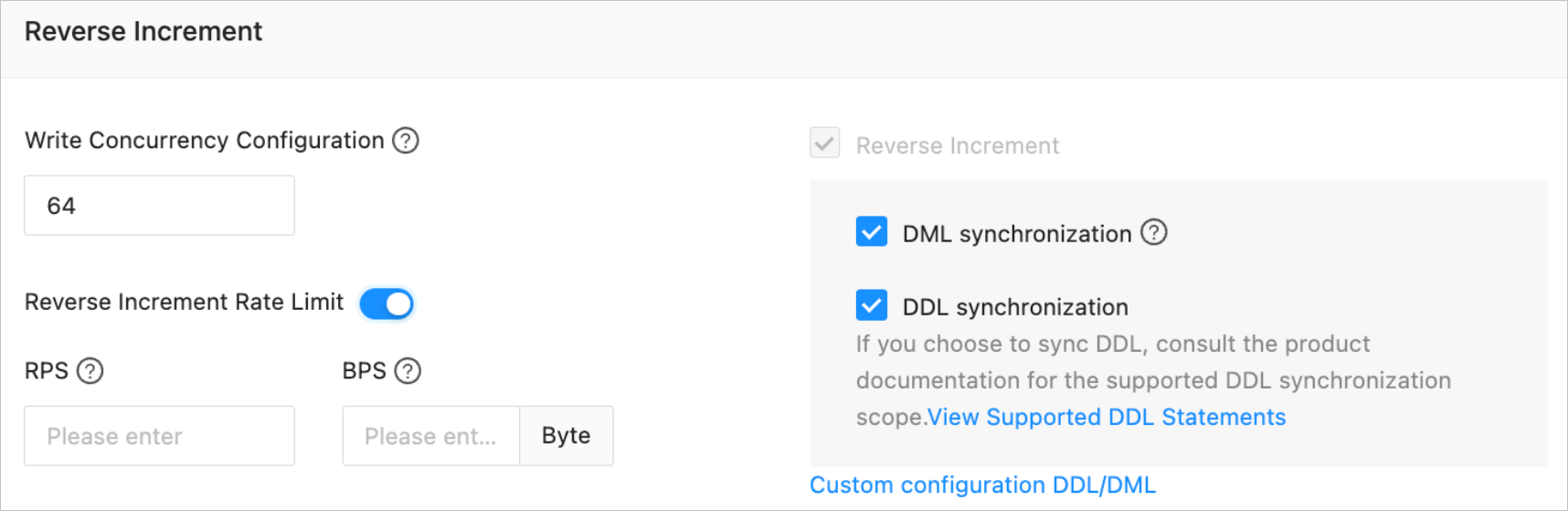
This section is displayed only if you have selected Incremental Synchronization on the Select Migration Type page. The default parameter configurations for reverse increment are consistent with those for incremental synchronization.
Parameter
Description
Write Concurrency
The concurrency for writing data to the source during reverse increment. The maximum value is 512. A high concurrency may incur excessive stress on the source, affecting the business.
Incremental Synchronization Rate Limit
You can choose whether to limit the incremental synchronization rate as needed. If you choose to limit the reverse increment rate, you must specify the RPS and BPS. The RPS specifies the maximum number of data rows synchronized to the source per second during reverse increment, and the BPS specifies the maximum amount of data in bytes synchronized to the source per second during reverse increment.
NoteThe RPS and BPS values specified here are only for throttling. The actual reverse increment performance is subject to factors such as the settings of the source and target and the instance specifications.
Reverse Increment
Options for Reverse Increment are DML Synchronization and DDL Synchronization. You can select operations as needed. For more information, see Configure DDL/DML synchronization.
Click OK.