ack-koordinator is a Quality of Service (QoS)-aware scheduling system that uses features such as CPU Burst and dynamic resource overcommitment to optimize cluster resource utilization and prioritize the service quality of high-priority applications. This improves overall system stability. ack-koordinator also supports resource profiling and descheduling. This topic describes the ack-koordinator component and its change history.
To view the release and change history of the component, see the Change history section.
What is ack-koordinator
ack-koordinator is a Kubernetes-based QoS-aware scheduling system that improves cluster resource utilization and provides QoS guarantees for applications with different priorities to prevent performance degradation caused by resource contention. For example, ack-koordinator lets you colocate service-type applications and batch processing jobs on the same node. It uses capabilities such as dynamic resource overcommitment and QoS-aware scheduling to improve cluster resource utilization while ensuring the service quality of service-type applications. This makes it suitable for business scenarios such as batch processing, high-performance computing (HPC), AI tasks, and machine learning. ack-koordinator is the core component that enables QoS-aware scheduling in ACK. It provides QoS-aware scheduling capabilities such as elastic resource limits, topology-aware scheduling, and dynamic resource overcommitment, in addition to features such as load-aware scheduling, descheduling, and resource profiling.
To use the component, log on to the Container Service console and install the ack-koordinator component in an ACK cluster. You can then enable and use the features using a ConfigMap or pod annotations.
Component architecture
ack-koordinator consists of central and node-level components. The function of each module is described as follows:
Koordinator Manager: A central component that is deployed as a deployment. It consists of one primary instance and one standby instance to ensure high availability (HA).
SLO Controller: Manages resource overcommitment. It dynamically adjusts the amount of overcommitted resources in the cluster based on the runtime status of colocated workloads and manages differentiated SLO policies for each node.
Recommender: Provides the resource profiling feature. It estimates the peak resource requirements of workloads to simplify the configuration of container resource specifications.
Koordinator Descheduler: A central component that is deployed as a deployment and provides the descheduling feature.
Koordlet: A node-level component that is deployed as a DaemonSet. It supports dynamic resource overcommitment, load-aware scheduling, and QoS-aware scheduling in colocation scenarios for online and offline workloads.
Koordinator scheduling plugin: The Koord-Scheduler module is not included in the ack-koordinator component. Instead, the related scheduling capabilities are integrated into the ACK scheduler as a plugin that is installed by default.
In an ACK Serverless cluster, ack-koordinator includes only the Koordinator Manager component and provides the resource profiling feature.

Version number description
Starting from v1.1.1-ack.1, the version number of ack-koordinator uses the x.y.z-ackn format.
x.y.z: Corresponds to the Koordinator open source version. This indicates that ack-koordinator supports all features of that open source version.ackn: Indicates feature enhancements and optimizations based on the open source version.
Related concepts
Supported features
Each module of the ack-koordinator component includes the features that are supported by the corresponding open source version of Koordinator. In the installation configuration, only the feature gates for commonly used features are enabled by default. To use other features of the open source version of Koordinator, you must enable the corresponding feature gates for the ack-koordinator modules. For more information about other features of the open source version of Koordinator, see the official Koordinator documentation.
Type | Feature documentation | Description | Consistent with open source version |
Schedules pods to nodes with lower loads based on the actual load of nodes. This balances the load across nodes and reduces the risk of node failures. | Yes | ||
Dynamically detects CPU throttling and adaptively adjusts container parameters. When a burst in workload occurs, it temporarily provides extra CPU resources to the container to ensure and improve the service quality of the application. | Yes | ||
Pins pods to specific CPU cores on a node to run. This mitigates application performance degradation caused by CPU context switching and cross-NUMA memory access. | No | ||
Collects real-time load data from nodes to quantify the allocated but unused CPU and memory resources in the cluster. It provides resources for BestEffort jobs and ensures resource fairness among them. | Yes | ||
In dynamic resource overcommitment scenarios, it limits the CPU resource usage of BE pods to a reasonable range to prioritize the stable operation of LS pods on the node. | Yes | ||
Prevents CPU resource contention among applications with different priorities and prioritizes CPU resource usage for LS applications. | Yes | ||
Allows you to set QoS parameters for containers based on their priorities. This prioritizes the performance of high-priority applications while it ensures memory resource fairness. | Yes | ||
Prevents L3 cache and memory bandwidth resource contention among applications with different priorities and prioritizes memory resource usage for LS applications. | Yes | ||
Dynamically modifies pod resource parameters based on cgroups files. You can temporarily modify single-node isolation parameters such as CPU, memory, and disk I/O at the pod or deployment dimension without restarting the pod. | No | ||
Uses the Intel® Data Streaming Accelerator (DSA) to improve the data processing efficiency of data-intensive workloads on nodes. It can also further optimize the acceleration effect of container nearest memory access. | No | ||
Migrates memory from a remote NUMA node to the local NUMA node for a core-bound application while it ensures data security. This improves the local memory access hit rate and provides better memory access performance for memory-intensive workloads. | No | ||
In scenarios such as unbalanced cluster resource utilization, high node load, or new scheduling policy requirements, it reschedules inappropriately scheduled pods from one node to another. This maintains cluster health, optimizes resource usage, and improves the service quality of workloads. | Yes | ||
Dynamically detects changes in node loads within the cluster and automatically optimizes nodes that exceed the safe load threshold. This prevents extreme load imbalances. | Yes | ||
GPU topology awareness | Schedules pods to the optimal NUMA nodes based on the NUMA topology-aware scheduling capability. This reduces cross-NUMA node access to optimize performance. | No | |
Recommends resource specifications for containers by analyzing historical resource usage data. This simplifies the complexity of configuring container requests and limits. | No | ||
Component installation and management
ack-koordinator is available on the Component Management page of the Container Service Management Console. You can install, upgrade, and uninstall the component on the Component Management page.
Prerequisites
An ACK cluster of v1.18 or later is created. For more information about how to upgrade a cluster, see Manually upgrade an ACK cluster.
Helm v3.0 or later is installed. For more information about how to upgrade, see [Component Upgrade] Helm V2 Tiller Upgrade Announcement and How do I manually upgrade Helm?.
Install and manage the component
You can install the ack-koordinator component on the Component Management page. You can also modify the component parameter settings or upgrade the component on this page as needed.
If the component version you are using was deployed from the App Marketplace (version earlier than v0.7), see Migrate ack-koordinator from the App Marketplace to the Add-ons center to complete the migration.
Install the component: Follow the steps below to install the component and verify that the deployment is successful.
Modify component parameters: The system automatically redeploys ack-koordinator with the new configuration.
Upgrade the component: If you have manually modified the deployed modules (Deployment, DaemonSet) of ack-koordinator in other ways, the custom configuration is overwritten after the component is upgraded.
Log on to the ACK console. In the left navigation pane, click Clusters.
On the Clusters page, find the one you want to manage and click its name. In the left navigation pane, click Add-ons.
On the Component Management page, find ack-koordinator and click Install on the ack-koordinator (ack-slo-manager) card.
In the Install Component Ack-koordinator(ack-slo-manager) dialog box, modify the configuration parameters as needed and click OK.
(Optional) In the navigation pane on the left of the cluster management page, choose to view the deployment status of ack-koordinator.
If the Status of ack-koordinator is Deployed, the component is successfully deployed.
Uninstall the component
Clean up the ConfigMap for nodes that are not offline
The CPU topology-aware scheduling feature creates a topology information ConfigMap for each ACK node in the kube-system namespace. Starting from v0.5.1, ack-koordinator automatically cleans up the ConfigMaps of offline nodes. However, after you uninstall ack-koordinator, the ConfigMaps of online nodes are retained. These uncleared ConfigMaps do not affect the normal use of other features but occupy data space. We recommend that you promptly clean them up.
On the Component Management page, find ack-koordinator and follow the on-screen instructions to uninstall the component.
Delete the topology information ConfigMap.
In the navigation pane on the left, choose . At the top of the page, select the kube-system namespace.
In the Name text box, search for -numa-info. In the list that appears, select the ConfigMaps that are named in the
${NODENAME}-numa-infoformat. In the Actions column of the target ConfigMap, click Delete and follow the on-screen instructions to complete the deletion.
Clean up CRD objects
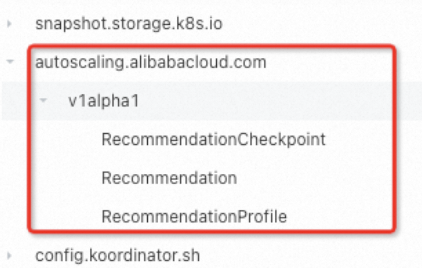
When you uninstall the ack-koordinator component, some CRD objects may remain. These uncleared objects do not affect the normal use of other features but occupy data space. If you want to reinstall ack-koordinator later, these objects may affect the normal use of the component's features. We recommend that you promptly clean them up. The CRDs are as follows:
autoscaling.alibabacloud.com | slo.koordinator.sh |
|
|

Billing
The ack-koordinator component is free to install and use. However, additional fees may be incurred in the following scenarios:
ack-koordinator is a self-managed component and consumes worker node resources after installation. You can configure the resource requests for each module when you install the component.
By default, ack-koordinator exposes monitoring metrics for features such as resource profiling and fine-grained scheduling in Prometheus format. If you select the Enable Prometheus Monitoring for ACK-Koordinator option when you configure the component and use the Alibaba Cloud Prometheus service, these metrics are considered custom metrics and incur fees. The fees depend on factors such as your cluster size and the number of applications. Before you enable this feature, carefully read the Billing of Prometheus instances documentation for Alibaba Cloud Prometheus to understand the free quota and billing policies for custom metrics. You can monitor and manage your resource usage by querying usage data.
Related information
Relationship between ack-koordinator and ack-slo-manager
ack-slo-manager is the predecessor of ack-koordinator and incubated the open source project Koordinator. As Koordinator matured and stabilized, it contributed back to ack-slo-manager. ack-koordinator provides the features that are supported by the open source version of Koordinator and also adds a richer set of features based on ack-slo-manager. We recommend that you see Migrate ack-koordinator from the App Marketplace to the Add-ons center to promptly upgrade to the latest component version. This lets you use new features and bug fixes.
Migrate ack-koordinator from the App Marketplace to the Add-ons center
If the version of ack-koordinator you are using was deployed from the App Marketplace (version earlier than v0.7), you must uninstall it from the App Marketplace and then reinstall it. Follow the instructions below to complete the migration.
If you have modified the ConfigMap of ack-koordinator in the App Marketplace, back it up before you upgrade. If not, go to step 2 to upgrade the component.
Back up the ConfigMap of ack-koordinator using kubectl or the console.
kubectl
Run the following command to save the original configuration to a file named slo-config.yaml. The command is based on the namespace (for example, kube-system) and name (for example, ack-slo-manager-config) of the original ConfigMap.
kubectl get cm -n kube-system ack-slo-manager-config -o yaml > slo-config.yamlRun the
vim slo-config.yamlcommand to edit the file. Change a field in the ConfigMap tokube-system, set thenamefield toack-slo-config, and delete allannotationsandlabelsfrom the ConfigMap. This prevents them from being automatically overwritten during an upgrade.Run the following command to submit the modified configuration to the cluster.
kubectl apply -f slo-config.yaml
Console
Record the key-value pairs of the original ConfigMap.
In the navigation pane on the left, click . At the top of the page, select the Namespace (kube-system by default) that you specified when you installed ack-koordinator in the App Marketplace.
In the Name text box, search for ack-slo-manager-config. Click the name of the target ConfigMap and record its key-value pairs.
Create a new ConfigMap using the key-value pairs from the original ConfigMap.
In the navigation pane on the left, choose . At the top of the page, select All Namespaces.
On the ConfigMaps page, click Create in the upper-right corner. Set ConfigMap Name to ack-slo-config and select the new namespace kube-system. Click + Add, enter the key-value pairs that you recorded in the previous step, and then click Create.
In the navigation pane on the left of the cluster management page, choose to view the deployment status of ack-slo-manager. In the Actions column, click Delete to uninstall the ack-slo-manager that was installed from the App Marketplace.
On the Component Management page, install the latest version of ack-koordinator. For more information, see Install and manage the component.
ImportantIf you have modified the ConfigMap of ack-koordinator in the App Marketplace, you must enter the name of the backed-up ConfigMap from step 1 (for example, ack-slo-config) into the corresponding configuration item in the Ack-koordinator Parameter Settings dialog box.
Migrate from resource-controller to ack-koordinator
The resource-controller component is offline. ack-koordinator now supports all features of the original resource-controller, such as Enable CPU topology-aware scheduling and Dynamically modify pod resource parameters. If your cluster is using resource-controller, follow these steps to migrate from resource-controller to ack-koordinator.
Upgrade resource-controller to the latest version.
Log on to the ACK console. In the left navigation pane, click Clusters.
On the Clusters page, find the one you want to manage and click its name. In the left navigation pane, click Add-ons.
On the Component Management page, find resource-controller and follow the on-screen instructions to upgrade the component.
Install and configure ack-koordinator.
On the Component Management page, find ack-koordinator and follow the on-screen instructions to install it.
In the Install Component Ack-koordinator(ack-slo-manager) dialog box, modify agentFeatures (the feature-gates control switch for Koordlet) and configure other parameters as needed. Then, click OK.
Check whether your cluster is using the CPU Limit Adjustment feature in Dynamically modify pod resource parameters. This feature lets you modify the cpu.cfs_quota_us cgroups parameter file for a specified container by creating a CRD or pod annotation. If it is, proceed to step ii. If not, go to step c.
Run the following command to obtain the current feature-gate configuration from the DaemonSet YAML of the current ack-koordlet.
kubectl get daemonset -n kube-system ack-koordlet -o yaml |grep feature-gates
- --feature-gates=AllAlpha=false,AllBeta=false,...,CPUBurst=true,....
Modify the current feature-gate configuration of ack-koordlet as shown in the following example to disable the CPU Burst policy module. Set
CPUBurst=falseand keep the other parameters unchanged. Use commas (,) to separate parameters.After you disable the module, the CPU Burst mechanism for all containers in the cluster does not take effect. This prevents both modules from modifying the container's cpu.cfs_quota_us cgroups parameter file at the same time.
AllAlpha=false,AllBeta=false,...,CPUBurst=false,....To implement elastic CPU resources for containers, we recommend that you use the CPU Burst policy for performance optimization to automatically adjust the pod's elastic CPU resources. For more information, see Enable the CPU Burst policy for performance optimization.
In the navigation pane on the left, choose to view the deployment status of ack-koordinator.
If the Status of ack-koordinator is Deployed, the component is successfully deployed.
On the Component Management page, find resource-controller and follow the on-screen instructions to uninstall the component.
FAQ
Error during component installation: no matches for kind "ServiceMonitor" in version "monitoring.coreos.com/v1" ensure CRDs are installed first
This error occurs because Prometheus is not installed in the cluster. You can see Connect to and configure Alibaba Cloud Prometheus Monitoring to install the Prometheus component, or clear the Enable Prometheus Monitoring For Ack-koordinator checkbox when you install ack-koordinator on the Component Management page.
Error during component installation: task install-addons-xxx timeout, error install addons map[ack-slo-manager:Can't install release with errors: ... function "lookup" not defined
This error occurs because you need to upgrade Helm to v3.0 or later. See [Component Upgrade] Helm V2 Tiller Upgrade Announcement to complete the upgrade.
Change history
November 2025
Version | Image URL | Change time | Changes | Impact |
v1.6.1-ack1.21 |
| November 6, 2025 |
| None |
August 2025
Version | Image URL | Change time | Changes | Impact |
v1.6.1-ack1.19 |
| August 8, 2025 |
| None |
July 2025
Version | Image URL | Change time | Changes | Impact |
v1.6.1-ack1.18 |
| July 30, 2025 |
| None |
v1.6.1-ack1.17 |
| July 14, 2025 |
| None |
v1.6.1-ack1.16 |
| July 4, 2025 |
| None |
September 2024
Version | Image URL | Change time | Changes | Impact |
v1.5.0-ack1.14 |
| September 12, 2024 |
| None |
July 2024
Version | Image URL | Change time | Changes | Impact |
v1.5.0-ack1.12 |
| July 29, 2024 | Optimized internal interfaces. | None |
January 2024
Version | Image URL | Change time | Changes | Impact |
v1.3.0-ack1.8 |
| January 24, 2024 |
| None |
December 2023
Version | Image URL | Change time | Changes | Impact |
v1.3.0-ack1.7 |
| December 21, 2023 |
| None |
October 2023
Version | Image URL | Change time | Changes | Impact |
v1.3.0-ack1.6 |
| October 19, 2023 | Optimized internal interfaces. | None |
June 2023
Version | Image URL | Change time | Changes | Impact |
v1.2.0-ack1.3 |
| June 9, 2023 | Optimized internal interfaces. | None |
April 2023
Version | Image URL | Change time | Changes | Impact |
v1.2.0-ack1.2 |
| April 25, 2023 |
| None |
March 2023
Version | Image URL | Change time | Changes | Impact |
v1.1.1-ack.2 |
| March 23, 2023 | Optimized internal interfaces. | None |
January 2023
Version | Image URL | Change time | Changes | Impact |
v1.1.1-ack.1 |
| January 11, 2023 |
| None |
November 2022
Version | Image URL | Change time | Changes | Impact |
v0.8.0 |
| November 17, 2022 |
| After the component is upgraded, if you use load-aware scheduling, you need to upgrade ACK to 1.22.15-ack-2.0. Other features can be used normally. |
September 2022
Version | Image URL | Change time | Changes | Impact |
v0.7.2 | registry.{REGION}.aliyuncs.com/acs/ack-slo-manager:v0.7.2 | September 16, 2022 | Fixed an issue introduced in version 0.7.1: topology-aware scheduling did not take effect on pods. | None |
v0.7.1 | registry.{REGION}.aliyuncs.com/acs/ack-slo-manager:v0.7.1 | September 2, 2022 |
| None |
August 2022
Version | Image URL | Change time | Changes | Impact |
v0.7.0 | registry.{REGION}.aliyuncs.com/acs/ack-slo-manager:v0.7.0 | August 8, 2022 | Migrated the installation method of ack-slo-manager from the App Marketplace to Component Management. | None |
July 2022
Version | Image URL | Change time | Changes | Impact |
v0.6.0 | registry.{REGION}.aliyuncs.com/acs/ack-slo-manager:v0.6.0 | July 26, 2022 | Optimized internal interfaces and simplified component configuration. | None |
June 2022
Version | Image URL | Change time | Changes | Impact |
v0.5.2 | registry.{REGION}.aliyuncs.com/acs/ack-slo-manager:v0.5.2 | June 14, 2022 |
| None |
v0.5.1 | registry.{REGION}.aliyuncs.com/acs/ack-slo-manager:v0.5.1 | June 2, 2022 |
| None |
April 2022
Version | Image URL | Change time | Changes | Impact |
v0.5.0 | registry.{REGION}.aliyuncs.com/acs/ack-slo-manager:v0.5.0 | April 29, 2022 |
| None |
v0.4.1 | registry.{REGION}.aliyuncs.com/acs/ack-slo-manager:v0.4.1 | April 14, 2022 |
| None |
v0.4.0 | registry.{REGION}.aliyuncs.com/acs/ack-slo-manager:v0.4.0 | April 11, 2022 | Optimized the memory overhead of slo-agent. | None |
February 2022
Version | Image URL | Change time | Changes | Impact |
v0.3.0 | registry.{REGION}.aliyuncs.com/acs/ack-slo-manager:v0.3.0 | February 25, 2022 |
| None |
December 2021
Version | Image URL | Change time | Changes | Impact |
v0.2.0 | registry.{REGION}.aliyuncs.com/acs/ack-slo-manager:v0.2.0 | December 10, 2021 |
| None |
September 2021
Version | Image URL | Change time | Changes | Impact |
v0.1.1 | registry.{REGION}.aliyuncs.com/acs/ack-slo-manager:v0.1.1-c2ccefa | September 2, 2021 | Optimized internal interfaces. | None |
July 2021
Version | Image URL | Change time | Changes | Impact |
v0.1.0 | registry.{REGION}.aliyuncs.com/acs/ack-slo-manager:v0.1.0-09766de | July 8, 2021 | Added support for Use load-aware scheduling. | None |