The pay-as-you-go edition of Cloud Firewall uses a post-paid billing method. You can pair it with a pre-paid Pay-as-you-go Savings Plan to further reduce costs.
Starting October 15, 2025, the billable items for Cloud Firewall will be updated to Billing 2.0. New users use Billing 2.0 by default. Existing users can continue to use Billing 1.0 and can choose to upgrade to Billing 2.0. For more information about the pricing changes in Billing 1.0 and how to upgrade to Billing 2.0, see Billing 1.0 and upgrade instructions.
You can enable the pay-as-you-go edition of Cloud Firewall on demand, without requiring large upfront resource purchases. You are billed for the number of firewall instances and the traffic they process. This model is ideal for the following use cases:
Scenarios with fluctuating business volumes or temporary, bursty resource demands, offering high elasticity and flexibility.
Small and medium-sized enterprises with lower traffic volumes, providing a more cost-effective solution.
The pay-as-you-go edition of Cloud Firewall provides the following capabilities:
Automatically discovers cloud assets and enables protection with a single click.
The Internet Firewall automatically discovers your public cloud assets and provides instant protection. This includes assets such as ECS public IP addresses, Classic Load Balancer (CLB) public IP addresses, Application Load Balancers (ALBs), Network Load Balancers (NLBs), Elastic IP Addresses (EIPs) including Layer 2 EIPs, and Elastic Network Interfaces (ENIs). It protects both IPv4 and IPv6 assets.
The NAT Firewall supports automatic protection for private assets that access the internet through a public NAT gateway.
The VPC Firewall supports automatic protection for private assets across different Virtual Private Cloud (VPC) networks.
Provides real-time defense against both inbound and outbound network attacks, including web attacks, brute-force attacks, database attacks, cryptojacking trojans, viruses, worms, command execution, reverse shells, and malicious external connections. It also supports virtual patching for vulnerabilities, threat intelligence, and breach detection.
Supports granular Layer 4 to Layer 7 access control to isolate business domains. This includes access control for public and private traffic across internet, NAT, and VPC boundaries based on IP addresses, domain names, applications, protocols, ports, and geographic locations.
Provides traffic analysis and visualization to promptly identify active outbound connections, public exposure risks, private network outbound connections, and traffic trends and anomalies between VPCs.
Supports log auditing and analysis with a 180-day log retention period, facilitating quick attack traceback, unified analysis, and compliance with security standards.
To learn more, see Cloud Firewall (Pay-as-you-go) Use cases, Feature comparison by edition, and Supported regions.
Billing
The cost of Cloud Firewall (Pay-as-you-go) consists of an Instance Fee, a Firewall Traffic Processing Fee, and a Firewall Function Fee. The system calculates and deducts charges for the previous day from your account balance on the following day.
Cloud Firewall (Pay-as-you-go) is billed on an hourly basis. Usage for any period less than a full hour is billed as one hour. For example, usage from 15:55 to 16:05 spans two billing hours (the 15:00 hour and the 16:00 hour) and is billed as two hours.
If your account has an insufficient balance and is overdue for more than 15 consecutive days, the system automatically releases your Cloud Firewall (Pay-as-you-go) instance. If no assets are protected for more than 30 days, the system automatically disables the corresponding boundary firewall switches.
Billing item | Unit price | Description |
Instance Fee | $0.36/instance/hour | This fee is based on the number of Cloud Firewall instances you create, including all firewall types. The number of instances is calculated as follows:
|
Firewall Traffic Processing Fee | $0.06/GB | This fee is based on the total traffic processed by all three types of boundary firewalls. The maximum supported peak bandwidth is 10 Gbps. To request a higher specification, contact your sales manager or solution architect. |
Access Control | Free (up to 10,000 policies) | This is the core access control feature. To increase the policy limit, upgrade to a subscription edition or contact your account team. |
Sensitive Data Leak Prevention |
|
|
Synchronization Node | Free | You can configure up to five ACK and five DNS synchronization nodes. |
Threat Intelligence (IPS) | $0.36/hour | You can enable the Threat Intelligence capability on demand using its corresponding switch. |
Log Analysis Service | $0.3/TB/hour | This fee is based on your selected log storage capacity. The minimum capacity is 1 TB. |
If a Cloud Firewall instance has no protected assets and incurs no fees for 30 consecutive days, the system automatically releases it and deletes all historical alert data and configurations.
Cloud Firewall (Pay-as-you-go) automatically synchronizes your assets and detects their protection status in real time. If the system detects that your instance has not protected any assets for 1 to 30 consecutive days, it will send you a notification.
If no assets are protected for more than 30 days, Cloud Firewall automatically disables the corresponding Internet Firewall, NAT Firewall, or VPC Firewall modules, and other related modules revert to their initial state. You can re-enable these modules when needed.
Billing example
Example scenario | Hourly bill |
You have enabled Cloud Firewall (Pay-as-you-go). No other features are enabled, and no assets are protected. | Free |
You have enabled Cloud Firewall (Pay-as-you-go). You have one firewall instance protecting a group of IP assets in the same region with an Internet Firewall. The total inbound and outbound traffic processed by the firewall is approximately 1 GB per hour. | (1 instance × $0.36/hour) + (1 GB × $0.06/GB) = $0.42 |
Enable Cloud Firewall (Pay-as-you-go)
Go to the Cloud Firewall purchase page and set Product Type to Pay-as-you-go 2.0. Configure the following specifications.
Automatic Protection for Assets: Select whether to enable automatic asset protection.
If you enable Automatic Protection for Assets, Cloud Firewall automatically protects your public assets after you enable the Cloud Firewall (Pay-as-you-go). This includes turning on the firewall switch and attack protection to reduce security risks to your public assets.
NoteAfter enabling this feature, if you no longer need automatic asset protection, you can go to the Cloud Firewall console and turn off the Automatic Protection for Assets switch. For detailed instructions, see Internet firewall.
Log Analysis: Select whether to enable log analysis. By default, Cloud Firewall stores audit logs for the last 7 days. Enable this feature if you need longer log retention, want to meet compliance requirements, or need to export logs. Log Analysis lets you customize the log storage period from 7 to 730 days.
Read and agree to the Cloud Firewall (Pay-As-You-Go) Service Agreement, then click Buy Now and complete the payment.
After you enable the Cloud Firewall (Pay-as-you-go) edition, Alibaba Cloud settles your bill for the previous day's usage on the following day.
After enabling the pay-as-you-go firewall, you can enable the NAT Firewall and VPC Firewall as needed.
Enable NAT Firewall
Log on to the Cloud Firewall console. In the left-side navigation pane, click Firewall Settings.
On the NAT Firewall tab, click Enable Now.
If you enable the NAT Firewall but do not create a NAT firewall within 30 days, the system automatically disables this module. You can re-enable it when needed. Protect your assets immediately after enabling the firewall to ensure continuous security. The initial asset synchronization takes about 1 to 5 minutes.
Enable VPC Firewall
Log on to the Cloud Firewall console. In the left-side navigation pane, click Firewall Settings.
On the VPC Firewall tab, click Enable Now.
If you enable the VPC Firewall but do not create a VPC firewall within 30 days, the system automatically disables this module. You can re-enable it when needed. Protect your assets immediately after enabling the firewall to ensure continuous security. The initial asset synchronization takes about 1 to 5 minutes.
View traffic usage details
Cloud Firewall (Pay-as-you-go) is billed hourly. Costs from the previous day are settled on the following day. You can view the bill details for the pay-as-you-go edition to understand your itemized charges.
Log on to the Cloud Firewall console.
In the left-side navigation pane, choose .
On the Bill Management page, view the pay-as-you-go traffic usage details, including the Instance Fee, Traffic Processing Fee, and Feature Fee.
Click View Details to see a detailed breakdown of your bill. For specific steps, see Billing.
Use Pay-as-you-go with a Savings Plan
When you use the Cloud Firewall (Pay-as-you-go) edition, you can pair it with a Cloud Firewall Pay-as-you-go Savings Plan to reduce costs. The pre-paid Pay-as-you-go Savings Plan functions like a stored-value card that offers discounts on your usage. You can purchase a plan based on your expected spending, starting from $10. After purchase, the system automatically applies the plan's balance to your pay-as-you-go charges, providing a discount on all applicable billing items. For example, if you purchase a $20 plan, you may receive promotional or business discounts at the time of purchase, and all pay-as-you-go items will be discounted by an additional 5%. You can purchase multiple plans as needed. For more information, see Pay-as-you-go Savings Plan.
Log on to the Cloud Firewall console.
In the left-side navigation pane, click Overview.
In the right-side panel of the Overview page, click Pay-as-you-go Savings Plan.
In the Pay-as-you-go Savings Plan panel, purchase a plan that suits your needs. For specific steps, see Pay-as-you-go Savings Plan.
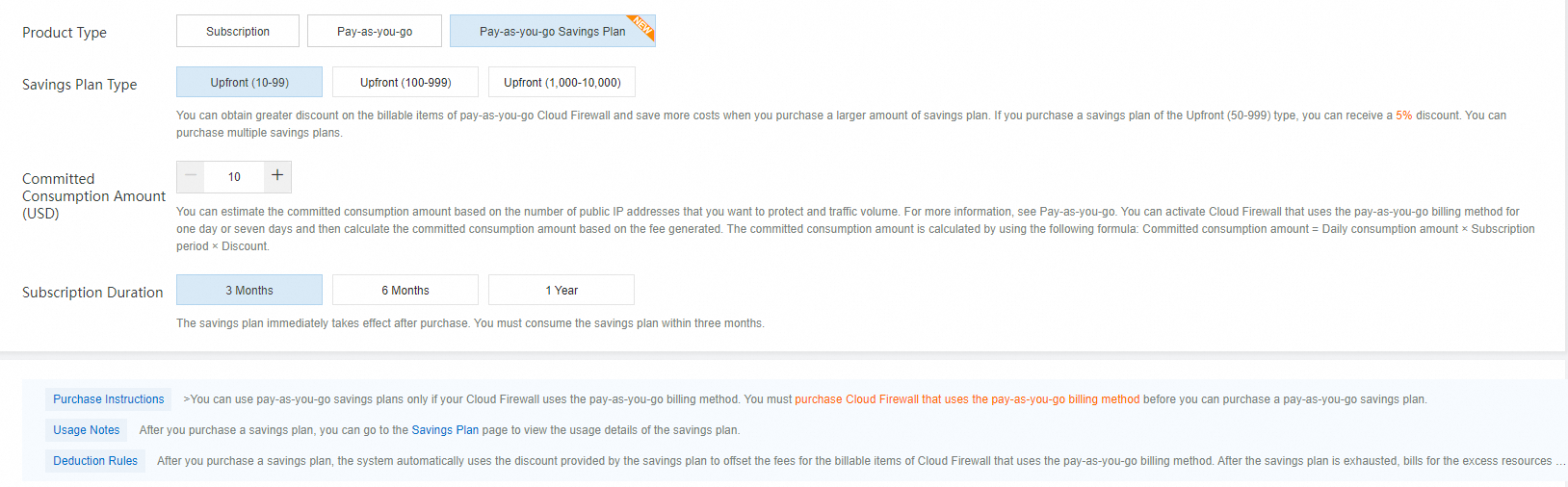
The Cloud Firewall Pay-as-you-go Savings Plan is a discount program. By committing to a certain amount of spending (by pre-purchasing a plan), you receive a lower pay-as-you-go rate. The larger your spending commitment, the greater the discount and cost savings.
Convert from pay-as-you-go to subscription
You can convert your Cloud Firewall billing method from pay-as-you-go to subscription to suit your business needs.
Release a Cloud Firewall (Pay-as-you-go) instance
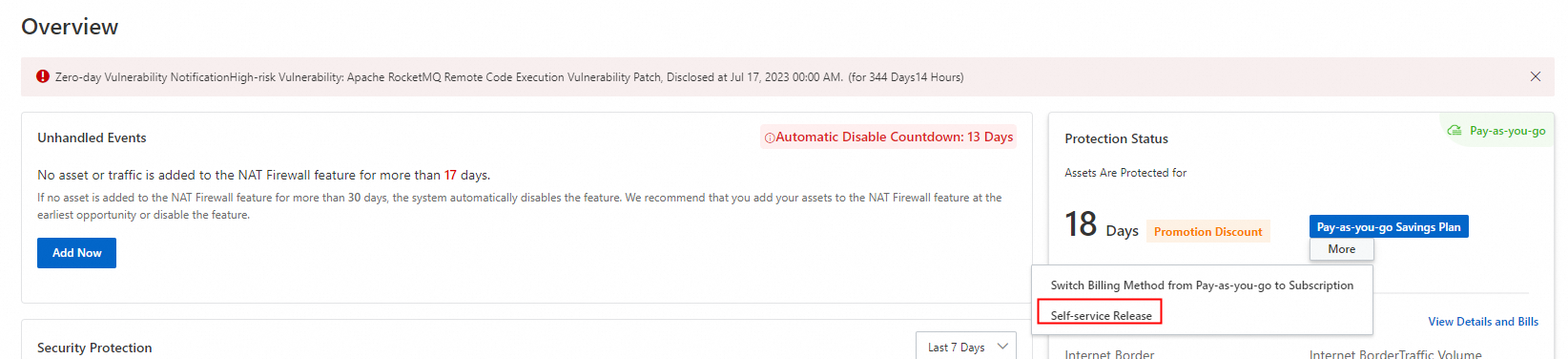
If you no longer need the Cloud Firewall (Pay-as-you-go) edition, you can turn off the firewall switches on the Internet Firewall, NAT Firewall, and VPC Firewall tabs. Then, on the Overview page, click More > Self-service Release in the upper-right corner. The following figure shows the self-service release option:
FAQ
How do I get started with the Pay-as-you-go edition?
You can follow the Pay-as-you-go quickstart guide to enable and configure your firewall instance.
Is there a way to reduce costs for my Pay-as-you-go usage?
Yes, you can purchase a Pay-as-you-go Savings Plan. This is a pre-paid plan that offers discounts on your hourly pay-as-you-go charges. By committing to a certain level of spending, you get a lower rate.
What are the features of the Cloud Firewall Pay-as-you-go edition?
The Pay-as-you-go edition provides a flexible, on-demand firewall service. For a detailed list of capabilities and how they compare to other editions, see the Feature comparison by edition.
What's the difference between the Pay-as-you-go and Subscription editions?
The main difference is the billing model and intended use case.
Pay-as-you-go is billed hourly based on actual usage, ideal for fluctuating or temporary workloads.
Subscription involves a fixed-term commitment (monthly or yearly) and is better for stable, long-term traffic.
For more details, see the overview of the Cloud Firewall Subscription Edition.
How can I upgrade or downgrade my Cloud Firewall edition?
You can change your Cloud Firewall edition or specifications directly from the console to better match your business needs. For step-by-step instructions, see Upgrade or downgrade the edition and specifications.
Where can I find answers to common pre-sales questions?
For questions related to purchasing decisions, feature capabilities, and pricing before you buy, refer to the Pre-sales FAQ.
How do I release a Cloud Firewall instance that I no longer need?
First, turn off all firewall switches for your Internet, NAT, and VPC boundaries. Then, you can release the instance. The process is detailed in Release a Cloud Firewall instance.