Use Cloud Architect Design Tools (CADT) to create an Elastic Compute Service (ECS) instance with an Alibaba Cloud Marketplace image. The following example uses a single-region, single-zone architecture template.
Prerequisites
Before you begin, make sure that you have:
An Alibaba Cloud account with permissions to create ECS instances
Access to the CADT console
Procedure
Log on to the CADT console.
In the upper part of the page, choose Create > Create > Application.
In the left-side navigation pane, click Quick Start.
Find the Single Region, Single Zone suite in the drop-down list and drag it to the canvas. This template provisions a virtual private cloud (VPC) and vSwitch for a single-region, single-zone deployment.
Enter
ECSin the search box, then drag the ECS node to the vswitch section on the canvas.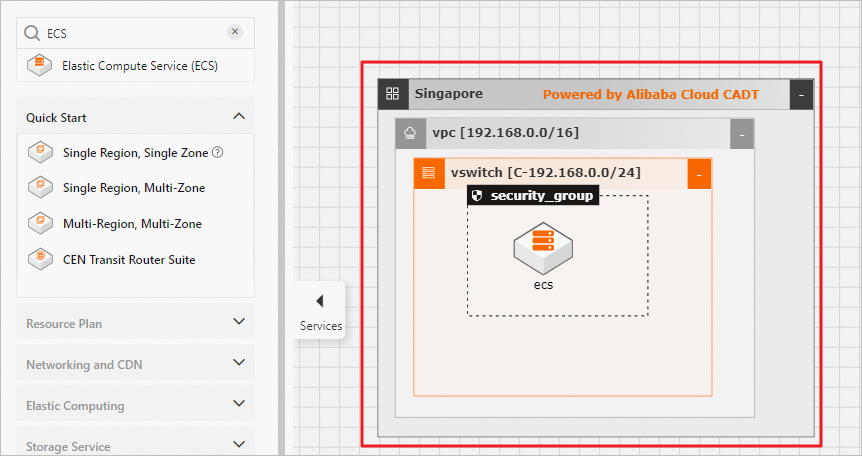
Double-click each resource icon on the canvas to configure parameters for the region, VPC, and vSwitch in sequence.
Double-click the ecs icon to configure the ECS instance. Set the following parameters:
Parameter Action Mirror Select Mirror Market from the drop-down list Mirror Version Select the desired image version Note: The Mirror and Mirror Market labels in the CADT console refer to ECS images and the Alibaba Cloud Marketplace, respectively.

Save the configuration for each resource in sequence, then deploy the application.

Next steps
After deployment completes, manage the deployed ECS instance from the ECS console.