MaxCompute allows you to export data from a MaxCompute project to an external data store such as Object Storage Service (OSS) or Hologres. This way, other compute engines can use the data that is exported from MaxCompute to the external data store. This topic describes how to use UNLOAD statements and provides related examples.
You can execute the statements on the following platforms:
Feature description
MaxCompute allows you to execute UNLOAD statements to export data from MaxCompute to the external data store OSS or Hologres. OSS can store data in the CSV format or another open source format. Take note of the following points:
MaxCompute data must be exported to OSS before the data can be exported to other compute engines, such as Amazon Redshift and BigQuery.
If you repeatedly export data, the previously exported file is not overwritten. Instead, a new file is generated.
Usage notes
The dual-signature authorization mode is not supported when you export MaxCompute data to Hologres.
Exporting MaxCompute data to Hologres partitioned tables is not supported.
You cannot add file extensions to exported files in open-source formats.
Authorization
The operating account must have the required MaxCompute permissions.
Before you run the
UNLOADcommand, the operating account must have at least the read (Select) permission on the table data that you want to export from the MaxCompute project. For more information about how to grant permissions, see MaxCompute permissions.The operating account must have the required permissions on the data source for the external storage.
Before you export data from MaxCompute, you must grant MaxCompute access to the external storage, such as OSS or Hologres. The authorization mode for the
UNLOADcommand is the same as that for MaxCompute foreign tables. The authorization methods for OSS and Hologres are as follows:OSS: OSS uses a more secure one-click authorization method. The role name is defined as AliyunODPSDefaultRole. For more information, see STS authorization.
Hologres: To complete the authorization, create a RAM role, grant it permissions to allow MaxCompute access, and then add the role to the Hologres instance. For more information, see Hologres external tables.
Export data
Export data using a built-in extractor (StorageHandler)
Syntax
UNLOAD FROM {<select_statement>|<table_name> [PARTITION (<pt_spec>)]}
INTO
LOCATION <external_location>
STORED BY <StorageHandler>
[WITH SERDEPROPERTIES ('<property_name>'='<property_value>',...)];
Parameters
External storage: OSS
Parameter | Required | Description |
select_statement | No | A SELECT statement that queries the data to be inserted into the destination OSS path from the source table. |
table_name and pt_spec | No |
|
external_location | Yes | Specifies the destination OSS path where the exported data is stored. The format is |
StorageHandler | Yes | Specifies the name of the built-in StorageHandler. The only valid values are:
These are built-in text data resolvers for processing CSV and TSV files. They define how to read or write CSV and TSV files. The exported files have the |
'<property_name>'='<property_value>' | No |
|
For more information, see OSS foreign tables.
External storage: Hologres
Parameter | Required | Description |
select_statement | No | A SELECT statement that queries the data to be inserted into the destination Hologres path from the source table. |
table_name | No |
|
external_location | Yes |
|
StorageHandler | Yes |
|
'<property_name>'='<property_value>' | No |
|
For more information, see Hologres foreign tables.
Examples
External storage: OSS
Export data from the sale_detail table in a MaxCompute project to OSS.
Sample data
The following shows the data in the
sale_detailtable:+------------+-------------+-------------+------------+------------+ | shop_name | customer_id | total_price | sale_date | region | +------------+-------------+-------------+------------+------------+ | s1 | c1 | 100.1 | 2013 | china | | s2 | c2 | 100.2 | 2013 | china | | s3 | c3 | 100.3 | 2013 | china | | null | c5 | NULL | 2014 | shanghai | | s6 | c6 | 100.4 | 2014 | shanghai | | s7 | c7 | 100.5 | 2014 | shanghai | +------------+-------------+-------------+------------+------------+Log on to the OSS console and create the OSS bucket directory
oss-unload-test/data_location/. This example uses theoss-cn-hangzhouregion. The following figure shows the result.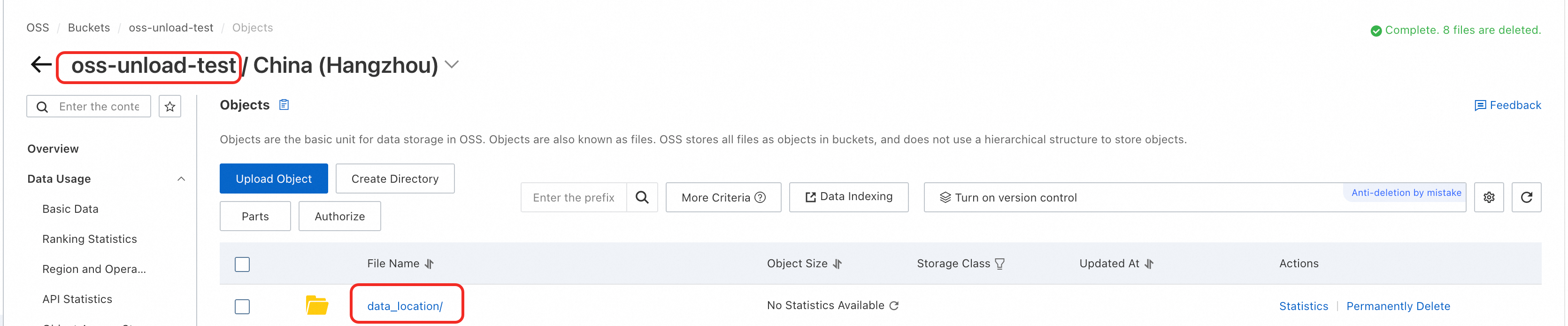
The OSS path is:
oss://oss-cn-hangzhou-internal.aliyuncs.com/oss-unload-test/data_location.Log on to the MaxCompute client and run the UNLOAD command to export data from the
sale_detailtable to OSS.Example 1: Export data from the sale_detail table to a CSV file and compress it into the GZIP format. The command is as follows:
-- Control the number of exported files: Set the size of data that a single worker can read from a MaxCompute table. Unit: MB.
-- Because MaxCompute tables are compressed, the data size typically expands by about four times when exported to OSS.
SET odps.stage.mapper.split.size=256;

-- Export data
UNLOAD FROM
(SELECT * FROM sale_detail)
INTO
LOCATION 'oss://oss-cn-hangzhou-internal.aliyuncs.com/oss-unload-test/data_location'
STORED BY 'com.aliyun.odps.CsvStorageHandler'
WITH SERDEPROPERTIES (
  'odps.properties.rolearn'='acs:ram::<uid>:role/AliyunODPSDefaultRole',
  'odps.text.option.gzip.output.enabled'='true');
The command
UNLOAD FROM (SELECT * FROM sale_detail)is equivalent toUNLOAD FROM sale_detail.Example 2: Export data from the partition where sale_date='2013' and region='china' of the sale_detail table to a TSV file and compress it into the GZIP format. The command is as follows:
-- Control the number of exported files: Set the size of data that a single worker can read from a MaxCompute table. Unit: MB.
-- Because MaxCompute tables are compressed, the data size typically expands by about four times when exported to OSS.
SET odps.stage.mapper.split.size=256;

-- Export data.
UNLOAD FROM sale_detail PARTITION (sale_date='2013',region='china')
INTO
LOCATION 'oss://oss-cn-hangzhou-internal.aliyuncs.com/oss-unload-test/data_location'
STORED BY 'com.aliyun.odps.TsvStorageHandler'
WITH SERDEPROPERTIES (
  'odps.properties.rolearn'='acs:ram::<uid>:role/AliyunODPSDefaultRole',
  'odps.text.option.gzip.output.enabled'='true');
The parameter
'odps.text.option.gzip.output.enabled'='true'in both examples specifies that the exported file is compressed using the GZIP format. Currently, only GZIP compression is supported. For more information about parameters, see OSS foreign tables.
External storage: Hologres
Export data from the data_test table in a MaxCompute project to Hologres.
Sample data
The following shows the data in the
data_testtable:+------------+----------+ | id | name | +------------+----------+ | 3 | rgege | | 4 | Gegegegr | +------------+----------+In Hologres, create a destination table named
mc_2_holo. The database name istest.You can run the CREATE TABLE statement in the HoloWeb SQL editor. For more information, see Connect to HoloWeb and run queries. The CREATE TABLE statement is as follows:
CREATE TABLE mc_2_holo (id INT, name TEXT);The field data types in the destination table must correspond to the field data types in the MaxCompute table. For more information, see Data type mappings between MaxCompute and Hologres.
Log on to the MaxCompute client and run the UNLOAD command to export data from the
data_testtable to Hologres. The following is a sample command:UNLOAD FROM (SELECT * FROM data_test) INTO LOCATION 'jdbc:postgresql://hgprecn-cn-5y**********-cn-hangzhou-internal.hologres.aliyuncs.com:80/test?ApplicationName=MaxCompute¤tSchema=public&useSSL=false&table=mc_2_holo/' STORED BY 'com.aliyun.odps.jdbc.JdbcStorageHandler' WITH SERDEPROPERTIES ( 'odps.properties.rolearn'='acs:ram::13**************:role/aliyunodpsholorole', 'mcfed.mapreduce.jdbc.driver.class'='org.postgresql.Driver', 'odps.federation.jdbc.target.db.type'='holo' );Query the exported data in Hologres:
SELECT * FROM mc_2_holo;The following is a sample result:
id	name
4	Gegegegr
3	rgege
Export data in other open-source formats
Syntax
UNLOAD FROM {<select_statement>|<table_name> [PARTITION (<pt_spec>)]}
INTO
LOCATION <external_location>
[ROW FORMAT SERDE '<serde_class>'
  [WITH SERDEPROPERTIES ('<property_name>'='<property_value>',...)]
]
STORED AS <file_format>
[PROPERTIES ('<tbproperty_name>'='<tbproperty_value>')];
Parameters
Parameter | Required | Description |
select_statement | No | A SELECT statement that queries the data to be inserted into the destination OSS path from the source table. |
table_name and pt_spec | No |
|
external_location | Yes | Specifies the destination OSS path where the exported data is stored. The format is |
serde_class | No | The usage is the same as for MaxCompute foreign tables. For more information, see Create an OSS foreign table. |
'<property_name>'='<property_value>' | No |
The supported properties are the same as for MaxCompute foreign tables. For more information, see Create an OSS foreign table. |
file_format | Yes | Specifies the file format of the exported data. Examples: ORC, PARQUET, RCFILE, SEQUENCEFILE, and TEXTFILE. The usage is the same as for MaxCompute foreign tables. For more information, see Create an OSS foreign table. |
'<tbproperty_name>'='<tbproperty_value>' | No |
For example, to export open-source data in SNAPPY or LZO compression format, set the compression property to:
When you export data in SNAPPY or LZO compression format, the exported files do not display the |
Examples
Sample data
-- Data in the sale_detail table.
+------------+-------------+-------------+------------+------------+
| shop_name  | customer_id | total_price | sale_date  | region     |
+------------+-------------+-------------+------------+------------+
| s1         | c1          | 100.1       | 2013       | china      |
| s2         | c2          | 100.2       | 2013       | china      |
| s3         | c3          | 100.3       | 2013       | china      |
| null       | c5          | NULL        | 2014       | shanghai   |
| s6         | c6          | 100.4       | 2014       | shanghai   |
| s7         | c7          | 100.5       | 2014       | shanghai   |
+------------+-------------+-------------+------------+------------+
Log on to the OSS console and create the OSS bucket directory
oss-unload-test/data_location/. This example uses theoss-cn-hangzhouregion. The following figure shows the result.The OSS path is:
oss://oss-cn-hangzhou-internal.aliyuncs.com/oss-unload-test/data_location.Log on to the MaxCompute client and run the UNLOAD command to export data from the
sale_detailtable to OSS.Example 1: Export data from the
sale_detailtable in PARQUET format and compress it using SNAPPY.-- Control the number of exported files: Set the size of data that a single worker can read from a MaxCompute table. Unit: MB. -- Because MaxCompute tables are compressed, the data size typically expands by about four times when exported to OSS. SET odps.stage.mapper.split.size=256; -- Export data UNLOAD FROM (SELECT * FROM sale_detail) INTO LOCATION 'oss://oss-cn-hangzhou-internal.aliyuncs.com/oss-unload-test/data_location' ROW FORMAT SERDE 'org.apache.hadoop.hive.ql.io.parquet.serde.ParquetHiveSerDe' WITH SERDEPROPERTIES ('odps.properties.rolearn'='acs:ram::<uid>:role/AliyunODPSDefaultRole') STORED AS PARQUET PROPERTIES('mcfed.parquet.compression'='SNAPPY');Example 2: Export data from the partition where sale_date='2013' and region='china' of the
sale_detailtable in PARQUET format and compress it using SNAPPY.-- Control the number of exported files: Set the size of data that a single worker can read from a MaxCompute table. Unit: MB. -- Because MaxCompute tables are compressed, the data size typically expands by about four times when exported to OSS. SET odps.stage.mapper.split.size=256; --Export data. UNLOAD FROM sale_detail PARTITION (sale_date='2013',region='china') INTO LOCATION 'oss://oss-cn-hangzhou-internal.aliyuncs.com/oss-unload-test/data_location' ROW FORMAT SERDE 'org.apache.hadoop.hive.ql.io.parquet.serde.ParquetHiveSerDe' WITH SERDEPROPERTIES ('odps.properties.rolearn'='acs:ram::<uid>:role/AliyunODPSDefaultRole') STORED AS PARQUET PROPERTIES('mcfed.parquet.compression'='SNAPPY');Example 3: Export data from the
sale_detailtable to a .txt file and specify a comma as the separator.SET odps.sql.allow.fullscan=true; UNLOAD FROM (SELECT * FROM sale_detail) INTO LOCATION 'oss://oss-cn-hangzhou-internal.aliyuncs.com/oss-unload-test/data_location' ROW FORMAT SERDE 'org.apache.hadoop.hive.serde2.lazy.LazySimpleSerDe' WITH SERDEPROPERTIES ('field.delim'=',') STORED AS TEXTFILE PROPERTIES('odps.external.data.enable.extension'='true');
Set file prefixes, suffixes, and extensions
When you use the UNLOAD command to export a MaxCompute table to a file, you can customize the file's prefix and suffix, and generate the extension that corresponds to the file format by default.
Syntax
Export files in formats such as CSV and TSV using a built-in resolver.
UNLOAD FROM  {<select_statement>|<table_name> [PARTITION (<pt_spec>)]}
INTO
LOCATION <external_location>
[STORED BY <StorageHandler>]
[WITH SERDEPROPERTIES ('<property_name>'='<property_value>',...)];
Export open-source format files such as ORC and Parquet.
UNLOAD FROM {<select_statement>|<table_name> [PARTITION (<pt_spec>)]}
INTO
LOCATION <external_location>
[ROW FORMAT SERDE '<serde_class>'
  [WITH SERDEPROPERTIES ('<property_name>'='<property_value>',...)]
]
STORED AS <file_format>
[PROPERTIES('<tbproperty_name>'='<tbproperty_value>')];
Parameters
property_name tbproperty_name | Use case | Description | property_value |
odps.external.data.output.prefix (Compatible with odps.external.data.prefix) | Adds a custom prefix to the output file name. |
| A valid combination of characters, such as |
odps.external.data.enable.extension | Specifies whether to display the extension of the output file. | Set this parameter to `true` to display the output file extension. If you do not set this parameter or set it to `false`, the extension is not displayed. By default, the extension is not displayed. |
|
odps.external.data.output.suffix | Adds a custom suffix to the output file name. | Can contain only digits, letters, and underscores (a-z, A-Z, 0-9, _). | A valid combination of characters, such as |
odps.external.data.output.explicit.extension | Adds a custom extension to the output file. |
| A valid combination of characters, such as |
For information about other parameters, see Parameters for built-in extractors and Parameters for other open-source data formats.
Extensions
The following table lists the extensions that are automatically generated for different file formats when you set the odps.external.data.enable.extension=true parameter.
File format | SERDE | Extension |
SEQUENCEFILE | org.apache.hadoop.hive.serde2.lazy.LazySimpleSerDe | .sequencefile |
TEXTFILE | org.apache.hadoop.hive.serde2.lazy.LazySimpleSerDe | .txt |
RCFILE | org.apache.hadoop.hive.serde2.columnar.LazyBinaryColumnarSerDe | .rcfile |
ORC | org.apache.hadoop.hive.ql.io.orc.OrcSerde | .orc |
PARQUET | org.apache.hadoop.hive.ql.io.parquet.serde.ParquetHiveSerDe | .parquet |
AVRO | org.apache.hadoop.hive.serde2.avro.AvroSerDe | .avro |
JSON | org.apache.hive.hcatalog.data.JsonSerDe | .json |
Examples
Export a file in
textformat. Add the prefix mc_ and the suffix _hangzhou. Automatically generate the extensiontxt.UNLOAD FROM (SELECT * FROM sale_detail) INTO LOCATION 'oss://oss-cn-hangzhou-internal.aliyuncs.com/oss-unload-test/data_location' ROW FORMAT SERDE 'org.apache.hadoop.hive.serde2.lazy.LazySimpleSerDe' STORED AS TEXTFILE PROPERTIES ( 'odps.external.data.output.prefix'='mc_', 'odps.external.data.output.suffix'='_beijing', 'odps.external.data.enable.extension'='true');You can view the exported file in the destination OSS path:

Export data to downstream systems through OSS
MaxCompute can use OSS as intermediate storage to export data to various databases that are not directly supported, such as the Time Series Database (TSDB) InfluxDB. The steps are as follows:
Use the
UNLOADcommand to export data to OSS.Download the OSS data to your local environment.
Use the import tool or command of the destination database to load the data.
Billing
Compute costs: The UNLOAD command itself is not billed. However, the query clause within the UNLOAD command scans data and consumes compute resources to calculate results. Therefore, the query clause is billed as a regular SQL job.
Storage costs: Storing structured data in OSS can save storage costs in some scenarios, but you should estimate the costs in advance.
The storage cost for MaxCompute is 0.018 USD/GB/month. For more information about storage billing, see Storage fees (pay-as-you-go). The data compression ratio for data that is imported into MaxCompute is about 5:1. You are charged based on the size of the data after compression.
OSS Standard storage costs USD 0.018/GB/month. Other storage classes, such as Infrequent Access, Archive, and Cold Archive, are also available. For more information, see Storage fees.
If you export data only to save on storage costs, estimate the compression ratio based on the features of your data. You should also estimate the UNLOAD costs based on the query statement used for the export and assess how you will access the exported data to avoid extra costs from unnecessary data migration.
References
To import data in CSV or other open-source formats from external storage to MaxCompute, see LOAD.
For information about the syntax and parameters for creating, reading from, and writing to OSS foreign tables, see OSS foreign tables.
For more information about Hologres foreign tables, see Hologres foreign tables.
FAQ
Q: When I export data from a MaxCompute table to external storage, such as OSS or Hologres, can I enclose each field in double quotation marks? For example: "Cloud-native Big Data Computing Service", "MaxCompute", "Hello".
A: Yes, you can. This can be achieved by modifying the field data or by changing the table format.
Modify the field data: You can manually concatenate strings using the CONCAT function.
Adjust the table format: When you use the open-source data Resolver
org.apache.hadoop.hive.serde2.OpenCSVSerdeto create a foreign table, double quotation marks are added to each field of the exported data by default.If you use the built-in text data resolver
com.aliyun.odps.CsvStorageHandler/TsvStorageHandlerto create an OSS foreign table, this output format is not supported, and no parameters are available to enable this feature.
For more information, see the descriptions of data resolvers and parameters in OSS foreign tables.