This topic answers frequently asked questions about how fees are generated, how resource plans are used for offsets, and how bills are deducted when you use ApsaraVideo VOD.
About resource plans
Why are fees still charged after I purchase a resource plan?
You can troubleshoot the issue by checking the following items:
Check the time when the resource plan takes effect and its expiration time. Billing data may be delayed. For example, a bill generated at 10:00 may include charges for usage at 07:00, 08:00, or even earlier. If you recently purchased a resource plan, check whether new charges are generated after the plan takes effect.
Fees are charged if your actual usage exceeds the resource plan's quota or if the usage occurs after the resource plan expires.
Check whether the resources that you consumed can be offset by the resource plan that you purchased. For example, you cannot use a transcoding plan to offset storage fees. For more information about the types of resource plans and usage notes, see Resource plans.
If an accelerated domain name is not configured and OSS outbound traffic is generated, the ApsaraVideo VOD data transfer plan cannot be used for offsets.
Why am I still charged for traffic after purchasing an ApsaraVideo VOD data transfer plan?
A purchased data transfer plan takes effect only after you configure an accelerated domain name and select the pay-by-traffic billing method for that domain name. After the data transfer plan takes effect, you can use it to offset only acceleration traffic fees. Data transfer plans cannot be used to offset OSS outbound traffic fees. If your usage exceeds the capacity of the data transfer plan, the overage is billed using the pay-as-you-go billing method. If traffic fees are still incurred, check the following items to identify the reason:
An accelerated domain name is configured
If an accelerated domain name is not fully configured, you cannot use resource plans to offset fees. For example, you may have added the domain name but not configured a CNAME record for it. Make sure that the accelerated domain name is in the Running state. For more information about how to configure an accelerated domain name, see ApsaraVideo VOD Quick Start.
You have successfully configured an accelerated domain name. However, if you use the direct OSS address instead of the accelerated domain name to access resources in ApsaraVideo VOD, storage outbound traffic fees are incurred. For more information, see Billing of storage outbound traffic.
Check whether your usage exceeds the capacity of the data transfer plan that you purchased. You can renew your resource plan. For more information, see Renew a resource plan.
No accelerated domain name is configured
If you do not configure an accelerated domain name in ApsaraVideo VOD, the service returns an OSS origin URL by default. Playing or downloading resources from ApsaraVideo VOD using this type of URL generates storage outbound traffic fees.
After I purchase an ApsaraVideo VOD resource plan, can I use it for CDN or OSS?
No, you cannot. ApsaraVideo VOD is a separately billed product. During use, it consumes resources such as storage, transcoding, traffic, or bandwidth. The resource plans in an ApsaraVideo VOD package, such as data transfer plans, storage plans, and HD transcoding plans, can be used to offset resource consumption only within the ApsaraVideo VOD product. They cannot be used for similar resource-consuming products such as CDN or OSS.
The offset duration of an ApsaraVideo VOD transcoding plan does not match the actual usage duration
You can perform the following steps to troubleshoot the issue:
Understand the billing rules for ApsaraVideo VOD transcoding.
Billing is based on the duration and specifications of the transcoded output file.
If you initiate multiple transcoding tasks for the same video, each task is billed.
If you initiate transcoding for the same video into multiple specifications, each specification is billed.
The transcoding specification in a transcoding template may differ from the actual billing specification. This is because billing is determined by the resolution set in the template. For more information about how billing specifications are determined, see Media transcoding.
For example, if the output specifications in a transcoding template are set to H.264, Standard Definition (LD), and a resolution of 960×540, the transcoding is billed based on the H.264 SD (1280 x 720) and lower tier. In the VOD console, this usage is recorded as SD transcoding on the Consumption Trend or Usage page.
The deduction ratio for a transcoding plan varies based on the transcoding specifications. For more information, see Regular transcoding plans.
The transcoding duration displayed on the Overview or Usage page of the ApsaraVideo VOD console is the actual duration and does not reflect deductions from resource plans. Therefore, this value is not the final billed amount. You must refer to the data in your Expenses and Costs bill for the final charges.
Bills
How do I investigate a bill if I have questions about the charges?
You can troubleshoot the issue by performing the following steps:
View the billing details to identify the billable items, generation time, and other information for the bill in question.
For more information about how to view billing details, see Query bills.
For more information about billable items, see Billable items.
Analyze the possible reasons for the fees.
Abnormal traffic fees with an accelerated domain name configured
Use the statistical analysis dashboard to analyze possible causes of abnormal traffic.
Check the Popular URLs or Top Rankings dashboards for the relevant time period to identify the access behaviors or videos that may cause unusual traffic. For more information, see Playback Data Statistics.
Analyze operation logs to identify potential abnormal users or access behaviors.
View the logs for a specific time period or URL. For more information, see Download logs. If you find abnormal users, who are identified by the access IP field in the logs, you can use features such as Referer and IP blacklists and whitelists to restrict some requests. For more information, see Blacklists and whitelists.
Abnormal transcoding fees
Understand the billing rules for ApsaraVideo VOD transcoding.
ApsaraVideo VOD transcoding is billed based on the specifications and duration of the output files, and a fee is charged for each successful processing. This means that if you transcode the same video into multiple specifications, or initiate multiple transcoding tasks for the same video, each task is billed separately. To avoid unnecessary fees, initiate transcoding only when needed and delete unnecessary transcoding templates.
After you identify the transcoding specifications and time by viewing the bill, you can analyze whether the video transcoding tasks and specifications that you initiated during that period were reasonable.
To manage transcoding template groups, see Manage templates.
Other fee abnormalities
Understand the billing rules for each billable item.
For more information, see Billable items.
Check if the usage matches the actual consumption.
For more information, see Query resource usage.
How do I deactivate ApsaraVideo VOD or stop billing?
ApsaraVideo VOD does not provide a one-click deactivation feature. This is to prevent business interruptions.
However, you can use the following alternative solutions to deactivate the ApsaraVideo VOD service or stop its billing.
If you no longer want to use the ApsaraVideo VOD service, perform the following operations to ensure that no fees are generated in the next billing cycle.
Delete all media files from the system storage bucket
ImportantResources cannot be restored after they are deleted. Back up important resources before you delete them.
For detailed steps on how to manually delete media files, see Delete media files.
For more information about how to release system storage with one click, see Manage storage buckets.
Delete the configured accelerated domain name
ImportantBefore you disable or remove an accelerated domain name, we recommend that you migrate the workloads of the domain name to another domain name to prevent service interruptions. You can migrate workloads from a domain name to another domain name by using one of the following methods:
Add a domain name to replace the one that you want to remove. Then, requests are sent to the new domain name, and workloads are gradually migrated to the new domain name.
In the DNS settings of the domain name that you want to remove, map the accelerated domain name to the origin server instead of the CNAME.
Log on to the ApsaraVideo VOD console.
In the left-side navigation pane, choose Configuration Management > CDN Configuration > Domain Names.
On the Domain Names page, find the target domain name, disable the domain name, and then delete it. You can follow the prompts on the page to perform identity verification and complete the operation.
If you have media files stored in VOD that you have not used for more than 30 days but want to retain, you can use the VOD tiered storage service. You can change the storage class of the media files from Standard to Infrequent Access, Archive Storage, or Cold Archive to reduce your storage cost by approximately 30% to 80%. For more information, see Change the storage class of a media asset.
Player billing FAQ
After ApsaraVideo Player SDK officially starts charging, how do I determine if my license will be affected?
The Player SDK will be subject to fees starting February 14, 2025. For more information, see Player SDK billing. If you have an existing license, you can refer to the following table to understand the impact and our suggestions based on your SDK version.
Version | Impact | Upgrade Policy |
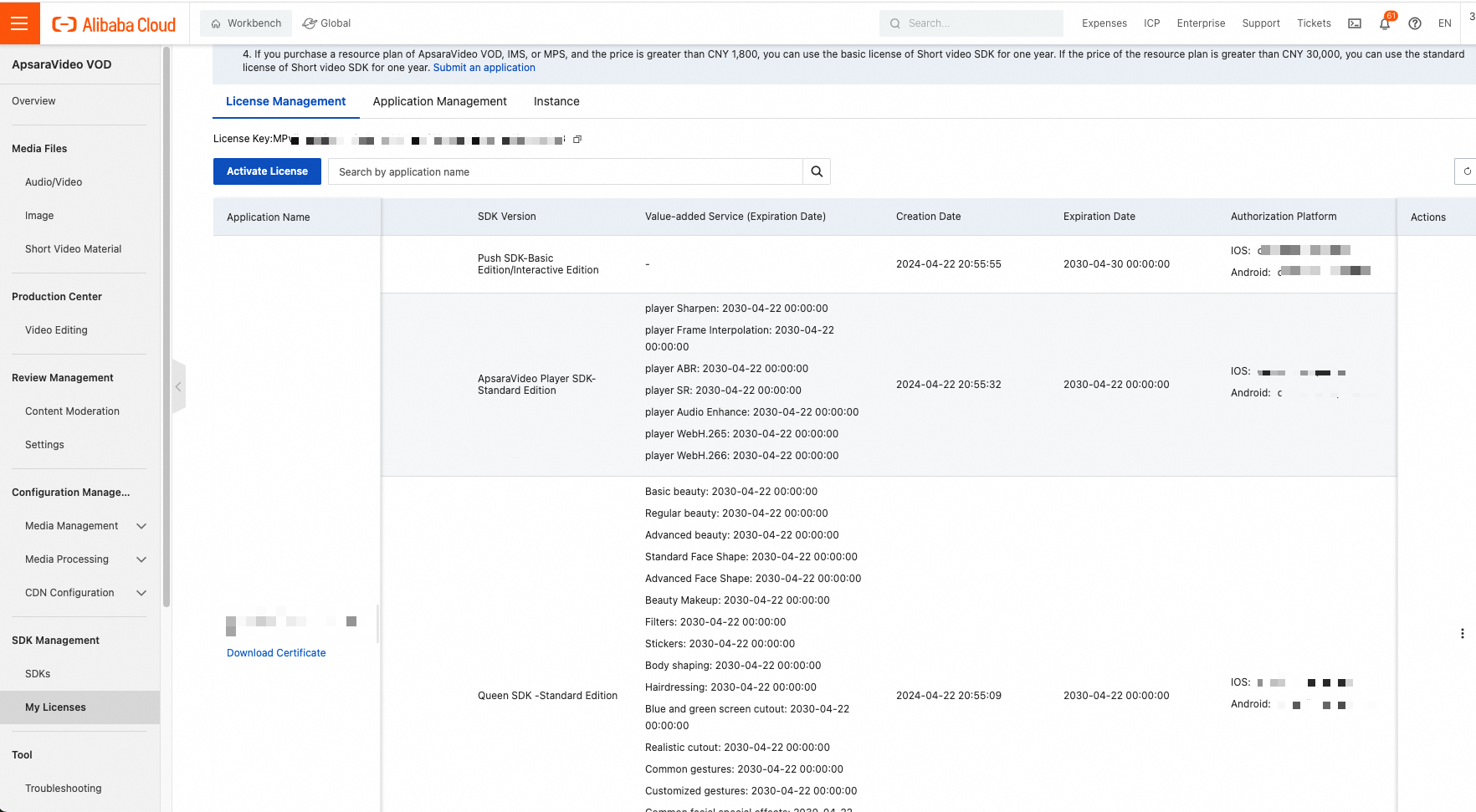
Standard Edition | Go to the SDK Management > My License page in the ApsaraVideo VOD console to confirm the SDK version and expiration time.
If the SDK is Standard Edition and is within the validity period, the use of Standard Edition features is not affected. For more information about Standard Edition features, see Features of Player SDK. | If the ApsaraVideo Player SDK Standard Edition is within its validity period, the use of Standard Edition features is not affected. Renew the SDK after it expires. |
Professional Edition | Before the Player starts to charge fees, users who have used Professional Edition features are granted a one-year license for the Player SDK Professional Edition. You can check your license at VOD Console > SDK Management > My License. If the Professional Edition is within its validity period, you can use its features normally. If the ApsaraVideo Player SDK Professional Edition expires, you can use only Standard Edition features. After you renew ApsaraVideo Player SDK Professional Edition, you can continue to use Professional Edition features. For more information about features of ApsaraVideo Player SDK Professional Edition, see Features of ApsaraVideo Player SDK. | For users who used Professional Edition features before the upgrade, a one-year Professional Edition entitlement is granted. After it expires, you must renew it. Otherwise, it will be downgraded to Standard Edition entitlements. The verification for the Professional Edition is only for version 7.0.0 and later. |
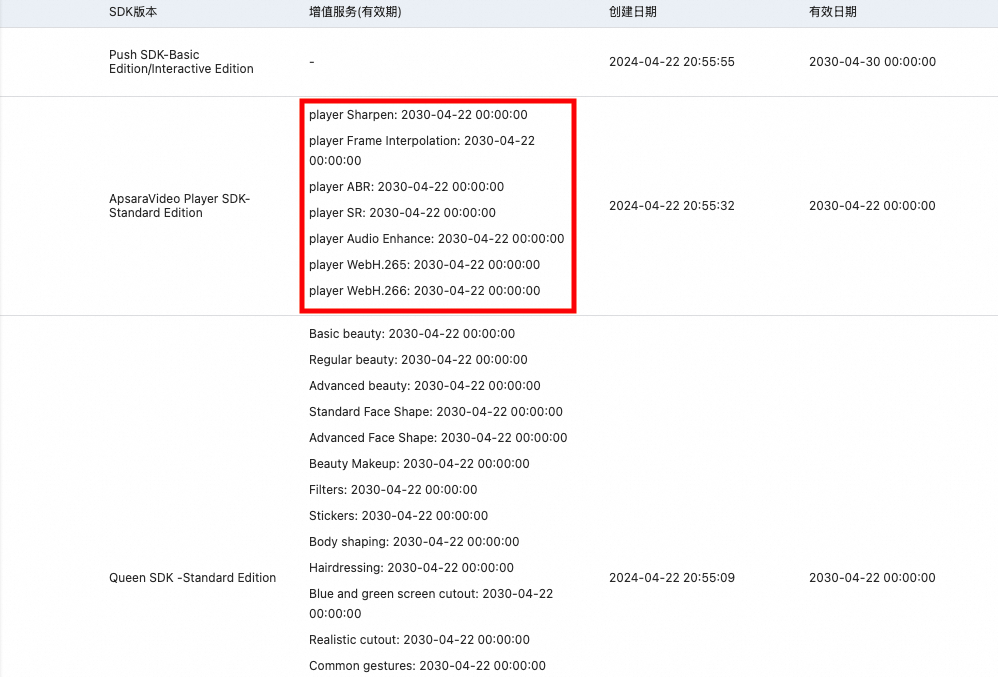
Value-added Features | For both Standard & Professional editions of the player, you can purchase "Value-added Features" separately. The validity period of value-added features is verified independently, as shown in the figure.
| The use of value-added features is not affected. Renew them after they expire. |
If the Standard Edition in the console is within its validity period, do I need to worry about being affected?
If you are using the playback control features of the Standard Edition, you will not be affected during its validity period. However, if you upgrade to version 7.0.0 or later and need to use Professional Edition features, you must purchase a new license for the Professional Edition.
If I do not need Professional Edition features, can I just not upgrade to new versions?
Upgrading the ApsaraVideo Player SDK is not mandatory. However, new versions include the latest feature iterations and bug fixes, which makes them more stable than older versions. To provide a better service, the Alibaba Cloud technical team provides technical support only for SDK versions released within the last six months. For versions older than six months, you must upgrade to the latest version to ensure feature compatibility and avoid potential issues.
What are the reasons and solutions for the "Pricing plan not found" or "auto-renewal failed" error messages?
If the price of the player product is adjusted, you may encounter an "auto-renewal failed" error. You can use the following solution:
Go to the SDK Management > My License page in the ApsaraVideo VOD console, and find the Order Instance tab. Click the Purchase License button.
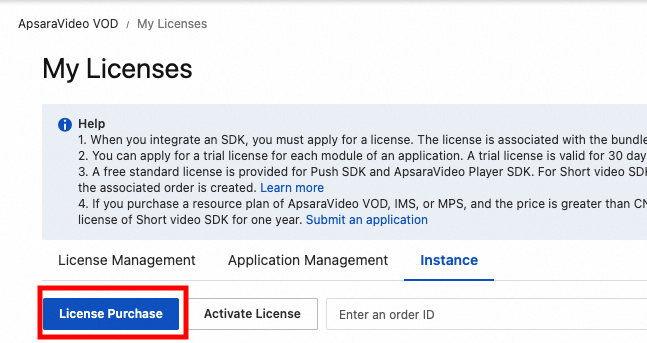
You are redirected to a new page to purchase the SDK. Place an order for a new SDK.
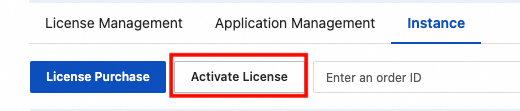
After you complete the order, click the Activate License button on the order instance page.
 Important
Refresh the console after the purchase.
The verification fails if the application information is modified.
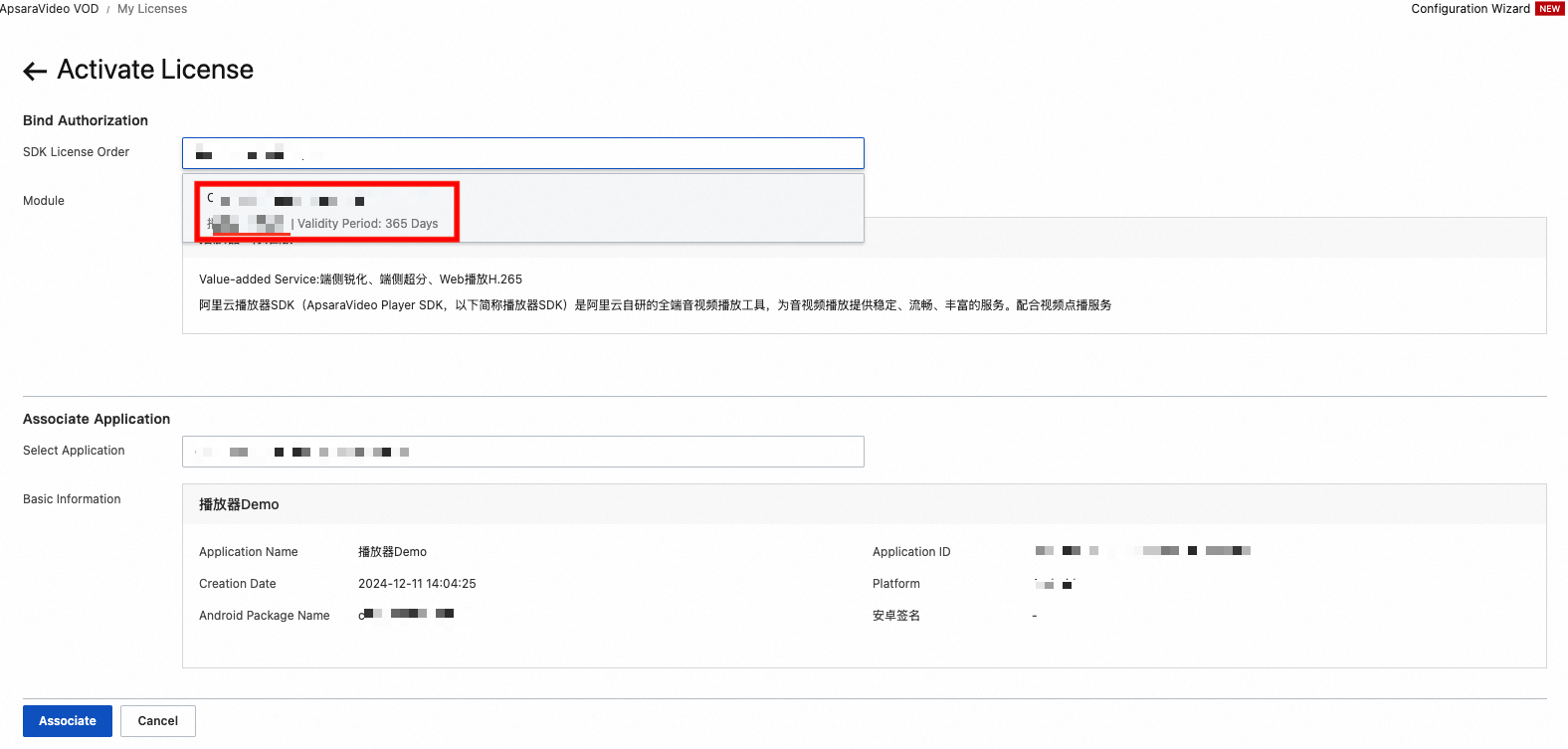
After you confirm that the application information is correct, click Confirm. This resolves the issue with renewing the original license.
After the license is successfully bound, the SDK validity period is extended. Check the Validity Period.
 Important
The console still displays the license instance expiration time. However, you only need to check the "Validity Period" in the preceding screenshot.
The application's license certificate is not affected. However, you should update the certificate in your next application release.
Are there rules for reducing or waiving ApsaraVideo Player SDK fees?
Yes, there are. You can apply for a free Player SDK of a specific specification based on the gift rules. For more information, see Gift upon reaching the threshold.