Before you customize the navigation bar for HTML5 pages, make sure you understand the framework navigation bar and the HTML5 container.
Prerequisites
Set the default style for all HTML5 page navigation bars
To set a uniform style for all HTML5 pages based on the application theme, you can use the event listener mechanism provided by the Nebula container for customization.
For a list of events that the container supports, see the
NebulaSDK/NBDefine.hheader file: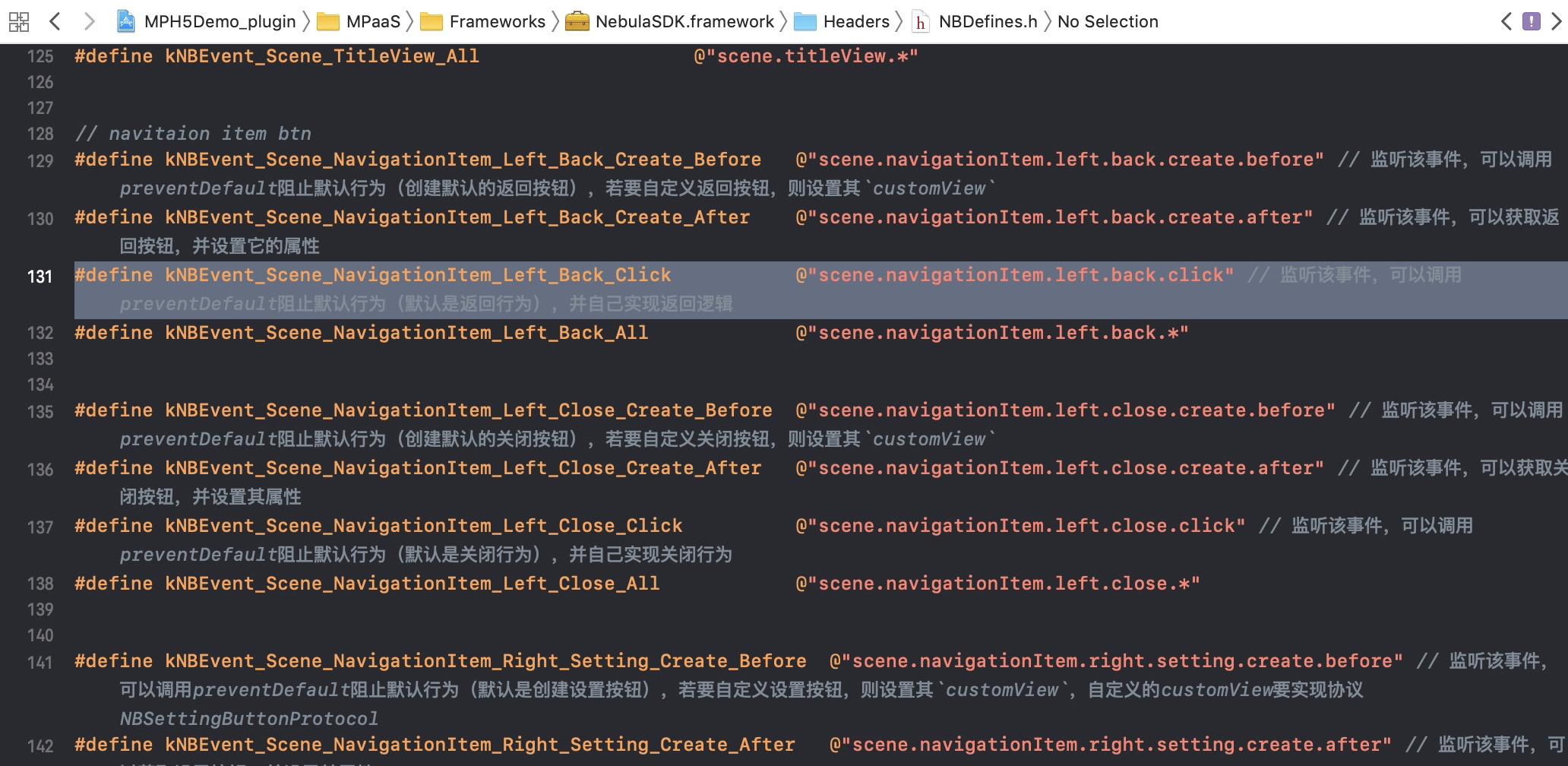
You must customize event listeners for custom plugins:
@implementation MPPlugin4TitleView

- (void)pluginDidLoad
{
     self.scope = kPSDScope_Scene;
     // -- Back area
     [self.target addEventListener:kNBEvent_Scene_NavigationItem_Left_Back_Create_Before withListener:self useCapture:NO];
     [self.target addEventListener:kNBEvent_Scene_NavigationItem_Left_Back_Create_After withListener:self useCapture:NO];
     [self.target addEventListener:kNBEvent_Scene_NavigationItem_Left_Close_Create_Before withListener:self useCapture:NO];
     [self.target addEventListener:kNBEvent_Scene_NavigationItem_Left_Close_Create_After withListener:self useCapture:NO];

     // -- Title area
     [self.target addEventListener:kNBEvent_Scene_TitleView_Create_Before withListener:self useCapture:NO];
     [self.target addEventListener:kNBEvent_Scene_TitleView_Create_After withListener:self useCapture:NO];

     // -- Control button area
     [self.target addEventListener:kNBEvent_Scene_NavigationItem_Right_Setting_Create_Before withListener:self useCapture:NO];
     [self.target addEventListener:kNBEvent_Scene_NavigationItem_Right_Setting_Create_After withListener:self useCapture:NO];
     [self.target addEventListener:kNBEvent_Scene_NavigationItem_Right_SubSetting_Create_After withListener:self useCapture:NO];
     [self.target addEventListener:kNBEvent_Scene_NavigationItem_Right_Setting_Change withListener:self useCapture:NO];

     // -- Progress bar
     [self.target addEventListener:kNBEvent_Scene_ProgressView_Create_Before withListener:self useCapture:NO];
     [self.target addEventListener:kNBEvent_Scene_ProgressView_Create_After withListener:self useCapture:NO];

     [super pluginDidLoad];
}
You can set the style for the Back and Close buttons in the back area:
  - (void)handleEvent:(PSDEvent *)event
  {
      [super handleEvent:event];

      if ([kNBEvent_Scene_NavigationItem_Left_Back_Create_Before isEqualToString:event.eventType]) {
          [event preventDefault];

          event.context.currentViewController.navigationItem.leftBarButtonItem = [[UIBarButtonItem alloc] initWithTitle:@"Cancel" style:UIBarButtonItemStylePlain target:self action:@selector(onClickBack)];
      }else if ([kNBEvent_Scene_NavigationItem_Left_Back_Create_After isEqualToString:event.eventType]){
          // Modify the style of the Back button.
          NSArray *leftBarButtonItems = event.context.currentViewController.navigationItem.leftBarButtonItems;
          if ([leftBarButtonItems count] == 1) {
              if (leftBarButtonItems[0] && [leftBarButtonItems[0] isKindOfClass:[AUBarButtonItem class]]) {
                  // Based on the default Back button, modify the color of the back arrow and text.
                  AUBarButtonItem *backItem = leftBarButtonItems[0];
                  backItem.backButtonColor = [UIColor greenColor];
                  backItem.titleColor = [UIColor colorFromHexString:@"#00ff00"];

                  // Hide the back arrow.
  //                backItem.hideBackButtonImage = YES;

                  // Hide the back text: Set the text color to transparent, but keep the tappable area of the Back button.
  //                backItem.titleColor = [UIColor clearColor];
              }
          }
      }else if ([kNBEvent_Scene_NavigationItem_Left_Close_Create_Before isEqualToString:event.eventType]){
  //        // Hide the Close button.
  //        [event preventDefault];
  //        NBNavigationItemLeftCloseEvent *itemEvent = (NBNavigationItemLeftCloseEvent *)event;
  //        UIButton *button = [UIButton buttonWithType:UIButtonTypeCustom];
  //        button.frame = CGRectMake(0, 0, 44, 44);
  //        button.backgroundColor = [UIColor greenColor];
  //        [button setTitle:@"Close" forState:UIControlStateNormal];
  //        itemEvent.customView = button;
      }else if ([kNBEvent_Scene_NavigationItem_Left_Close_Create_After isEqualToString:event.eventType]){
  //        // Modify the style of the Close button.
  //        [event preventDefault];
  //        NBNavigationItemLeftCloseEvent *itemEvent = (NBNavigationItemLeftCloseEvent *)event;
  //        UIButton *closeButton = (UIButton *)itemEvent.customView;
  //        [closeButton setTitle:@"Close" forState:UIControlStateNormal];
  //        [closeButton setTitleColor:[UIColor greenColor] forState:UIControlStateNormal];
      }
  }
You can set the title style for the HTML5 page:
  if ([kNBEvent_Scene_TitleView_Create_Before isEqualToString:event.eventType]) {
          // Rewrite the style of the TitleView.
          NBNavigationTitleViewEvent *e = (id)event;
          [e preventDefault];

      }else if ([kNBEvent_Scene_TitleView_Create_After isEqualToString:event.eventType]) {
          // Change the style of the created TitleView.
          NBNavigationTitleViewEvent *e = (id)event;
          [[e.titleView mainTitleLabel] setFont:[UIFont systemFontOfSize:16]];
          [[e.titleView mainTitleLabel] setTextColor:[UIColor greenColor]];
          [e.titleView mainTitleLabel].lineBreakMode = NSLineBreakByTruncatingMiddle;
      }
You can set the style for the OptionMenu control button:
  if ([kNBEvent_Scene_NavigationItem_Right_Setting_Create_After isEqualToString:event.eventType] || [kNBEvent_Scene_NavigationItem_Right_SubSetting_Create_After isEqualToString:event.eventType]) {
          // Change the style of the created RightBarItem.
          NBNavigationItemRightSettingEvent *settingEvent = (id)event;
          settingEvent.adjustsWidthToFitText = YES;
          settingEvent.maxWidth = [UIScreen mainScreen].bounds.size.width / 3.0f;
          UIButton *button = settingEvent.customView;
          button.titleLabel.font = [UIFont systemFontOfSize:14.0f];
          CGRect frame = CGRectMake(0, 0, 22, 22);
          button.frame = frame;
          [button setTitleColor:[UIColor blackColor] forState:UIControlStateNormal];
          if (!CGSizeEqualToSize(button.bounds.size, frame.size)) {
              button.frame = frame;
          }
      }
You can set the style for the progress bar that appears when the HTML5 page loads:
if([kNBEvent_Scene_ProgressView_Create_After isEqualToString:event.eventType]){
      NBProgressViewEvent *progressEvent = (NBProgressViewEvent *)event;
      id<NBProgressViewProtocol> progressView = progressEvent.progressView;
      [progressView setProgressTintColor:[UIColor greenColor]];
  }
Customize the navigation bar style for a specific HTML5 page
To customize the navigation bar for a specific HTML5 page, you can use different methods. The method you use depends on whether you make the change before the page loads or after the page opens.
Before the page loads, you can customize the navigation bar based on the default style. This process has two main steps:
Customize the startup parameters. When an HTML5 page loads, you can specify the customization method using custom startup parameters:
To pass custom startup parameters when navigating from one HTML5 page to another, see Open a new page with pushWindow and Start another application with startApp.
To pass custom startup parameters when navigating from a native page to an HTML5 page, see the following code:
   #pragma mark Modify on page entry. HTML5 needs to be set through startup parameters.
   - (void)gotoHideNavigator
   {
       // Open the HTML5 page and hide the navigation bar.
       [[MPNebulaAdapterInterface shareInstance] startH5ViewControllerWithParams:@{@"url": @"https://tech.antfin.com", @"showTitleBar":@NO,@"transparentTitle":@"auto"}];
   }

   - (void)gotoShowNavigator
   {
       // Open the HTML5 page and show the navigation bar.
       [[MPNebulaAdapterInterface shareInstance] startH5ViewControllerWithParams:@{@"url": @"https://tech.antfin.com", @"showTitleBar":@YES}];
   }

   - (void)gotoTransparency
   {
       // Open the HTML5 page and set a transparent navigation bar.
       [[MPNebulaAdapterInterface shareInstance] startH5ViewControllerWithParams:@{@"url": @"https://tech.antfin.com", @"transparentTitle":@"auto"}];
   }

   - (void)gotoUpdateBackgroundColor
   {
       // Modify the navigation bar background color.
       [[MPNebulaAdapterInterface shareInstance] startH5ViewControllerWithParams:@{@"url": @"https://tech.antfin.com", @"titleBarColor":@"16775138"}];
   }

   - (void)gotoUpdateStatusBarStyle
   {
       // Modify the status bar color.
       [[UIApplication sharedApplication] setStatusBarStyle:UIStatusBarStyleLightContent];
   }

   - (void)gotoUpdateBackTitleColor
   {
       // Modify the text color of the default Back button.
       [[MPNebulaAdapterInterface shareInstance] startH5ViewControllerWithParams:@{@"url": @"https://tech.antfin.com", @"backButtonColor":@"ff0000"}];
   }

   - (void)gotoUpdateTitleColor
   {
       // Modify the title color.
       [[MPNebulaAdapterInterface shareInstance] startH5ViewControllerWithParams:@{@"url": @"https://tech.antfin.com", @"titleColor":@"ff0000"}];
   }
Process the HTML5 base class. In the
viewWillAppearmethod of the base class, you can call the native API method to modify the navigation bar style based on the incoming startup parameters:- (void)viewWillAppear:(BOOL)animated { [super viewWillAppear:animated]; // The WebView of the current page. UIWebView *currentWebView = (UIWebView *)self.psdContentView; NSLog(@"[mpaas] webView: %@", currentWebView); // The startup parameters of the current page. NSDictionary *expandParams = self.psdScene.createParam.expandParams; NSLog(@"[mpaas] expandParams: %@", expandParams); if ([expandParams count] > 0) { [self customNavigationBarWithParams:expandParams]; } WKWebView *webView = (WKWebView *)[self psdContentView]; if (@available(iOS 11.0, *)) { webView.scrollView.contentInsetAdjustmentBehavior = UIScrollViewContentInsetAdjustmentNever; } else { self.automaticallyAdjustsScrollViewInsets = NO; } webView.scrollView.contentInset = UIEdgeInsetsMake(200, 0, 0, 0); webView.scrollView.scrollIndicatorInsets = webView.scrollView.contentInset; } - (void)customNavigationBarWithParams:(NSDictionary *)expandParams { // Customize the navigation bar background. NSString *titleBarColorString = expandParams[@"titleBarColor"]; if ([titleBarColorString isKindOfClass:[NSString class]] && [titleBarColorString length] > 0) { UIColor *titleBarColor = [UIColor colorFromHexString:titleBarColorString]; [self.navigationController.navigationBar setNavigationBarStyleWithColor:titleBarColor translucent:NO]; [self.navigationController.navigationBar setNavigationBarBottomLineColor:titleBarColor]; } // Whether the navigation bar is hidden. It is not hidden by default. If hidden, the webview must be full screen. NSString *showTitleBar = expandParams[@"showTitleBar"]; if (showTitleBar && ![showTitleBar boolValue]) { self.options.showTitleBar = NO; [self.navigationController setNavigationBarHidden:YES]; // Adjust the position of the webview. UIWebView *webView = (UIWebView *)[self psdContentView]; CGRect frame = webView.frame; frame.origin.y = [[UIApplication sharedApplication] statusBarFrame].size.height; frame.size.height -= [[UIApplication sharedApplication] statusBarFrame].size.height; webView.frame = frame; self.automaticallyAdjustsScrollViewInsets = NO; } // Whether the navigation bar is transparent. It is not transparent by default. If set to transparent, the webview must be full screen. NSString *transparentTitle = expandParams[@"transparentTitle"]; if ([transparentTitle isEqualToString:@"always"] || [transparentTitle isEqualToString:@"auto"]) { // Make the navigation bar and the bottom line transparent. UIColor *clearColor = [UIColor clearColor] ; [self.navigationController.navigationBar setNavigationBarTranslucentStyle]; [self.navigationController.navigationBar setNavigationBarStyleWithColor:clearColor translucent:YES]; // Adjust the position of the webview. self.edgesForExtendedLayout = UIRectEdgeAll; if (@available(iOS 11.0, *)) { UIWebView *wb = (UIWebView *)[self psdContentView]; wb.scrollView.contentInsetAdjustmentBehavior = UIScrollViewContentInsetAdjustmentNever; }else{ self.automaticallyAdjustsScrollViewInsets = NO; } } // Modify the text color of the default Back button. NSString *backButtonColorString = expandParams[@"backButtonColor"]; if ([backButtonColorString isKindOfClass:[NSString class]] && [backButtonColorString length] > 0) { UIColor *backButtonColor = [UIColor colorFromHexString:backButtonColorString]; NSArray *leftBarButtonItems = self.navigationItem.leftBarButtonItems; if ([leftBarButtonItems count] == 1) { if (leftBarButtonItems[0] && [leftBarButtonItems[0] isKindOfClass:[AUBarButtonItem class]]) { AUBarButtonItem *backItem = leftBarButtonItems[0]; backItem.titleColor = backButtonColor; backItem.backButtonColor = backButtonColor; } } } // Set the title color. NSString *titleColorString = expandParams[@"titleColor"]; if ([titleColorString isKindOfClass:[NSString class]] && [titleColorString length] > 0) { UIColor *titleColor = [UIColor colorFromHexString:titleColorString]; id<NBNavigationTitleViewProtocol> titleView = self.navigationItem.titleView; [[titleView mainTitleLabel] setFont:[UIFont systemFontOfSize:16]]; [[titleView mainTitleLabel] setTextColor:titleColor]; } }
After the page opens, you can dynamically modify the navigation bar style during user interaction. This is mainly done by customizing JavaScript APIs (JSAPIs) to call native API methods.
Customize a JSAPI to handle the navigation bar style of the current page.
Use the API provided in Customize the navigation bar style for a specific page to handle the native navigation bar in the JSAPI:
- (void)handler:(NSDictionary *)data context:(PSDContext *)context callback:(PSDJsApiResponseCallbackBlock)callback
{
    [super handler:data context:context callback:callback];

    UIViewController *currentVC = context.currentViewController;
    currentVC.navigationItem.titleView = [[AUDoubleTitleView alloc] initWithTitle:@"Main Title" detailTitle:@"Subtitle"];
    callback(@{@"success":@YES});
}