Alibaba Cloud ESSD AutoPL disks are based on enterprise-grade solid-state drives (ESSDs). ESSD AutoPL disks inherit the features and performance of ESSDs and decouple disk capacity from disk performance. When you configure the capacity of an ESSD AutoPL disk, you can also customize its provisioned performance and performance burst settings. This topic describes the features, specifications, billing, and scenarios of ESSD AutoPL disks, and explains how to configure them.
The workload on an ESSD AutoPL disk originates from the instance to which the disk is attached. Performance statistics include all applications on the instance that use the AutoPL disk, such as Alibaba Cloud Security, Cloud Monitor, and Cloud Assistant that run on the instance's operating system.
For more information about common disk performance metrics, see Performance metrics.
For more information about ESSDs, see ESSDs.
Features
The total performance of an ESSD AutoPL disk is the sum of its baseline performance, provisioned performance, and performance burst.
Baseline performance
Baseline performance is the maximum IOPS and throughput included with a disk upon purchase. It increases linearly with the disk capacity. The maximum baseline performance varies based on disk specifications.
Provisioned performance
You can specify and separately purchase the maximum IOPS and throughput for a disk without changing its storage capacity. IOPS is the unit of measurement for the purchase. Each provisioned IOPS includes 16 KB of throughput.
Burst performance
By default, the performance burst feature is enabled for ESSD AutoPL disks. For services with fluctuating workloads, ESSD AutoPL disks can temporarily increase their performance to handle sudden spikes in data read and write operations. The performance returns to normal after the workload stabilizes. An ESSD AutoPL disk can deliver up to 1,000,000 IOPS, a maximum throughput of 4 GB/s, and a maximum performance density of 1,000 IOPS/GiB.
Scenarios
ESSD AutoPL disks can be used in the same scenarios as ESSDs, such as for latency-sensitive applications or I/O-intensive workloads. Their flexible performance configuration and performance burst capabilities also make them suitable for the following situations:
Services that require higher performance with a fixed capacity.
Services with highly fluctuating workloads and frequent peaks that require disks to handle sudden business surges.
ESSD AutoPL disk specifications
The following table describes the specifications of ESSD AutoPL disks.
Performance category | Disk property | Specifications |
Baseline performance | Capacity range (GiB) | 1 to 65,536 |
Maximum IOPS per disk | 50,000 | |
Maximum I/O size (KiB) | 16 | |
Maximum throughput per disk (MB/s) | 350 | |
Average latency of random writes (ms), Block Size=4k | 0.2 | |
IOPS formula per disk (baseline performance①) | max{min{1,800 + 50 * Capacity, 50,000}, 3,000} | |
Throughput formula per disk (baseline performance①, MB/s) | max{min{120 + 0.5 * Capacity, 350}, 125} | |
Provisioned performance | Maximum provisioned IOPS② per disk | 50,000 |
IOPS formula per disk (provisioned performance②) | Capacity (GiB) <= 3: Provisioned performance cannot be set. Capacity (GiB) >= 4: [1, min{(1,000 IOPS/GiB * Capacity - Baseline IOPS), 50,000}] | |
Throughput formula per disk (provisioned performance②, MB/s) | 16 KB * Provisioned IOPS/1,024 | |
Performance burst | Burst IOPS formula per disk (performance burst③) | Actual final IOPS - Baseline IOPS - Provisioned IOPS |
Burst throughput formula per disk (performance burst③) | Actual final throughput - Baseline throughput - Provisioned throughput | |
ESSD AutoPL disk performance | Performance composition | Baseline performance① + Provisioned performance② + Performance burst③ |
Maximum I/O density per disk④ | 1,000 IOPS/GiB | |
Maximum IOPS per disk (performance burst enabled) | Capacity <= 3 GiB: Performance burst is not supported. Capacity >= 4 GiB: min{1,000,000, 1,000 * Capacity} | |
Maximum throughput per disk (performance burst enabled) | Capacity <= 3 GiB: Performance burst is not supported. Capacity >= 4 GiB: max{min{16 KB * IOPS/1,024, 4 GB/s}, (Baseline throughput + Provisioned throughput)} | |
Maximum IOPS per disk (performance burst disabled, which is the sum of baseline and provisioned performance) | 100,000 | |
Maximum throughput per disk (performance burst disabled, which is the sum of baseline and provisioned performance) | 1,131 MB/s |
①: Indicates the maximum IOPS and throughput included with a disk upon purchase. It increases linearly with the disk capacity. The maximum baseline performance varies based on disk specifications.
②: Indicates that you can specify and separately purchase the maximum IOPS and throughput for a disk without changing its storage capacity. IOPS is the unit of measurement for the purchase. Each provisioned IOPS includes 16 KB of throughput.
③: Indicates the burst performance that a disk can provide in addition to its baseline and provisioned performance. You can use CloudLens for EBS to monitor the burst details of an ESSD AutoPL disk in real time, including the burst duration and burst count (total burst I/O). For more information, see Disk analysis.
④: I/O density = IOPS/Disk capacity. The unit is IOPS/GiB. This metric indicates the IOPS capability per GiB.
The read and write performance of a disk is limited by both the instance type and the disk's specifications. The performance is capped when either limit is reached. For example, if an instance type limits the disk bandwidth to 6 Gbit/s (equivalent to 750 MB/s), the actual disk throughput will not exceed 750 MB/s.
For more information about the disk IOPS and bandwidth supported by different instance types, see Overview of instance families. If a disk cannot deliver its maximum performance because of the limits of an instance type, we recommend that you upgrade the instance type.
For more information about the relationship between instance types and storage I/O performance, see Relationship between instance types and storage I/O performance.
Supported instance families
ESSD AutoPL disks support the same instance families as ESSDs. For more information about instance families, see Instance families.
Billing
Billable items and billing rules
The fees for an ESSD AutoPL disk consist of the following items: disk capacity fee, provisioned performance fee, and performance burst fee. For more information about specific billing rules, see Elastic Block Storage billing.
Disk capacity fee: This fee is charged upon creation. After purchase, the disk has the same baseline performance as a PL1 ESSD.
Provisioned performance fee: This fee is charged on a pay-as-you-go basis after the feature is enabled.
Performance burst fee: This fee is charged on a pay-as-you-go basis after the feature is enabled.
If the total burst I/O per hour is 100,000 or less, you receive a free quota of 100,000 I/Os, and no performance burst fee is charged.
If the total burst I/O per hour is greater than 100,000, a fee capping rule is applied to ensure that you can enjoy high performance without the risk of cost overruns. For more information, see Performance burst fee cap rules.
Performance burst fee cap rules
The performance burst fee cap for ESSD AutoPL disks is designed to handle extreme business situations where excessively high burst IOPS can lead to unexpected cost accumulation. To address this issue, ESSD AutoPL disks use a performance burst fee cap rule. This rule ensures that even in cases of extreme performance bursts, the performance burst fee remains within a controllable range, which eliminates the risk of cost overruns.
Fee cap rules
The performance burst fee is capped if the maximum burst I/O density (Maximum burst IOPS/Disk capacity) within a billing epoch is greater than 200 IOPS/GiB. The details are described in the following table.
NoteBurst IOPS does not include baseline performance and provisioned performance.
Total burst I/O (I/O per hour)
Maximum burst I/O density (Maximum burst IOPS/GiB)
Fee before capping
Fee after capping
Typical scenario
100,000 or less
Not applicable
Fee = Total burst I/O * Unit price of performance burst
Free (free quota of 100,000 I/Os)
Occasional I/O glitches
Greater than 100,000
200 or less
Not capped
Fee = (Burst I/O - 100,000) * Unit price of performance burst
Occasional business peaks, but the IOPS cap threshold is not exceeded
Greater than 200
Capped
Fee = min((Burst I/O - 100,000) * Unit price of performance burst, Disk capacity fee * 8)
Extreme payload, enormous peak IOPS pressure, and long duration
Cost savings comparison
For example, in the China (Hangzhou) region, a 40 GiB ESSD AutoPL disk experiences a performance burst. The total burst I/O for that hour is 4,390,000, which is greater than 100,000. The maximum burst I/O density during that hour reaches 230 IOPS/GiB (greater than 200 IOPS/GiB), which meets the condition for the fee cap. The performance burst fee is calculated as follows:
Fee comparison before and after capping
Billing method
Performance burst fee
Fee before capping
Total burst I/O * Unit price of performance burst
4.39 million × 0.0015 = 0.6585 USD
Fee after capping
min((Burst I/O - 100,000) * Unit price of performance burst, Disk capacity fee * 8)
min((439 - 10) * 10,000 * 0.0015, 8 * 40 * 0.000319) = 0.1021 USD
You can view the performance burst fees and bill details for your ESSD AutoPL disks in the Billing Center. For more information, see Query bills.
Pricing
For more information about the pricing of ESSD AutoPL disks, see and the Elastic Compute Service product page.
Impacts of overdue payments
If your Alibaba Cloud account has an overdue payment for the pay-as-you-go bill of an ESSD AutoPL disk's provisioned performance or performance burst, Alibaba Cloud immediately stops the provisioned performance and performance burst services. The baseline performance is not affected. After you settle the bill, the provisioned performance and performance burst services resume immediately.
Configure provisioned performance and performance burst
You can create an ESSD AutoPL disk in the ECS console or select an ESSD AutoPL disk when you create an ECS instance, and then configure the disk.
For more information about how to create an ECS instance and a disk, see Create an instance on the Custom Launch tab and Create a data disk.
After creation, you can flexibly adjust the provisioned performance and performance burst of the disk based on your business needs to reduce costs. For more information, see Modify the performance configurations of an ESSD AutoPL disk.
The following example shows how to create an ESSD AutoPL disk in the ECS console:
Go to ECS console - Block Storage.
In the top navigation bar, select the region and resource group of the resource that you want to manage.

Click Create Cloud Disk.
On the Create Disk page, set the configuration parameters for the disk.
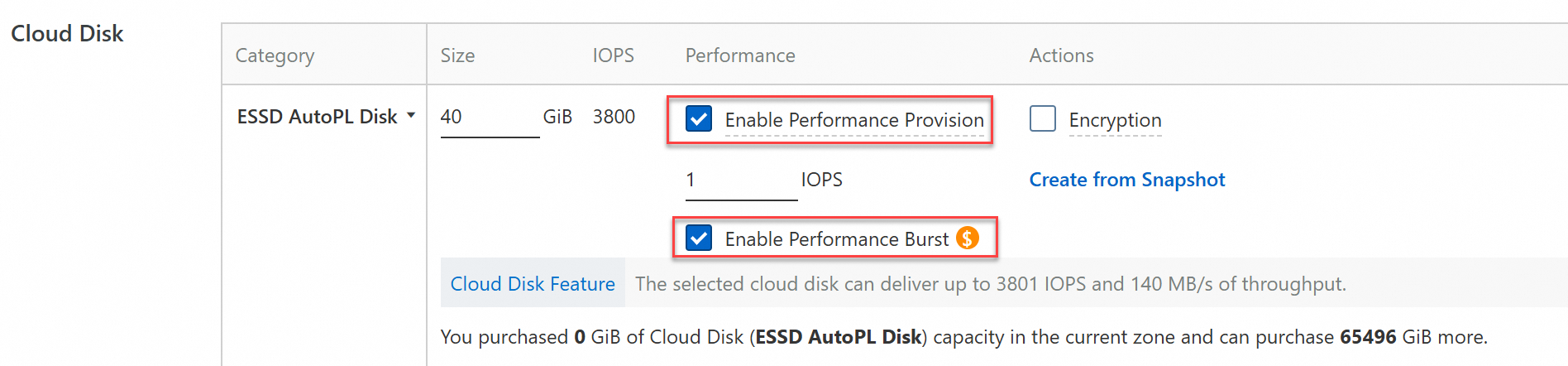
Set Disk Type to ESSD AutoPL Disk and configure the disk capacity.
Select Enable Performance Provision and configure the IOPS value.
Enable Performance Burst is selected by default. You can disable performance burst based on your business needs.
For more information about other parameter settings, see Create an empty data disk.
Billing examples of an ESSD AutoPL disk
The following examples show the performance metrics and fees for an ESSD AutoPL disk after you configure its provisioned performance and performance burst. Assume that the selected region is China (Hangzhou), where the unit prices are as follows:
Subscription
Unit price of baseline performance: USD 0.153 per 1 GiB/month
Unit price of provisioned performance: USD 0.000006 per 1 IOPS/hour
Unit price of performance burst: USD 0.0015 per 10,000 I/Os
Pay-as-you-go
Unit price of baseline performance: USD 0.000319 per 1 GiB/hour
Unit price of provisioned performance: USD 0.000006 per 1 IOPS/hour
Unit price of performance burst: USD 0.0015 per 10,000 I/Os
The preceding unit prices are for reference only. The actual prices displayed on the Pricing tab of the Elastic Compute Service product page prevail.
Example 1: Configure provision performance for an ESSD AutoPL disk without enabling the performance burst feature
A user purchases an ESSD AutoPL disk in the ECS console with a capacity of 100 GiB and provisioned performance of 200 IOPS. Performance burst is not enabled. The fees and performance of the disk are described in the following table: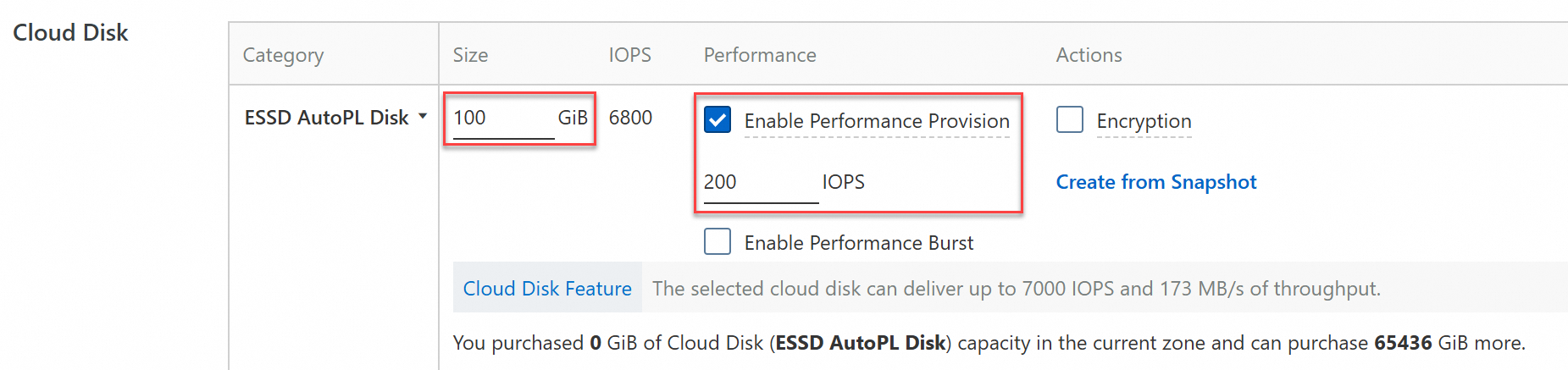
Billing method | Disk fee (USD) | Disk Performance |
Subscription
Subscription duration: 1 month |
|
|
Pay-as-you-go
Billing duration: 24 hours |
|
Example 2: Configure provisioned performance and enable the performance burst feature for an ESSD AutoPL disk
A user purchases an ESSD AutoPL data disk in the ECS console with a capacity of 100 GiB and provisioned performance of 200 IOPS. Performance burst is enabled by default.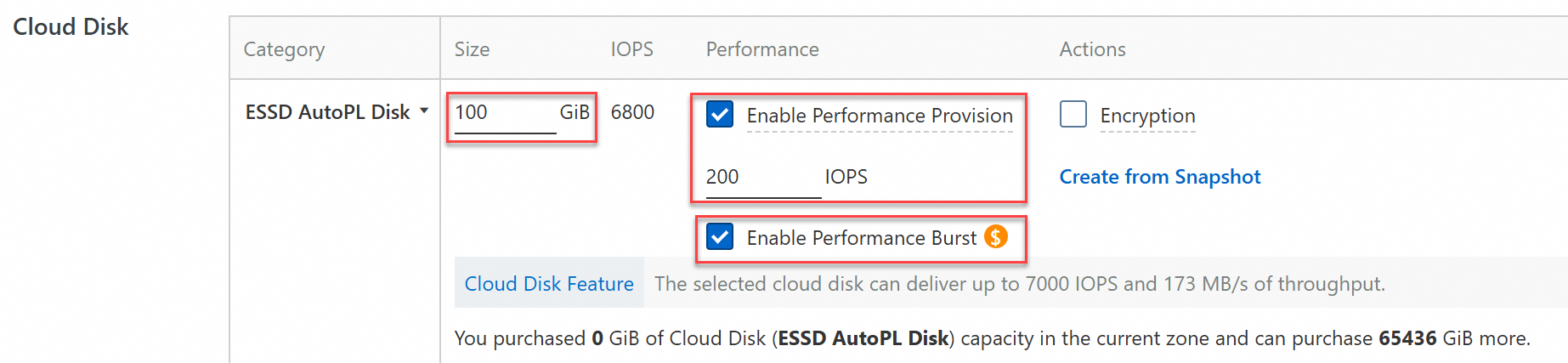
The disk's fees and performance vary in different performance burst scenarios, as described in the following examples:
Scenario 1: Only IOPS bursts occur
Assume that during the disk's usage, an IOPS burst occurs only once for 1 second. The I/O burst amount that exceeds the sum of the baseline and provisioned performance is 8,000. The performance burst fee is 0 because you receive a free quota of 100,000 I/Os per hour.
Billing method
Disk fee (USD)
Disk Performance
Subscription
Baseline performance: subscription
Provisioned performance: pay-as-you-go
Performance burst: pay-as-you-go
Subscription duration: 1 month
Baseline performance fee: Disk capacity * Unit price * Subscription duration = 100 * 0.153 * 1 = 15.3
Provisioned performance fee: Unit price of provisioned performance * Provisioned IOPS * Subscription duration = 0.000006 * 200 * (30 * 24) = 0.864
No fee is charged for the first 100,000 performance bursts.
Total fee: Baseline performance fee + Provisioned performance fee + Performance burst fee = 15.3 + 0.864 + 0 = 16.164
IOPS:
Baseline IOPS: 1,800 + 50 * Capacity = 1,800 + 50 * 100 = 6,800
Provisioned IOPS: 200
Performance burst: 8,000 * 1 = 8,000
Total IOPS per disk: Baseline IOPS + Provisioned IOPS + Performance burst = 6,800 + 200 + 8,000 = 15,000
Throughput (MB/s):
Baseline throughput: 120 + 0.5 * Capacity = 120 + 0.5 * 100 = 170
Provisioned throughput: 16 KB * Provisioned IOPS/1,024 = 16 KB * 200/1,024 = 3.125
Total throughput per disk: Baseline throughput + Provisioned throughput = 170 + 3.125 = 173.125 (rounded in the console)
Pay-as-you-go
Baseline performance: pay-as-you-go
Provisioned performance: pay-as-you-go
Performance burst: pay-as-you-go
Billing duration: 24 hours
Baseline performance fee: Disk capacity * Unit price * Billing duration = 100 * 0.000319 * 24 = 0.7656
Provisioned performance fee: Unit price of provisioned performance * Provisioned IOPS * Billing duration = 0.000006 * 200 * 24 = 0.0288
Performance burst fee: Free for less than 100,000 I/Os
Total fee: Baseline performance fee + Provisioned performance fee + Performance burst fee = 0.7656 + 0.0288 + 0 = 0.7944
Scenario 2: Only throughput bursts occur, IOPS does not burst
Assume that during the disk's usage, a throughput burst occurs only once for 28 seconds. The throughput that exceeds the sum of the baseline and provisioned performance is 1 GB/s (equivalent to 1 * 1,024 * 1,024 / 16 = 65,536 I/Os). The burst I/O amount for throughput in 28 seconds is 65,536 * 28 = 1,835,008. This is rounded up to 1,840,000 I/Os for billing. The total burst I/O is greater than 100,000 and the I/O density is greater than 200 IOPS/GiB (Maximum burst I/O density = 65,536/100 = 655.36 IOPS/GiB), so the performance burst fee is capped.
Disk billing method
Disk fee (USD)
Disk performance
Subscription
Baseline performance: subscription
Provisioned performance: pay-as-you-go
Performance burst: pay-as-you-go
Subscription duration: 1 month
Baseline performance fee: Disk capacity * Unit price * Subscription duration = 100 * 0.153 * 1 = 15.3
Provisioned performance fee: Unit price of provisioned performance * Provisioned IOPS * Subscription duration = 0.000006 * 200 * (30 * 24) = 0.864
Performance burst fee = min((Burst IOPS - 10) * Unit price of performance burst, Disk capacity fee * 8) = min((184 - 10) * 0.0015, 0.000319 * 100 * 8) = 0.2552
Total fee: Baseline performance fee + Provisioned performance fee + Performance burst fee = 15.3 + 0.864 + 0.2552 = 16.4192
IOPS:
Baseline IOPS: 1,800 + 50 * Capacity = 1,800 + 50 * 100 = 6,800
Total IOPS per disk: Baseline IOPS + Provisioned IOPS = 6,800 + 200 = 7,000
Throughput (MB/s):
Baseline throughput: 120 + 0.5 * Capacity = 120 + 0.5 * 100 = 170
Provisioned throughput: 16 KB * Provisioned IOPS/1,024 = 16 KB * 200/1,024 = 3.125
Performance burst: 1 GB/s * 1,024 = 1,024
Total throughput per disk: Baseline throughput + Provisioned throughput + Performance burst = 170 + 3.125 + 1,024 = 1,197.125
Pay-as-you-go
Baseline performance: pay-as-you-go
Provisioned performance: pay-as-you-go
Performance burst: pay-as-you-go
Billing duration: 24 hours
Baseline performance fee: Disk capacity * Unit price * Billing duration = 100 * 0.000319 * 24 = 0.7656
Provisioned performance fee: Unit price of provisioned performance * Provisioned IOPS * Billing duration = 0.000006 * 200 * 24 = 0.0288
Performance burst fee = min((Burst I/O - 10) * Performance burst unit price, Disk capacity fee * 8) = min((184 - 10) * 0.0015, 0.000319 * 100 * 8) = 0.2552
Total fee: Baseline performance fee + Provisioned performance fee + Performance burst fee = 0.7656 + 0.0288 + 0.2552 = 1.0496
Scenario 3: Both IOPS and throughput burst, billing is based on the larger burst I/O amount.
Assume that during the disk's usage, both an IOPS burst and a throughput burst occur once for 2 seconds. The IOPS burst amount is 8,000, and the throughput burst amount is 1 GB/s. The IOPS burst amount in 2 seconds is 8,000 * 2 = 16,000. The burst I/O amount for throughput in 2 seconds is 1 * 1,024 * 1,024 / 16 * 2 = 131,072, which is rounded up to 140,000 I/Os. The performance burst fee is calculated based on 140,000 I/Os. The total burst I/O is greater than 100,000 and the I/O density is greater than 200 IOPS/GiB (Maximum burst I/O density = 65,536/100 = 655.36 IOPS/GiB), so the performance burst fee is capped.
Billing method
Disk fee (USD)
Disk Performance
Subscription
Baseline performance: subscription
Provisioned performance: pay-as-you-go
Performance burst: pay-as-you-go
Subscription duration: 1 month
Baseline performance fee: Disk capacity * Unit price * Subscription duration = 100 * 0.153 * 1 = 15.3
Provisioned performance fee: Unit price of provisioned performance * Provisioned IOPS * Subscription duration = 0.000006 * 200 * (30 * 24) = 0.864
Performance burst fee = min((Burst IOPS - 10) * 10,000 * Performance burst unit price, Disk capacity fee * 8) = min((14-10)*0.0015, 0.000319*100*8) = 0.006
Total fee: Baseline performance fee + Provisioned performance fee + Performance burst fee = 15.3 + 0.864 + 0.006 = 16.17
IOPS:
Baseline IOPS: 1,800 + 50 * Capacity = 1,800 + 50 * 100 = 6,800
Provisioned IOPS: 200
Performance burst: 8,000 * 1 = 8,000
Total IOPS per disk: Baseline IOPS + Provisioned IOPS + Performance burst = 6,800 + 200 + 8,000 = 15,000
Throughput (MB/s):
Baseline throughput: 120 + 0.5 * Capacity = 120 + 0.5 * 100 = 170
Provisioned throughput: 16 KB * Provisioned IOPS/1,024 = 16 KB * 200/1,024 = 3.125
Performance burst: 1 GB/s * 1,024 = 1,024
Total throughput per disk: Baseline throughput + Provisioned throughput + Performance burst = 170 + 3.125 + 1,024 = 1,197.125
Pay-as-you-go
Baseline performance: pay-as-you-go
Provisioned performance: pay-as-you-go
Performance burst: pay-as-you-go
Billing duration: 24 hours
Baseline performance fee: Disk capacity * Unit price * Billing duration = 100 * 0.000319 * 24 = 0.7656
Provisioned performance fee: Unit price of provisioned performance * Provisioned IOPS * Billing duration = 0.000006 * 200 * 24 = 0.0288
Performance burst fee: min((Burst IOPS (in 10k units) - 10) * Burst unit price, Disk capacity fee * 8) = min((14 - 10) * 0.0015, 0.000319 * 100 * 8) = 0.006
Total fee: Baseline performance fee + Provisioned performance fee + Performance burst fee = 0.7656 + 0.0288 + 0.006 = 0.8004