This topic describes how to use Alibaba Cloud Command Line Interface (CLI) to call Anti-DDoS Proxy APIs. To illustrate this process, we use Alibaba Cloud CLI to call the DescribeInstanceIds API of Anti-DDoS Proxy to query Anti-DDoS Proxy instances.
Background
Alibaba Cloud CLI is a general-purpose command-line tool developed based on APIs. It enables automated management and maintenance of Anti-DDoS Proxy. For more information, see What is Alibaba Cloud CLI?
Procedure
Step 1: Install Alibaba Cloud CLI
Ensure that you have installed Alibaba Cloud CLI on your system. Alibaba Cloud CLI offers installation packages for Windows, Linux, and macOS users.
You can also debug Alibaba Cloud CLI commands in Cloud Shell, where Alibaba Cloud CLI is pre-installed and receives regular updates. For more information, see What is Cloud Shell?
Step 2: Configure Alibaba Cloud CLI
We highly recommend that you create a RAM user and apply the Principle of Least Privilege when granting permissions to access APIs. An Alibaba Cloud account has the permissions to manage and access the APIs of all Alibaba Cloud services, which can lead to security risks. For the permission policies supported by Anti-DDoS Proxy, see System policies of Anti-DDoS Proxy and Custom policies of Anti-DDoS Proxy.
Before using Alibaba Cloud CLI, you need to configure your identity credentials and region ID. Alibaba Cloud CLI supports various types of identity credentials. For more information, see Credential types.
To configure AccessKey credentials with the AccessKey ID of a RAM user, follow these steps:
Create a RAM user and an AccessKey pair. For more information, see Create a RAM user and Create an AccessKey.
Grant permissions to the RAM user. In this example, grant the RAM user read-only access to Anti-DDoS Proxy using
AliyunYundunAntiDDoSPremiumReadOnlyAccess. For more information, see Grant permissions to a RAM user.Identify the region ID. Alibaba Cloud CLI uses the specified region to call APIs. To check available regions for Anti-DDoS Proxy, see Endpoints.
NoteWhen using Alibaba Cloud CLI, you can specify a region with the
--regionoption to override the default region information set in your identity credential configuration and environment variable settings. For more information, see Command line options for API calls.Configure AccessKey credentials with the AccessKey ID of the RAM user, and name the configuration file
AkProfile. For more information, see Configuration examples.
Step 3: Generate CLI command examples
Access DescribeInstanceIds debugging address.
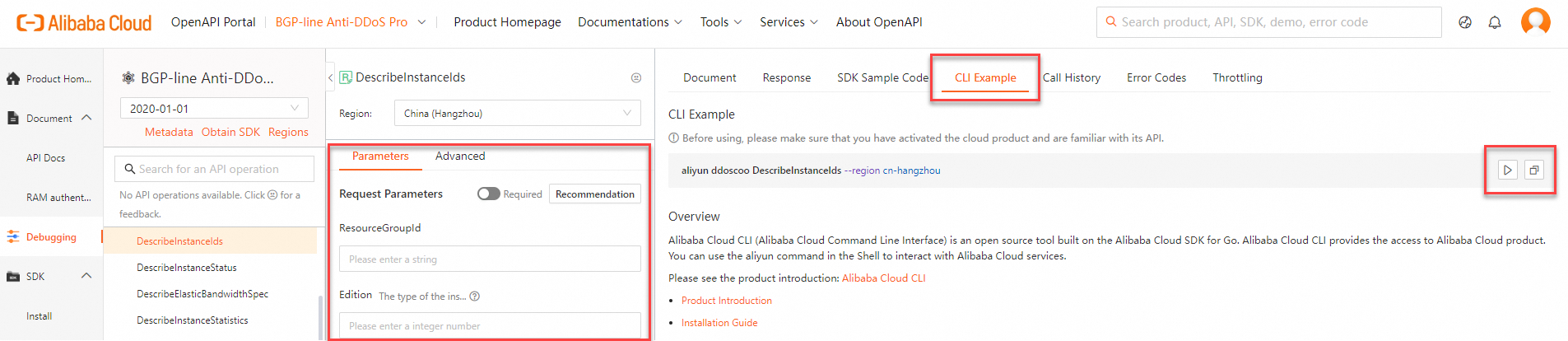
In the Parameters section, input the request parameters and click the CLI Example tab to view the generated CLI command.
Copy the CLI example or execute it directly in Cloud Shell:
Click Run Command
 to launch Cloud Shell, which allows you to expedite command debugging.
Click Copy
 to copy the CLI command to your clipboard. You can then use this command in your local shell, or for scripting purposes.
NoteWhen you paste the CLI command into your local shell for debugging, ensure that the parameter format is correct. For more information on the command parameter formats of Alibaba Cloud CLI, see Parameter format description.
Additionally, note that the
--regionoption is included by default in the sample command generated in the OpenAPI Explorer. When you copy this command to your shell, Alibaba Cloud CLI ignores the region information in the default identity credential configurations and environment variable settings, and preferentially runs the command in the specified region. You can either delete or retain this option based on your business requirements.
Step 4: Call the APIs of Anti-DDoS Proxy
Example 1: Query the Anti-DDoS Proxy API operations that can be called by Alibaba Cloud CLI
Use the --help option to list the Anti-DDoS Proxy API operations available in the Alibaba Cloud CLI. For more information, see List of operations by function.
Run the following command:
aliyun ddoscoo --helpView the result.

Example 2: Query Anti-DDoS Proxy instance
This example shows how to use Alibaba Cloud CLI to call the DescribeInstanceIds API of Anti-DDoS Proxy to query the ID, version, description, and IP address type of the Anti-DDoS Proxy instance in a specific resource group. For more information on the API, see DescribeInstanceIds.
Run the following command:
aliyun ddoscoo DescribeInstanceIds --ResourceGroupId 'rg-acfm2pz25js****'Run the following command:
{ "RequestId": "310A41FD-0990-5610-92E0-A6A55D7C6444", "InstanceIds": [ { "IpMode": "fnat", "Edition": 0, "InstanceId": "ddoscoo-cn-zvp2eibz****", "IpVersion": "Ipv4", "Remark": "test" } ] }NoteIf you receive an error after calling the API operations of Anti-DDoS Proxy, you need to verify the accuracy of the request parameters and their associated values based on the error message.
You can also document the RequestID or the SDK error message returned by the API call for self-diagnosis using the Alibaba Cloud OpenAPI diagnostic platform.