This topic describes the billing items, overdue payments, endpoint expiration, and refund policy for Anti-DDoS Origin 2.0 subscription plans.
Instance Types and Selection Guide
Anti-DDoS Origin 2.0 (subscription) offers two instance types. Each instance type provides an Insurance mode and a Worry-free mode:
Inclusive Edition for Small and Medium Enterprises instance: If your assets that are assigned public IP addresses are in the same region, the number of IPs is fewer than 30, and the clean bandwidth does not exceed 1,000 Mbps, you can select this instance.
Enterprise instance: If your assets that are assigned public IP addresses are distributed across multiple regions, the number of IPs exceeds 30, and the asset IP network protocol types include both IPv4 and IPv6, you can select this instance.
If you deploy services outside the Chinese mainland, we recommend purchasing EIPs with Anti-DDoS (Enhanced) enabled or Anti-DDoS Pro (outside the Chinese mainland). If you must use Anti-DDoS Origin 2.0 (subscription), contact your pre-sales account manager.
Before purchasing the Worry-free mode for the Inclusive Edition for Small and Medium Enterprises or the Insurance mode for the Enterprise Edition, contact your pre-sales account manager.
Comparison Item | Inclusive Edition for Small and Medium Enterprises | Enterprise Edition | ||
Insurance Mode | Worry-free Mode | Insurance Mode | Worry-free Mode | |
Mitigation Sessions | 2 sessions/month Note After you consume all mitigation sessions, the cloud product retains only Anti-DDoS Basic mitigation capacity. For more information about the mitigation capacity, see thresholds that trigger blackhole filtering in Anti-DDoS Basic. | Unlimited sessions | 2 sessions/month Note After you consume all mitigation sessions, the cloud product retains only Anti-DDoS Basic mitigation capacity. For more information about the mitigation capacity, see thresholds that trigger blackhole filtering in Anti-DDoS Basic. | Unlimited sessions |
Mitigation Capabilities | Varies by region. For more information, see Comparison of Version Mitigation Capabilities. | Varies by region. For more information, see Comparison of Version Mitigation Capabilities. | ||
Network Protocol Types of Public IP Assets to Protect | An instance protects only one of IPv4 or IPv6. | An instance can protect both IPv4 and IPv6 assets. | ||
Number of Regions for Asset Protection | 1 | An instance can protect assets that are assigned public IP addresses in all regions in the Chinese mainland. | ||
Number of IPs Supported for Protection | When purchasing an instance, you can select 1 to 29. | When purchasing an instance, you can select 30 to 2,000. For higher specifications, contact your account manager. | ||
Clean Bandwidth Supported for Protection | When purchasing an instance, you can select 50 Mbps to 1,000 Mbps. | When purchasing an instance, you can start with 100 Mbps, freely select bandwidth, and support unlimited scale-out. | ||
Burstable Clean Bandwidth | Not supported. | Supported. After enabling, the total supported clean bandwidth is 5 times the baseline clean bandwidth. | ||
SLS Logs | Not supported. | Supported. | ||
Multi-account Management | Not supported. | Supported. | ||
Upgrade Scenarios
This section describes upgrade scenarios based on mitigation sessions and supported regions. You can also upgrade the clean bandwidth and number of IPs as needed.
Inclusive Edition for Small and Medium Enterprises (Insurance Mode)
If you need more than 2 mitigation sessions per month, you can upgrade to the Inclusive Edition for Small and Medium Enterprises (Worry-free Mode).
To protect assets that are assigned public IP addresses in multiple regions, you can upgrade to the Enterprise Edition (Insurance Mode) or Enterprise Edition (Worry-free Mode).
Inclusive Edition for Small and Medium Enterprises (Worry-free Mode)
To protect assets that are assigned public IP addresses in multiple regions, you can upgrade to the Enterprise Edition (Worry-free Mode).
Enterprise Edition (Insurance Mode)
If you need more than 2 mitigation sessions per month, you can upgrade to the Enterprise Edition (Worry-free Mode).
You can select the Inclusive Edition for Small and Medium Enterprises (Worry-free Mode) and Enterprise Edition (Insurance Mode) only when upgrading. To purchase a new instance, contact your account manager.
Billing Items
Total instance cost = Subscription fee (protection feature fee + clean bandwidth fee + IP quantity protection fee) + Pay-as-you-go fee (burstable clean bandwidth fee).
Subscription
Protection Feature Fee
This is the basic protection fee for using the instance. The unit price varies based on the instance's protection mode.
Instance Protection Mode
Unit Price(USD/month)
Inclusive Edition for Small and Medium Enterprises (Insurance Mode)
1,950
Enterprise Edition (Worry-free Mode)
6,000
Bandwidth fee
Instance Protection Mode
Unit Price(USD/month/Mbps)
Inclusive Edition for Small and Medium Enterprises (Insurance Mode)
Enterprise Edition (Insurance Mode)
5
Inclusive Edition for Small and Medium Enterprises (Worry-free Mode)
Enterprise Edition (Worry-free Mode)
10
IP Quantity Protection Fee
The fee is charged based on the number of protected asset IPs and uses tiered pricing. The unit price for the IP quantity protection fee varies based on the instance's protection mode. If the number of IPs in the following table does not meet your business requirements, you can contact us.
Instance Protection Mode
Number of IPs
Unit Price(USD/month/instance)
Inclusive Edition for Small and Medium Enterprises (Insurance Mode, Worry-free Mode)
[0, 100]
24
Enterprise Edition (Insurance Mode, Worry-free Mode)
[0, 30]
0
(30, 100]
24
(100, 300]
19.2
(300, 500]
14.4
(500, 700]
12
(700, 1,000]
9.6
For example, if you purchase an Enterprise Edition (Worry-free Mode) instance with 200 IPs, the IP quantity protection fee is calculated as follows:
Of these, 30 IPs fall within the range [0, 30], and the monthly fee is 0 USD.
Of these, 70 IPs fall within the range (30, 100], and the monthly fee is 24 × 70 = 1,680 USD.
Of these, 100 IPs fall within the range (100, 300], and the monthly fee is 19.2 × 100 = 1,920 USD.
Therefore, the monthly IP protection fee is 1,680 + 1,920 = 3,600 USD.
Pay-as-you-go
Pay-as-you-go includes one fee: the burstable clean bandwidth fee.
After you enable the Metering Method of 95th Percentile Burstable Clean Bandwidth for an instance, the clean bandwidth increases flexibly by 4 times the baseline clean bandwidth. The total clean bandwidth becomes five times the baseline clean bandwidth. For example, if the baseline clean bandwidth is 1 Gbps, enabling this feature increases the clean bandwidth by 4 Gbps, resulting in a total clean bandwidth of 5 Gbps.
If the actual traffic peak exceeds the baseline clean bandwidth, traffic is not rate-limited, but you are charged for the excess. If the actual traffic peak does not exceed the baseline clean bandwidth, no additional pay-as-you-go fees are incurred. You can query burstable clean bandwidth usage in the Billing Center. For more information, see Billing Center.
Billing Mode | Unit Price | Cost Calculation Formula |
Daily 95th Percentile | USD 1.79/day/Mbps | 95th percentile billing bandwidth × daily 95th percentile unit price. 95th percentile billing bandwidth calculation method:
|
Monthly 95th Percentile | USD 12.5/month/Mbps | 95th percentile billing bandwidth × effective factor × monthly 95th percentile unit price.
|
Monthly 95th percentile billing is recommended to be enabled by default. Daily 95th percentile billing is suitable for short-term sales promotions.
Monthly 95th percentile billing and daily 95th percentile billing take effect the next day after you disable them. You can disable them only once per month.
You can directly switch between monthly 95th percentile billing and daily 95th percentile billing. The switch takes effect the next month. You can switch only once per month.
Billing generation and settlement times are as follows. The system determines the specific times.
Billing Mode | Billing Generation Time | Settlement Time |
Daily 95th Percentile | At approximately 10:00 on the next day, the burstable clean bandwidth bill for the previous calendar day is sent to the Alibaba Cloud account contact via email and internal message. | Around 4:00 PM the next day, Alibaba Cloud pushes the burstable clean bandwidth usage and deducts the corresponding fees from the account balance. |
Monthly 95th Percentile | Around 10:00 on the 1st day of the next month, the burstable clean bandwidth bill for the previous calendar month is sent to the Alibaba Cloud account contact through emails and internal messages. | Around 11:00 AM on the 3rd of the next month, Alibaba Cloud pushes the burstable clean bandwidth usage and deducts the corresponding fees from the account balance. |
Mitigation sessions
The system records a traffic data point every 5 seconds (12 per minute). When attack traffic exceeds N Gbps, the system accumulates the attack duration, as shown by X+Y in the figure. One best-effort protection session is consumed for every 15 minutes of accumulated attack time, equivalent to 180 data points.
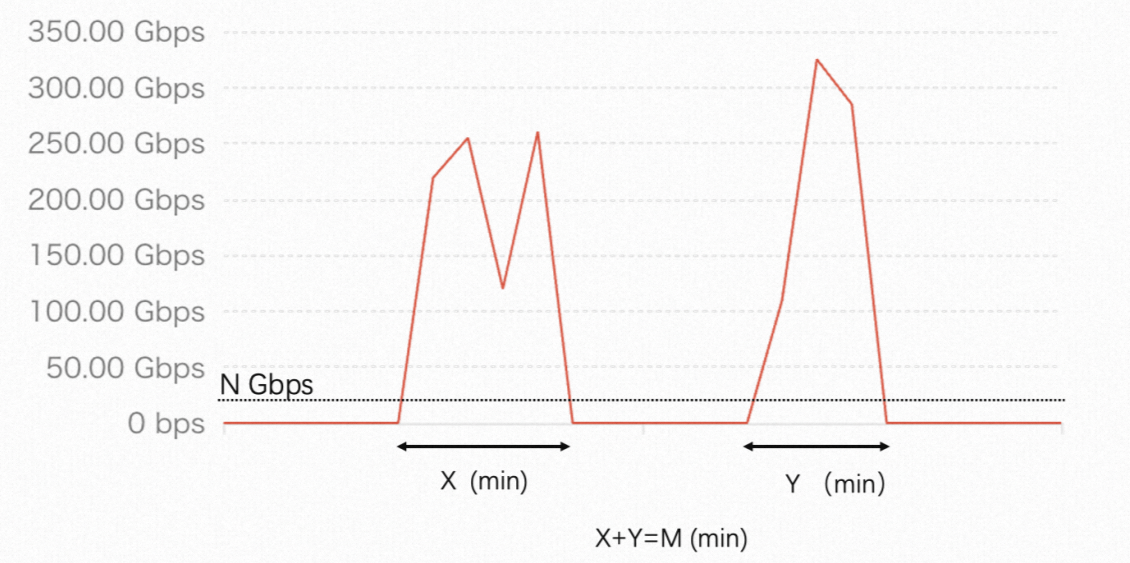
The red line represents the inbound traffic of a public IP-enabled asset.
For protected assets in the Chinese mainland, N is 20.
For protected assets outside the Chinese mainland, N is 10.
For example, a Chinese mainland asset under two attacks exceeding 20 Gbps, lasting 10 and 12 minutes (22 minutes total), consumes one session after the first 15 minutes; the remaining 7 minutes apply toward the second session. If additional attacks occur in the same month and the accumulated duration reaches 15 minutes, the second session is consumed.
To view the remaining mitigation sessions, see Query Remaining Mitigation Sessions for Inclusive Edition for Small and Medium Enterprises.
Estimate business scale
To help you select an appropriate clean bandwidth when you purchase an instance, you can estimate your business scale as follows.
Sample your inbound and outbound traffic at 5-minute intervals. Calculate the average inbound and outbound bandwidth for each interval. The higher of the two values is the bandwidth for that sample point. At the end of the month, sort all sample points by bandwidth in descending order. Then, remove the top 5% of sample points. The highest remaining bandwidth value is your 95th percentile bandwidth. Use this value as a reference.
The following figure shows a diagram of the billable bandwidth over a 30-day period.

Bandwidth Overage Details
Anti-DDoS Origin allows the clean traffic peak to temporarily exceed the instance's clean bandwidth. When the accumulated overage duration reaches 1 hour, 9 hours, 18 hours, 27 hours, or 36 hours per month, Alibaba Cloud sends a clean bandwidth overage alert through the notification channels you configured. Overage alerts are sent uniformly on the morning of T+1 day. After you receive the 36-hour overage alert, the Anti-DDoS Origin mitigation capability becomes invalid, and only Anti-DDoS Basic mitigation capacity remains.
You can restore Anti-DDoS Origin mitigation capability as follows:
Method 1: You can wait for automatic recovery the next month.
Method 2: If you use an Anti-DDoS Origin 2.0 (subscription) Enterprise instance, you can enable burstable clean bandwidth. It automatically recovers immediately after enabling. The clean bandwidth increases flexibly by 4 times the baseline clean bandwidth, making the total clean bandwidth five times the baseline clean bandwidth.
Method 3: You can upgrade the baseline clean bandwidth of the Anti-DDoS Origin instance. It automatically recovers immediately after upgrading.
If the clean bandwidth has exceeded 36 hours before you use Method 2 or Method 3, the Anti-DDoS Origin mitigation capability is already invalid. If bandwidth overage occurs again in the current month after using Method 2 or Method 3, the mitigation capability is downgraded again after you receive the overage alert on T+1 day.
If the clean bandwidth has exceeded but not accumulated 36 hours before you use Method 2 or Method 3, the overage duration continues to accumulate in the current month after using Method 2 or Method 3. If it accumulates to 36 hours, the mitigation capability is downgraded after you receive the overage alert on T+1 day.
You can view overage details in the Billing Center. For more information, see Billing Center.
Overdue payments
Your account has an overdue payment if the available balance, including cash, coupons, and vouchers, is insufficient to pay your outstanding bill.
After your account has an overdue payment, top up your account to ensure that you have a sufficient balance and prevent service interruptions.
Expiration Information
Time Period | Impact After Expiration | Instance Configuration |
Within 7 days (inclusive) after instance expiration | After instance expiration, services stop immediately. You can resume services after renewal. | Instance configuration is retained. |
On the 8th day after instance expiration | The instance is released and cannot be recovered. | The instance configuration is permanently deleted and cannot be recovered. |
Refund Policy
Refunds are not supported after purchasing an instance.
Query Bills
You can query bills in the Expenses and Costs console. For more information, see Monthly Bill Overview.