You can change the public bandwidth billing method for an Elastic Compute Service (ECS) instance from pay-by-bandwidth to pay-by-traffic, or vice versa, if the current method no longer meets your needs.
If you are using an Elastic IP Address (EIP) and need to switch its billing method, see Switch between billing methods.
Billing methods for a static public IP address
Pay-by-bandwidth: This method charges you based on a specified bandwidth value. Your actual outbound bandwidth does not exceed this value. It is ideal for scenarios with stable network bandwidth requirements.
Pay-by-traffic: A postpaid method that charges you for the actual traffic you use. In this mode, you set a maximum bandwidth to prevent high costs from sudden traffic spikes. It is suitable for scenarios where network bandwidth demands vary significantly.
ImportantFor the pay-by-traffic, the specified maximum bandwidth is a cap, not a performance guarantee. During periods of resource contention, available resources may limit the maximum bandwidth. If your business requires guaranteed bandwidth, use the pay-by-bandwidth billing method.
BGP (Multi-ISP) Pro lines in the China (Hong Kong) region do not support the pay-by-traffic billing method.
Change from pay-by-bandwidth to pay-by-traffic
To change the public bandwidth billing method for an ECS instance from pay-by-bandwidth to pay-by-traffic in the ECS console, follow these steps. You can also call the ModifyInstanceNetworkSpec operation.
Go to ECS console - Instances.
In the top navigation bar, select the region and resource group of the resource that you want to manage.

Change the billing method for network usage of an ECS instance based on its billing method.
Pay-as-you-go instance
Find the pay-as-you-go instance that you want to manage and click its ID to go to the instance details page. In the upper-right corner of the page, choose .
In the Public Bandwidth section, select Pay-By-Traffic and specify a maximum bandwidth value.

Read and select ECS Terms of Service, and then click Confirm. Follow the on-screen instructions to complete the operation. The new configuration immediately takes effect.
Subscription instance
Find the subscription instance that you want to manage and click its ID to go to the instance details page. In the upper-right corner of the page, choose .
In the dialog box that appears, select Downgrade Bandwidth and click Continue.
On the Downgrade Bandwidth page, select Pay-By-Traffic and specify a maximum bandwidth value.

Read and select ECS Terms of Service, and then click Downgrade. Follow the on-screen instructions to complete the operation. The new configuration immediately takes effect.
Alibaba Cloud allows you to perform batch operations on the Instance page. You can select multiple instances and change their billing methods simultaneously.
Change from pay-by-traffic to pay-by-bandwidth
To switch the public bandwidth billing method for an ECS instance from pay-by-traffic to pay-by-bandwidth in the ECS console, follow these steps. You can also call the ModifyInstanceNetworkSpec operation.
Go to ECS console - Instances.
In the top navigation bar, select the region and resource group of the resource that you want to manage.
Change the billing method for network usage of an ECS instance based on its billing method.
Pay-as-you-go instance
Find the pay-as-you-go instance that you want to manage and click its ID to go to the instance details page. In the upper-right corner of the page, choose .
In the Public Bandwidth section, select Pay-By-Bandwidth and specify a bandwidth value.
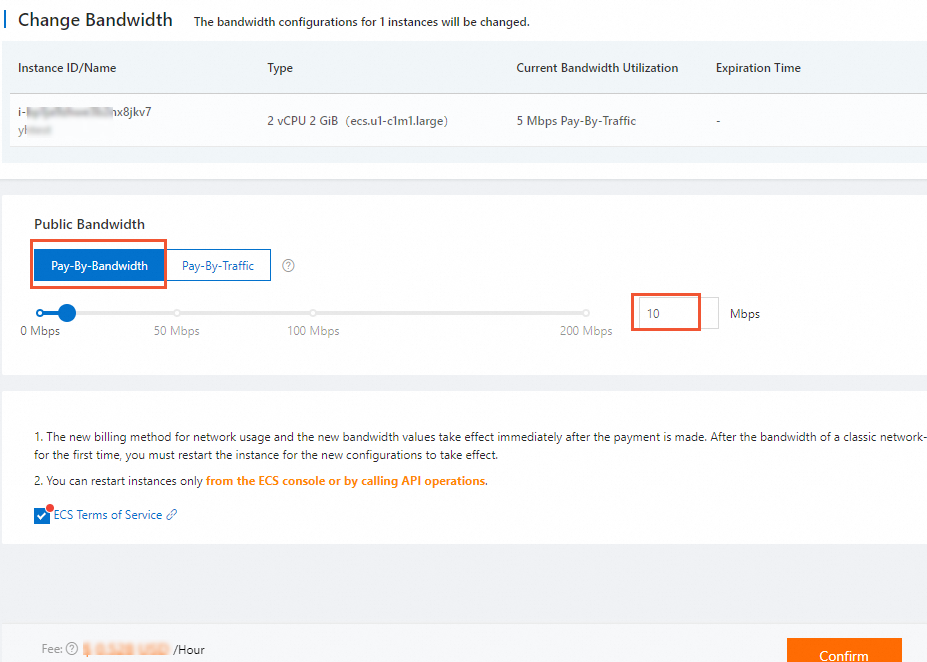
Read and select ECS Terms of Service, and then click Confirm. Follow the on-screen instructions to complete the operation. The new configuration immediately takes effect.
Subscription instance
Find the subscription instance that you want to manage and click its ID to go to the instance details page. In the upper-right corner of the page, choose .
In the dialog box that appears, select Modify Maximum Bandwidth Value and click Continue.
In the Public Bandwidth section, select Pay-By-Bandwidth and specify a bandwidth value.
Read and select ECS Terms of Service, and then click Confirm. Follow the on-screen instructions to complete the operation. The new configuration immediately takes effect.
Alibaba Cloud allows you to perform batch operations on the Instance page. You can select multiple instances and change their billing methods simultaneously.
References
After you switch the billing method, Alibaba Cloud calculates your public bandwidth costs based on the new method. For more information, see Public bandwidth billing.
You may need to adjust your bandwidth limits or quotas based on the new billing method.
For more flexibility in managing public IP addresses, such as associating or disassociating them from ECS instances on demand, you can convert the static public IP addresses of the ECS instances to EIPs.
ImportantIf you convert a static public IP address to an EIP and then change the EIP's billing method from pay-as-you-go to subscription, a price difference may occur. Proceed with caution. For more information, see Billing FAQ.