In addition to the console, Tablestore provides integration methods such as online OpenAPI debugging, software development kits (SDKs), and the command-line interface (CLI). You can select a suitable method to develop and use Tablestore based on your requirements.
Integration methods
Tablestore features are divided into instance management and data management.
Instance management
This category includes operations and features related to instances, such as creating instances, using tags and resource groups, and configuring instance access control policies.
Data management
This category includes operations and features related to tables and data, such as creating data tables, running SQL queries, and connecting to big data systems.
The following table describes the Tablestore features that each integration method supports.
Integration method | Support | ||
Instance management | Data management | ||
Tablestore SDK | Not supported | Supported (Recommended) | |
Alibaba Cloud SDK | Supported (Recommended) | Not supported | |
Partially supported | Partially supported | ||
Partially supported | Partially supported | ||
Partially supported | Partially supported | ||
SDK
You can use Tablestore SDKs and the Alibaba Cloud SDK to access Tablestore features.
Tablestore SDK
Tablestore provides SDKs for several popular programming languages, including Java, Go, Python, Node.js, .NET, and PHP. You can use Tablestore SDKs to perform operations on tables and data. The following table describes the features that each SDK supports.
Note"" indicates that the feature is supported. "" indicates that the feature is not supported.
Feature
Java
Go
Python
Node.js
.NET
PHP
Table operations
Global table operations
Data operations: Basic features
Data operations: Local transactions
Search index: Basic features
Search index: Vector search
Search index: Statistical aggregation
Global secondary index
Local secondary index
Tunnel Service
SQL query
Data lake delivery
Time series model
Message model
Alibaba Cloud SDK
The Alibaba Cloud SDK is a dependency package used to call the API operations of cloud services. You can use the Alibaba Cloud SDK to perform operations on and manage instances.
You can also debug online in the OpenAPI portal. For more information, see Appendix 1: Introduction to OpenAPI.
CLI
The Tablestore CLI provides simple and convenient management commands and runs on Windows, Linux, and macOS. You can use the Tablestore CLI to perform operations such as activating the Tablestore service and creating instances.
Terraform
Terraform is an open source tool for automated resource orchestration that you can use to manage IT resources as code. The Terraform CLI provides a simple way to deploy configuration files to Alibaba Cloud or any other supported cloud and manage their versions.
For a list of Tablestore features that you can orchestrate and use with Terraform, see Terraform resources.
For instructions on how to integrate Tablestore with Terraform, see Create a Tablestore instance using Terraform.
Resource Orchestration Service (ROS)
Resource Orchestration Service (ROS) is an Alibaba Cloud service that simplifies cloud resource management. You can write templates to define required Alibaba Cloud resources, such as ECS instances and RDS database instances, and the dependencies between them. The ROS orchestration engine automatically creates and configures all resources based on the template to enable automated deployment and operations and maintenance (O&M).
For a list of Tablestore features that support resource orchestration, see Resource orchestration list.
For instructions on how to integrate Tablestore with ROS, see ROS integration example.
Custom API call encapsulation
If none of the preceding methods meet your business requirements, you can encapsulate requests to call the OpenAPI. This method is not recommended. For more information, see API overview and Request body and signature mechanism V3.
FAQ
To learn more about Tablestore, see What is Tablestore?.
Tablestore is a serverless table storage service for massive amounts of structured data. It also provides a one-stop IoTstore solution that is deeply optimized for Internet of Things (IoT) scenarios. To learn more about the features that the product supports, see Features.
Appendix
Appendix 1: Introduction to OpenAPI
Alibaba Cloud provides the OpenAPI website to help developers learn and use the OpenAPI of cloud products quickly and efficiently. The website integrates features such as intelligent search, documentation, online debugging, obtaining SDKs, code samples, error diagnosis, and call statistics. In the OpenAPI portal, you can call the OpenAPI of various Alibaba Cloud products and view the requests and responses. The portal also automatically generates SDK call examples to help you get started quickly with Alibaba Cloud products.
Versions
Alibaba Cloud OpenAPI uses version numbers to manage the API lists for major product versions. For example, Tablestore currently supports the API list for version 2020-12-09. The string 2020-12-09 represents the API version, not a date. The list shows the latest public API data and is not limited to data from before 2020-12-09.
Version | Description |
2020-12-09 | Recommended |
Online debugging
Tablestore provides features such as API debugging in the OpenAPI portal. Before you make a call, you must understand the information provided by Tablestore, such as versions, endpoints, API styles, and calling methods.
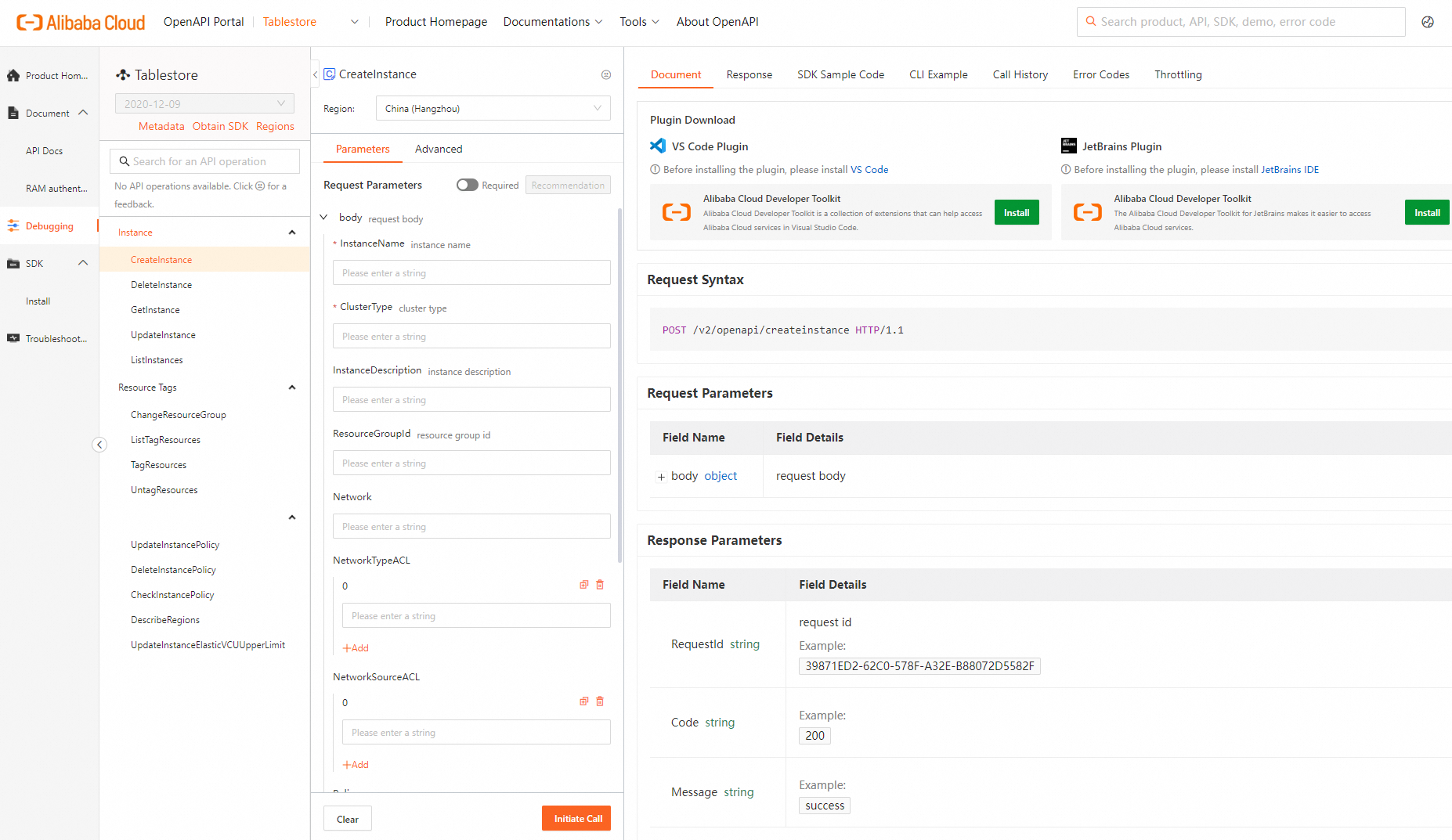
Debugging entry point
The API debugging entry point is: https://next.api.alibabacloud.com/api/Tablestore/2020-12-09
Endpoints
You can select an endpoint based on the region where your resources reside to obtain the lowest latency.
For a list of Tablestore service endpoints, see Endpoints.
User identity
After you log on to the OpenAPI portal with your Alibaba Cloud account, the portal uses your Alibaba Cloud account to debug OpenAPI calls by default. An Alibaba Cloud account has access permissions to all APIs, which poses a high security risk. We strongly recommend that you create and use a RAM user for API access or daily operations and maintenance (O&M). Before you call an API, you must grant the required permissions to the RAM user. For more information, see Use RAM for access control.
User identity | Support |
Support | |
RAM user (Recommended) | Supported |
RAM role (Recommended) | Supported |
Notes
If an error is returned after you call a service API, you can check whether the request parameters and their values are correct based on the returned error code.
You can also record the RequestID or SDK error message from the call and use the Alibaba Cloud OpenAPI Diagnostic Platform for self-service diagnosis.