This topic describes the cause of the "Upgrade requires links in root directory to be relative" error message that is reported when you use Server Migration Center (SMC) to migrate a Linux operating system. This topic also describes how to resolve the error.
Problem description
The "Upgrade requires links in root directory to be relative" error message is reported when a Linux operating system is migrated by using SMC.
Cause
Symbolic links in the root directory must point to relative paths. This error message is reported if a symbolic link in the root directory points to an absolute path.
Solution
Connect to the source server. For more information, see Connect to an instance.
Run the following command to check whether symbolic links exist in the root directory:
ll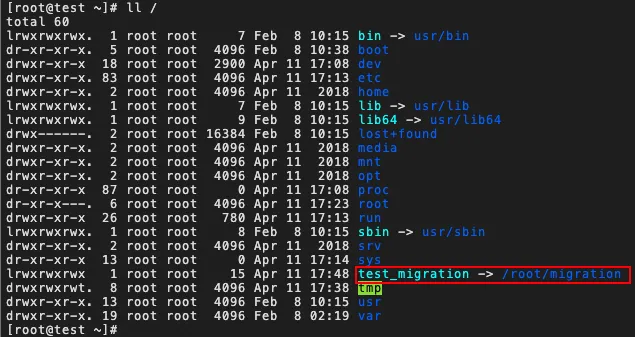
The preceding error information indicates that the / root directory contains the symbolic link test_migration that points to the absolute path
/root/migration. If you migrate the source server, some upgrade steps may fail after the source server restarts.Run the following command to replace the symbolic link with a relative path:
ln -snf root/migration /test_migrationAfter the error is resolved, run the SMC client and retry the migration job. For more information, see Run the SMC client.