Retrieval-Augmented Generation (RAG) enhances LLM responses by retrieving relevant information from external knowledge bases before generating answers. Deploy a RAG chatbot on Elastic Algorithm Service (EAS) to answer questions about your private, domain-specific data.
Step 1: Deploy the RAG service
Log on to the PAI console. Select a region on the top of the page. Then, select the desired workspace and click Elastic Algorithm Service (EAS).
-
On the Elastic Algorithm Service (EAS) page, click Deploy Service. Under Scenario-based Model Deployment, click RAG-based LLM Chatbot Deployment.
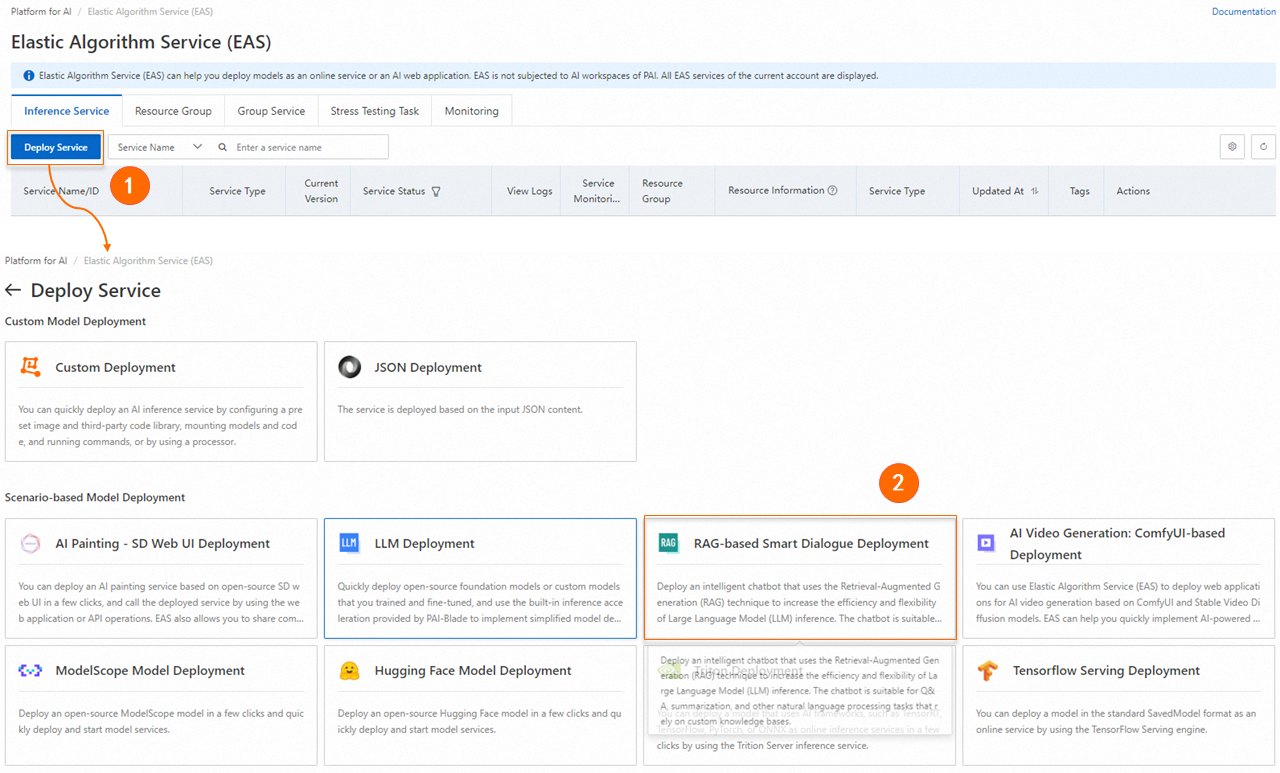
-
Configure the following parameters on the RAG-based LLM Chatbot Deployment page and click Deploy. Deployment completes when Service Status shows Running (typically about 5 minutes).
-
Basic Information
Parameter
Description
Version
Choose a deployment version:
-
LLM-Integrated Deployment: Deploys both RAG service and LLM (such as Qwen) in a single EAS instance. Best for rapid prototyping.
-
LLM-Separated Deployment: Deploys only RAG service; connect to external LLMs (EAS or Model Studio). Enables resource sharing and independent scaling. Best for production or existing LLM setups.
Model Type
Select the LLM to deploy when using LLM Integrated Deployment.
-
-
Resource Information
Parameter
Description
Deployment Resources
-
LLM Integrated Deployment: Auto-selects resources based on model. Using lower specs may cause startup failure.
-
LLM-Separated Deployment: RAG service requires minimal resources. Use at least 8 vCPUs and 16 GB memory (for example,
ecs.g6.2xlargeorecs.g6.4xlarge).
-
-
Vector Database Settings
Supported vector databases: Faiss, Elasticsearch, Hologres, OpenSearch, and RDS PostgreSQL.
FAISS
Faiss builds a local vector database. Lightweight option—no external database purchase required.
Parameter
Description
Vector Database Type
Select FAISS.
OSS Path
Select an OSS folder in the current region for knowledge base files. Create one via Console Quick Start if needed.
NoteIf you use a self-hosted fine-tuned model deployment service, ensure that the selected OSS path differs from the model path to prevent conflicts.
Elasticsearch
Configure Elasticsearch connection. To create an instance and prepare configuration, see Use EAS and Elasticsearch to deploy a RAG-based LLM chatbot.
Parameter
Description
Version Type
Select Elasticsearch.
Private Endpoint/port
Private endpoint and port. Format:
http://<private_endpoint>:<private_port>. See View instance basic information.Index Name
New or existing index name. Existing indices must match PAI-RAG schema requirements.
Account
Login username. Default:
elastic.Password
Instance password. Reset the password if forgotten.
OSS Address
OSS folder in the current region for knowledge base management.
Hologres
Configure Hologres connection. To activate an instance, see Purchase an instance.
Parameter
Description
Version Type
Select Hologres.
Call Information
VPC host. In the Hologres console, go to instance details, and copy the Specified VPC host (the domain before
:80).Database Name
Hologres database name. See Create a database.
Account
Custom user with Instance Super Administrator (SuperUser) role. See Create a custom user.
Password
Custom user password.
Table Name
New or existing table. Existing tables must match PAI-RAG schema.
OSS Address
OSS directory in the current region for knowledge base management.
OpenSearch
Configure OpenSearch Vector Search Edition connection. See Prepare the OpenSearch vector database.
Parameters
Description
Version Type
Select OpenSearch.
Endpoint
Internet endpoint. Enable Internet access first. See Set up an OpenSearch vector search database.
Instance ID
Instance ID from the OpenSearch Vector Search Edition console.
Username
Credentials set when creating the OpenSearch instance.
Password
Table Name
Index table created during instance setup. See Prepare the OpenSearch vector search database.
OSS Path
OSS directory in the current region for knowledge base management.
ApsaraDB RDS for PostgreSQL
Configure RDS PostgreSQL connection. See Prepare the ApsaraDB RDS for PostgreSQL vector database.
Parameter
Description
Version Type
Select RDS PostgreSQL.
Host Address
Internal endpoint from the Database Connection page in the RDS console.
Port
Default: 5432.
Database
Database name. See Create a database and an account.
-
Account: Set Account Type to Privileged Account.
-
Database: Set Authorized Account to the privileged account.
Table Name
Custom table name.
Account
Privileged account credentials. See Create a database and an account. Set Account Type to Privileged Account.
Password
OSS Address
OSS directory in the current region for knowledge base management.
-
-
VPC
Parameter
Description
VPC
-
For LLM-Separated Deployment, ensure RAG service can access the LLM:
-
Internet access: Configure VPC with Internet access. See Enable EAS Internet access.
-
Internal endpoint: Use same VPC for both RAG and LLM services.
-
-
To use Model Studio models or web search for Q&A, configure VPC with Internet access. See Enable EAS Internet access.
-
Vector database network requirements:
-
Faiss: No network access required.
-
Hologres, Elasticsearch, RDS PostgreSQL: Use private network (recommended). EAS VPC must match the database VPC. See Create and manage a VPC and Create a security group.
-
OpenSearch: Internet access only. See Step 2: Prepare configuration items.
-
vSwitch
Security Group
-
-
Step 2: API Call
The RAG service provides APIs for knowledge base management and chat. See RAG API operations.
Specify a knowledge base name in query/upload APIs to switch bases. Omit to use default.
Obtain invocation information
-
On the EAS page, click the RAG service name and then click View Endpoint Information in Basic Information.
-
Get the endpoint and token from the Invocation Method dialog.
NoteEndpoint options:
-
Public: Client needs Internet access.
-
VPC: Client must be in same VPC as RAG service.
-
Upload knowledge base files
Upload local files via API. Use the returned task_id to check upload status.
Replace <EAS_SERVICE_URL> and <EAS_TOKEN> with your RAG service endpoint and token. See Obtain invocation information.
Upload a single file (use -F 'files=@path' to upload the file)
# Replace <EAS_TOKEN> and <EAS_SERVICE_URL> with the service token and endpoint, respectively.
# Replace <name> with the name of your knowledge base.
# Replace the path after "-F 'files=@" with your knowledge base file path.
curl -X 'POST' <EAS_SERVICE_URL>/api/v1/knowledgebases/<name>/files \
-H 'Authorization: <EAS_TOKEN>' \
-H 'Content-Type: multipart/form-data' \
-F 'files=@example_data/paul_graham/paul_graham_essay.txt'
Upload multiple files
Use multiple
-F 'files=@path'parameters. Each parameter corresponds to a file to upload. For example:# Replace <EAS_TOKEN> and <EAS_SERVICE_URL> with the service token and endpoint, respectively. # Replace <name> with the name of your knowledge base. # Replace the path after "-F 'files=@" with your knowledge base file path. curl -X 'POST' <EAS_SERVICE_URL>/api/v1/knowledgebases/<name>/files \ -H 'Authorization: <EAS_TOKEN>' \ -H 'Content-Type: multipart/form-data' \ -F 'files=@example_data/paul_graham/paul_graham_essay.txt' \ -F 'files=@example_data/another_file1.md' \ -F 'files=@example_data/another_file2.pdf' \-
Query the upload status
# Replace <EAS_TOKEN> and <EAS_SERVICE_URL> with the service token and endpoint, respectively.
# Replace <name> with your knowledge base name and <file_name> with your file name.
curl -X 'GET' <EAS_SERVICE_URL>/api/v1/knowledgebases/<name>/files/<file_name> -H 'Authorization: <EAS_TOKEN>'
Send a chat request
You can call the service using the OpenAI-compatible API operation. Before you call the service, you must configure the required features on the WebUI of the RAG service.
Supported features
web search: Searches the web. You must configure the web search parameters on the RAG service WebUI in advance.
chat knowledgebase: Queries a knowledge base. You must upload knowledge base files in advance.
chat llm: Uses a large language model (LLM) to provide answers. You must configure an LLM service in advance.
chat agent: Calls tools using the agent. You must configure the agent-related code on the RAG service WebUI in advance.
chat db: Queries a database or table. You must configure the data analytics settings on the RAG service WebUI in advance.
Request examples
Web search
from openai import OpenAI

##### API configuration #####

# Replace <EAS_TOKEN> and <EAS_SERVICE_URL> with the service token and endpoint, respectively.
openai_api_key = "<EAS_TOKEN>"
openai_api_base = "<EAS_SERVICE_URL>/v1"
client = OpenAI(
    api_key=openai_api_key,
    base_url=openai_api_base,
)


#### Chat ######
def chat():
    stream = True
    chat_completion = client.chat.completions.create(
        model="default",
        stream=stream,
        messages=[
            {"role": "user", "content": "Hello"},
            {"role": "assistant", "content": "Hello, how can I help you?"},
            {"role": "user", "content": "What is the capital of Zhejiang?"},
            {"role": "assistant", "content": "Hangzhou is the capital of Zhejiang."},
            {"role": "user", "content": "What are some fun places to visit?"},
        ],
        extra_body={
            "search_web": True,
        },
    )

    if stream:
        for chunk in chat_completion:
            print(chunk.choices[0].delta.content, end="")
    else:
        result = chat_completion.choices[0].message.content
        print(result)


chat()
Query a database
from openai import OpenAI

##### API configuration #####
# Replace <EAS_TOKEN> and <EAS_SERVICE_URL> with the service token and endpoint, respectively.

openai_api_key = "<EAS_TOKEN>"
openai_api_base = "<EAS_SERVICE_URL>/v1"
client = OpenAI(
    api_key=openai_api_key,
    base_url=openai_api_base,
)


#### Chat ####
def chat():
    stream = True
    chat_completion = client.chat.completions.create(
        model="default",
        stream=stream,
        messages=[
            {"role": "user", "content": "How many cats are there?"},
            {"role": "assistant", "content": "There are 2 cats."},
            {"role": "user", "content": "And dogs?"},
        ],
        extra_body={
            "chat_db": True,
        },
    )

    if stream:
        for chunk in chat_completion:
            print(chunk.choices[0].delta.content, end="")
    else:
        result = chat_completion.choices[0].message.content
        print(result)


chat()
Notes
This tutorial covers basic RAG retrieval. Conversation length is limited by server resources and LLM token limits.
FAQ
How am I charged?
Billing
RAG chatbot deployment charges only EAS resources. Other products (Model Studio, vector databases like Elasticsearch, Hologres, OpenSearch, RDS PostgreSQL, OSS, NAT gateway, web search like Bing) are billed separately.
Stop billing
Stopping EAS only stops EAS billing. Stop or delete other product instances separately.
Are knowledge base documents uploaded through the API stored permanently?
Files uploaded via API are not permanently stored. Retention depends on your vector database configuration (OSS, Elasticsearch, Hologres). Check each product's storage policies.
Why are some PAI-RAG service parameters not taking effect when set via the API?
API-configurable parameters are limited to those in the API Reference. Configure others via WebUI.
References
-
Other EAS scenario-based deployments:
-
EAS provides stress testing for LLM and general services. See Automatic stress testing.