The RPC-related modules are APMobileNetwork.framework and MPMgsAdapter. You can use the interfaces in MPMgsAdapter.
This topic describes the steps for using the Mobile Gateway Service software development kit (SDK):
Initialize the gateway service
You can call the following method to initialize the gateway service:
[MPRpcInterface initRpc];Notes on upgrading from an earlier version
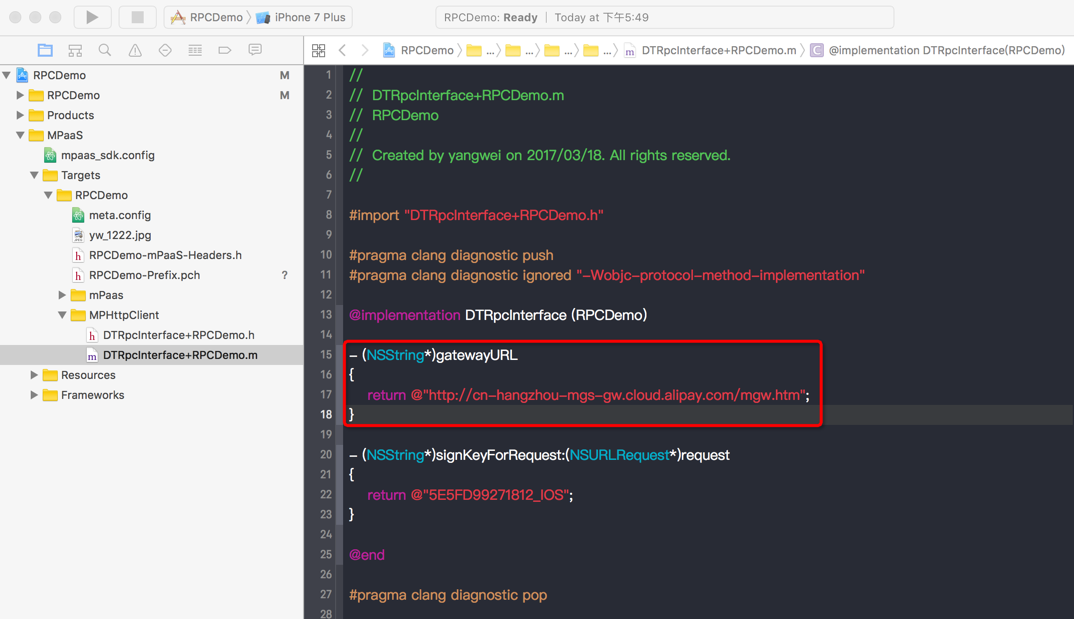
Starting from version 10.1.32, you no longer need to add the Category file for the DTRpcInterface class because the middle layer reads the configuration from meta.config. After you upgrade, check your project for configurations from an earlier version and remove them. The following image shows the Category file for the DTRpcInterface class that you must remove.
Generate RPC code
After your app connects to the backend service in the Mobile Gateway Service console, you can download the client-side RPC code. For more information, see Generate code.
The downloaded RPC code has the following structure:
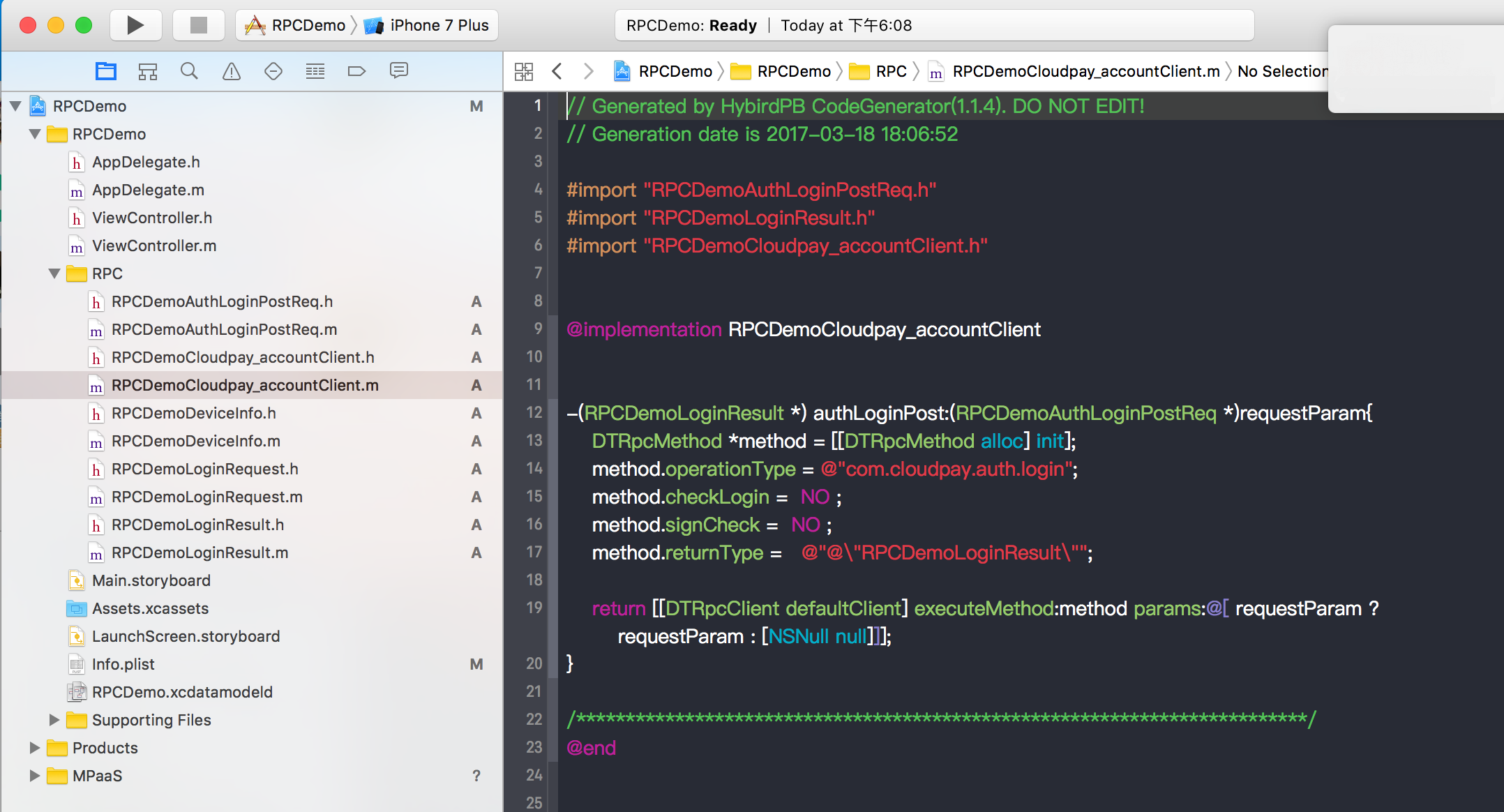
Where:
RPCDemoCloudpay_accountClientis the RPC configuration.RPCDemoAuthLoginPostReqis the request model.RPCDemoLoginResultis the response model.
Send a request
You can call RPC requests in a subthread using the subthread call interface encapsulated in MPRpcInterface in the middle layer. The callback method runs on the main thread by default. The following code provides an example:
- (void)sendRpc
{
    __block RPCDemoLoginResult *result = nil;
    [MPRpcInterface callAsyncBlock:^{
        @try
        {
            RPCDemoLoginRequest *req = [[RPCDemoLoginRequest alloc] init];
            req.loginId = @"alipayAdmin";
            req.loginPassword = @"123456";
            RPCDemoAuthLoginPostReq *loginPostReq = [[RPCDemoAuthLoginPostReq alloc] init];
            loginPostReq._requestBody = req;
            RPCDemoCloudpay_accountClient *service = [[RPCDemoCloudpay_accountClient alloc] init];
            result = [service authLoginPost:loginPostReq];
        }
        @catch (NSException *exception) {
            NSLog(@"%@", exception);
            NSError *error = [userInfo objectForKey:@"kDTRpcErrorCauseError"];        // Get detailed exception information
            NSInteger code = error.code;        // Get the error code from the detailed exception information
        }
    } completion:^{
        NSString *str = @"";
        if (result && result.success) {
            str = @"Logon successful";
        } else {
            str = @"Logon failed";
        }

        UIAlertView *alert = [[UIAlertView alloc] initWithTitle:str message:nil delegate:nil
                                              cancelButtonTitle:nil otherButtonTitles:@"ok", nil];
        [alert show];
    }];
}Use
try catchto catch exceptions. An exception is thrown if the gateway is abnormal. You can find the cause in Gateway result codes.RPC Swift cannot use
try catchto catch exceptions. For more information, see Safely handle Objective-C exceptions in Swift.
Safely handle Objective-C exceptions in Swift
Background
The Swift error handling mechanism (do-catch) differs from the Objective-C exception handling mechanism (@try-@catch) at a low level. As a result, Swift code cannot directly catch an NSException thrown by Objective-C code. This can cause the application to crash in a mixed-language programming environment.
Solution
To solve this problem and ensure application stability, you can use the APRpcExceptionCatch tool. Its safeExecuteTry method encapsulates the Objective-C @try-@catch logic. This lets you safely execute RPC calls in a Swift environment.
If the Objective-C code throws an exception during execution, safeExecuteTry catches it and returns it as a DTRpcException object. If the code executes normally, it returns nil.
Version
Supported in baseline version 10.2.3.66 and later.
Sample code
import MBProgressHUD
import APMobileNetwork

private func performGetIdRpcCall() {

    // 1. Display the loading indicator (original start of executeRpc).
    MBProgressHUD.showAdded(to: self.view, animated: true)

    // 2. Define variables to receive the result and error.
    var response: MPDemoUserInfo? // Replace the generic type T with the specific type MPDemoUserInfo.
    var rpcError: DTRpcException?

    // 3. Asynchronously execute the RPC call (original DTRpcAsyncCaller.callAsyncBlock).
    DTRpcAsyncCaller.callAsyncBlock({

        // 3.1. Safely execute the actual RPC call in a background thread.
        rpcError = APRpcExceptionCatch.safeExecuteTry {
            // This is the content of the original 'call' closure.
            let client = MPDemoRpcDemoClient()
            // Assign the result to the response variable.
            response = client.getIdGet(self.getRequest())
        }

    }, completion: {

        // 4. Handle the completion logic on the main thread.
        DispatchQueue.main.async {

            // 4.1. Hide the loading indicator.
            MBProgressHUD.hide(for: self.view, animated: true)

            // 4.2. Check if the RPC call has an error.
            if let exception = rpcError {
                // If there is an error, construct and display the error message.
                var errorMsg: String
                if exception.code.rawValue == 0 {
                    if let realError = exception.userInfo?["kDTRpcErrorCauseError"] as? NSError {
                        let errorString = "Error: [Domain: \(realError.domain), Code: \(realError.code), Description: \(realError.localizedDescription)]"
                        errorMsg = "Rpc Exception: \(errorString)"
                    } else {
                        let cause = exception.userInfo?["kDTRpcErrorCauseError"]
                        errorMsg = "Rpc Exception code: \(exception.code), no real error: \(cause ?? "nil")"
                    }
                } else {
                    errorMsg = "Rpc Exception code: \(exception.code)"
                }

                // Display the error toast.
                self.showErrorToast(message: errorMsg)

            } else {
                // 4.3. If the call is successful, process the returned data.
                // This is the content of the original 'success' closure.
                self.showAlert(title: "Returned Data", message: response?.description)
            }
        }
    })
}
Customize request configurations
DTRpcMethod describes the RPC request method. It records information about the request, such as the method name, parameters, and return type.
If you do not need to add a signature when sending a request, set the
signCheckproperty ofDTRpcMethodto NO.-(MPDemoUserInfo *) dataPostSetTimeout:(MPDemoPostPostReq *)requestParam { DTRpcMethod *method = [[DTRpcMethod alloc] init]; method.operationType = @"com.antcloud.request.post"; method.checkLogin = NO ; method.signCheck = NO ; method.returnType = @"@\"MPDemoUserInfo\""; return [[DTRpcClient defaultClient] executeMethod:method params:@[ ]]; }To set a timeout period, configure the
timeoutIntervalproperty ofDTRpcMethod.-(MPDemoUserInfo *) dataPostSetTimeout:(MPDemoPostPostReq *)requestParam { DTRpcMethod *method = [[DTRpcMethod alloc] init]; method.operationType = @"com.antcloud.request.post"; method.checkLogin = NO ; method.signCheck = YES ; method.timeoutInterval = 1; // This timeout period is the time until the client receives a response from the gateway. The server-side timeout period is the time until a response is returned from the backend business system. The default value is 20s. A value less than 1 is invalid and uses the default. method.returnType = @"@\"MPDemoUserInfo\""; return [[DTRpcClient defaultClient] executeMethod:method params:@[ ]]; }To add a header to the interface, use the following extension method of
DTRpcClient.-(MPDemoUserInfo *) dataPostAddHeader:(MPDemoPostPostReq *)requestParam { DTRpcMethod *method = [[DTRpcMethod alloc] init]; method.operationType = @"com.antcloud.request.postAddHeader"; method.checkLogin = NO ; method.signCheck = YES ; method.returnType = @"@\"MPDemoUserInfo\""; // Add a header for the interface NSDictionary *customHeader = @{@"testKey": @"testValue"}; return [[DTRpcClient defaultClient] executeMethod:method params:@[ ] requestHeaderField:customHeader responseHeaderFields:nil]; }To add a header to all interfaces, you can use an interceptor. For more information, see the Mobile Gateway Service code sample.
The
checkLoginproperty is used for interfacesessionverification. This verification requires configuration in the gateway console. By default, this property is set to NO.
Customize RPC interceptors
You may need to process logic before an RPC request is sent or after it is processed. The RPC module provides an interceptor mechanism for this purpose.
Customize an interceptor
You can create an interceptor and implement the methods of the <DTRpcInterceptor> protocol to handle operations before and after an RPC request.
@interface HXRpcInterceptor : NSObject<DTRpcInterceptor>

@end

@implementation HXRpcInterceptor

- (DTRpcOperation *)beforeRpcOperation:(DTRpcOperation *)operation{
    // TODO
    return operation;
}

- (DTRpcOperation *)afterRpcOperation:(DTRpcOperation *)operation{
   // TODO
   return operation;
}
@end
Register the interceptor
You can call the extension interface of the middle layer to register a custom sub-interceptor in the interceptor container.
    HXRpcInterceptor *mpTestIntercaptor = [[HXRpcInterceptor alloc] init];    // Custom sub-interceptor
    [MPRpcInterface addRpcInterceptor:mpTestIntercaptor];
Encrypt data
RPC provides multiple data encryption configuration features. For more information, see Data encryption.