PolarDB-X is developed by Alibaba Cloud to address the bottleneck of single-host database services. PolarDB-X is compatible with the MySQL protocol and syntax, and supports automatic sharding, online smooth scaling, auto scaling, and transparent read/write splitting. PolarDB-X provides O&M capabilities throughout the lifecycle of databases. This topic describes how to synchronize data between PolarDB-X instances by using Data Transmission Service (DTS).
Prerequisites
A database is created in the source PolarDB-X instance based on one or more ApsaraDB RDS for MySQL instances.
The tables to be synchronized contain primary keys.
The destination database in the RDS instance that corresponds to the destination PolarDB-X instance has sufficient storage space.
Precautions
DTS uses read and write resources of the source and destination RDS instances during initial full data synchronization. This may increase the loads of the RDS instances. If the instance performance is unfavorable, the specification is low, or the data volume is large, database services may become unavailable. For example, DTS occupies a large amount of read and write resources in the following cases: a large number of slow SQL queries are performed on the source RDS instance, the tables have no primary keys, or a deadlock occurs in the destination RDS instance. Before data synchronization, evaluate the impact of data synchronization on the performance of the source and destination RDS instances. We recommend that you synchronize data during off-peak hours. For example, you can synchronize data when the CPU utilization of the source and destination RDS instances is less than 30%.
When the data synchronization task is running, do not upgrade or downgrade the PolarDB-X instance, migrate frequently-accessed tables, change shard keys, or perform DDL operations on source objects. Otherwise, the data synchronization task fails.
If you need to change the network type of a PolarDB-X instance during data synchronization, you must modify the network connection information of the data synchronization task after you complete the network type change.
Billing
| Synchronization type | Task configuration fee |
| Schema synchronization and full data synchronization | Free of charge. |
| Incremental data synchronization | Charged. For more information, see Billing overview. |
SQL operations that can be synchronized
INSERT, UPDATE, and DELETE
Before you begin
DTS does not support schema synchronization between PolarDB-X instances. Therefore, you must create a database and tables in the destination PolarDB-X instance based on the schemas of the objects in the source PolarDB-X instance. For more information, see Create a database and Create a table.
During schema synchronization, DTS synchronizes the schemas of the required objects from the source database to the destination database.
Procedure
Purchase a data synchronization instance. For more information, see Purchase a DTS instance.
NoteOn the buy page, set both Source Instance and Destination Instance to PolarDB-X and set Synchronization Topology to One-way Synchronization.
Log on to the DTS console.
NoteIf you are redirected to the Data Management (DMS) console, you can click the
 icon in the
  to go to the previous version of the DTS console.
In the left-side navigation pane, click Data Synchronization.
In the upper part of the Synchronization Tasks page, select the region in which the destination instance resides.
Find the data synchronization instance and click Configure Task in the Actions column.
Configure the source and destination instances.
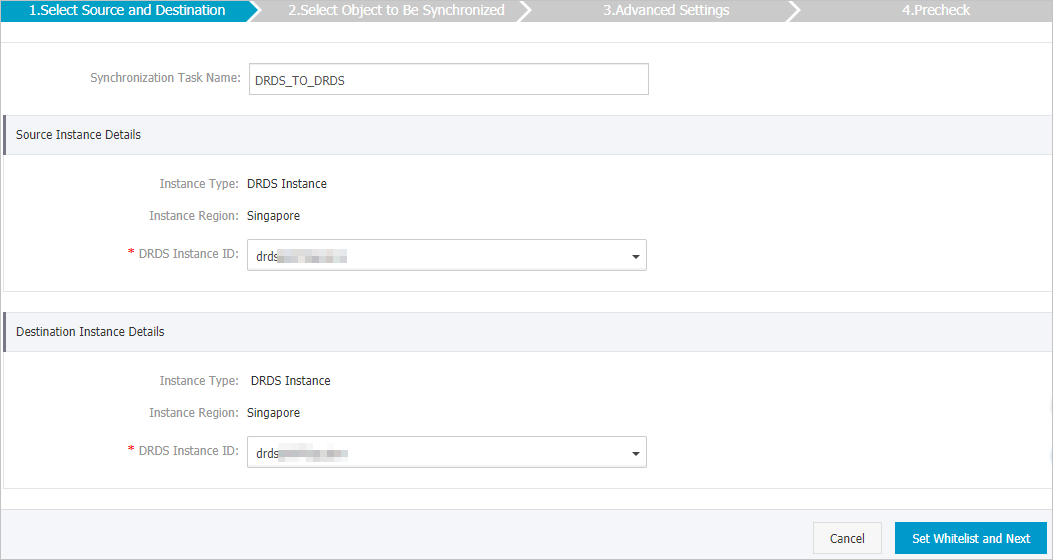
Section
Parameter
Description
N/A
Synchronization Task Name
The task name that DTS automatically generates. We recommend that you specify a descriptive name that makes it easy to identify the task. You do not need to use a unique task name.
Source Instance Details
Instance Type
This parameter is set to DRDS Instance and cannot be changed.
Instance Region
The source region that you selected on the buy page. You cannot change the value of this parameter.
DRDS Instance ID
The ID of the source PolarDB-X instance.
Destination Instance Details
Instance Type
This parameter is set to DRDS Instance and cannot be changed.
Instance Region
The destination region that you selected on the buy page. You cannot change the value of this parameter.
DRDS Instance ID
The ID of the destination PolarDB-X instance.
In the lower-right corner of the page, click Set Whitelist and Next.
If the source or destination database is an Alibaba Cloud database instance, such as an ApsaraDB RDS for MySQL or ApsaraDB for MongoDB instance, DTS automatically adds the CIDR blocks of DTS servers to the IP address whitelist of the instance. If the source or destination database is a self-managed database hosted on an Elastic Compute Service (ECS) instance, DTS automatically adds the CIDR blocks of DTS servers to the security group rules of the ECS instance, and you must make sure that the ECS instance can access the database. If the self-managed database is hosted on multiple ECS instances, you must manually add the CIDR blocks of DTS servers to the security group rules of each ECS instance. If the source or destination database is a self-managed database that is deployed in a data center or provided by a third-party cloud service provider, you must manually add the CIDR blocks of DTS servers to the IP address whitelist of the database to allow DTS to access the database. For more information, see Add the CIDR blocks of DTS servers.
WarningIf the CIDR blocks of DTS servers are automatically or manually added to the whitelist of the database or instance, or to the ECS security group rules, security risks may arise. Therefore, before you use DTS to synchronize data, you must understand and acknowledge the potential risks and take preventive measures, including but not limited to the following measures: enhancing the security of your username and password, limiting the ports that are exposed, authenticating API calls, regularly checking the whitelist or ECS security group rules and forbidding unauthorized CIDR blocks, or connecting the database to DTS by using Express Connect, VPN Gateway, or Smart Access Gateway.
Select the synchronization policy and the objects to be synchronized.
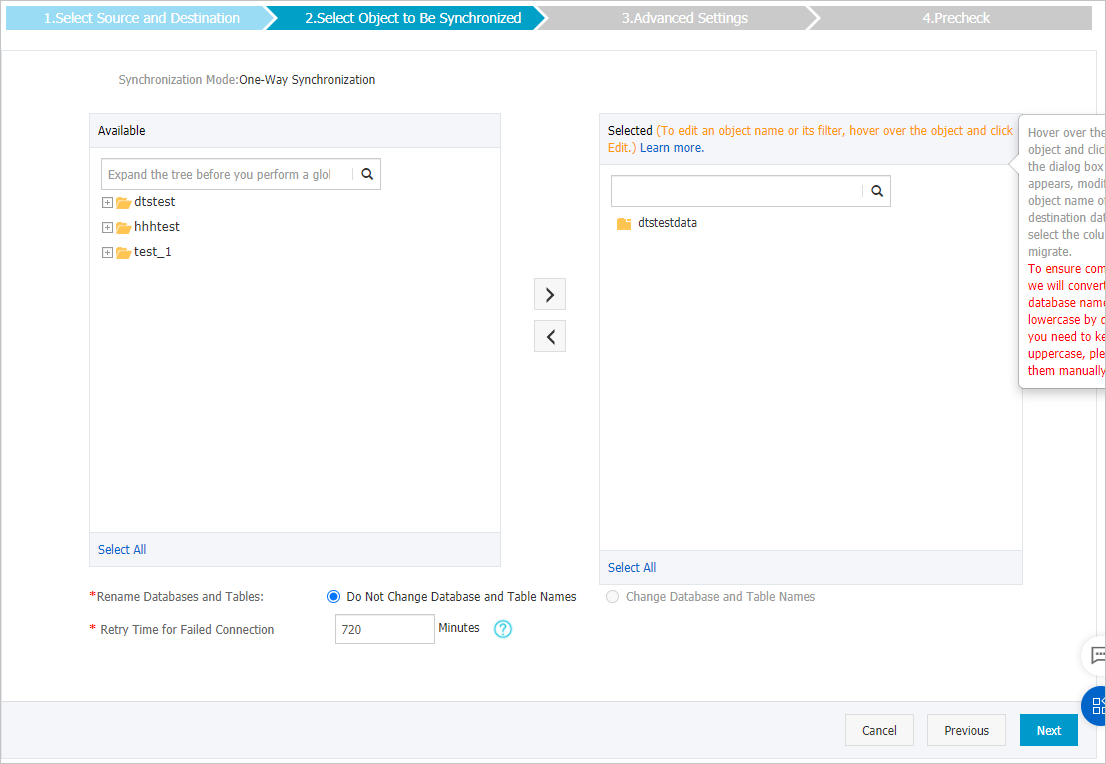
Parameter or setting
Description
Select the processing mode of conflicting tables
Pre-check and Intercept: checks whether the destination tables are empty. If the destination tables are empty, the precheck is passed. If the tables are not empty, an error is returned during the precheck and the data synchronization task cannot be started.
Ignore: skips the check for empty destination tables.
WarningIf you select Ignore, data consistency is not guaranteed and your business may be exposed to potential risks.
If the source and destination databases have the same schema, DTS does not synchronize the data records that have the same primary keys as the data records in the destination database.
If the source and destination databases have different schemas, only some columns are synchronized or the data synchronization task fails.
Select the objects to be synchronized
Select one or more tables from the Available section and click the
 icon to move the tables to the Selected section. Note
You can select only tables as the objects to be synchronized.
By default, after an object is synchronized to the destination instance, the name of the object remains unchanged. You can use the object name mapping feature to rename the objects that are synchronized to the destination instance. For more information, see Rename an object to be synchronized.
Rename Databases and Tables
You can use the object name mapping feature to rename the objects that are synchronized to the destination instance. For more information, see Object name mapping.
Retry Time for Failed Connections
By default, if DTS fails to connect to the source or destination database, DTS retries within the next 720 minutes (12 hours). You can specify the retry time based on your needs. If DTS reconnects to the source and destination databases within the specified time, DTS resumes the data synchronization task. Otherwise, the data synchronization task fails.
NoteWhen DTS retries a connection, you are charged for the DTS instance. We recommend that you specify the retry time based on your business needs. You can also release the DTS instance at your earliest opportunity after the source and destination instances are released.
Click Next.
Specify whether you want to perform initial full data synchronization.
 Note
NoteDuring initial full data synchronization, DTS synchronizes the historical data of the required objects from the source database to the destination database. If you do not select Initial Full Data Synchronization, DTS does not synchronize the historical data.
In the lower-right corner of the page, click Precheck.
NoteBefore you can start the data synchronization task, DTS performs a precheck. You can start the data synchronization task only after the task passes the precheck.
If the task fails to pass the precheck, you can click the
 icon next to each failed item to view details.
 After you troubleshoot the issues based on the details, initiate a new precheck.
If you do not need to troubleshoot the issues, ignore the failed items and initiate a new precheck.
Close the Precheck dialog box after the following message is displayed: Precheck Passed. Then, the data synchronization task starts.
Wait until initial synchronization is complete and the data synchronization task enters the Synchronizing state.
You can view the status of the data synchronization task on the Synchronization Tasks page.
