Application Load Balancer (ALB) Ingress routes external HTTP, HTTPS, and QUIC traffic to Kubernetes services through a fully managed Layer 7 load balancer. It is compatible with Nginx Ingress and supports automatic certificate discovery. Unlike Nginx Ingress, where controller pods handle traffic inside the cluster, ALB Ingress offloads traffic processing entirely to ALB. The ALB Ingress Controller only manages configuration -- it does not sit in the data path.
This tutorial deploys two sample services, creates the required ALB resources, and verifies path-based routing. By the end, requests to /coffee and /tea under the same domain are forwarded to separate backend services.
| Frontend request | Routed to |
|---|---|
demo.domain.ingress.top/coffee | coffee-svc |
demo.domain.ingress.top/tea | tea-svc |
How it works
ALB Ingress relies on four Kubernetes resources that map to a single ALB instance:

| Resource | Scope | Description |
|---|---|---|
| AlbConfig | Cluster-level CRD | Defines the ALB instance configuration. One AlbConfig maps to one ALB instance. The ALB instance is the entry point for user traffic and is fully managed by Application Load Balancer (ALB). |
| IngressClass | Cluster-level | Links an Ingress to a specific AlbConfig. Each IngressClass corresponds to one AlbConfig. |
| Ingress | Namespace-level | Declares routing rules (host, path, backend service). The ALB Ingress Controller watches for Ingress changes via the API Server and updates the ALB instance accordingly. |
| Service | Namespace-level | Provides a stable virtual IP and port for a group of pods. The ALB instance forwards traffic to these Services. |
The ALB Ingress Controller is the control plane. It retrieves Ingress and AlbConfig changes through the API Server and configures the ALB instance, but does not handle user traffic directly.
Limitations
Names of AlbConfig, namespace, Ingress, and Service resources cannot start with
aliyun.Earlier versions of the Nginx Ingress controller do not recognize the
spec.ingressClassNamefield. If both Nginx Ingresses and ALB Ingresses exist in your cluster, the ALB Ingresses may be incorrectly reconciled by an older Nginx Ingress controller. To prevent this, upgrade the Nginx Ingress controller or use annotations to specify IngressClasses.
Prerequisites
Before you begin, make sure that you have:
The ALB Ingress Controller installed in the cluster
Two vSwitches in different zones within the same VPC as the cluster (see Create and manage vSwitches)
Step 1: Deploy backend services
Deploy two Deployments (coffee and tea, each with 2 replicas) and two corresponding ClusterIP Services (coffee-svc and tea-svc).
Save the following YAML as cafe-service.yaml:
apiVersion: apps/v1
kind: Deployment
metadata:
  name: coffee
spec:
  replicas: 2
  selector:
    matchLabels:
      app: coffee
  template:
    metadata:
      labels:
        app: coffee
    spec:
      containers:
      - name: coffee
        image: registry.cn-hangzhou.aliyuncs.com/acs-sample/nginxdemos:latest
        ports:
        - containerPort: 80
---
apiVersion: v1
kind: Service
metadata:
  name: coffee-svc
spec:
  ports:
  - port: 80
    targetPort: 80
    protocol: TCP
  selector:
    app: coffee
  type: ClusterIP
---
apiVersion: apps/v1
kind: Deployment
metadata:
  name: tea
spec:
  replicas: 2
  selector:
    matchLabels:
      app: tea
  template:
    metadata:
      labels:
        app: tea
    spec:
      containers:
      - name: tea
        image: registry.cn-hangzhou.aliyuncs.com/acs-sample/nginxdemos:latest
        ports:
        - containerPort: 80
---
apiVersion: v1
kind: Service
metadata:
  name: tea-svc
spec:
  ports:
  - port: 80
    targetPort: 80
    protocol: TCP
  selector:
    app: tea
  type: ClusterIP
Console
Log on to the ACS console. In the left navigation pane, click Clusters.
On the Clusters page, click the name of the target cluster. In the left navigation pane, choose Workloads > Deployments.
Click Create from YAML in the upper-right corner.
Set Sample Template to Custom, paste the YAML above into Template, and click Create.
Verify the resources:
In the left navigation pane, choose Workloads > Deployments. Confirm that the
coffeeandteadeployments exist.In the left navigation pane, choose Network > Services. Confirm that the
coffee-svcandtea-svcServices exist.
kubectl
Apply the configuration: Expected output:
kubectl apply -f cafe-service.yamldeployment "coffee" created service "coffee-svc" created deployment "tea" created service "tea-svc" createdVerify the Deployments and Services: Expected output: Expected output:
kubectl get deploymentNAME READY UP-TO-DATE AVAILABLE AGE coffee 2/2 2 2 2m26s tea 2/2 2 2 2m26skubectl get svcNAME TYPE CLUSTER-IP EXTERNAL-IP PORT(S) AGE coffee-svc ClusterIP 172.16.XX.XX <none> 80/TCP 9m38s tea-svc ClusterIP 172.16.XX.XX <none> 80/TCP 9m38s
Step 2: Create an AlbConfig
An AlbConfig provisions an ALB instance. The YAML below creates an Internet-facing ALB with an HTTP listener on port 80.
Save the following YAML as alb-test.yaml. Replace the vSwitch ID placeholders with your actual values.
apiVersion: alibabacloud.com/v1
kind: AlbConfig
metadata:
  name: alb-demo
spec:
  config:
    name: alb-test
    addressType: Internet
    zoneMappings:
    - vSwitchId: <vsw-id-zone-1>   # vSwitch in zone 1
    - vSwitchId: <vsw-id-zone-2>   # vSwitch in zone 2 (must differ from zone 1)
  listeners:
    - port: 80
protocol: HTTP| Placeholder | Description |
|---|---|
<vsw-id-zone-1> | vSwitch ID in zone 1, for example vsw-uf6ccg2a9g71hx8go**** |
<vsw-id-zone-2> | vSwitch ID in zone 2, for example vsw-uf6nun9tql5t8nh15**** |
Parameter reference:
| Parameter | Required | Description |
|---|---|---|
metadata.name | Yes | AlbConfig name. Must be unique within the cluster. |
spec.config.name | No | Display name of the ALB instance. |
spec.config.addressType | No | Network type. Internet (default): public-facing, uses an elastic IP address (EIP). You are charged for the EIP, bandwidth, and data transfer. See Pay-as-you-go. Intranet: accessible only within the VPC. |
spec.config.zoneMappings | Yes | At least two vSwitches in different zones. The vSwitches must be in a zone supported by ALB and in the same VPC as the cluster. |
spec.listeners | No | Listener port and protocol. If omitted, create a listener manually before using ALB Ingress. |
Console
Log on to the ACS console. In the left navigation pane, click Clusters.
On the Clusters page, click the name of the target cluster. In the left navigation pane, choose Workloads > Custom Resources.
On the CRDs tab, click Create from YAML.
Set Sample Template to Custom, paste the YAML above into Template, and click Create.
Verify that the ALB instance is created:
Log on to the ALB console.
In the top menu bar, select the region where the instance is located.
On the Instances page, confirm that an ALB instance named
alb-testexists.
kubectl
Apply the configuration: Expected output:
kubectl apply -f alb-test.yamlalbconfig.alibabacloud.com/alb-demo created
Step 3: Create an IngressClass
An IngressClass links an Ingress to an AlbConfig. Each IngressClass maps to exactly one AlbConfig.
Save the following YAML as alb.yaml:
apiVersion: networking.k8s.io/v1
kind: IngressClass
metadata:
  name: alb
spec:
  controller: ingress.k8s.alibabacloud/alb
  parameters:
    apiGroup: alibabacloud.com
    kind: AlbConfig
name: alb-demo| Parameter | Required | Description |
|---|---|---|
metadata.name | Yes | IngressClass name. Must be unique within the cluster. |
spec.parameters.name | Yes | Name of the AlbConfig to associate with. |
Console
Log on to the ACS console. In the left navigation pane, click Clusters.
On the Clusters page, click the name of the target cluster. In the left navigation pane, choose Workloads > Custom Resources.
On the CRDs tab, click Create from YAML.
Set Sample Template to Custom, paste the YAML above into Template, and click Create.
Verify the IngressClass:
In the left navigation pane, choose Workloads > Custom Resources.
Click the Resource Objects tab.
In the API Group search bar, search for IngressClass and confirm the resource appears.
kubectl
Apply the configuration: Expected output:
kubectl apply -f alb.yamlingressclass.networking.k8s.io/alb created
Step 4: Create an Ingress
The Ingress defines path-based routing rules. Requests matching /coffee are forwarded to coffee-svc, and requests matching /tea are forwarded to tea-svc.
Save the following YAML as cafe-ingress.yaml:
apiVersion: networking.k8s.io/v1
kind: Ingress
metadata:
  name: cafe-ingress
spec:
  ingressClassName: alb
  rules:
  - host: demo.domain.ingress.top
    http:
      paths:
      - path: /tea
        pathType: ImplementationSpecific
        backend:
          service:
            name: tea-svc
            port:
              number: 80
      - path: /coffee
        pathType: ImplementationSpecific
        backend:
          service:
            name: coffee-svc
            port:
number: 80| Parameter | Required | Description |
|---|---|---|
metadata.name | Yes | Ingress name. Must be unique within the cluster. |
spec.ingressClassName | Yes | Name of the IngressClass to use. |
spec.rules.host | No | Domain name matched against the Host header. If omitted, the rule matches all requests. If set to a custom domain, obtain an ICP filing for the domain. |
spec.rules.http.paths.path | Yes | URL path for routing. |
spec.rules.http.paths.pathType | Yes | Path matching rule. See Forward requests based on URL paths. |
spec.rules.http.paths.backend.service.name | Yes | Name of the target Service. |
spec.rules.http.paths.backend.service.port.number | Yes | Port number of the target Service. |
Console
Log on to the ACS console. In the left navigation pane, click Clusters.
On the Clusters page, click the name of the target cluster. In the left navigation pane, choose Network > Ingresses.
Click Create Ingress and configure the following in the Create Ingress dialog box: > Note: The Rules section supports additional settings. Click + Add Rule to add routing rules, and + Add Path to add multiple paths under the same domain. For details on all options, see the parameter descriptions below.
Full parameter descriptions
Setting Description Gateway Type Select ALB Ingress or MSE as the gateway type. Name Custom name for the Ingress. Ingress Class The IngressClass to use (for example, alb).Rules Define routing rules. Domain Name: the request host. Path Mapping: Path (URL path), Matching Rule (Prefix, Exact, or ImplementationSpecific), Service Name (target Service), and Port (exposed port). TLS Configuration Enable to configure HTTPS. Specify a domain and select or create a secret containing the TLS certificate and key. See Configure an HTTPS certificate. More Configurations Phased Release: split traffic by request header ( alb.ingress.kubernetes.io/canary-by-header), cookie (alb.ingress.kubernetes.io/canary-by-cookie), or weight (alb.ingress.kubernetes.io/canary-weight, 0--100). Only one rule type applies at a time, evaluated in order: header, cookie, weight. Protocol: set backend protocol to HTTPS or gRPC (alb.ingress.kubernetes.io/backend-protocol). Rewrite Path: rewrite the URL path before forwarding (alb.ingress.kubernetes.io/rewrite-target).Custom Forwarding Rules Fine-grained traffic control with up to 10 conditions per rule. Conditions: domain name, path, HTTP header. Actions: forward to multiple backend server groups (with weights) or return a fixed response (status code, body type: text/plain,text/css,text/html,application/javascript, orapplication/json). See Customize forwarding rules.Annotations Custom annotation key-value pairs. See Annotations. Labels Tags for the Ingress resource. Click OK.
Verify the Ingress:
In the left navigation pane, choose Network > Ingresses. Confirm that
cafe-ingressis listed.In the Endpoints column for
cafe-ingress, note the endpoint information for later use.
kubectl
Apply the configuration: Expected output:
kubectl apply -f cafe-ingress.yamlingress.networking.k8s.io/cafe-ingress createdRetrieve the ALB DNS name: Expected output:
kubectl get ingressNAME CLASS HOSTS ADDRESS PORTS AGE cafe-ingress alb demo.domain.ingress.top alb-m551oo2zn63yov****.cn-hangzhou.alb.aliyuncs.com 80 50s
(Optional) Step 5: Configure domain name resolution
If you set a custom domain in spec.rules.host, add a CNAME record that resolves the domain to the ALB DNS name. This step is not required if you plan to test using the ALB DNS name directly.
Log on to the ACS console and navigate to your cluster.
In the left navigation pane, choose Network > Ingresses.
In the Endpoints column for
cafe-ingress, copy the DNS name.Add a CNAME record in DNS:
Log on to the Alibaba Cloud DNS console.
On the Domain Names page, click Add Domain Name and enter the host domain name. > Important: The host domain name must have passed TXT record verification.
In the Actions column of the domain, click Configure.
Click Add Record and configure the following: | Setting | Value | |---|---| | Type | CNAME | | Host | The prefix of the domain name, such as
www| | Resolution Request Source | Default | | Value | The ALB DNS name copied in the previous step | | TTL | Default |Click OK.
Step 6: Test traffic forwarding
Open a browser and access the test domain with each path. If you configured a custom domain with DNS resolution, use that domain. Otherwise, use the ALB DNS name from Step 4.
If you configured a custom domain name, the test domain name is your custom domain name.
If you did not configure a custom domain name, the test domain name is the endpoint DNS name of
cafe-ingress.
This example uses demo.domain.ingress.top as the domain.
Access
demo.domain.ingress.top/coffee. The response should come from thecoffee-svcbackend.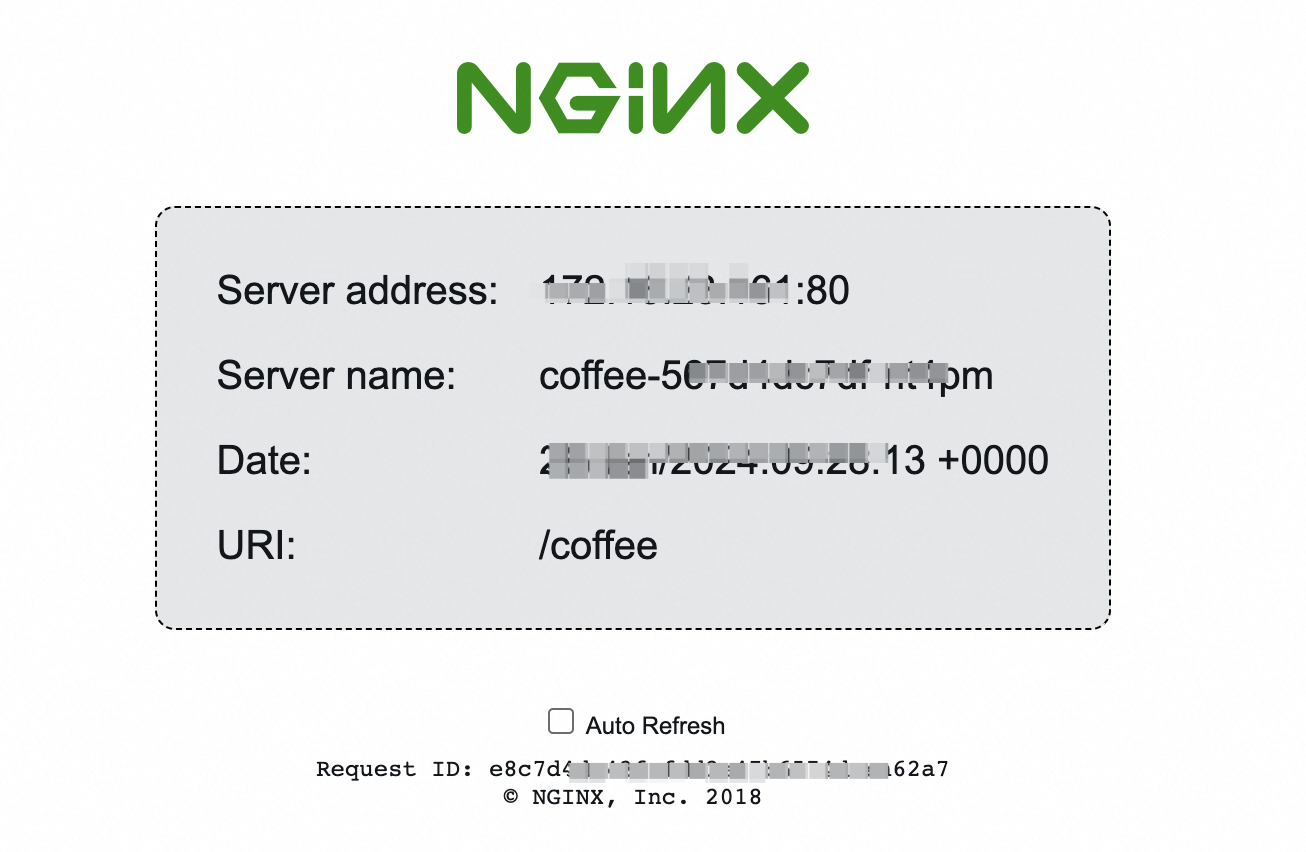
Access
demo.domain.ingress.top/tea. The response should come from thetea-svcbackend.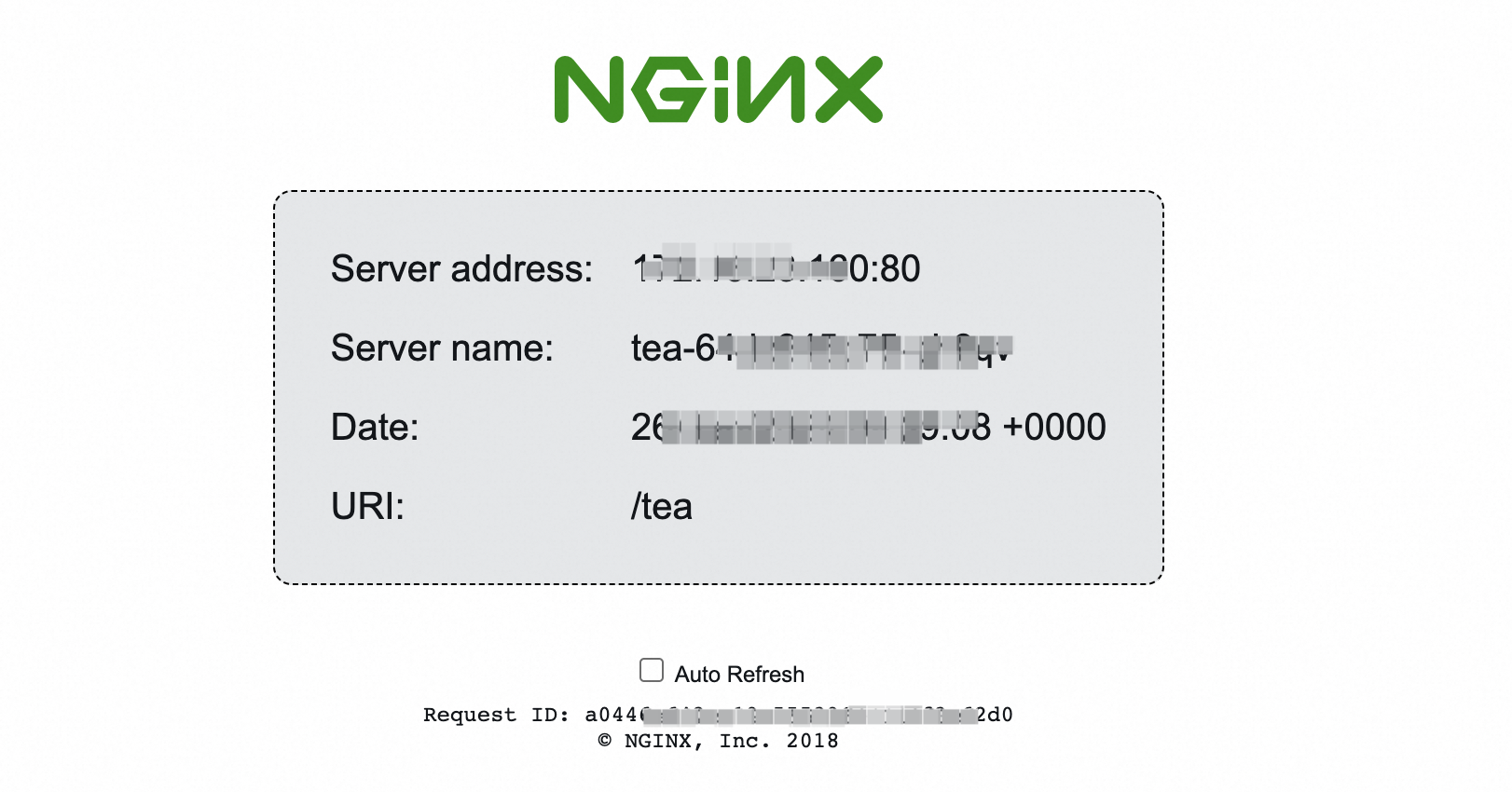
Clean up resources
The ALB instance created by the AlbConfig incurs charges even when idle. To remove all resources created in this tutorial, delete them in reverse order:
kubectl delete -f cafe-ingress.yaml
kubectl delete -f alb.yaml
kubectl delete -f alb-test.yaml
kubectl delete -f cafe-service.yamlDeleting the AlbConfig (alb-test.yaml) also deletes the associated ALB instance and EIP. Deleting only the Ingress does not remove the ALB instance.
References
Advanced configurations for ALB Ingress -- forwarding by domain or URL path, health checks, HTTP-to-HTTPS redirect, canary releases, and custom listener ports
Customize forwarding rules for ALB Ingress -- forwarding conditions and actions
Configure an HTTPS certificate for encrypted communication -- HTTPS listener setup