ApsaraDB for ClickHouse Enterprise Edition uses the compute-storage separation architecture to provide serverless capabilities, which allow computing resources of clusters to be dynamically scaled based on your business loads. In scenarios in which business loads significantly fluctuate, the serverless capabilities of ApsaraDB for ClickHouse Enterprise Edition help you reduce resource usage during off-peak hours. This way, the overall cost of resource procurement is reduced. This topic describes the serverless capabilities of ApsaraDB for ClickHouse Enterprise Edition clusters, serverless policies, and usage scenarios.
Feature description
Computing resources
The billing unit of computing resources in an ApsaraDB for ClickHouse cluster is ClickHouse Compute Unit (CCU). 1 CCU is equivalent to 1 virtual CPU (vCPU) and 4 GiB of memory.
For an Enterprise Edition cluster, computing resources can be scaled within the specified scaling range based on actual business loads. The minimum scaling step size is 1 CCU.
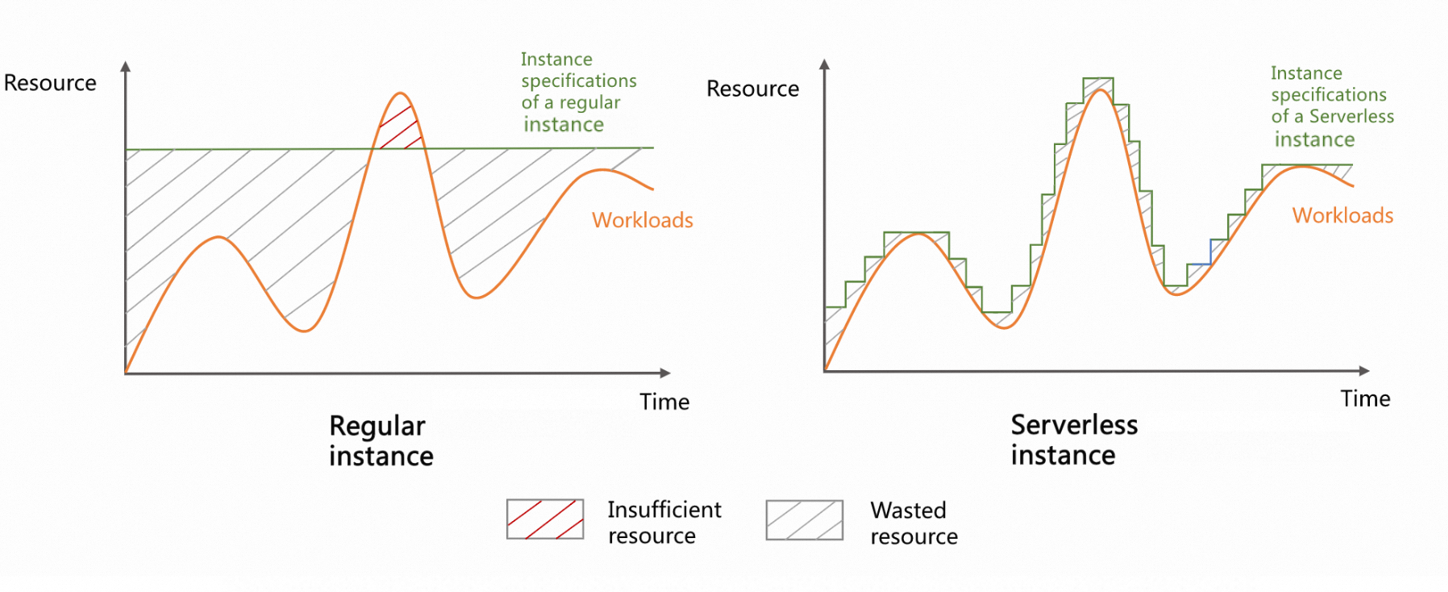
The following figure shows the resource usage and specification changes of clusters with defined specifications and Enterprise Edition clusters in scenarios where business loads greatly fluctuate. Clusters with defined specifications have the following disadvantages: A large number of resources are wasted during off-peak hours. Resources are insufficient during peak hours, which affects service performance. Enterprise Edition clusters have the following advantages:
-
Resources can be dynamically scaled based on business requirements. This reduces the O&M workload.
-
The overall resource utilization is improved. This reduces resource procurement costs.
-
During peak hours, resources are scaled out within seconds without impact on your business. This improves system stability.
Storage resources
Enterprise Edition uses Object Storage Service (OSS) to implement shared storage. In serverless mode, storage resources are billed by using the pay-as-you-go billing method. You do not need to purchase disks in advance.
Scenarios
-
Your business has obvious peak hours and off-peak hours.
-
Intermittent business spikes require frequent changes to cluster configurations.
-
The loads are unpredictable, as seen in the Internet of Things (IoT) and edge computing scenarios.
-
O&M costs are expected to be reduced, and O&M efficiency is expected to be improved.
Fees
The fees of ApsaraDB for ClickHouse Enterprise Edition clusters consist of the fees of computing resources and the fees of storage resources. For more information, see Enterprise Edition pay-as-you-go pricing.
You can also purchase resource plans to offset the resource consumption of clusters. This helps further reduce your costs. For more information about the billing rules and purchase of resource plans, see Enterprise Edition resource plans.
Trigger conditions for auto scaling of serverless resources
ApsaraDB for ClickHouse Enterprise Edition provides the conservative and aggressive serverless policies.
|
Serverless policy |
Enabling method |
Scale-out |
Scale-in |
|
Type: conservative. Application scenarios:
|
By default, the conservative serverless policy is used when you create a cluster. |
|
|
|
Type: aggressive. Application scenarios:
|
You can submit a ticket to enable the whitelist feature. Important
After you enable the aggressive policy, the performance and stability of your cluster may be affected. Proceed with caution.
|
|
|
What to do next
-
For more information about how to change the scaling range, see Modify the scaling settings of an ApsaraDB for ClickHouse Enterprise Edition cluster.
NoteIf you want to change your serverless policy to the aggressive type, submit a ticket.
-
For more information about how to create a cluster, see Create an ApsaraDB for ClickHouse cluster.
-
For more information about how to restart a cluster, see Restart an ApsaraDB for ClickHouse cluster.
-
For more information about how to release a cluster, see Delete a cluster.