Region-level disaster is an extreme failure that may occur in Alibaba Cloud services. In the event of such a disaster, services across any zone in a region are at risk, including connection failures, data loss, and workload failure. An ingress gateway created in Service Mesh (ASM) can be deployed in a Kubernetes cluster or an Elastic Container Instance (ECI) to serve as unified traffic ingress to access business applications. In addition, a cluster has independent IP address for an ingress gateway. When a failure occurs in one of the regions, abnormal IP addresses are removed and the traffic involved is redirected to other regions. This way, the region-level disaster recovery is implemented.
Architecture
This section describes the architecture of the disaster recovery. In this example, dual-region and dual-cluster are deployed to verify the capability of the architecture to implement region-level disaster recovery:
Build a multi-master control plane architecture by deploying a Kubernetes cluster in each of the two regions and deploying identical cloud-native services in each of the two clusters. The services call each other by using the domain names of the Kubernetes clusters.
NoteA multi-master control plane can make the latency of a mesh proxy that is pushed in each region controllable and ensure high availability for the services and the disaster recovery of control planes when errors occur in a region.
Deploy an ASM gateway in each of the two clusters and configure IP addresses or domain names for the gateways to expose the access over Internet through Internet-facing Classic Load Balancer (CLB) or Network Load Balancer (NLB) instance. Next resolve the domain names into two IP addresses by combining Alibaba Cloud Domain Name System (DNS) and Global Traffic Manager (GTM).
When a failure occur in a region, the services in another region are not affected. In this case, GTM automatically removes the IP addresses of the services deployed in the faulty region from the resolution pool, and the traffic involved is redirected to the ASM gateway in the normal region.

If traffic spikes occur, you can enable the following features to further optimize traffic redirection:
Enable HPA for ASM gateways to add more ASM gateway instances.
NoteThe HPA feature is applicable to only the ASM instance of Enterprise Edition or Ultimate Edition.
Configure throttling policy for the critical services in ASM gateways or clusters. This can limit the traffic within the specified capabilities of the cluster services and prevent server crash in normal regions due to large and sudden influx of users.
(Optional) Configure metric collection and alerts for local throttling on ASM console. In this way, you can monitor the traffic in real time, and identify faults and enable the HPA feature in normal regions at the earliest opportunity.
Process
Cross-region disaster recovery is supported in all types of clusters. The following sample shows the entire process about how to create an ACK cluster and ASM instance, configure disaster recovery, and conduct failure drills.

Procedure
This section uses a CLB instance that is associated with ingress gateway as an example to describe the configuration practices for disaster recovery. For more information about how to integrate a GTM with an NLB instance that is associated with ingress gateway, see GTM configuration process.
Step 1: Build a multi-master control plane architecture
Create two clusters, named cluster-1 and cluster-2, in two different regions and enable Expose API Server by EIP. For more information, see Create an ACK managed cluster.
Create two ASM instances, named mesh-1 and mesh-2, in the regions where the clusters reside, and add cluster-1 and cluster-2 to mesh-1 and mesh-2 respectively. In this way, a multi-master control plane architecture is created. For more information, see Step 1 and Step 2 in Multi-cluster disaster recovery through ASM multi-master control plane architecture.
Step 2: Deploy ingress gateways and sample applications
Create an ASM ingress gateway named ingressgateway in each ASM instance. For more information, see Create an ingress gateway.
Deploy a Bookinfo sample application in each cluster. For more information, see Deploy an application in an ACK cluster that is added to an ASM instance.
Create an Istio gateway and a virtual service in each ASM instance for the sample application, and use the ASM gateway as the traffic ingress to the Bookinfo application. For more information, see Use Istio resources to route traffic to different versions of a service.
Enable the feature to route all traffic from a cluster to destinations in the same cluster for each ASM instance. For more information, see the section of Enable cluster-local traffic retention globally in the topic "Enable the feature of keeping traffic in-cluster in multi-cluster scenarios".
NoteIn region-level disaster recovery scenarios, all traffic from a cluster is routed to destinations in the same cluster. If two or more Kubernetes clusters are added in an ASM instance and no configuration is made, the default Server Load Balancer (SLB) in the ASM instance routes the request to a peer-to-peer service in another cluster in the ASM instance. In addition, you can enable the feature of keeping traffic in-cluster to ensure that requests to a service are always routed to another service within the same cluster.
(Optional) Step 3: Verify service status
Obtain the public IP addresses of the two ASM gateways to verify the service status and configure GTM. For more information, see the step of Obtain the IP address of the ingress gateway in the topic "Use Istio resources to route traffic to different versions of a service".
Use the kubeconfig file of cluster-1 and cluster-2 to view the Pod names of the reviews service.
kubectl get pod| grep reviewsExpected output:
reviews-v1-5d99dxxxxx-xxxxx       2/2     Running   0          3d17h
reviews-v2-69fbbxxxxx-xxxxx       2/2     Running   0          3d17h
reviews-v3-8c44xxxxx-xxxxx        2/2     Running   0          3d17h
In the address bar of a browser, enter
http://{IP address of mesh-1 ingress gateway}/productpageandhttp://{IP address of mesh-2 ingress gateway}/productpagein sequence. Refresh the page 10 times before you access the Bookinfo application.You can access the v1, v2, and v3 of the reviews service each time you refresh the page. The output shows that the pod number of the three reviews services in two clusters is consistent with the pod names returned in the previous step. This indicates that the service is running as expected and the feature of routing all traffic from a cluster to destinations in the same cluster takes effect.

Step 4: Configure GTM
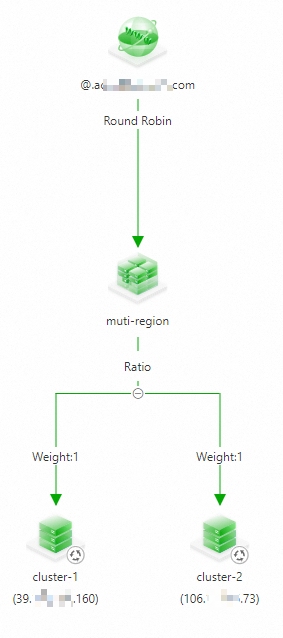
Use the two public IP addresses as the ingress IP addresses of the application, and configure multi-acitive load balancing and disaster recovery on GTM. For more information, see Use GTM to implement multi-acitive load balancing and disaster recovery.
The following figure shows the configuration:
(Optional) Step 5: Configure local throttling and monitoring metrics and alerts based on the local throttling
Run the following command to configure local throttling rules for mesh-1 and mesh-2. For more information, see Configure local throttling on an ingress gateway.
apiVersion: istio.alibabacloud.com/v1beta1
kind: ASMLocalRateLimiter
metadata:
  name: ingressgateway
  namespace: istio-system
spec:
  configs:
    - limit:
        fill_interval:
          seconds: 1
        quota: 100
      match:
        vhost:
          name: '*'
          port: 80
          route:
            name_match: gw-to-productage
  isGateway: true
  workloadSelector:
    labels:
      istio: ingressgateway
Configure metrics collection and alerts for the local throttling of the ASM instances. For more information, see the section of Configure metric collection and alerts for local throttling in the topic "Configure local throttling in traffic management center".
Failure drill
In the drill, to simulate access to the application from external users, a stress test is performed on a sample application by using fortio tool. During the test, a regional failure is simulated by deliberately removing the ingress gateway workload to monitor the disaster recovery process.
Replace the domain name in the following command with the actual domain name configured in GTM, and run the command to test the application for five minutes.
fortio load -jitter=False -c 1 -qps 100 -t 300s -keepalive=False -a http://{domain name}/productpageDuring the test, simulate a regional failure with cluster-2 as the failed cluster.
Log on to the ACK console. In the left navigation pane, click Clusters.
On the Clusters page, find the cluster you want to manage and click its name. In the left navigation pane, choose .
Select istio-system from the Namespace drop-down list.
Find istio-ingressgateway in the workload list and click in the Actions column.
The expected output:
# range, mid point, percentile, count
>= -261.054 <= -0.0693516 , -130.561 , 100.00, 3899
# target 50% -130.595
WARNING 100.00% of sleep were falling behind
Aggregated Function Time : count 3899 avg 0.076910055 +/- 0.02867 min 0.062074583 max 1.079674 sum 299.872304
# range, mid point, percentile, count
>= 0.0620746 <= 0.07 , 0.0660373 , 19.34, 754
> 0.07 <= 0.08 , 0.075 , 71.94, 2051
> 0.08 <= 0.09 , 0.085 , 96.08, 941
> 0.09 <= 0.1 , 0.095 , 99.23, 123
> 0.1 <= 0.12 , 0.11 , 99.62, 15
> 0.12 <= 0.14 , 0.13 , 99.82, 8
> 0.14 <= 0.16 , 0.15 , 99.92, 4
> 1 <= 1.07967 , 1.03984 , 100.00, 3
# target 50% 0.0758289
# target 75% 0.0812673
# target 90% 0.0874825
# target 99% 0.0992691
# target 99.9% 0.155505
Error cases : count 527 avg 0.074144883 +/- 0.07572 min 0.062074583 max 1.079674 sum 39.0743532
# range, mid point, percentile, count
>= 0.0620746 <= 0.07 , 0.0660373 , 82.54, 435
> 0.07 <= 0.08 , 0.075 , 96.58, 74
> 0.08 <= 0.09 , 0.085 , 99.05, 13
> 0.09 <= 0.1 , 0.095 , 99.24, 1
> 0.12 <= 0.14 , 0.13 , 99.43, 1
> 1 <= 1.07967 , 1.03984 , 100.00, 3
# target 50% 0.0668682
# target 75% 0.0692741
# target 90% 0.0753108
# target 99% 0.0897923
# target 99.9% 1.06568
# Socket and IP used for each connection:
[0] 3900 socket used, resolved to [39.XXX.XXX.160:80 (3373), 106.XXX.XXX.73:80 (527)], connection timing : count 3900 avg 0.038202153 +/- 0.03097 min 0.027057 max 1.07747175 sum 148.988395
Connection time histogram (s) : count 3900 avg 0.038202153 +/- 0.03097 min 0.027057 max 1.07747175 sum 148.988395
# range, mid point, percentile, count
>= 0.027057 <= 0.03 , 0.0285285 , 13.28, 518
> 0.03 <= 0.035 , 0.0325 , 62.79, 1931
> 0.035 <= 0.04 , 0.0375 , 83.95, 825
> 0.04 <= 0.045 , 0.0425 , 86.13, 85
> 0.045 <= 0.05 , 0.0475 , 86.18, 2
> 0.05 <= 0.06 , 0.055 , 86.28, 4
> 0.06 <= 0.07 , 0.065 , 98.03, 458
> 0.07 <= 0.08 , 0.075 , 99.77, 68
> 0.08 <= 0.09 , 0.085 , 99.92, 6
> 1 <= 1.07747 , 1.03874 , 100.00, 3
# target 50% 0.0337079
# target 75% 0.0378848
# target 90% 0.0631659
# target 99% 0.0755882
# target 99.9% 0.0885
Sockets used: 3900 (for perfect keepalive, would be 1)
Uniform: false, Jitter: false, Catchup allowed: true
IP addresses distribution:
39.XXX.XXX.160:80: 3373
106.XXX.XXX.73:80: 527
Code  -1 : 527 (13.5 %)
Code 200 : 3372 (86.5 %)
Response Header Sizes : count 3899 avg 178.19851 +/- 70.45 min 0 max 207 sum 694796
Response Body/Total Sizes : count 3899 avg 4477.7081 +/- 1822 min 0 max 5501 sum 17458584
All done 3899 calls (plus 1 warmup) 76.910 ms avg, 13.0 qps
The result shows that a small number of requests from clients cannot established a connection to the application. This indicates that the region-level disaster recovery is achieved by combining ASM with GTM.
Go to Global Traffic Manager page and view the access status of the domain name. You can find that the IP address of cluster-2 is no longer listed.
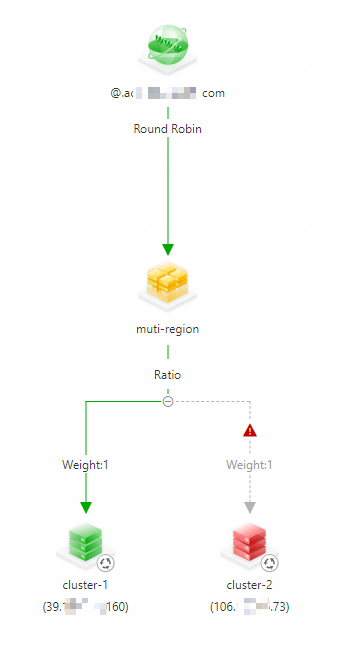
To receive alert notifications on address unavailability and manually remove the unavailable address, you need to configure an alert rule. For more information, see Configure alert settings.