All Products
Search
Document Center

ApsaraVideo VOD:HLS encryption

Last Updated:Jan 29, 2026

HTTP Live Streaming (HLS) encryption uses the AES-128 algorithm. This method is compatible with all HLS players and uses key management and token services for access control. HLS encryption is widely used in scenarios with high security requirements, such as online education and exclusive content streaming. This topic describes how to use HLS encryption to encrypt videos and decrypt them for playback.

How it works

ApsaraVideo VOD uses envelope encryption. Your service uses Alibaba Cloud Key Management Service (KMS) to generate a data key (DK) and an enveloped data key (EDK). After you use the DK to encrypt a video, the encrypted video and the EDK are stored. During playback, the decryption service retrieves the DK to decrypt the video.

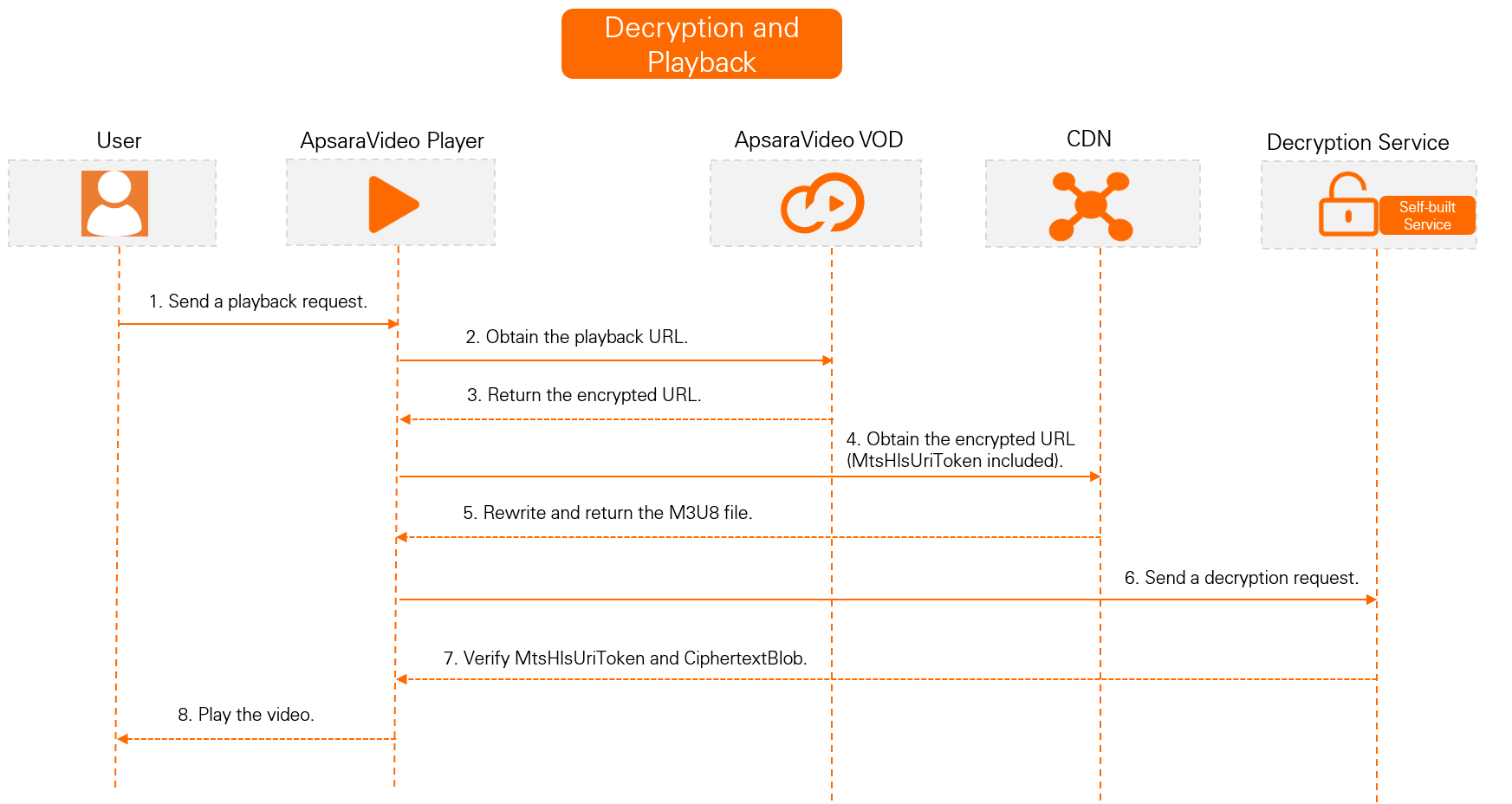
To perform security authentication on the decryption address, you can enable M3U8 encryption and rewrite to add another layer of protection to the HLS data access process. The default rewritten parameter is MtsHlsUriToken. For more information about how to enable M3U8 encryption and rewrite and how it works, see Configure M3U8 encryption and rewrite.

Prerequisites

  • Alibaba Cloud Video Encryption (HLS encryption) is a free service. However, video transcoding is required to use this feature. Transcoding operations incur service fees. For more information about billing, see Media transcoding billing.

  • ApsaraVideo VOD is activated. For more information, see Activate ApsaraVideo VOD.

  • You have granted ApsaraVideo VOD the required permissions to access KMS. You can grant the permissions on the Cloud Resource Access Authorization page.

  • An accelerated domain name is configured in ApsaraVideo VOD. For more information, see Add an accelerated domain name.

  • The ApsaraVideo VOD server-side software development kit (SDK) is installed. For more information, see Server-side SDKs. This topic uses the SDK for Java as an example.

Terms

Concept

Description

Resource Access Management (RAM)

An Alibaba Cloud service that you can use to manage user identities and resource access permissions. For more information, see What is RAM?.

Key Management Service (KMS)

A one-stop platform for key management and data encryption. It provides simple, reliable, secure, and compliant encryption protection and credential management capabilities. For more information, see What is KMS?.

Data key (DK)

A plaintext key used to encrypt data. For more information, see Terms.

Enveloped data key (EDK)

A ciphertext data key that is protected using envelope encryption. For more information, see Terms.

Encryption and decryption process

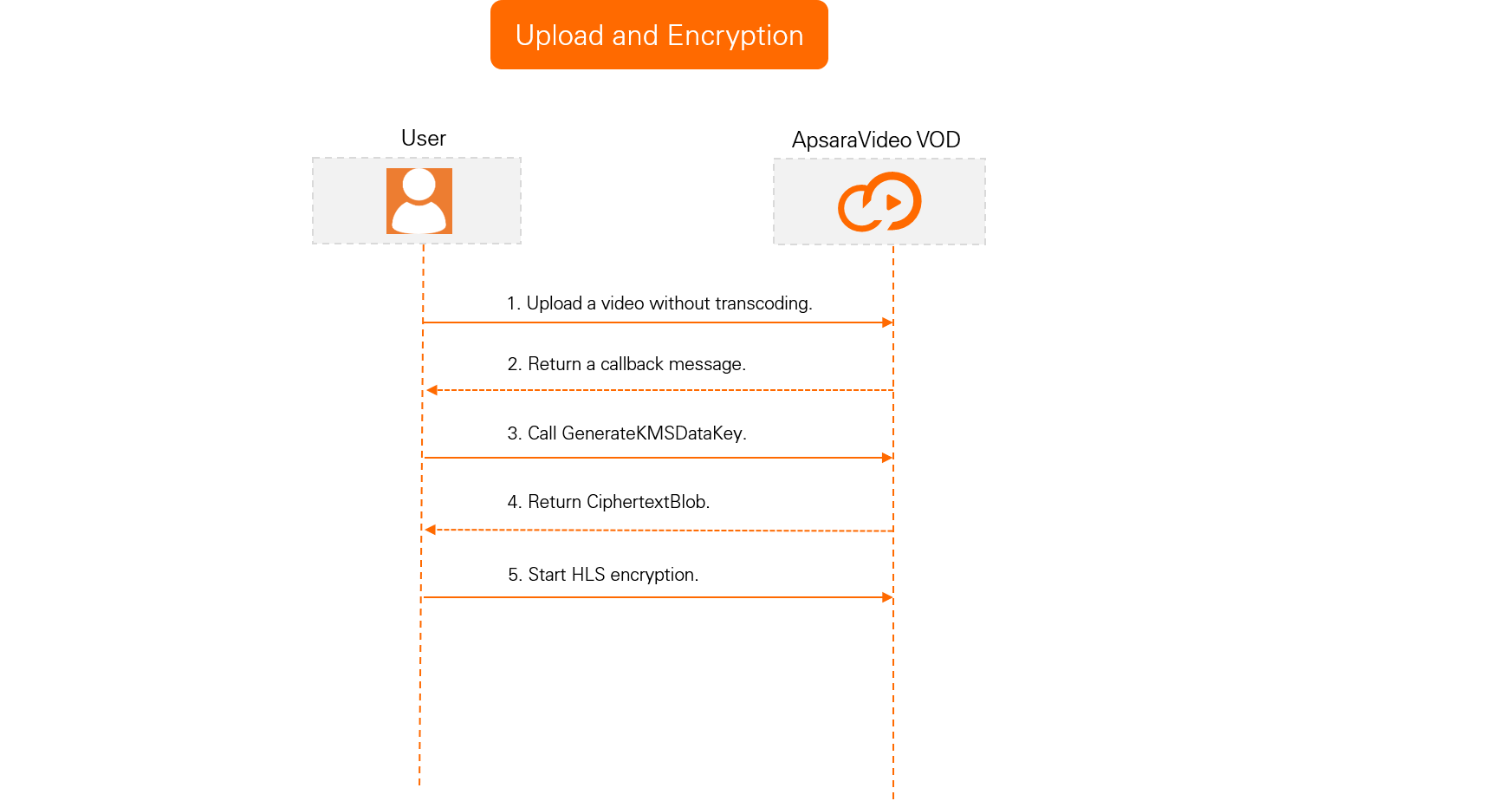
Upload and encryption process
视频安全-HLS标准加密3

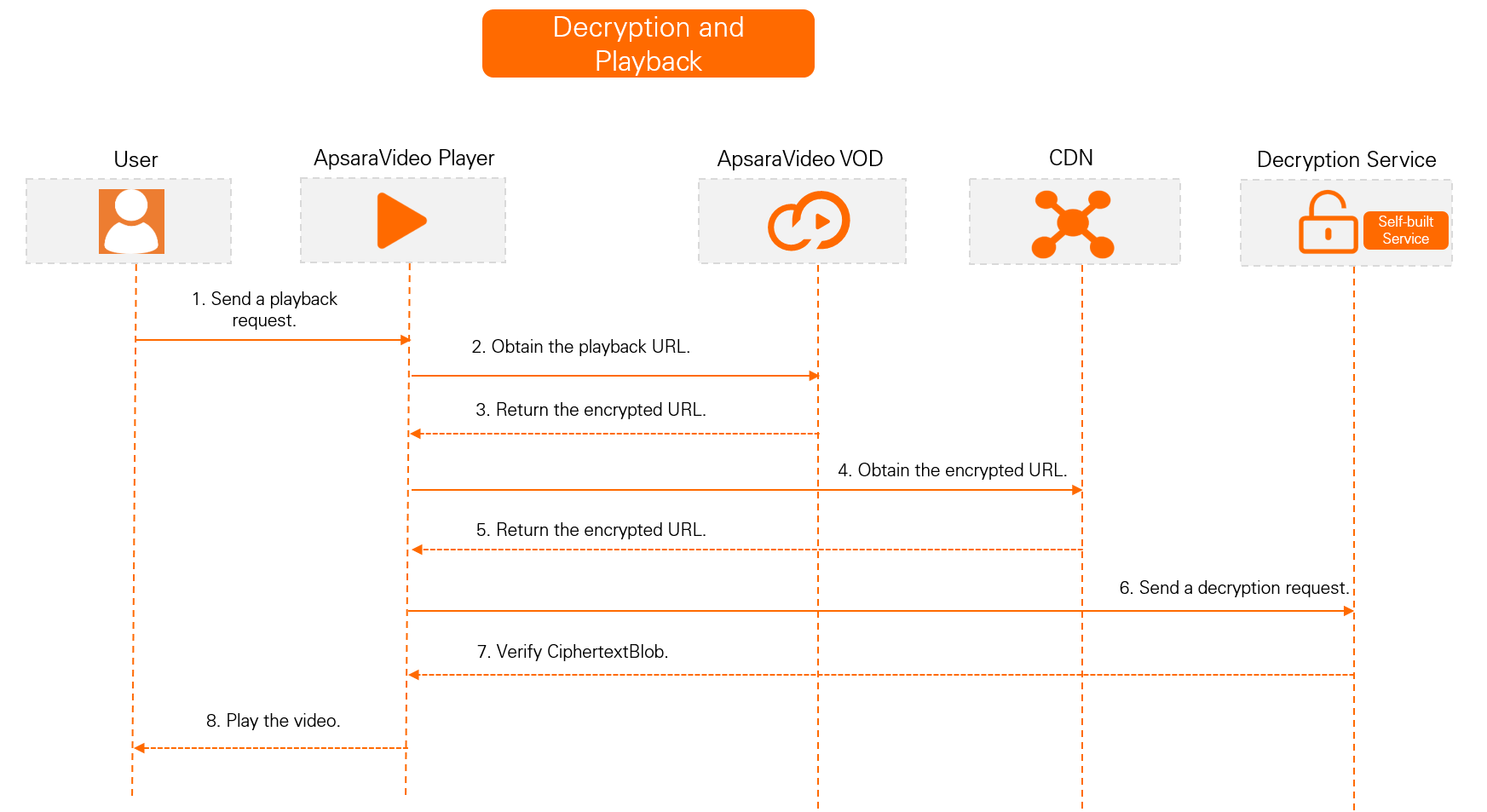
Decryption and playback process

M3U8 encryption and rewrite enabled (Recommended)
视频安全-HLS标准加密6..png

M3U8 encryption and rewrite not enabled
视频安全-HLS标准加密2

Encrypt a video

  1. Upload a video and receive a callback.

    To prevent HLS-encrypted videos from being automatically transcoded, use the built-in No Transcoding template group when you upload them to ApsaraVideo VOD.

    1. Upload the video using the ApsaraVideo VOD console or by calling an API operation. For more information, see Upload media files using the ApsaraVideo VOD console and Media upload.

    2. Configure event notifications for ApsaraVideo VOD. When you receive a Video Upload Completed callback message, the video is uploaded to ApsaraVideo VOD. For more information about how to configure event notifications, see Event notifications.

  2. Set up an encryption service.

    1. Create a service key.

      A service key is the primary encryption key in KMS and is required to generate standard encryption keys. If you do not create a service key, an error is reported when you call the GenerateDataKey operation to generate a key.

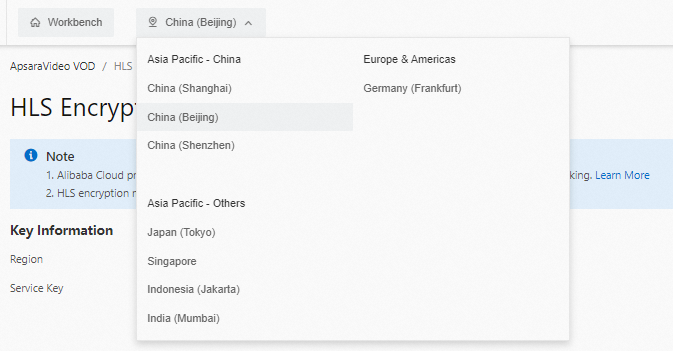
      1. In the upper-left corner of the page, click the region ID to switch to the region where you want to create the service key.

        Note

        The service key must be in the same region as the origin server where your video is stored. For example, if your video is stored in China (Shanghai), the service key must also be created in China (Shanghai).
        标准加密-服务地域

      2. Log on to the ApsaraVideo VOD console. In the navigation pane on the left, choose Configuration Management > Media Processing > HLS Standard Encryption.

      3. On the Standard Encryption page, click Create Service Key.

        After the service key is created, a message is displayed. You can view your service key in the Key Information section.

        Note

        If a message indicates that the service key is created but you cannot view the service key, a service-linked role may be missing. You can re-grant the permissions to restore the role and then refresh the page to view the service key.

    2. Call an API operation to generate a data key.

      Call the GenerateDataKey operation to generate a DK and an EDK. You do not need to pass any parameters for this operation. After the call is successful, the `CiphertextBlob` in the response is the EDK in AES-128 format. You must cache this value for standard encryption and transcoding. The `Plaintext` in the response is the DK.

  3. Create a transcoding template group for HLS encryption.

    The HLS encryption process requires two transcoding template groups: the built-in No Transcoding template group and a custom HLS encryption transcoding template group. The following steps describe how to create the custom group:

    1. Log in to the ApsaraVideo VOD console. In the navigation pane on the left, choose Configuration Management > Media Processing > Transcoding Template Groups.

    2. On the Transcoding Template Groups page, create a template group for HLS encryption.

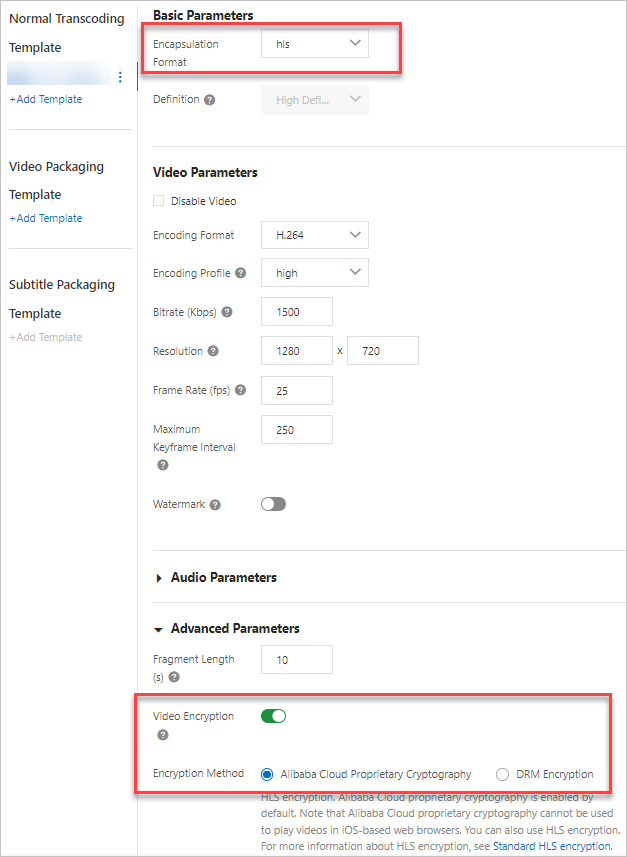
      Set the Encapsulation Format to hls. In the Advanced Parameters section, enable Video Encryption and select Alibaba Cloud Encryption. You can configure the other parameters as needed. For more information, see Transcoding templates.视频安全-HLS加密-控制台

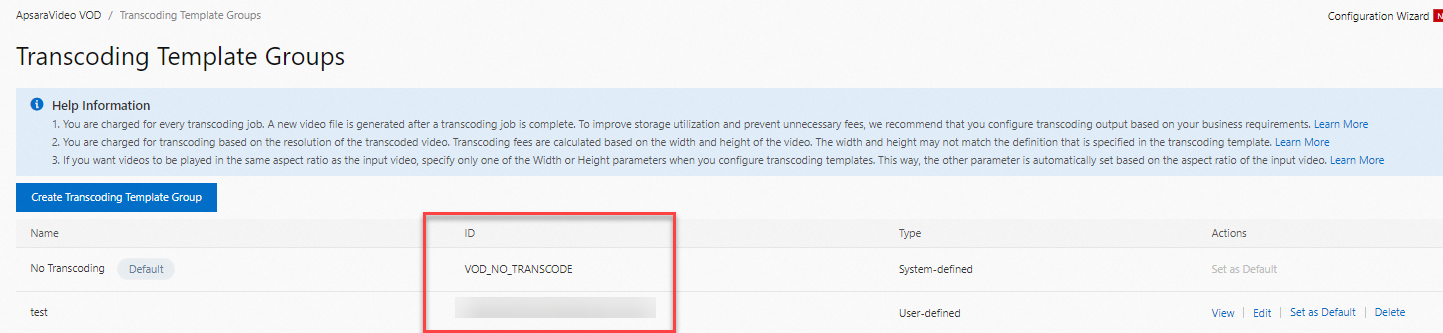
    3. After the template is created, you can view the ID of the transcoding template group on the Transcoding Template Groups page. Save the ID. You will need it later when you initiate HLS encryption and transcoding.视频安全-HLS加密-控制台1

  4. Initiate HLS encryption and transcoding.
    1. Call the SubmitTranscodeJobs operation to initiate HLS encryption and transcoding.

      Expand to view the Java sample code

      The following parameters in the Java sample code must be changed based on your requirements:

      Parameter

      Input Value

      request.setTemplateGroupId("")

      The ID of the transcoding template group for HLS encryption that you created in Step 3.

      request.setVideoId("")

      The ID of the video to be encrypted that you uploaded in Step 1.

      encryptConfig.put("CipherText","")

      The CiphertextBlob value that is returned in Step 2.

      encryptConfig.put("DecryptKeyUri","")

      The key URI. The key URI is a combination of the decryption service address and the CiphertextBlob value. For example, if the local port is 8099, the key URI is as follows:

      http://172.16.0.1:8099?CipherText=CiphertextBlobValue

      import com.alibaba.fastjson.JSON;
      import com.alibaba.fastjson.JSONObject;
      import com.aliyuncs.DefaultAcsClient;
      import com.aliyuncs.exceptions.ClientException;
      import com.aliyuncs.profile.DefaultProfile;
      import com.aliyuncs.vod.model.v20170321.SubmitTranscodeJobsRequest;
      import com.aliyuncs.vod.model.v20170321.SubmitTranscodeJobsResponse;
      
      public class SubmitTranscodeJobs {
      
          // The AccessKey pair of an Alibaba Cloud account has permissions to call all API operations. We recommend that you use the AccessKey pair of a RAM user to call API operations or perform routine O&M.
          // We strongly recommend that you do not hard-code the AccessKey ID and AccessKey secret in your project code. Otherwise, the AccessKey pair may be leaked, which threatens the security of all your resources.
          // This example shows how to read the AccessKey pair from environment variables to authenticate the API access. Before you run the code, configure the ALIBABA_CLOUD_ACCESS_KEY_ID and ALIBABA_CLOUD_ACCESS_KEY_SECRET environment variables.
          private static String accessKeyId = System.getenv("ALIBABA_CLOUD_ACCESS_KEY_ID");
          private static String accessKeySecret = System.getenv("ALIBABA_CLOUD_ACCESS_KEY_SECRET");
      
          public static SubmitTranscodeJobsResponse submitTranscodeJobs(DefaultAcsClient client) throws Exception{
              SubmitTranscodeJobsRequest request = new SubmitTranscodeJobsRequest();
              request.setTemplateGroupId("");
              request.setVideoId("");
              JSONObject encryptConfig = new JSONObject();
              encryptConfig.put("CipherText","");
              encryptConfig.put("DecryptKeyUri","");
              encryptConfig.put("KeyServiceType","KMS");
              request.setEncryptConfig(encryptConfig.toJSONString());
              return client.getAcsResponse(request);
          }
      
          public static void main(String[] args) throws ClientException {
              String regionId = "cn-shanghai";  // The region where the ApsaraVideo VOD service is activated.
              DefaultProfile profile = DefaultProfile.getProfile(regionId, accessKeyId, accessKeySecret);
              DefaultAcsClient client = new DefaultAcsClient(profile);
      
              SubmitTranscodeJobsResponse response;
              try {
                  response = submitTranscodeJobs(client);
                  System.out.println("RequestId is:"+response.getRequestId());
                  System.out.println("TranscodeTaskId is:"+response.getTranscodeTaskId());
                  System.out.println("TranscodeJobs is:"+ JSON.toJSON(response.getTranscodeJobs()));
              } catch (Exception e) {
                  e.printStackTrace();
              }
          }
      }       
    2. If you have configured event notifications for ApsaraVideo VOD, video transcoding is complete when you receive a Transcoding of a Single-definition Video Completed or Transcoding of All-definition Videos Completed callback message.

  5. View the HLS encryption result.

    After transcoding is complete, you can use the following three methods to determine whether standard encryption was successful.

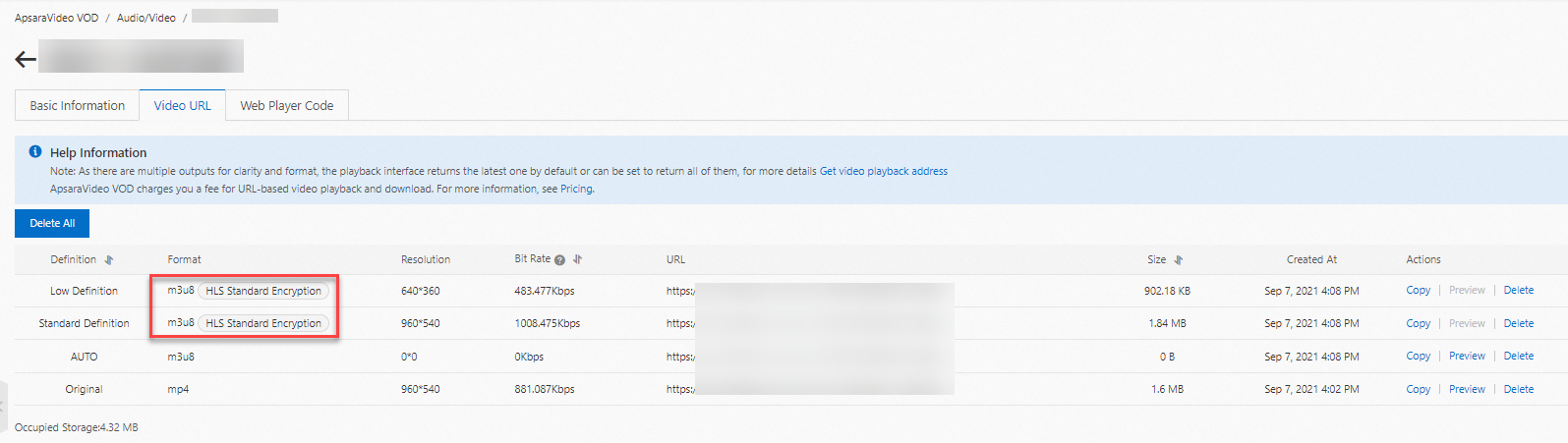
    • Method 1: Log on to the ApsaraVideo VOD console and choose Media Files > Audio/Video > Manage > Video URL. On the Video URL page, if the video has outputs in multiple formats, such as an original MP4 file, check whether the m3u8 video stream is labeled with HLS Standard Encryption. If the label is present, HLS encryption is successful.视频安全-HLS标准加密5

    • Method 2: Copy the URL of an M3U8 file that uses HLS Standard Encryption. Run the curl -v "URL of the M3U8 file" command to check the M3U8 content. If the content contains the key URI="<The decryption URI that you pass for standard encryption, which is the value of the DecryptKeyUri parameter>", the video is protected by HLS encryption.

    • Method 3: Call the GetTranscodeTask operation. Pass the value of the JobId parameter that is returned in Step 4. If the returned TranscodeTemplateId parameter is the ID of the transcoding template group that you created in Step 3 and the TranscodeJobStatus parameter is TranscodeSuccess, HLS encryption is successful.

HLS (M3U8) encryption and rewrite (Recommended)

After you enable the M3U8 encryption and rewrite feature, the system automatically adds encryption parameters, such as the encryption algorithm, key URI, and authentication parameters, to the #EXT-X-KEY tag in the Media Playlist (M3U8 file) of the HLS protocol. When the client parses the rewritten M3U8 file, it uses the key URI with authentication parameters to request the decryption key. The client then uses the key and the specified algorithm to decrypt the TS shards. This process provides encrypted access protection for HLS streaming media.

Step 1: Enable standard encryption parameter pass-through

In the ApsaraVideo VOD console, enable Parameter Pass-through for HLS Encryption.

Enabling Parameter Pass-through for HLS Encryption lets you modify the M3U8 file for HLS. This feature modifies the URI in the #EXT-X-KEY tag by appending parameters from a client request. The default parameter name is MtsHlsUriToken.

Prerequisites

Cross-origin resource sharing (CORS) is configured. For more information, see Configure cross-origin resource sharing.

Important

This feature is not currently supported in Alibaba Gov Cloud.

Procedure

  1. Log on to the ApsaraVideo VOD console.

  2. In the navigation pane on the left, click Configuration Management.

  3. Click CDN Configuration > Domain Names to go to the Domain Names page.

  4. Find the target domain name and click Configure in the Actions column.

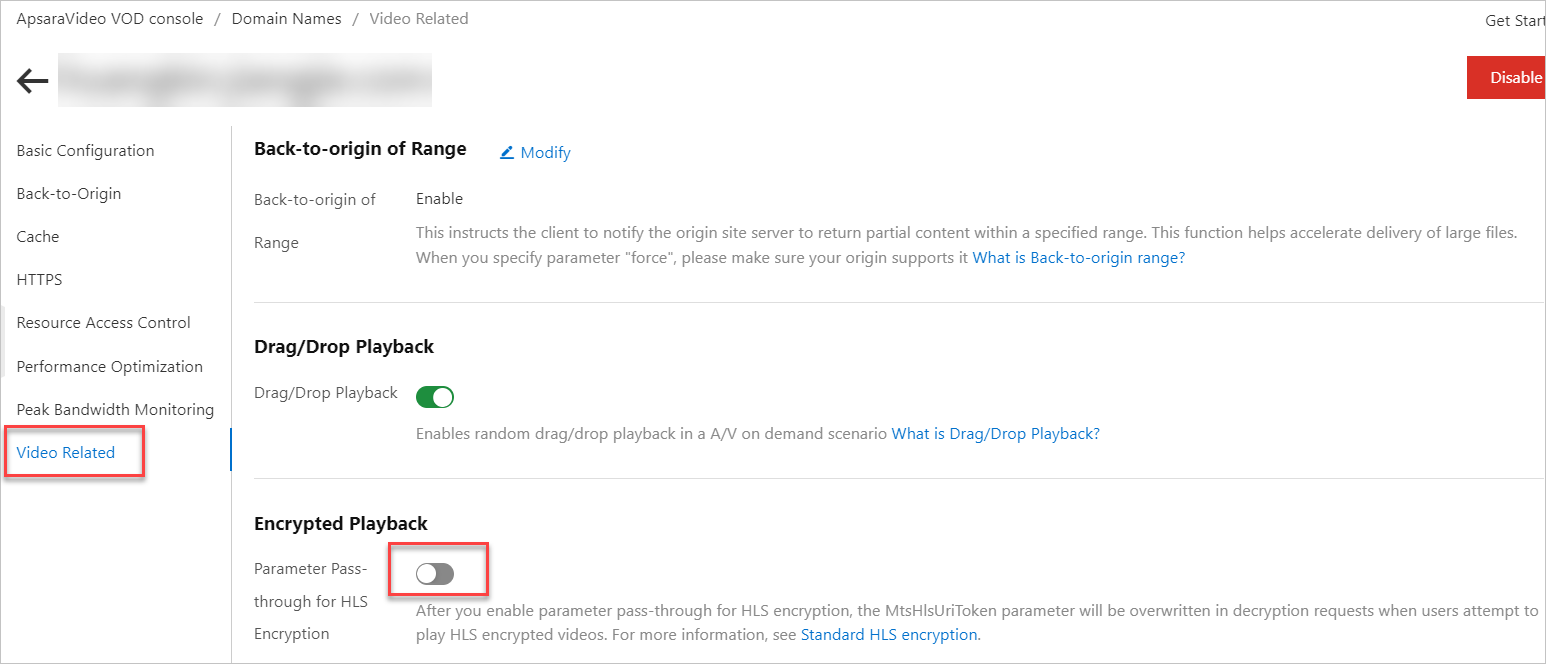
  5. In the navigation pane on the left of the domain name's page, click Video Related.

  6. In the Encrypted Playback section, turn on the Parameter Pass-through for HLS Encryption switch.p181836

Note
  • After you enable this feature, when HLS encryption parameters are passed through, the system authenticates your request by rewriting the token authentication parameter. The rewritten parameter name is MtsHlsUriToken, and its value is test. When Alibaba Cloud CDN decrypts the video for playback, MtsHlsUriToken=test is appended to the end of the URI in the #EXT-X-KEY tag of the M3U8 file.

Step 2: Send a request that includes the MtsHlsUriToken parameter

The client sends a request that includes the MtsHlsUriToken parameter to a CDN point of presence (POP) to access the M3U8 file.

To obtain the MtsHlsUriToken, you must build a token service to issue user tokens. This service generates the MtsHlsUriToken.

The token generated by the following code is the MtsHlsUriToken. The following parameters in the sample code must be changed based on your requirements:

Expand to view the Java sample code

Parameter

Input value

ENCRYPT_KEY

The encryption key. A custom string of 16, 24, or 32 characters.

INIT_VECTOR

The encryption offset. A custom string of 16 characters that cannot contain special characters.

import org.apache.commons.codec.binary.Base64;
import org.apache.commons.lang3.StringUtils;

import javax.crypto.Cipher;
import javax.crypto.spec.IvParameterSpec;
import javax.crypto.spec.SecretKeySpec;
import java.util.Arrays;

public class PlayToken {
    // The following parameters are not required if you do not use AES to generate the token.
    private static String ENCRYPT_KEY = ""; // The encryption key. A custom string of 16, 24, or 32 characters.
    private static String INIT_VECTOR = ""; // The encryption offset. A custom string of 16 characters that cannot contain special characters.

    public static void main(String[] args) throws Exception {

        String serviceId = "12";
        PlayToken playToken = new PlayToken();
        String aesToken = playToken.generateToken(serviceId);
        //System.out.println("aesToken " + aesToken);
        //System.out.println(playToken.validateToken(aesToken));   // Decryption verification part.
    }
    /**
     * Generates a token based on the passed parameters.
     * Notes:
     *  1. The parameters can be the user ID of your service, the type of the playback client, and other information.
     *  2. A token is generated when the token API is called.
     * @param args
     * @return
     */
    public String generateToken(String... args) throws Exception {
        if (null == args || args.length <= 0) {
            return null;
        }
        String base = StringUtils.join(Arrays.asList(args), "_");
        // Set the token to expire after 30 seconds. You can adjust the expiration time.
        long expire = System.currentTimeMillis() + 30000L;
        base += "_" + expire;   // Custom string. The length of the base string is 16 characters. In this example, the timestamp occupies 13 characters and the underscore (_) occupies 1 character. Therefore, you need to pass another 2 characters. You can also change the entire string as needed to ensure that the base string is 16, 24, or 32 characters long.
        // Generate the token.
        String token = encrypt(base, ENCRYPT_KEY);  // arg1 is the custom string to be encrypted, and arg2 is the encryption key.
        // Save the token. It is used to verify the validity of the token during decryption, such as the expiration time and the number of times the token can be used.
        saveToken(token);
        return token;
    }

    /**
     * Verifies the validity of the token.
     * Notes:
     *  1. Before the decryption API returns the playback key, it needs to verify the legitimacy and validity of the token.
     *  2. We strongly recommend that you verify both the expiration time and the number of valid uses of the token.
     * @param token
     * @return
     * @throws Exception
     */
    public boolean validateToken(String token) throws Exception {
        if (null == token || "".equals(token)) {
            return false;
        }
        String base = decrypt(token,ENCRYPT_KEY); // arg1 is the string to be decrypted, and arg2 is the decryption key.
        // First, verify the validity period of the token.
        Long expireTime = Long.valueOf(base.substring(base.lastIndexOf("_") + 1));
        System.out.println("Time verification:" + expireTime);
        if (System.currentTimeMillis() > expireTime) {
            return false;
        }
        // Obtain token information from the database to determine its validity. You can implement this part yourself.
        TokenInfo dbToken = getToken(token);
        // Check if the token has already been used.
        if (dbToken == null || dbToken.useCount > 0) {
            return false;
        }
        // Obtain business attribute information for verification.
        String businessInfo = base.substring(0, base.lastIndexOf("_"));
        String[] items = businessInfo.split("_");
        // Verify the legitimacy of the business information. You can implement this part yourself.
        return validateInfo(items);
    }
    /**
     * Saves the token to the database.
     * You can implement this part yourself.
     *
     * @param token
     */
    public void saveToken(String token) {
        //TODO: Store the token.
    }
    /**
     * Queries the token.
     * You can implement this part yourself.
     *
     * @param token
     */
    public TokenInfo getToken(String token) {
        //TODO: Obtain token information from the database to verify its validity and legitimacy.
        return null;
    }
    /**
     * Verifies the validity of the business information. You can implement this part yourself.
     *
     * @param infos
     * @return
     */
    public boolean validateInfo(String... infos) {
        //TODO: Verify the validity of the information, for example, whether the UID is valid.
        return true;
    }
    /**
     * Generates a token using AES encryption.
     *
     * @param encryptStr  The string to be encrypted.
     * @param encryptKey  The encryption key.
     * @return
     * @throws Exception
     */
    public String encrypt(String encryptStr, String encryptKey) throws Exception {
        IvParameterSpec e = new IvParameterSpec(INIT_VECTOR.getBytes("UTF-8"));
        SecretKeySpec skeySpec = new SecretKeySpec(encryptKey.getBytes("UTF-8"), "AES");
        Cipher cipher = Cipher.getInstance("AES/CBC/PKCS5PADDING");
        cipher.init(Cipher.ENCRYPT_MODE, skeySpec, e);
        byte[] encrypted = cipher.doFinal(encryptStr.getBytes());
        return Base64.encodeBase64String(encrypted);
    }
    /**
     * Decrypts the token using AES.
     *
     * @param encryptStr  The string to be decrypted.
     * @param decryptKey  The decryption key.
     * @return
     * @throws Exception
     */
    public String decrypt(String encryptStr, String decryptKey) throws Exception {

        IvParameterSpec e = new IvParameterSpec(INIT_VECTOR.getBytes("UTF-8"));
        SecretKeySpec skeySpec = new SecretKeySpec(decryptKey.getBytes("UTF-8"), "AES");
        Cipher cipher = Cipher.getInstance("AES/CBC/PKCS5PADDING");
        cipher.init(Cipher.DECRYPT_MODE, skeySpec, e);

        byte[] encryptByte = Base64.decodeBase64(encryptStr);
        byte[] decryptByte = cipher.doFinal(encryptByte);
        return new String(decryptByte);
    }
    /**
     * Token information. You can provide more information. This is just an example for reference.
     */
    class TokenInfo {
        // The number of times the token can be used. In a distributed environment, pay attention to synchronization issues.
        int useCount;
        // The content of the token.
        String token;
    }}
                        
Note

The preceding code is an open source example and does not involve any SDK or service code. You must configure and adjust it based on your requirements.

Step 3: Decrypt and play the file

After a CDN POP receives a request from the client, it decrypts and plays the video if authentication is successful.

If the value of the MtsHlsUriToken parameter generated in Step 2 is test, MtsHlsUriToken=test is appended to the end of the URI in the #EXT-X-KEY tag of the M3U8 file when CDN decrypts the video for playback.

You must implement the authentication logic. For more information, see the sample code for the decryption service when M3U8 encryption and rewrite is enabled in Play videos.

Play videos

M3U8 encryption and rewrite enabled (Recommended)

  1. Set up a decryption service.

    Set up a local HTTP service to decrypt the video.

    Call the Decrypt operation to decrypt the key. The PlainText in the response is the data key (DK). This DK is the Base64-decoded data of the PlainText that is returned by the GenerateDataKey operation.

    To perform security authentication on the decryption address, you can enable M3U8 encryption and rewrite. This adds another layer of protection to the HLS data access process. The default rewritten parameter is MtsHlsUriToken. The code for setting up the decryption service varies depending on whether you enable M3U8 encryption and rewrite.

    Expand to view the Java sample code

    The following parameters in the Java sample code must be changed based on your requirements:

    Parameter

    Input value

    region

    The region ID. KMS and ApsaraVideo VOD must be in the same region. For example, if you use KMS and ApsaraVideo VOD in China (Shanghai), set this parameter to cn-shanghai. For more information about the IDs of other regions, see Region IDs of ApsaraVideo VOD.

    AccessKey

    The AccessKey ID and AccessKey secret of your Alibaba Cloud account or a RAM user. For more information about how to obtain an AccessKey pair, see Create an AccessKey pair.

    httpserver

    The port number that you want to use to start the service.

    import com.aliyuncs.DefaultAcsClient;
    import com.aliyuncs.exceptions.ClientException;
    import com.aliyuncs.http.ProtocolType;
    import com.aliyuncs.vod.model.v20170321.DecryptKMSDataKeyRequest;
    import com.aliyuncs.vod.model.v20170321.DecryptKMSDataKeyResponse;
    import com.aliyuncs.profile.DefaultProfile;
    import com.sun.net.httpserver.Headers;
    import com.sun.net.httpserver.HttpExchange;
    import com.sun.net.httpserver.HttpHandler;
    import com.sun.net.httpserver.HttpServer;
    import com.sun.net.httpserver.spi.HttpServerProvider;
    import org.apache.commons.codec.binary.Base64;
    import java.io.IOException;
    import java.io.OutputStream;
    import java.net.HttpURLConnection;
    import java.net.InetSocketAddress;
    import java.net.URI;import java.util.regex.Matcher;
    import java.util.regex.Pattern;
    public class HlsDecryptServer {
        private static DefaultAcsClient client;
        static {
            // The region of KMS. This must be the same as the region where the video is stored.
            String region = "";
            // The AccessKey pair used to access KMS.
            // The AccessKey pair of an Alibaba Cloud account has permissions to call all API operations. We recommend that you use the AccessKey pair of a RAM user to call API operations or perform routine O&M.
            // We strongly recommend that you do not hard-code the AccessKey ID and AccessKey secret in your project code. Otherwise, the AccessKey pair may be leaked, which threatens the security of all your resources.
            // This example shows how to read the AccessKey pair from environment variables to authenticate the API access. Before you run the code, configure the ALIBABA_CLOUD_ACCESS_KEY_ID and ALIBABA_CLOUD_ACCESS_KEY_SECRET environment variables.
            String accessKeyId = System.getenv("ALIBABA_CLOUD_ACCESS_KEY_ID");
            String accessKeySecret = System.getenv("ALIBABA_CLOUD_ACCESS_KEY_SECRET");
            client = new DefaultAcsClient(DefaultProfile.getProfile(region, accessKeyId, accessKeySecret));
        }
        /**
         * Notes:
         * 1. Receives a decryption request and obtains the ciphertext key and the user token.
         * 2. Calls the KMS decrypt operation to obtain the plaintext key.
         * 3. Returns the Base64-decoded plaintext key.
         */
        public class HlsDecryptHandler implements HttpHandler {
            /**
             * Processes the decryption request.
             * @param httpExchange
             * @throws IOException
             */
            public void handle(HttpExchange httpExchange) throws IOException {
                String requestMethod = httpExchange.getRequestMethod();
                if ("GET".equalsIgnoreCase(requestMethod)) {
                    // Verify the validity of the token.
                    String token = getMtsHlsUriToken(httpExchange);
                    boolean validRe = validateToken(token);
                    if (!validRe) {
                        return;
                    }
                    // Obtain the ciphertext key from the URL.
                    String ciphertext = getCiphertext(httpExchange);
                    if (null == ciphertext)
                        return;
                    // Decrypt the key from KMS and Base64-decode it.
                    byte[] key = decrypt(ciphertext);
                    // Set the header.
                    setHeader(httpExchange, key);
                    // Return the Base64-decoded key.
                    OutputStream responseBody = httpExchange.getResponseBody();
                    responseBody.write(key);
                    responseBody.close();
                }
            }
            private void setHeader(HttpExchange httpExchange, byte[] key) throws IOException {
                Headers responseHeaders = httpExchange.getResponseHeaders();
                responseHeaders.set("Access-Control-Allow-Origin", "*");
                httpExchange.sendResponseHeaders(HttpURLConnection.HTTP_OK, key.length);
            }
            /**
             * Calls the KMS decrypt operation to decrypt the key and Base64-decode the plaintext.
             * @param ciphertext
             * @return
             */
            private byte[] decrypt(String ciphertext) {
                DecryptKMSDataKeyRequest request = new DecryptKMSDataKeyRequest();
                request.setCipherText(ciphertext);
                request.setProtocol(ProtocolType.HTTPS);
                try {
                    DecryptKMSDataKeyResponse response = client.getAcsResponse(request);
                    String plaintext = response.getPlaintext();
                    System.out.println("PlainText: " + plaintext);
                    // Note: The plaintext must be Base64-decoded.
                    return Base64.decodeBase64(plaintext);
                } catch (ClientException e) {
                    e.printStackTrace();
                    return null;
                }
            }
            /**
             * Obtains the ciphertext key parameter from the URL.
             * @param httpExchange
             * @return
             */
            private String getCiphertext(HttpExchange httpExchange) {
                URI uri = httpExchange.getRequestURI();
                String queryString = uri.getQuery();
                String pattern = "CipherText=(\\w*)";
                Pattern r = Pattern.compile(pattern);
                Matcher m = r.matcher(queryString);
                if (m.find())
                    return m.group(1);
                else {
                    System.out.println("Not Found CipherText Param");
                    return null;
                }
            }
            
              /**
             * Verifies the validity of the token. This is required for M3U8 encryption and rewrite.
             * @param token
             * @return
             */
            private boolean validateToken(String token) {
                if (null == token || "".equals(token)) {
                    return false;
                }
                //TODO: Implement token validity verification.
                return true;
            }
            /**
             * Obtains the token parameter. This is required for M3U8 encryption and rewrite.
             *
             * @param httpExchange
             * @return
             */
            private String getMtsHlsUriToken(HttpExchange httpExchange) {
                URI uri = httpExchange.getRequestURI();
                String queryString = uri.getQuery();
                String pattern = "MtsHlsUriToken=(\\w*)";
                Pattern r = Pattern.compile(pattern);
                Matcher m = r.matcher(queryString);
                if (m.find())
                    return m.group(1);
                else {
                    System.out.println("Not Found MtsHlsUriToken Param");
                    return null;
                }
            }
        }
        /**
         * Starts the service.
         *
         * @throws IOException
         */
        private void serviceBootStrap() throws IOException {
            HttpServerProvider provider = HttpServerProvider.provider();
            // You can customize the listening port. It can accept up to 30 requests at the same time.
            HttpServer httpserver = provider.createHttpServer(new InetSocketAddress(8099), 30);
            httpserver.createContext("/", new HlsDecryptHandler());
            httpserver.start();
            System.out.println("hls decrypt server started");
        }
        public static void main(String[] args) throws IOException {
            HlsDecryptServer server = new HlsDecryptServer();
            server.serviceBootStrap();
        }}
  2. Obtain the video playback URL and credential.

    Call the GetVideoPlayAuth operation to obtain the playback credential or call the GetPlayInfo operation to obtain the playback URL.

  3. Play the encrypted video.

    HLS encryption is compatible with all HLS players. You can use a self-developed player or ApsaraVideo Player to play the encrypted video.

    If you use ApsaraVideo Player, you must obtain the token and authentication information as required by ApsaraVideo Player before playback. For more information, see Play encrypted videos. If you use a player other than ApsaraVideo Player, you must implement the playback logic.

    The following section describes the internal process of using ApsaraVideo Player for test playback:

    M3U8 encryption and rewrite enabled (Recommended)

    Process

    • The player parses the EXT-X-KEY tag in the M3U8 file to obtain the decryption key URI. This URI corresponds to the value of the DecryptKeyUri parameter in EncryptConfig.

    • To prevent unauthorized access, the player must include authentication information, which is passed using the MtsHlsUriToken parameter, when it requests the decryption API.

    • The player automatically requests the decryption API to obtain the key, decrypts the encrypted TS files, and then starts playback.

    Example

    • The playback URL of the video is https://demo.aliyundoc.com/encrypt-stream****-hd.m3u8. The request must include the MtsHlsUriToken parameter.

    • The final request URL is https://demo.aliyundoc.com/encrypt-stream****-hd.m3u8?MtsHlsUriToken=<token>.

    • The decryption address is https://demo.aliyundoc.com?CipherText=ZjJmZGViNzUtZWY1Mi00Y2RlLTk3MTMtOT****.

    • The final decryption request URL is https://demo.aliyundoc.com?CipherText=ZjJmZGViNzUtZWY1Mi00Y2RlLTk3MTMtOT****&MtsHlsUriToken=<issued_token>.

M3U8 encryption and rewrite disabled

  1. Set up a decryption service.

    Set up a local HTTP service to decrypt the video.

    Call the Decrypt operation to decrypt the key. The PlainText in the response is the data key (DK). This DK is the Base64-decoded data of the PlainText that is returned by the GenerateDataKey operation.

    The following is an example:

    Expand to view the Java sample code

    The following parameters in the Java sample code must be changed based on your requirements:

    Parameter

    Input value

    region

    The region ID. KMS and ApsaraVideo VOD must be in the same region. For example, if you use KMS and ApsaraVideo VOD in China (Shanghai), set this parameter to cn-shanghai. For more information about the IDs of other regions, see Region IDs of ApsaraVideo VOD.

    AccessKey

    The AccessKey ID and AccessKey secret of your Alibaba Cloud account or a RAM user. For more information about how to obtain an AccessKey pair, see Create an AccessKey pair.

    httpserver

    The port number that you want to use to start the service.

    import com.aliyuncs.DefaultAcsClient;
    import com.aliyuncs.exceptions.ClientException;
    import com.aliyuncs.http.ProtocolType;
    import com.aliyuncs.profile.DefaultProfile;
    import com.aliyuncs.vod.model.v20170321.DecryptKMSDataKeyRequest;
    import com.aliyuncs.vod.model.v20170321.DecryptKMSDataKeyResponse;
    import com.sun.net.httpserver.Headers;
    import com.sun.net.httpserver.HttpExchange;
    import com.sun.net.httpserver.HttpHandler;
    import com.sun.net.httpserver.HttpServer;
    import com.sun.net.httpserver.spi.HttpServerProvider;
    import org.apache.commons.codec.binary.Base64;
    
    import java.io.IOException;
    import java.io.OutputStream;
    import java.net.HttpURLConnection;
    import java.net.InetSocketAddress;
    import java.net.URI;
    import java.util.regex.Matcher;
    import java.util.regex.Pattern;
    
    public class HlsDecryptServerNoToken {
    
        private static DefaultAcsClient client;
        static {
            // The region of KMS. This must be the same as the region where the video is stored.
            String region = "cn-beijing";
            // The AccessKey pair used to access KMS.
            // The AccessKey pair of an Alibaba Cloud account has permissions to call all API operations. We recommend that you use the AccessKey pair of a RAM user to call API operations or perform routine O&M.
            // We strongly recommend that you do not hard-code the AccessKey ID and AccessKey secret in your project code. Otherwise, the AccessKey pair may be leaked, which threatens the security of all your resources.
            // This example shows how to read the AccessKey pair from environment variables to authenticate the API access. Before you run the code, configure the ALIBABA_CLOUD_ACCESS_KEY_ID and ALIBABA_CLOUD_ACCESS_KEY_SECRET environment variables.
            String accessKeyId = System.getenv("ALIBABA_CLOUD_ACCESS_KEY_ID");
            String accessKeySecret = System.getenv("ALIBABA_CLOUD_ACCESS_KEY_SECRET");
            client = new DefaultAcsClient(DefaultProfile.getProfile(region, accessKeyId, accessKeySecret));
        }
        /**
         * Notes:
         * 1. Receives a decryption request and obtains the ciphertext key and the token.
         * 2. Calls the KMS decrypt operation to obtain the plaintext key.
         * 3. Returns the Base64-decoded plaintext key.
         */
        public class HlsDecryptHandler implements HttpHandler {
            /**
             * Processes the decryption request.
             * @param httpExchange
             * @throws IOException
             */
            public void handle(HttpExchange httpExchange) throws IOException {
                String requestMethod = httpExchange.getRequestMethod();
                if ("GET".equalsIgnoreCase(requestMethod)) {
    
                    // Obtain the ciphertext key from the URL.
                    String ciphertext = getCiphertext(httpExchange);
                    System.out.println(ciphertext);
                    if (null == ciphertext)
                        return;
                    // Decrypt the key from KMS and Base64-decode it.
                    byte[] key = decrypt(ciphertext);
                    // Set the header.
                    setHeader(httpExchange, key);
                    // Return the Base64-decoded key.
                    OutputStream responseBody = httpExchange.getResponseBody();
                    responseBody.write(key);
                    responseBody.close();
                }
            }
            private void setHeader(HttpExchange httpExchange, byte[] key) throws IOException {
                Headers responseHeaders = httpExchange.getResponseHeaders();
                responseHeaders.set("Access-Control-Allow-Origin", "*");
                httpExchange.sendResponseHeaders(HttpURLConnection.HTTP_OK, key.length);
            }
            /**
             * Calls the KMS decrypt operation to decrypt the key and Base64-decode the plaintext.
             * @param ciphertext
             * @return
             */
            private byte[] decrypt(String ciphertext) {
    
                DecryptKMSDataKeyRequest request = new DecryptKMSDataKeyRequest();
                request.setCipherText(ciphertext);
                request.setProtocol(ProtocolType.HTTPS);
                try {
                    DecryptKMSDataKeyResponse response = client.getAcsResponse(request);
                    String plaintext = response.getPlaintext();
                    System.out.println("PlainText: " + plaintext);
                    // Note: The plaintext must be Base64-decoded.
                    return Base64.decodeBase64(plaintext);
                } catch (ClientException e) {
                    e.printStackTrace();
                    return null;
                }
            }
    
            /**
             * Obtains the ciphertext key parameter from the URL.
             * @param httpExchange
             * @return
             */
            private String getCiphertext(HttpExchange httpExchange) {
                URI uri = httpExchange.getRequestURI();
                String queryString = uri.getQuery();
                String pattern = "CipherText=(\\w*)";
                Pattern r = Pattern.compile(pattern);
                Matcher m = r.matcher(queryString);
                if (m.find())
                    return m.group(1);
                else {
                    System.out.println("Not Found CipherText Param");
                    return null;
                }
            }
        }
    
        /**
         * Starts the service.
         *
         * @throws IOException
         */
        private void serviceBootStrap() throws IOException {
            HttpServerProvider provider = HttpServerProvider.provider();
            // You can customize the listening port. It can accept up to 30 requests at the same time.
            HttpServer httpserver = provider.createHttpServer(new InetSocketAddress(8099), 30);
            httpserver.createContext("/", new HlsDecryptHandler());
            httpserver.start();
            System.out.println("hls decrypt server started");
        }
        public static void main(String[] args) throws IOException {
            HlsDecryptServerNoToken server = new HlsDecryptServerNoToken();
            server.serviceBootStrap();
        }}
    
  2. Obtain the video playback URL and credential.

    Call the GetVideoPlayAuth operation to obtain the playback credential or call the GetPlayInfo operation to obtain the playback URL.

  3. Play the encrypted video.

    HLS encryption is compatible with all HLS players. You can use a self-developed player or ApsaraVideo Player to play the encrypted video.

    If you use ApsaraVideo Player, you must obtain the token and authentication information as required by ApsaraVideo Player before playback. For more information, see Play encrypted videos. If you use a player other than ApsaraVideo Player, you must implement the playback logic.

    The following section describes the internal process of using ApsaraVideo Player for test playback:

    M3U8 encryption and rewrite disabled

    Process

    • The player parses the EXT-X-KEY tag in the M3U8 file to obtain the decryption key URI. This URI corresponds to the value of the DecryptKeyUri parameter in EncryptConfig.

    • The player automatically requests the decryption API to obtain the key, decrypts the encrypted TS files, and then starts playback.

    Example

    • The playback URL of the video is https://demo.aliyundoc.com/encrypt-stream****-hd.m3u8.

    • The final request URL is https://demo.aliyundoc.com/encrypt-stream****-hd.m3u8.

    • The decryption address is https://demo.aliyundoc.com?CipherText=ZjJmZGViNzUtZWY1Mi00Y2RlLTk3MTMtOT****.

    • The final decryption request URL is https://demo.aliyundoc.com?CipherText=ZjJmZGViNzUtZWY1Mi00Y2RlLTk3MTMtOT****.

References