Quest 1.0 is Qoder's autonomous coding agent. It takes a task description, plans a solution, writes the code, and runs it. Users can extend Quest with Skills (specialized knowledge modules loaded on demand), and this post is about an optimization we made to how Skills and MCP tools get loaded into context.
Shortly after launching Quest 1.0, a user reported that a task burned through a large amount of credits without delivering satisfactory results.
We pulled the token distribution data from that conversation. Out of 120K input tokens, 93.5% were tool definitions. None of those tools were called even once during the entire task.
This was an extreme case. The user had configured multiple MCP Servers loaded with tools. But it exposed a broader problem: context was stuffed with "just in case" definitions that rarely got used.
One of us configured playwright-mcp for frontend automation testing. After the tests were done, it sat there unused. Its tool definitions kept showing up in every subsequent conversation's context, and nobody noticed for weeks.
We ran a controlled experiment: same task, with two MCP Servers mounted (but never actually used during the task) vs. without. The unused tools alone inflated credits consumption by over 10%. The reason: just two MCP Servers contributed nearly a hundred tool definitions, consuming close to 2,000 tokens.
An internal team survey confirmed the pattern: 80% of colleagues had at least one MCP Server configured, but actual usage frequency was under 10%.
The problem was clear: how do you reduce MCP tools' context footprint without removing them entirely?
Before tackling MCP, we had already hit a similar wall with another feature: Skills.
Quest's Skills feature lets users define specialized knowledge and workflows that an Agent can load on demand. But users reported that Skills' automatic invocation rate was disappointing, often requiring a manual /skills command to trigger.
We tested in an environment with 28 Skills: the model's autonomous invocation rate was under 50%.
A model invoking a Skill needs to complete three steps:
Steps 1 and 3 depend on the model's reasoning ability and will naturally improve with model upgrades. The bottleneck was step 2: how does the model know which Skills are available?
The most straightforward approach was putting all Skills' full definitions into the system prompt. It worked, but the cost was context bloat: full descriptions for 28 Skills easily consumed thousands of tokens, while a single task typically only needed 1-2 of them.
Our approach: place a lightweight Skills index in the System Reminder instead of full definitions.
The index contains only each Skill's name and a one-line description, totaling a few hundred tokens. The model uses this index for intent matching. If it determines a Skill is needed, it locates and loads the full content through the index.
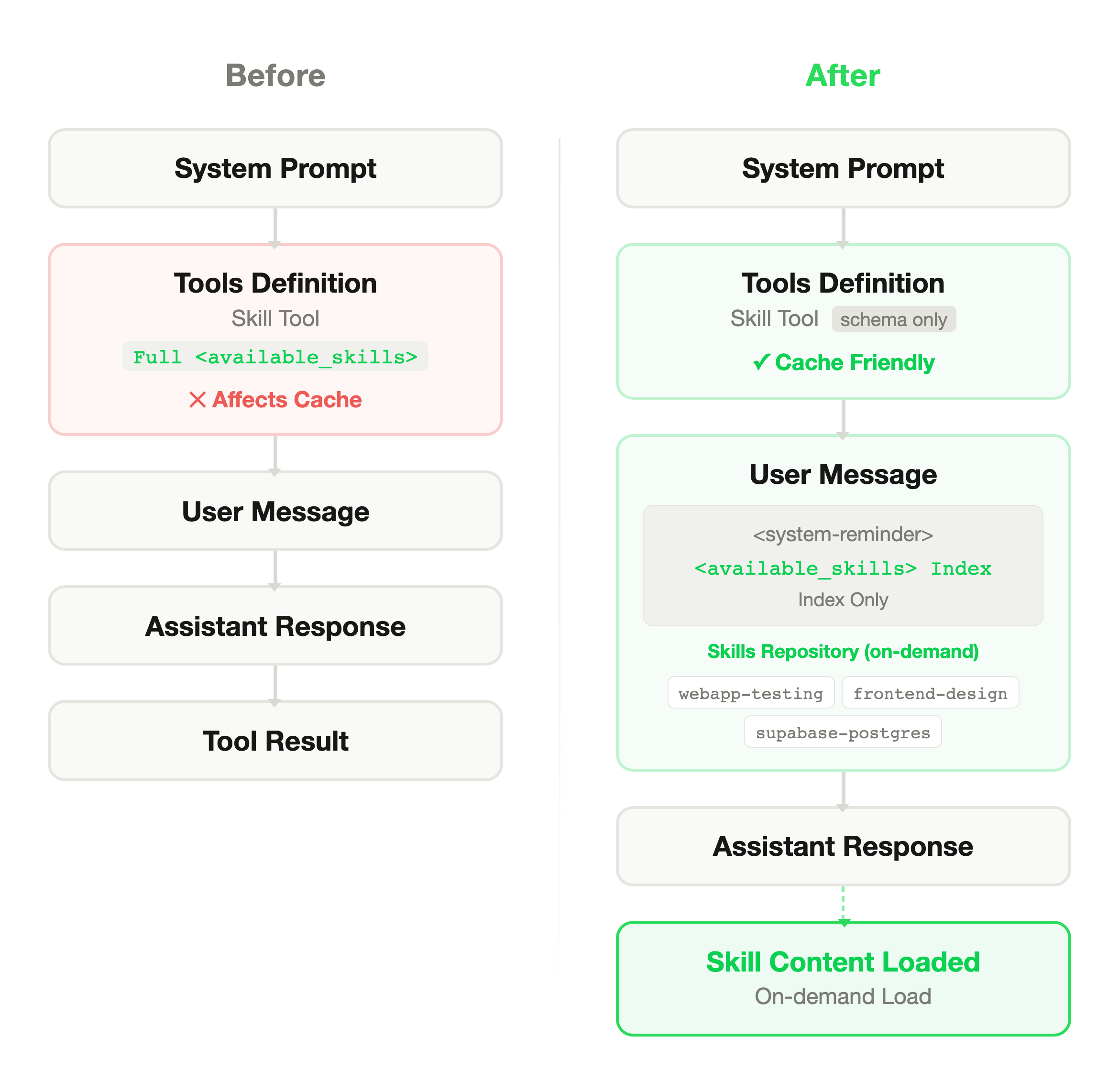
The design had three constraints. The index had to be lightweight (a new context burden would defeat the point). One-line descriptions had to be accurate enough for correct matching. And the injection mechanism had to preserve Prompt Cache hit rates, which meant leaving the Tools Definition structure unchanged and injecting dynamically via System Reminder instead.
This assumes the model is smart enough to judge whether it needs a Skill without seeing the full definition. Tell it "there's a tool called X that does Y," and it can decide whether to load it at the right moment.
Skill invocation rate went from under 50% to above 90%. Total token consumption dropped by roughly 12%.
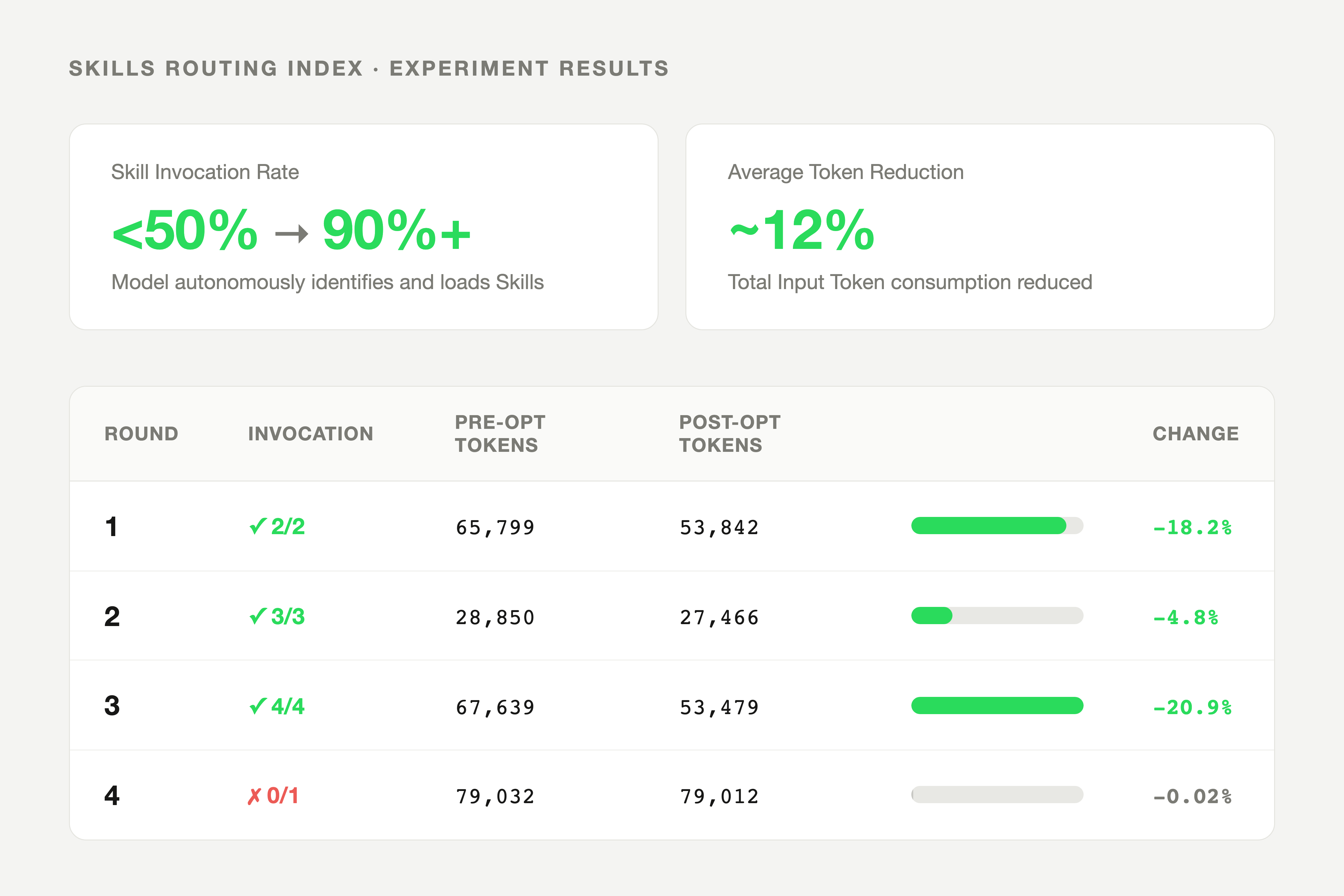
| Round | Invoked / Should Invoke | Pre-optimization Input Tokens | Post-optimization Input Tokens | Reduction |
|---|---|---|---|---|
| 1 | 2/2 | 65,799 | 53,842 | 18.2% |
| 2 | 3/3 | 28,850 | 27,466 | 4.8% |
| 3 | 4/4 | 67,639 | 53,479 | 20.9% |
| 4 | 0/1 | 79,032 | 79,012 | 0.02% |
Round 4's failure is worth noting: the Skill the task required had low similarity to its index description, so the model failed to identify it. Index quality turned out to matter more than we expected. Get the one-line description wrong and on-demand loading never triggers.
The Skills experience validated a pattern: a lightweight index plus on-demand loading can compress context while preserving functionality.
MCP tools face the same problem. Could we apply the same approach?
Technically yes, but MCP adds a layer of complexity. Skills are essentially text instructions with forgiving formatting. MCP tools require precise JSON Schema for correct invocation: parameter names, types, nested structures. A missing field or type mismatch causes the call to fail. So MCP's dynamic loading demands higher "injection precision."
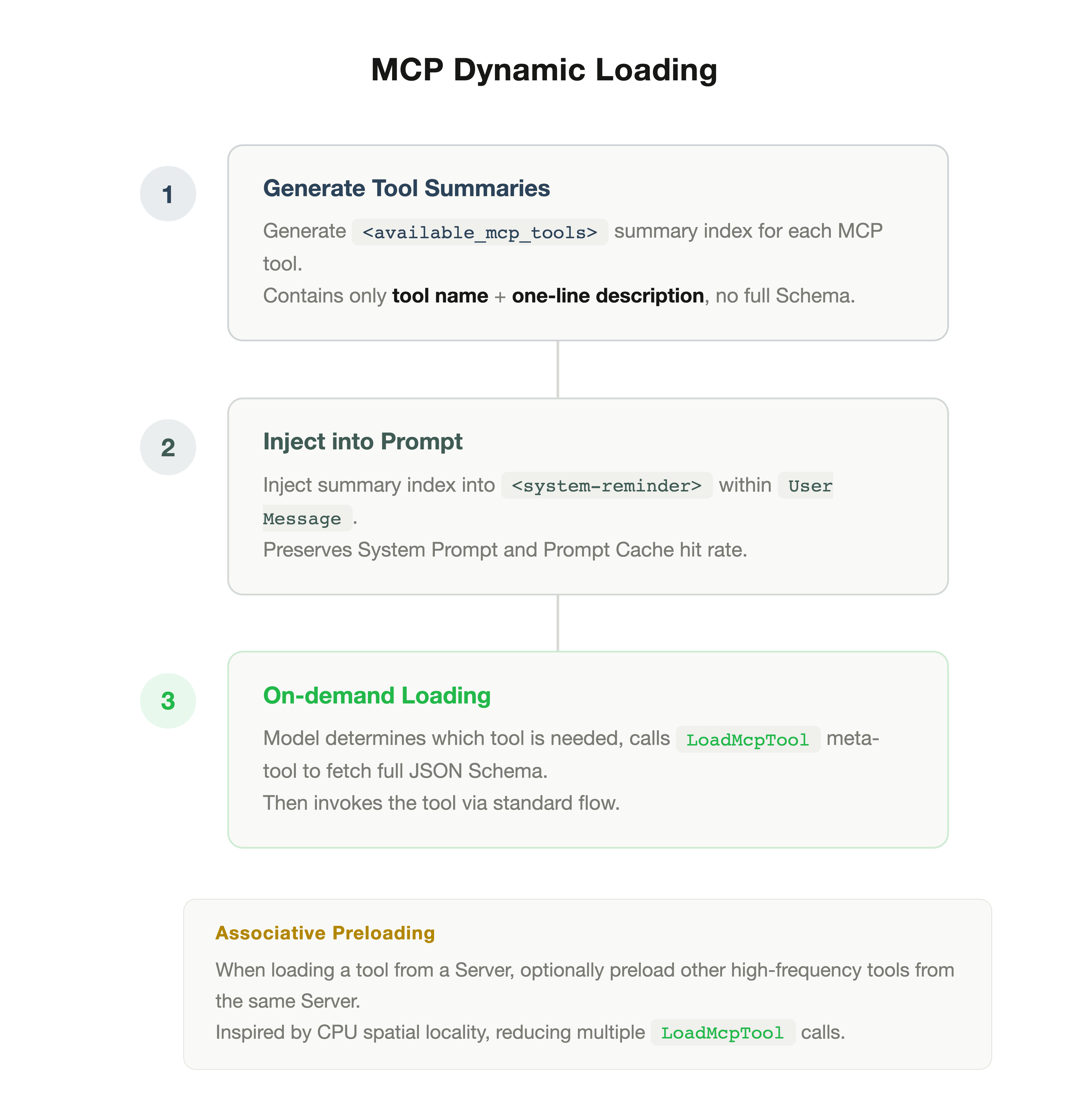
Our design uses two phases.
Phase 1 is discovery: the System Reminder shows only MCP tool summary indexes (name + one-line description), without full Schema. This mirrors the Skills approach.
Phase 2 is injection: when the model determines it needs a specific MCP tool, it calls a meta-tool called LoadMcpTool, which dynamically injects that tool's full JSON Schema into the current context. After injection, the model can invoke the tool through the standard flow.
LoadMcpTool is a lightweight tool whose Schema is always present in the context (consuming only a few dozen tokens). It is the gateway: the model uses it to "pull" other tools' full definitions.
The result: the initial context contains only summary indexes, full Schema is injected when needed without simplification, and the model always invokes tools from complete definitions.
A practical issue: MCP Servers typically contain a group of related tools. For example, browser-use Server includes click, fill, navigate, screenshot, and over a dozen other tools. If a user's task involves browser operations, the model likely needs several of them. Loading each individually via LoadMcpTool adds multi-round call overhead.
Borrowing from spatial locality in CPU caches, we added an optimization: when the model loads any tool from a Server, it can optionally preload other high-frequency tools from that same Server.
In practice, a browser task that would have triggered several separate LoadMcpTool calls now typically triggers one.
Test environment: 67 MCP tools. Task: build a website and test it with browser tools.
Initial context fell by 32%, overall cost by 10.4%, and tool call success rate stayed at 100%.
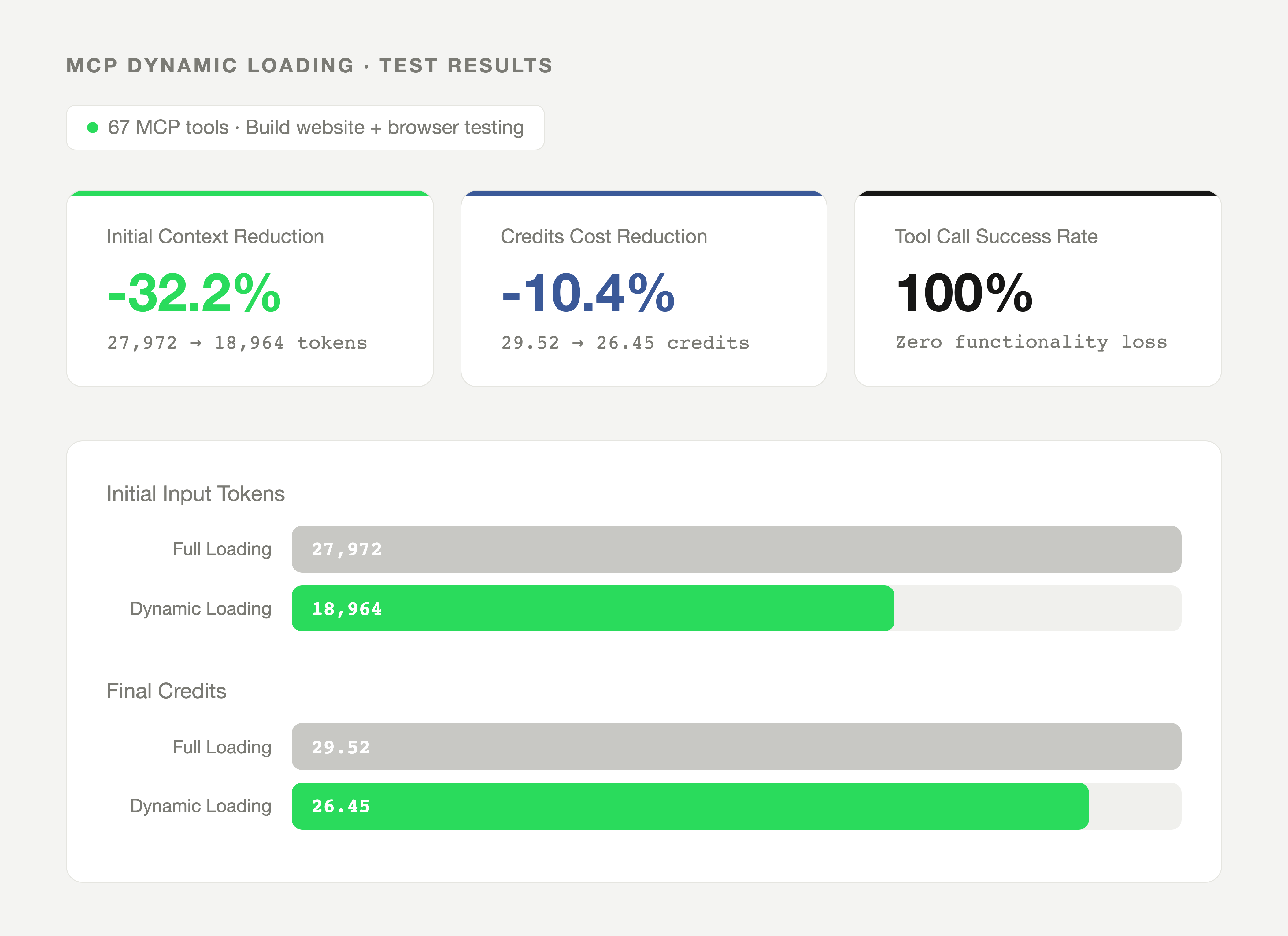
| Metric | Full Loading | Dynamic Loading | Change |
|---|---|---|---|
| Initial Input Tokens | 27,972 | 18,964 | 32.2% |
| Final Credits Consumed | 29.52 | 26.45 | 10.4% |
| MCP Tool Call Success Rate | 100% | 100% | No change |
After building both optimizations, we stepped back and noticed they were the same solution.
In 1984, IBM researcher John Carroll described Progressive Disclosure: don't show users everything at once. Expose common features first; reveal the rest when they need it. Word's collapsible menus, Notion's / command, iOS's nested settings are all this principle applied to UI.
We'd done the same thing to a context window. A lightweight index up front so the model knows what's available. Full definitions loaded only when needed. The "user" is an AI model and the "interface" is context, but the design problem is identical: feature richness versus cognitive load.
Carroll was solving this in 1984 with command menus. We were solving it forty years later with JSON Schema.
If you're on Qoder Quest 1.0, this is already live and requires no settings changes. The biggest difference will be visible if you have MCP Servers mounted: tool definitions that ate context every turn now only load when needed. Skills also invoke automatically, so you no longer need to trigger them manually with /skills.
These patterns apply beyond Quest. If you're building AI agents:
The 93.5% figure in the user report surprised us too. If you run the same breakdown on your own agent setup, the token distribution is usually the fastest way to find what's eating context.
Quest Remote: Delegate Tasks to Cloud as Effortlessly as Sending an Email
Engineering Knowledge Engine: The Knowledge Layer Behind Harness Engineering

1,495 posts | 509 followers
FollowApsaraDB - July 22, 2026
Alibaba Cloud Native Community - November 24, 2025
Alibaba Cloud Native Community - April 16, 2026
Alibaba Cloud Native Community - July 1, 2026
Alibaba Cloud Native Community - January 15, 2026
Alibaba Cloud Community - July 31, 2026
1,495 posts | 509 followers
Follow Token Plan
Build more, spend less. One plan, every modality.
Learn More
Alibaba Cloud Model Studio
A one-stop generative AI platform to build intelligent applications that understand your business, based on Qwen model series such as Qwen-Max and other popular models
Learn More AgentBay
Multimodal cloud-based operating environment and expert agent platform, supporting automation and remote control across browsers, desktops, mobile devices, and code.
Learn More Qwen
Qwen
Full-range, open-source, multimodal, and multi-functional
Learn MoreMore Posts by Alibaba Cloud Community

