Experts Mode is an engineering-oriented AI workflow built on task decomposition, role specialization, and coordinated execution. A Team Lead aligns on the goal, plans the approach, and coordinates the overall process, while specialized SWE Agents take on different parts of the work, such as design, implementation, testing, issue fixing, and quality review.
Rather than relying on a single execution path, Experts Mode turns development into a more structured collaborative process. Its goal is not just to generate code, but to help AI move steadily toward a clear objective and deliver more complete, practical results.
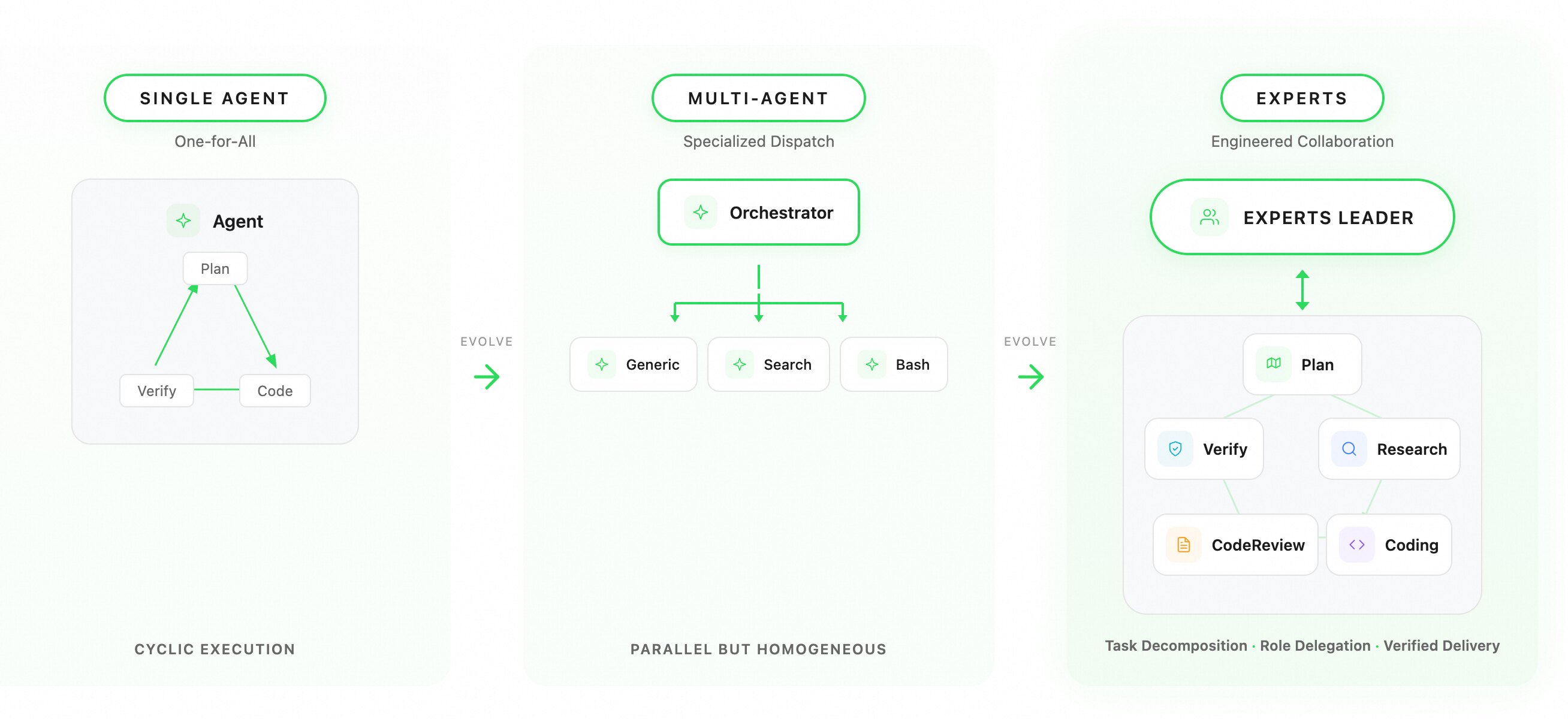
In real engineering work, development tasks often involve multiple stages, from requirements and design to implementation, testing, and final validation. When work spans multiple modules, steps, or areas of expertise, a single execution path often struggles to balance efficiency, quality, and consistency.
Experts Mode tends to perform especially well in scenarios such as:
The value of Experts Mode is not simply having more executors. It comes from a more systematic way of organizing work.
By breaking tasks down more clearly, assigning roles more appropriately, and defining execution boundaries more explicitly, the system can keep complex work collaborative, verifiable, and aligned with the overall goal.
In practice, this leads to:
Experts Mode improves not just one step, but the overall path from task start to final delivery.
Experts Mode adopts an Experts Leader + expert team architecture, similar to the division of responsibilities between a Tech Lead and engineers across different domains: the Leader makes unified decisions and maintains a global view, while each expert focuses on execution within their own area of responsibility.
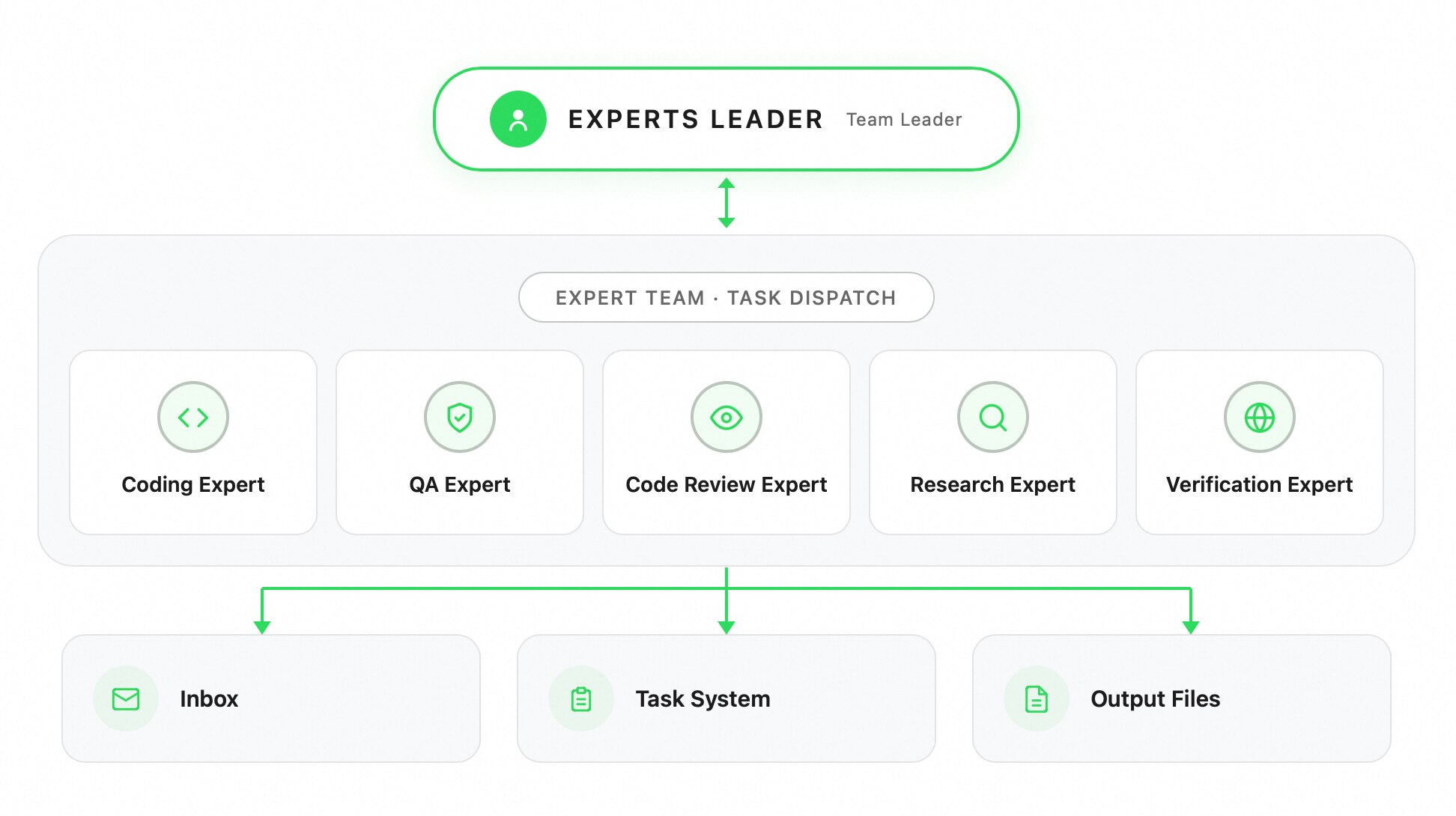
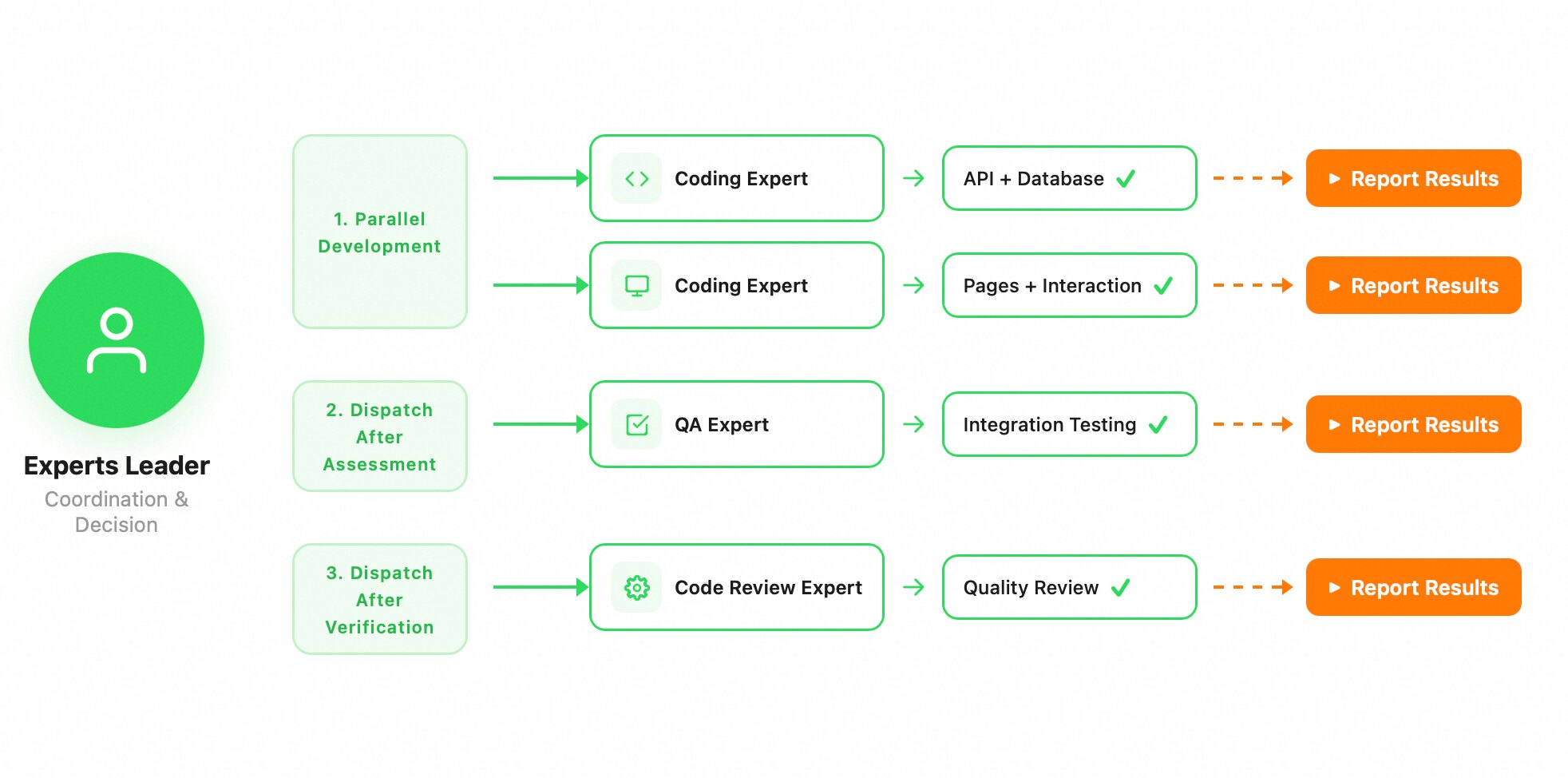
The Experts Leader is responsible for coordination, not implementation. Its role is to break down requirements, assign tasks, track progress, and consolidate results.
Tasks can declare dependencies and form a lightweight DAG. For example, API implementation and UI development can run in parallel, while integration testing is unlocked only after the frontend and backend are complete. This allows the Leader to express workflows such as research → parallel development → testing and review, rather than dispatching isolated tasks with no structure.
The system includes five built-in expert types: coding, QA, review, research, and verification. Each expert type has its own toolset, and custom expert types are also supported.
A key design of Experts Mode is that all experts run asynchronously and in parallel by default. Once the Experts Leader dispatches an expert, it returns immediately and can create the next expert right away, allowing multiple experts to start working at the same time.
The Experts Leader serves as the central hub for all information flow. It makes unified decisions and maintains a global view of the task. Experts do not communicate directly with one another; all coordination is routed through the Experts Leader.
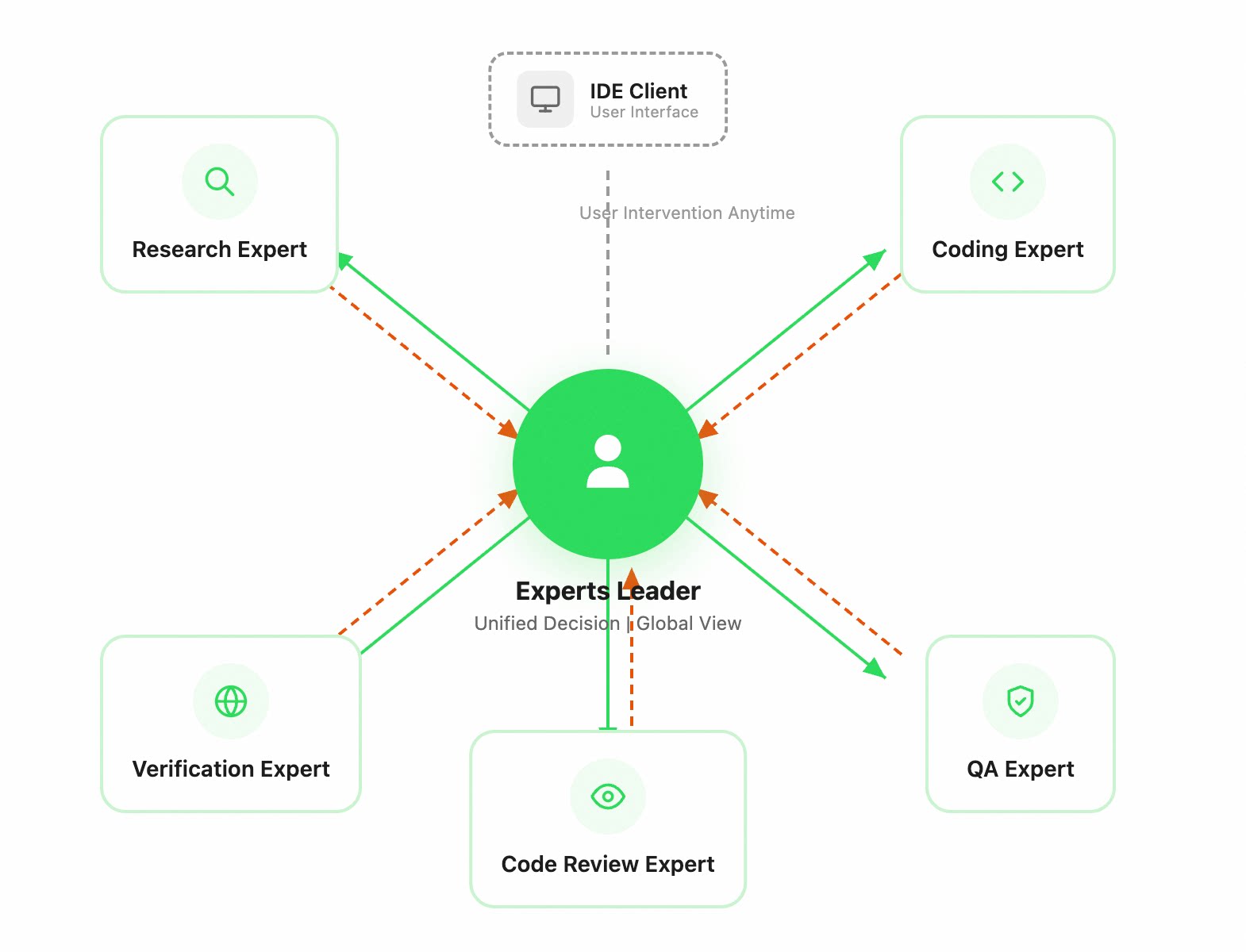
Unrestricted peer-to-peer communication would lead to fragmented information, coordination conflicts, and a rapidly growing state space as more participants join. Using the Leader as the coordination hub avoids these issues. In that sense, it works much like a real engineering team, where technical direction and task progress are aligned through the Tech Lead.
The user is also part of the coordination loop. You can step in at any time while the expert team is running, and the Experts Leader will process that input in the next cycle, adjusting task direction or canceling work that is no longer needed. In this model, your role shifts from driving every step manually to aligning intent, reviewing plans, and validating outcomes together with the Experts Leader, more like leading an experienced engineering team.
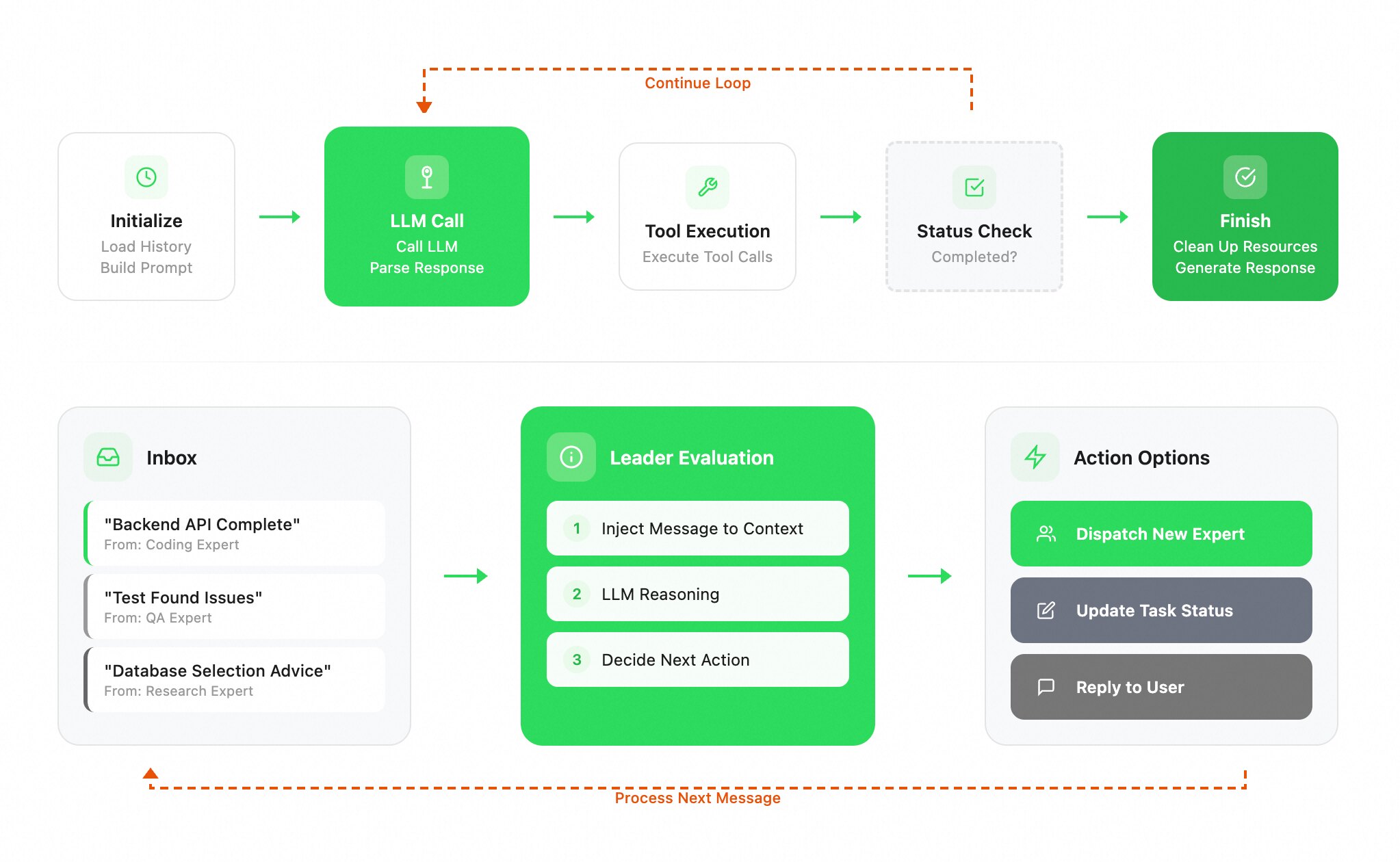
The system maintains a mailbox for the Experts Leader. After completing their work, experts proactively report back through callbacks, and their messages are placed into the mailbox. When idle, the Experts Leader consumes unread messages: it injects context, runs model reasoning, and decides the next action, dispatching new experts, updating task state, or replying to the user. Each message can trigger a new dispatch, so the loop of report → evaluate → act continues until all tasks are complete.
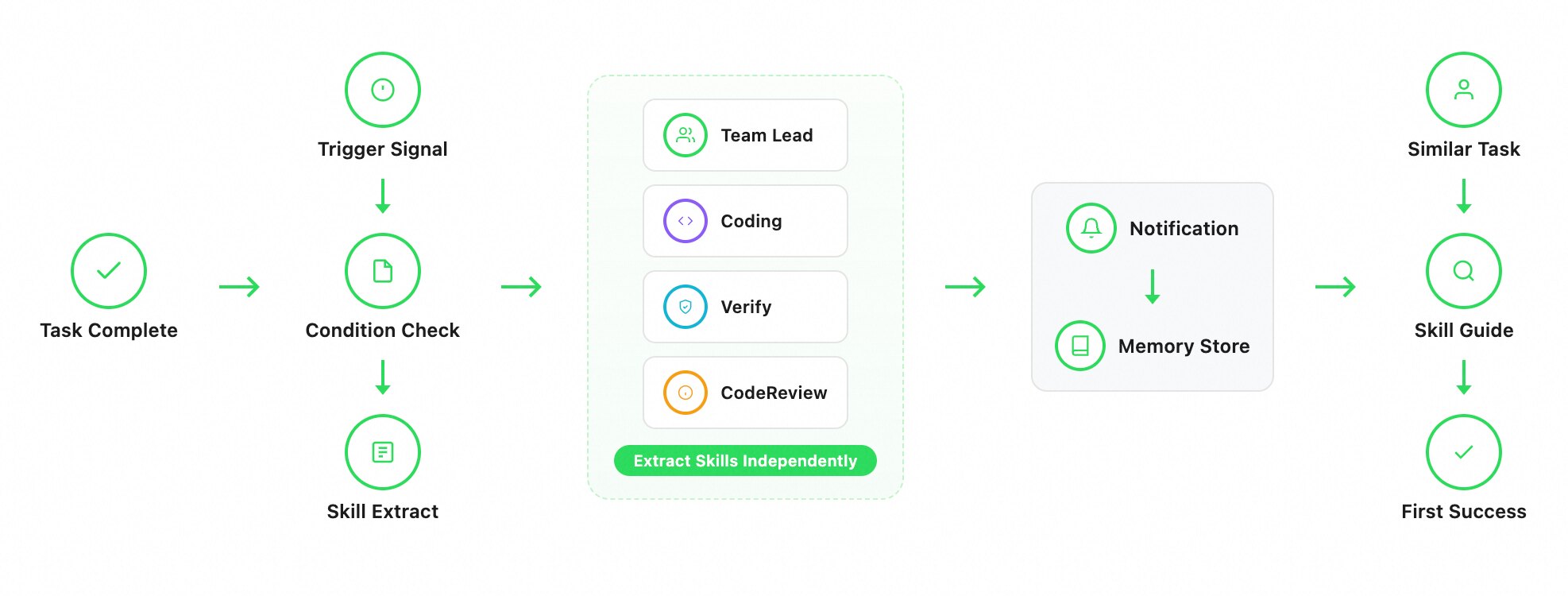
After task completion, the system detects signals such as corrections, failures, or user instruction, and extracts reusable skills under defined conditions. The primary agent and specialized sub-agents independently capture domain-specific skills from their own work.
These skills are stored as persistent memory and recalled automatically when similar tasks appear, where they are injected into the context to guide execution.
This forms a closed learning loop: complete a task, extract reusable skills, store them in memory, and apply them in future runs.
| Expert Name | Use Cases | Core Technology & Data |
|---|---|---|
| Research Expert | Technology selection for new projects; Root cause analysis for production issues; Competitive analysis and industry research; Codebase impact assessment; Dependency upgrade risk evaluation | Integrates semantic search, code search, knowledge graphs, Wiki semantic knowledge, and web search capabilities. Compared to mainstream industry solutions, code search F-Score improved by 21%. |
| Coding Expert | New feature module development; Emergency production bug fixes; Legacy code refactoring and optimization; API development and integration; Database modeling and migration | Combines the Context Engine, RepoWiki, and other core capabilities to achieve top-tier performance in the coding domain. Security-wise, it pioneered support for cross-platform sandboxing (Mac, Linux, Windows) to ensure code and data security. |
| QA Expert (Verify) | Regression verification after feature changes; Pre-commit quality gate checks; Functional integrity validation after refactoring; Requirement acceptance and feature verification; Pre-build and pre-deployment checks | Change-aware precise targeting; multi-dimensional checks (functionality/standards/types/testing/compilation, etc.); automatic collection of verification evidence. |
| Code Review Expert | PR/MR code review; Core logic change risk assessment; Security vulnerability and performance issue detection; Team coding standards enforcement; Architecture rationality review | Driven by context engineering; multi-dimensional review (architecture/logic/security/performance/concurrency/error handling, etc.); high recall with low false positives. Ranked Top 2 in the industry based on open-source evaluation benchmarks, outperforming Cursor, Codex, and other products.* |
| Browser Expert | Frontend page interaction acceptance; End-to-end form flow testing; Page rendering and visual regression; Core user flows like registration/login; Cross-browser compatibility verification | Through tool optimization, intelligent model routing, and sub-agent scheduling technologies, it saves 60% Token cost compared to Playwright-MCP for the same tasks. |
We systematically evaluated Qoder Experts Mode on an internal benchmark of complex engineering tasks. The benchmark covers typical scenarios such as full-stack development, cross-language refactoring, and feature implementation in existing codebases, with a focus on the delivery capability of a multi-agent architecture in real-world engineering tasks.
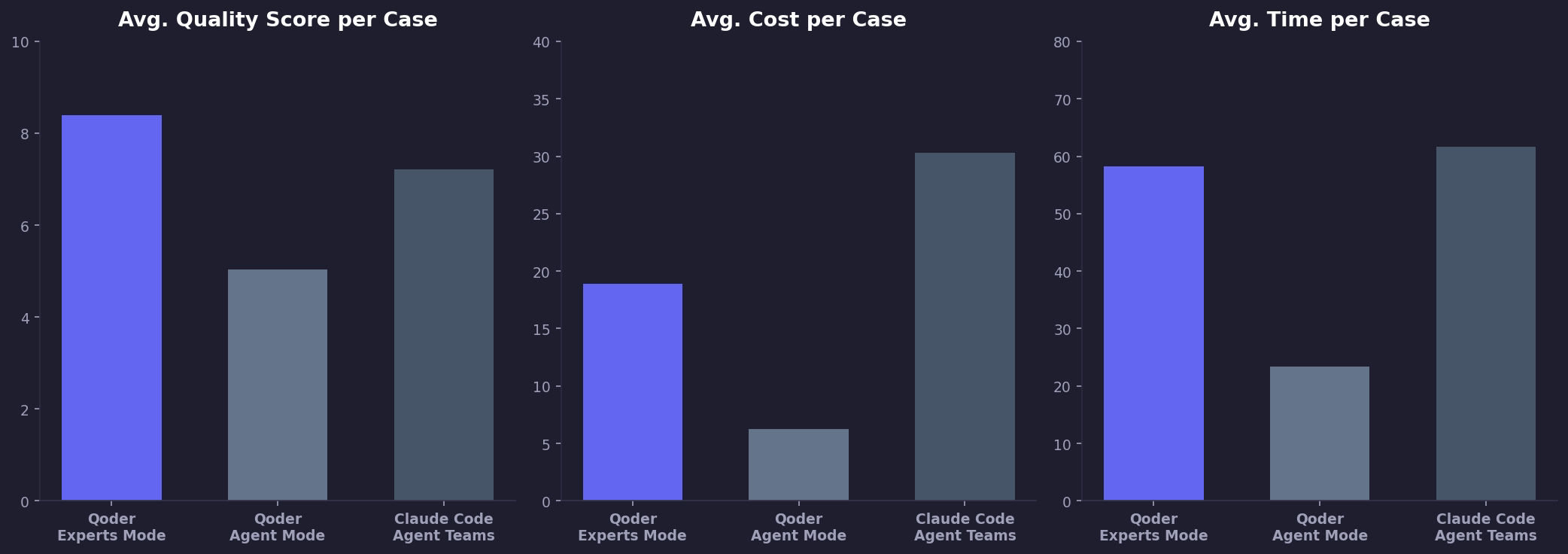
Key Takeaways:
In terms of quality, we evaluated results across four dimensions: usability, completeness, UI experience, and engineering quality.
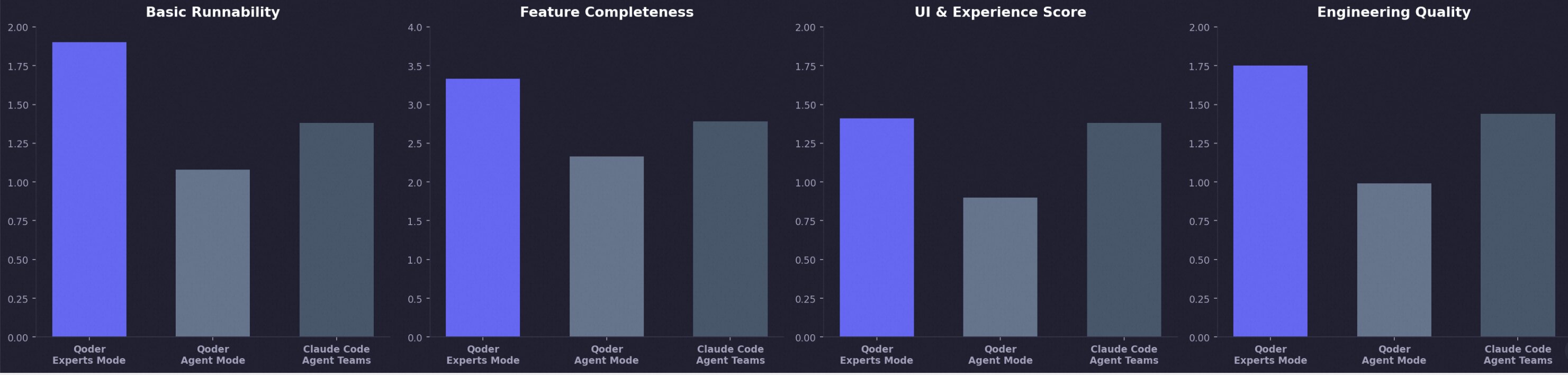
Qoder Experts Mode performs better across all four:
These gains come from several architectural choices in Experts Mode: asynchronous parallel scheduling, centralized coordination through the Leader, bidirectional message passing, and specialized experts for research, coding, verification, review, and browser operations. The result is not just stronger point capabilities, but more stable quality and more controllable delivery on complex tasks.
The data comes from Qoder’s internal benchmark for complex tasks. All tests used the same model, and costs were calculated using official API pricing.
/canvas: Beyond Better Output, Toward the Next Generation of Collaboration

1,495 posts | 509 followers
FollowAlibaba Cloud Community - July 29, 2026
Alibaba Cloud Community - August 6, 2026
Alibaba Cloud Community - July 17, 2026
Alibaba Cloud Community - August 6, 2026
Alibaba Cloud Community - June 16, 2026
Alibaba Cloud Community - July 31, 2026
1,495 posts | 509 followers
Follow Token Plan
Build more, spend less. One plan, every modality.
Learn More
Alibaba Cloud Model Studio
A one-stop generative AI platform to build intelligent applications that understand your business, based on Qwen model series such as Qwen-Max and other popular models
Learn More Qwen
Qwen
Full-range, open-source, multimodal, and multi-functional
Learn More AI Acceleration Solution
Accelerate AI-driven business and AI model training and inference with Alibaba Cloud GPU technology
Learn MoreMore Posts by Alibaba Cloud Community

