本文介紹ApsaraVideo for Live服務端Java SDK的使用方法和範例程式碼。
前提條件
建立RAM使用者並授權。訪問ApsaraVideo for LiveAPI需要RAM使用者擁有對應的許可權,具體授權操作可參見建立RAM使用者並授權。
已擷取存取金鑰(AccessKey)。服務端介面通過存取金鑰進行身分識別驗證,為RAM使用者產生存取金鑰請參見建立AccessKey。
已完成Java 環境配置,需要Java 1.8及以上版本。
使用SDK
安裝
此處以Maven安裝方式進行舉例,在專案pom.xml檔案中引入SDK:
<dependency>
  <groupId>com.aliyun</groupId>
  <artifactId>alibabacloud-live20161101</artifactId>
  <version>2.0.1</version>
</dependency>
使用
以下範例程式碼實現了使用SDK查詢直播截圖配置的功能。
// This file is auto-generated, don't edit it. Thanks.
package demo;

import com.aliyun.auth.credentials.Credential;
import com.aliyun.auth.credentials.provider.StaticCredentialProvider;
import com.aliyun.core.http.HttpClient;
import com.aliyun.core.http.HttpMethod;
import com.aliyun.core.http.ProxyOptions;
import com.aliyun.httpcomponent.httpclient.ApacheAsyncHttpClientBuilder;
import com.aliyun.sdk.service.live20161101.models.*;
import com.aliyun.sdk.service.live20161101.*;
import com.google.gson.Gson;
import darabonba.core.RequestConfiguration;
import darabonba.core.client.ClientOverrideConfiguration;
import darabonba.core.utils.CommonUtil;
import darabonba.core.TeaPair;

//import javax.net.ssl.KeyManager;
//import javax.net.ssl.X509TrustManager;
import java.net.InetSocketAddress;
import java.time.Duration;
import java.util.*;
import java.util.concurrent.CompletableFuture;
import java.io.*;

public class DescribeLiveSnapshotConfig {
    public static void main(String[] args) throws Exception {

        // HttpClient Configuration
        /*HttpClient httpClient = new ApacheAsyncHttpClientBuilder()
                .connectionTimeout(Duration.ofSeconds(10)) // Set the connection timeout time, the default is 10 seconds
                .responseTimeout(Duration.ofSeconds(10)) // Set the response timeout time, the default is 20 seconds
                .maxConnections(128) // Set the connection pool size
                .maxIdleTimeOut(Duration.ofSeconds(50)) // Set the connection pool timeout, the default is 30 seconds
                // Configure the proxy
                .proxy(new ProxyOptions(ProxyOptions.Type.HTTP, new InetSocketAddress("<YOUR-PROXY-HOSTNAME>", 9001))
                        .setCredentials("<YOUR-PROXY-USERNAME>", "<YOUR-PROXY-PASSWORD>"))
                // If it is an https connection, you need to configure the certificate, or ignore the certificate(.ignoreSSL(true))
                .x509TrustManagers(new X509TrustManager[]{})
                .keyManagers(new KeyManager[]{})
                .ignoreSSL(false)
                .build();*/

        // Configure Credentials authentication information, including ak, secret, token
        StaticCredentialProvider provider = StaticCredentialProvider.create(Credential.builder()
                // Please ensure that the environment variables ALIBABA_CLOUD_ACCESS_KEY_ID and ALIBABA_CLOUD_ACCESS_KEY_SECRET are set.
                .accessKeyId(System.getenv("ALIBABA_CLOUD_ACCESS_KEY_ID"))
                .accessKeySecret(System.getenv("ALIBABA_CLOUD_ACCESS_KEY_SECRET"))
                //.securityToken(System.getenv("ALIBABA_CLOUD_SECURITY_TOKEN")) // use STS token
                .build());

        // Configure the Client
        AsyncClient client = AsyncClient.builder()
                .region("<Your RegionId>") // Region ID
                //.httpClient(httpClient) // Use the configured HttpClient, otherwise use the default HttpClient (Apache HttpClient)
                .credentialsProvider(provider)
                //.serviceConfiguration(Configuration.create()) // Service-level configuration
                // Client-level configuration rewrite, can set Endpoint, Http request parameters, etc.
                .overrideConfiguration(
                        ClientOverrideConfiguration.create()
                                  // Endpoint 請參考 https://api.aliyun.com/product/live
                                .setEndpointOverride("live.aliyuncs.com")
                        //.setConnectTimeout(Duration.ofSeconds(30))
                )
                .build();

        // Parameter settings for API request
        DescribeLiveSnapshotConfigRequest describeLiveSnapshotConfigRequest = DescribeLiveSnapshotConfigRequest.builder()
                .domainName("<Your DomainName>")
                .appName("<Your AppName>")
                // Request-level configuration rewrite, can set Http request parameters, etc.
                // .requestConfiguration(RequestConfiguration.create().setHttpHeaders(new HttpHeaders()))
                .build();

        // Asynchronously get the return value of the API request
        CompletableFuture<DescribeLiveSnapshotConfigResponse> response = client.describeLiveSnapshotConfig(describeLiveSnapshotConfigRequest);
        // Synchronously get the return value of the API request
        DescribeLiveSnapshotConfigResponse resp = response.get();
        System.out.println(new Gson().toJson(resp));
        // Asynchronous processing of return values
        /*response.thenAccept(resp -> {
            System.out.println(new Gson().toJson(resp));
        }).exceptionally(throwable -> { // Handling exceptions
            System.out.println(throwable.getMessage());
            return null;
        });*/

        // Finally, close the client
        client.close();
    }

}您可以使用該範例程式碼進行測試,測試時需將“<>”內容替換成實際使用的值。
<regionId>為地區ID,地區ID擷取可參見服務存取點。
<ALIBABA_CLOUD_ACCESS_KEY_ID>與<ALIBABA_CLOUD_ACCESS_KEY_SECRET>為存取金鑰,如果您還未擁有存取金鑰,請參見本文檔前提條件相關內容。
DescribeLiveSnapshotConfigRequest為查詢截圖配置對應請求類。
DescribeLiveSnapshotConfigResponse為查詢截圖配置對應響應類。
請求參數以及響應內容說明可參見API查詢網域名稱下的截圖配置。
調用API有QPS限制,關於API的QPS限制說明請參見流控資訊。
在以上樣本中DescribeLiveSnapshotConfigResponse為還原序列化後的響應對象,某些時候您可能需要直接擷取響應結果HttpResponse,不需要進行還原序列化,在此情況下只需更換調用方法即可。
HttpResponse httpResponse=client.doAction(describeLiveStreamSnapshotInfoRequest);
int status=httpResponse.getStatus();
使用說明:
當HTTP status大於等於200且小於300時,表示API調用成功。
當HTTP status大於等於300且小於500時,服務端SDK會提示ClientException,表示用戶端錯誤。
當HTTP status大於等於500時,服務端SDK會提示ServerException,表示伺服器端錯誤。
client.getAcsResponse與client.doAction兩個方法都可以使用,您可以根據您業務的實際情況採用。
在使用ApsaraVideo for LiveSDK時遵循API加Request為API請求類,API加Response為API響應類。
此處列舉幾個常用API。
API | 請求類 | 響應類 |
DescribeLiveSnapshotConfig | DescribeLiveSnapshotConfig | |
AddLiveAppRecordConfig | AddLiveAppRecordConfig | |
DescribeLiveRecordConfig | DescribeLiveRecordConfig | |
AddLiveStreamTranscode | AddLiveStreamTranscode | |
DescribeLiveStreamTranscodeInfo | DescribeLiveStreamTranscodeInfo | |
BatchSetLiveDomainConfigs | BatchSetLiveDomainConfigs | |
DescribeLiveDomainConfigs | DescribeLiveDomainConfigs | |
更多API可參見API概覽。 | ||
資源控制
在您查看API的過程中,可能已留意到API有關授權資訊的說明,比如在添加直播截圖配置API中,有以下關於授權資訊的內容。
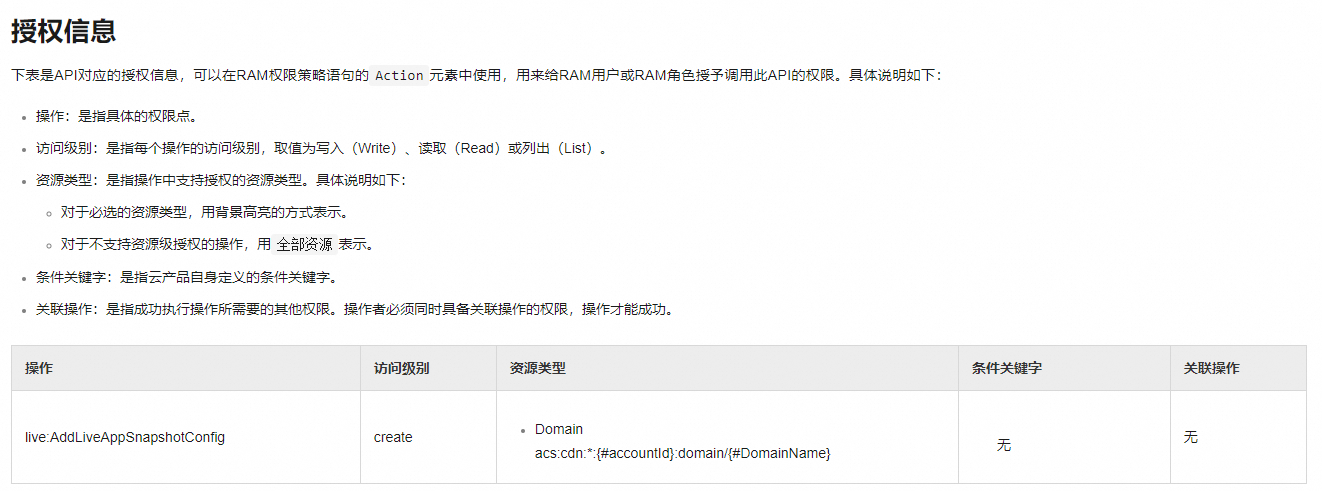
在為RAM使用者授權的過程中,您已為RAM使用者授予了API的存取權限。但有些時候您可能需要更細的許可權控制,比如調用同一個API,RAM使用者A只能操作DomainA網域名稱,RAM使用者B只能操作DomainB網域名稱。如果您有這樣的業務需求就可以通過資源控制進行實現,實現資源控制授權可參考文檔自訂授權。
各API支援的資源控制說明請參見API授權資訊總覽。