本文介紹如何使用Java在Maven專案中通過JDBC串連雲資料庫ClickHouse叢集。
前提條件
已將應用程式所在伺服器IP地址添加到雲資料庫ClickHouse的白名單中。如何添加白名單,請參見設定白名單。
說明如果您的應用程式所在伺服器與雲資料庫ClickHouse不在同一VPC下,您需解決網路問題。具體操作,請參見如何解決目的地組群與資料來源網路互連問題?。您也可以申請外網地址,使用外網地址連結。如何申請外網地址,請參見申請和釋放外網地址。
已建立資料庫帳號和密碼。具體操作,請參見建立帳號。
操作步驟
以下步驟為自行搭建Maven專案或在已有Maven專案基礎上,通過JDBC串連雲資料庫ClickHouse叢集的流程。您也可以下載完整專案樣本。
步驟一:建立Maven專案
如果您已有Maven專案,跳過此步驟。
使用Eclipse或其他IDE工具建立Maven專案。
步驟二:引入ClickHouse驅動依賴包
在pom.xml檔案中,寫入以下配置項。
<dependency>
    <groupId>com.zaxxer</groupId>
    <artifactId>HikariCP</artifactId>
    <version>3.4.5</version>
</dependency>
<dependency>
    <groupId>com.clickhouse</groupId>
    <artifactId>clickhouse-jdbc</artifactId>
    <version>0.4.6</version>
</dependency>
<dependency>
    <groupId>org.lz4</groupId>
    <artifactId>lz4-java</artifactId>
    <version>1.8.0</version>
</dependency>
<dependency>
    <groupId>org.apache.httpcomponents.client5</groupId>
    <artifactId>httpclient5</artifactId>
    <version>5.2.1</version>
</dependency>
步驟三:編寫應用程式代碼
代碼整體流程
以下為使用JDBC串連並使用雲資料庫ClickHouse叢集的主要步驟。
相關參數包括叢集資訊以及其他參數,具體說明如下。
參數 | 描述 | 樣本 |
YOUR_INSTANCE_PROTOCOL | 連線協定。固定為“http”。 | http |
YOUR_INSTANCE_ENDPOINT | 串連地址。 格式: |
|
DATABASE | 串連資料庫。 | testDB |
YOUR_INSTANCE_USER | 資料庫帳號。 | test |
YOUR_INSTANCE_PASSWORD | 資料庫帳號密碼。 | Password**** |
INSERT_BATCH_SIZE | 一批插入的資料行數。單位:條。 | 10000 |
INSERT_BATCH_NUM | 每個線程插入的批次數量。單位:批。 | 10 |
ENTERPRISE | 建表引擎的選擇。不同的叢集版本在建表時所採用的引擎各不相同。
| true |
INSERT_OPTIMIZE_LEVEL | 插入效能的最佳化層級。取值為1、2、3。 三者插入速度排名為:3>2>1。 | 3 |
完整範例程式碼
以下樣本為在企業版叢集的default庫下,建立test表,並發插入資料,每批資料10000條,共10批。
運行前,您需根據需求修改相關參數,適用於您的業務情境。參數說明,請參見上述代碼整體流程中的相關參數。
此代碼主邏輯以及閱讀入口為main方法。
package com.aliyun;

import com.clickhouse.jdbc.ClickHouseDataSource;
import com.clickhouse.data.ClickHouseOutputStream;
import com.clickhouse.data.ClickHouseWriter;
import com.zaxxer.hikari.HikariConfig;
import com.zaxxer.hikari.HikariDataSource;

import java.io.IOException;
import java.nio.ByteBuffer;
import java.nio.ByteOrder;
import java.sql.Connection;
import java.sql.PreparedStatement;
import java.sql.ResultSet;
import java.sql.Statement;
import java.util.Properties;
import java.util.concurrent.CountDownLatch;
import java.util.concurrent.ExecutorService;
import java.util.concurrent.Executors;

public class Main {
    private final static String YOUR_INSTANCE_PROTOCOL = "http";
    private final static String YOUR_INSTANCE_ENDPOINT = "VPC_ENDPOINT:8123"; // YOUR CONFIG HERE
    private final static String DATABASE = "default"; // YOUR CONFIG HERE
    private final static String YOUR_INSTANCE_USER = "USER"; // YOUR CONFIG HERE
    private final static String YOUR_INSTANCE_PASSWORD = "PASSWORD"; // YOUR CONFIG HERE
    private final static String JDBC_URL = "jdbc:clickhouse:%s://%s/%s";
    private final static Integer INSERT_BATCH_SIZE = 10000;
    private final static Integer INSERT_BATCH_NUM = 10;
    private final static boolean ENTERPRISE = true; // YOUR CONFIG HERE
    private final static Integer INSERT_OPTIMIZE_LEVEL = 3;

    public static void main(String[] args) {
        try {
            HikariConfig conf = buildHikariDataSource();
            try(HikariDataSource ds = new HikariDataSource(conf)) {
                // create table
                Connection conn = ds.getConnection();
                createTable(conn);
                conn.close();

                // concurrently insert data
                int concurrentNum = 5;
                CountDownLatch countDownLatch = new CountDownLatch(concurrentNum);
                ExecutorService executorService = Executors.newFixedThreadPool(concurrentNum);
                for (int i = 0; i < concurrentNum; i++) {
                    executorService.submit(() -> {
                        System.out.printf("[%d] Thread start inserting\n", Thread.currentThread().getId());
                        try(Connection connection = ds.getConnection()) {
                            batchInsert(connection, INSERT_OPTIMIZE_LEVEL);
                        } catch (Exception e) {
                            e.printStackTrace();
                        } finally {
                            System.out.printf("[%d] Thread stop inserting\n", Thread.currentThread().getId());
                            countDownLatch.countDown();
                        }
                    });
                }
                // wait for all threads to finish
                countDownLatch.await();

                // count table
                conn = ds.getConnection();
                count(conn);
                conn.close();
            }
        } catch (Exception e) {
            e.printStackTrace();
        }
    }

    /**
     * generate JDBC URL
     * @param protocol support http, https, grpc
     * @param endpoint endpoint
     * @return JDBC URL
     */
    public static String getJdbcUrl(String protocol, String endpoint, String database) {
        return String.format(JDBC_URL, protocol, endpoint, database);
    }

    /**
     * build HikariDataSource
     * @return HikariConfig
     */
    public static HikariConfig buildHikariDataSource() throws Exception {
        HikariConfig conf = new HikariConfig();

        // property
        Properties properties = new Properties();
        /// socket keepalive
        properties.setProperty("socket_keepalive", "true");
        properties.setProperty("http_connection_provider", "APACHE_HTTP_CLIENT");
        /// socket timeout
        properties.setProperty("socket_timeout", "120000");
        /// timezone
        properties.setProperty("use_server_time_zone", "true");

        // datasource config
        conf.setDataSource(new ClickHouseDataSource(getJdbcUrl(YOUR_INSTANCE_PROTOCOL, YOUR_INSTANCE_ENDPOINT, DATABASE), properties));
        conf.setUsername(YOUR_INSTANCE_USER);
        conf.setPassword(YOUR_INSTANCE_PASSWORD);

        // connection pool config
        conf.setMaximumPoolSize(10);
        conf.setMinimumIdle(5);
        conf.setIdleTimeout(30000);
        conf.setMaxLifetime(60000);
        conf.setConnectionTimeout(30000);
        conf.setPoolName("HikariPool");

        return conf;
    }

    /**
     * create table
     * @param conn ClickHouse connection
     * @throws Exception
     */
    public static void createTable(Connection conn) throws Exception {
        try(Statement statement = conn.createStatement()) {
            if (ENTERPRISE) {
                statement.execute("CREATE TABLE IF NOT EXISTS `default`.`test` ON CLUSTER default (id Int64, name String) ENGINE = MergeTree() ORDER BY id;");
            } else {
                // create local table
                statement.execute("CREATE TABLE IF NOT EXISTS `default`.`test_local` ON CLUSTER default (id Int64, name String) ENGINE = MergeTree() ORDER BY id;");
                // create distributed table
                statement.execute("CREATE TABLE IF NOT EXISTS `default`.`test` ON CLUSTER default (id Int64, name String) ENGINE = Distributed(default, default, test_local, rand());");
            }
        }
    }

    /**
     * batch insert
     * @param conn ClickHouse connection
     * @param optimizeLevel insert optimize level, 3 is faster than 2, 2 is faster than 1<br/>
     *                      1: insert into `default`.`test` (id, name) values(?, ?) -- with additional query for getting table structure.
     *                         It's portable.<br/>
     *                      2: insert into `default`.`test` select id, name from input('id Int64, name String') -- effectively convert and insert data sent to the server
     *                         with given structure to the table with another structure. It's NOT portable(as it's limited to ClickHouse).<br/>
     *                      3: insert into `default`.`test` format RowBinary -- fastest(close to Java client) with streaming mode but requires manual serialization and it's
     *                         NOT portable(as it's limited to ClickHouse).
     * @throws Exception
     */
    public static void batchInsert(Connection conn, int optimizeLevel) throws Exception {
        PreparedStatement preparedStatement = null;
        try {
            // prepared statement
            switch (optimizeLevel) {
                case 1:
                    preparedStatement = conn.prepareStatement("insert into `default`.`test` (id, name) values(?, ?)");
                    break;
                case 2:
                    preparedStatement = conn.prepareStatement("insert into `default`.`test` select id, name from input('id Int64, name String')");
                    break;
                case 3:
                    preparedStatement = conn.prepareStatement("insert into `default`.`test` format RowBinary");
                    break;
                default:
                    throw new IllegalArgumentException("optimizeLevel must be 1, 2 or 3");
            }

            // insert data
            long randBase = (long) (Math.random() * 1000000); // random number, prevent data duplicate and lost
            for (int i = 0; i < INSERT_BATCH_NUM; i++) {
                long insertStartTime = System.currentTimeMillis();
                switch (optimizeLevel) {
                    case 1:
                    case 2:
                        for (int j = 0; j < INSERT_BATCH_SIZE; j++) {
                            long id = (long) i * INSERT_BATCH_SIZE + j + randBase;
                            preparedStatement.setLong(1, id);
                            preparedStatement.setString(2, "name" + id);
                            preparedStatement.addBatch();
                        }
                        preparedStatement.executeBatch();
                        break;
                    case 3:
                        class MyClickHouseWriter implements ClickHouseWriter {
                            int batchIndex = 0;
                            public MyClickHouseWriter(int batchIndex) {
                                this.batchIndex = batchIndex;
                            }
                            @Override
                            public void write(ClickHouseOutputStream clickHouseOutputStream) throws IOException {
                                for (int j = 0; j < INSERT_BATCH_SIZE; j++) {
                                    long id = (long) batchIndex * INSERT_BATCH_SIZE + j + randBase;
                                    // write id(Int64)
                                    ByteBuffer buffer = ByteBuffer.allocate(Long.BYTES);
                                    buffer.order(ByteOrder.LITTLE_ENDIAN);
                                    buffer.putLong(id);
                                    clickHouseOutputStream.write(buffer.array());
                                    // write name(String)
                                    clickHouseOutputStream.writeUnicodeString("name" + id);
                                }
                            }
                        }
                        preparedStatement.setObject(1, new MyClickHouseWriter(i));
                        preparedStatement.executeUpdate();
                        break;
                }

                System.out.printf("[%d] optimizeLevel=%d, insert batch [%d/%d] success, cost %d ms\n",
                        Thread.currentThread().getId(), optimizeLevel, i + 1, INSERT_BATCH_NUM, System.currentTimeMillis() - insertStartTime);
            }
        } finally {
            if (preparedStatement != null) {
                preparedStatement.close();
            }
        }

    }

    /**
     * count table
     * @param conn ClickHouse connection
     * @throws Exception
     */
    public static void count(Connection conn) throws Exception {
        try(Statement statement = conn.createStatement()) {
            ResultSet resultSet = statement.executeQuery("SELECT count() as cnt FROM `default`.`test`");
            if (resultSet.next()) {
                System.out.printf("table `default`.`test` has %d rows\n", resultSet.getInt("cnt"));
            } else {
                throw new RuntimeException("failed to count table `default`.`test`");
            }
        }
    }
}
完整專案樣本說明
單擊awesome-clickhouse-jdbc-0.2.1.zip下載範例程式碼。
專案環境
Maven版本:3.9.6
JDK版本:1.8
專案結構
以下為此樣本專案的結構以及相關說明。
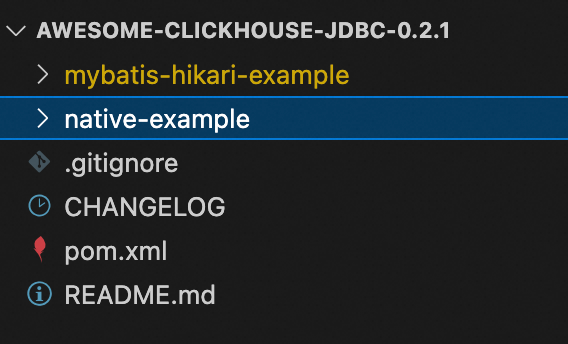
檔案名稱 | 說明 |
awesome-clickhouse-jdbc-0.2.1 | 專案名稱。 |
mybatis-hikari-example | 子專案名稱。
|
native-example | 子專案名稱。
|
使用說明
mybatis-hikari-example
此專案的整體代碼邏輯與native-example一致,閱讀使用時,需注意以下參數以及代碼入口即可。
資料庫參數配置:
src/main/resources/application.yml代碼閱讀以及其他參數配置入口:
src/main/java/com/aliyun/Main.java
參數說明如下。
修改位置 | 參數 | 描述 | 樣本 |
| url | 串連地址。 格式: |
|
username | 資料庫帳號。 | test | |
password | 資料庫帳號密碼。 | Password**** | |
| INSERT_BATCH_SIZE | 需要插入的資料量。單位:條。 | 10000 |
INSERT_BATCH_NUM | 每次插入的條數。單位:條 | 10 | |
ENTERPRISE | 建表引擎的選擇. true:企業版叢集。 false:社區版叢集。 | true | |
INSERT_OPTIMIZE_LEVEL | 插入最佳化層級。取值為1、2、3。 三者插入速度排名為:3>2>1。 | 3 |
native-example
此項的代碼閱讀入口以及所有的參數配置,都在src/main/java/com/aliyun/Main.java中,閱讀詳解,請參見步驟三:編寫應用程式代碼。
相關文檔
如果您還需要使用工具登入叢集,請參見以下文檔:
常見問題
Q:啟動程式後,報連線逾時connect timed out。
A:按照以下步驟排查問題。
檢查白名單:是否將程式所在IP添加至目的地組群的白名單中。如何查看,請參見設定白名單。
檢查網路:
應用程式與目的地組群是否在同一VPC下?
是:使用內網訪問,使用VPC地址串連叢集。
不是:解決網路問題,請參見如何解決目的地組群與資料來源網路互連問題?,或者申請公網,使用公網地址串連叢集。如何申請公網,請參見申請和釋放外網地址。
檢查配置的串連地址:
VPC或者公網地址是否正確。
連接埠是否正確?預設為8123。
Q:啟動程式後,報錯“java.sql.SQLException: Read timed out”如何解決?
A:請配置作業系統TCP探活參數,並參考native-example專案配置JDBC的socket_keepalive=true、http_connection_provider=APACHE_HTTP_CLIENT等屬性解決。具體請參見Troubleshooting。
Q:用戶端拋出類似“java.sql.SQLException: HikariPool-1 - Connection is not available”的錯誤資訊,如何解決?
A:請在串連使用完後主動關閉Connection。具體操作請參見完整專案樣本。