すべてのプロダクト
Search
ドキュメントセンター

Simple Log Service:アラートリソースデータのデータ構造

最終更新日:Sep 05, 2024

このトピックでは、アラートリソースデータのデータ構造について説明します。

背景情報

アラートリソースデータには、ユーザー、ユーザーグループ、当番グループ、webhook統合、アラートポリシー、アクションポリシー、アラートテンプレート、およびその他のカスタムリソースデータが含まれます。 アラートポリシーには、マージ、禁止、および沈黙ポリシーが含まれます。

説明

禁止ポリシーは推奨されません。

リソースデータは、リソースとレコードの2つのカテゴリに分類されます。 例えば、ユーザはリソースであり、各ユーザ情報はレコードである。

カテゴリ

属性

説明

Resource

resource_name

リソースの名前。 たとえば、ユーザーのリソース名をs sls.common.usします。

レコード

id

レコードの一意のID。 データ型: 文字列。

tag

レコードのタグ。 データ型: 文字列。

value

レコードの完全な値。 データ型: JSON文字列。

アラートリソースデータのデータ構造

リソースタイプ

resource_nameフィールド

record_idフィールド

record_tagフィールド

補足

ユーザー

sls.common.user

user_id

user_name

{
    "user_id": "alex",
    "user_name": "Alex",
    "email": [
        "***@example.com"
    ],
    "country_code": "86",
    "phone": "133********3333",
    "enabled": true,
    "sms_enabled": true,
    "voice_enabled": true
}

なし。

ユーザーグループ

sls.common.us er_group

user_group_id

user_group_name

{
    "user_group_id": "devops",
    "user_group_name": "DevOps Team",
    "enabled": true,
    "members": [
        "alex"
    ]
}

なし。

稼働中グループ

sls.alert.oncall_group

oncall_id

oncall_name

{
    "oncall_id": "default_oncall",
    "oncall_name": "Default Oncall",
    "enabled": true,
    "overrides": [],
    "rotations": [
        {
            "targets": [
                {
                    "type": "user",
                    "target_id": "alex"
                },
                {
                    "type": "user_group",
                    "target_id": "devops"
                }
            ],
            "end_time": 0,
            "shift_day": "",
            "shift_time": "12:00",
            "shift_type": "day",
            "start_time": 1633017600,
            "shift_minute": 0,
            "end_time_type": "none",
            "shift_interval": 1,
            "shift_week_custom": null,
            "restriction_date_type": "workday",
            "restriction_time_type": "allday",
            "restriction_week_range": null,
            "restriction_time_custom_range": null
        }
    ],
    "calendar_id": "default_calendar"
}

この構成は複雑である。 Simple Log Serviceコンソールで設定を完了することを推奨します。

Webhookの統合

sls.alert.action_webhook

id

name

{
    "id": "custom-webhook",
    "name": "Custom Webhook",
    "type": "custom",
    "url": "http://localhost:9099/data/webhook",
    "method": "POST",
    "headers": [
        {
            "key": "Content-Type",
            "value": "application/json"
        },
        {
            "key": "Foo",
            "value": "bar"
        }
    ]
}
{
    "id": "dingtalk",
    "name": "Dingtalk Webhook",
    "type": "dingtalk",
    "url": "https://oapi.dingtalk.com/robot/send?access_token=**********",
    "method": "POST",
    "secret": "SEC**********",
    "headers": []
}
  • typeをwebhookのタイプに設定します。 有効な値:

    • dingtalk: DingTalk webhook

    • wechat: エンタープライズWeChat webhook

    • ラーク: ラークwebhook

    • スラック: slack webhook

    • カスタム: カスタムwebhook

  • カスタムを除くすべての型について、methodをPOSTに設定し、headersを空の配列に設定します。

  • dingtalkチャットボットの作成時にtypeをDingTalkに設定し、セキュリティ設定に追加の署名を選択した場合、またはタイプをlarkに設定し、Larkボットの作成時にセキュリティ設定に署名検証を設定した場合は、secretフィールドを追加する必要があります。

    secretフィールドの値は、DingTalkのチャットボット管理ページまたはLarkのボット管理ページで取得できます。

アラートポリシー

sls.alert. alert_ポリシー

policy_id

policy_name

{
    "policy_id": "sls.builtin",
    "policy_name": "SLS Builtin Alert Policy",
    "parent_id": "sls.root",
    "is_default": false,
    "group_script": "fire(action_policy=\"sls.builtin\", group={\"project\": \"__a__\", \"uid\": alert.aliuid}, group_wait=\"5s\", group_interval=\"2m\", repeat_interval=\"2m\")\nstop()\nfire(action_policy=\"sls.builtin\", group={\"alert_id\": alert.alert_id}, group_wait=\"5s\", group_interval=\"10s\", repeat_interval=\"2m\")\nif alert.labels.name ~= \"^\\\\w+s$\":\n\tfire(action_policy=\"sls.builtin\", group={\"product\": \"xxs\"}, group_wait=\"5s\", group_interval=\"10s\", repeat_interval=\"2m\")\n\tstop()\nstop()\nfire(action_policy=\"sls.builtin\", group={\"label_name\": alert.labels.name}, group_wait=\"10s\", group_interval=\"10s\", repeat_interval=\"2m\")",
    "inhibit_script": "if alert.severity >= 8:\n    silence alert.severity < 6",
    "silence_script": ""
}
  • _defaultをfalseに設定します。

  • group_scriptをマージポリシーに設定します。

  • inhibition_scriptを禁止ポリシーに設定します。

  • silence_scriptを無音ポリシーに設定します。

  • SDKを使用して設定を実行する場合、group_scriptinhibit_script、およびsilence_scriptにはドメイン固有言語 (DSL) スクリプト情報のみが含まれ、UI設定情報は含まれません。 したがって、Simple Log Serviceコンソールでアラートポリシーのグラフィカルな構造を表示することはできません。

アクションポリシー

sls.alert.action_policy

action_policy_id

action_policy_name

{
    "action_policy_id": "sls.builtin",
    "action_policy_name": "SLS Builtin Action Policy",
    "labels": {},
    "is_default": false,
    "primary_policy_script": "fire(type=\"webhook_integration\", integration_type=\"dingtalk\", webhook_id=\"dingtalk-test\", template_id=\"default-template\", period=\"any\")",
    "secondary_policy_script": "fire(type=\"voice\", users=[\"jizhi\"], groups=[\"group-jizhi\"], template_id=\"default-template\")",
    "escalation_start_enabled": false,
    "escalation_start_timeout": "10s",
    "escalation_inprogress_enabled": false,
    "escalation_inprogress_timeout": "10s",
    "escalation_enabled": false,
    "escalation_timeout": "4h0m0s"
}
  • _defaultをfalseに設定します。

  • ラベルを空のオブジェクトに設定します。 labelsは予約済みパラメータです。

  • primary_policy_scriptをプライマリアクションポリシーに設定します。

  • secondary_policy_scriptをセカンダリアクションポリシーに設定します。

  • エスカレーション_* を設定して、セカンダリアクションポリシーを有効にするかどうかを決定します。 詳細については、Simple Log Serviceコンソールの設定項目をご参照ください。

  • SDKを使用して設定を実行する場合、primary_policy_scriptおよびsecondary_policy_scriptにはDSLスクリプト情報のみが含まれ、UI設定情報は含まれません。 したがって、Simple Log Serviceコンソールでアクションポリシーのグラフィカルな構造を表示することはできません。

アラートンプレート

sls.alert.content_template

template_id

template_name

{
    "template_id": "default-template",
    "template_name": "Default Template",
    "is_default": false,
    "templates": {
        "fc": {
            "limit": 0,
            "locale": "zh-CN",
            "content": "",
            "send_type": "merged"
        },
        "sms": {
            "locale": "zh-CN",
            "content": ""
        },
        "lark": {
            "title": "Alerthub alert test ${alert_name}",
            "locale": "zh-CN",
            "content": ""
        },
        "email": {
            "locale": "zh-CN",
            "content": "",
            "subject": "SLS alert test-jizhi-test"
        },
        "slack": {
            "title": "Alerthub alert test ${alert_name}",
            "locale": "zh-CN",
            "content": ""
        },
        "voice": {
            "locale": "zh-CN",
            "content": ""
        },
        "wechat": {
            "title": "Alerthub alert test ${alert_name}",
            "locale": "zh-CN",
            "content": ""
        },
        "webhook": {
            "limit": 0,
            "locale": "zh-CN",
            "content": "",
            "send_type": "batch"
        },
        "dingtalk": {
            "title": "Alerthub alert test ${alert_name}",
            "locale": "zh-CN",
            "content": ""
        },
        "event_bridge": {
            "locale": "zh-CN",
            "content": "",
            "subject": "wkb-test"
        },
        "message_center": {
            "locale": "zh-CN",
            "content": ""
        }
    }
}
  • _defaultをfalseに設定します。

  • 使用する通知方法ごとに、templatesをアラートテンプレートに設定します。 通知方法でcontentが空の場合、通知方法にはデフォルトのアラートテンプレートが使用されます。 詳細については、「デフォルトのアラートテンプレート」をご参照ください。

  • localeをzh-CNまたはen-USに設定します。

  • webhookおよびfc通知方法の場合、send_typeをsingleまたはbatchに設定します。 単一の値は、Simple Log Serviceが各アラートの通知を送信することを示します。 値batchは、Simple Log Serviceがアラートをアラートセットにマージし、アラートセットに対して1つの通知のみを送信することを示します。

デフォルトのカレンダー

sls.common.calendar

calendar_id

calendar_name

{
    "calendar_id": "default_calendar",
    "calendar_name": "Default Calendar",
    "timezone": "Asia/Shanghai",
    "workdays": [
        1,
        2,
        3,
        4,
        5
    ],
    "worktime": [
        {
            "end_time": "21:00",
            "start_time": "09:00"
        }
    ],
    "reset_days": [],
    "holiday_sync": "china"
}
  • デフォルトのカレンダーのIDをdefault_calendarに設定します。

  • この構成は複雑である。 Simple Log Serviceコンソールで設定を完了することを推奨します。

DSL構文の説明

このセクションでは、DSL構成例を提供します。

重要

DSL構成は複雑である。 Simple Log Serviceコンソールで設定を完了し、[ネットワーク] タブでリクエストのペイロード以下のデータを表示することを推奨します。

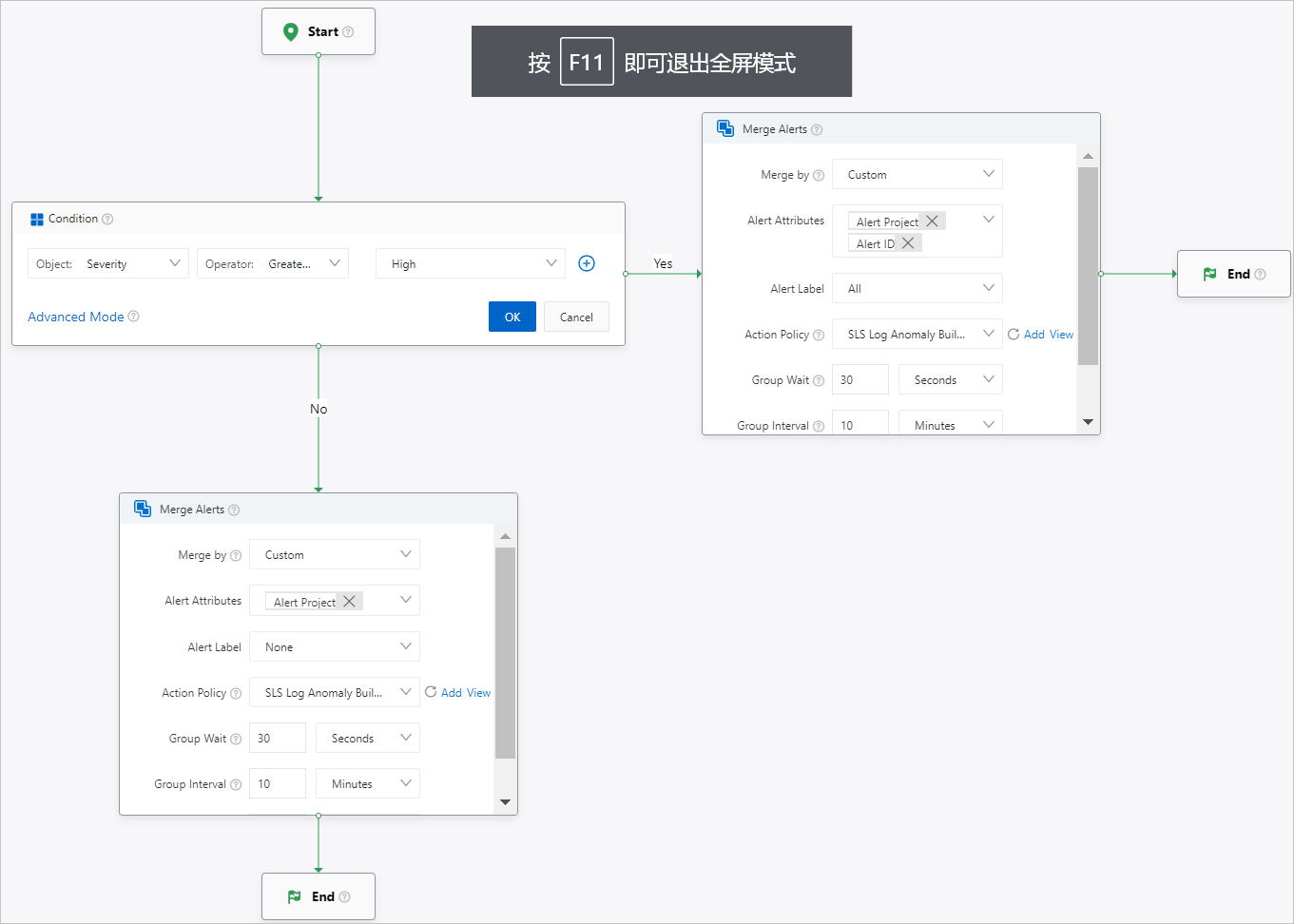
マージポリシーの設定

  • Simple Log Serviceコンソールでの設定Alert policy

  • DSL設定

    if alert.severity >= 8:
        fire(action_policy="sls.builtin", group={"alert.project": alert.project, "alert.alert_id": alert.alert_id}, group_by_all_labels=true, group_wait="15s", group_interval="5m", repeat_interval="1h")
        stop()
    fire(action_policy="sls.builtin", group={"alert.project": alert.project}, group_by_all_labels=false, group_wait="15s", group_interval="5m", repeat_interval="1h")

    DSL設定の説明:

    • if alert.severity >= 8条件ノードを指定します。

    • fire( ) はマージノードを指定します。

      • action_policyは、アクションポリシーのIDを指定します。

      • groupは、Simple Log Serviceがアラートをマージする基準を指定します。 データ型: dictionary。

      • group_by_all_labelsは、すべてのラベルに基づいてアラートをマージするかどうかを指定します。 有効な値は、true および false です。

      • group_waitは、最初のアラートセットが作成された場合にSimple Log Serviceがアラート通知を送信する間隔を指定します。

      • group_intervalは、アラートセット内のデータが変更された場合にSimple Log Serviceがアラート通知を送信する間隔を指定します。

      • repeat_intervalは、アラートセット内のデータが同じままである場合にSimple Log Serviceがアラート通知を送信する間隔を指定します。

    • stop() は終了ノードを指定します。

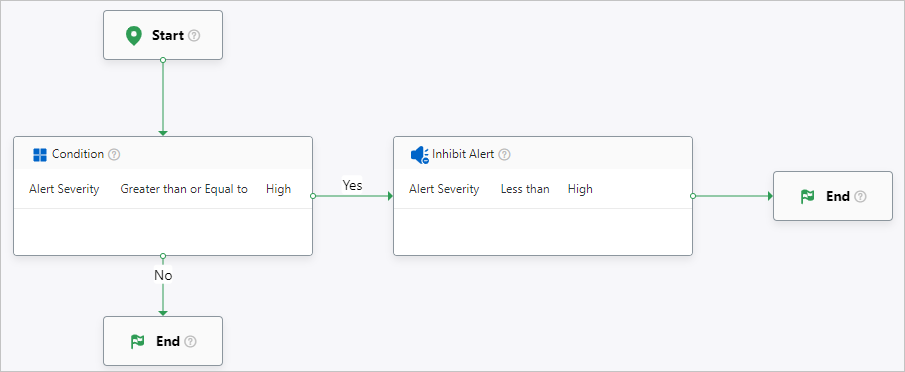
禁止ポリシーの設定

  • Simple Log Serviceコンソールでの設定Alert policy

  • DSL設定

    if alert.severity >= 8:
        silence alert.severity < 8
        stop()

    DSL設定の説明:

    • if alert.severity >= 8条件ノードを指定します。

    • silence alert.severity < 8は、禁止ノードを指定します。

    • stop() は終了ノードを指定します。

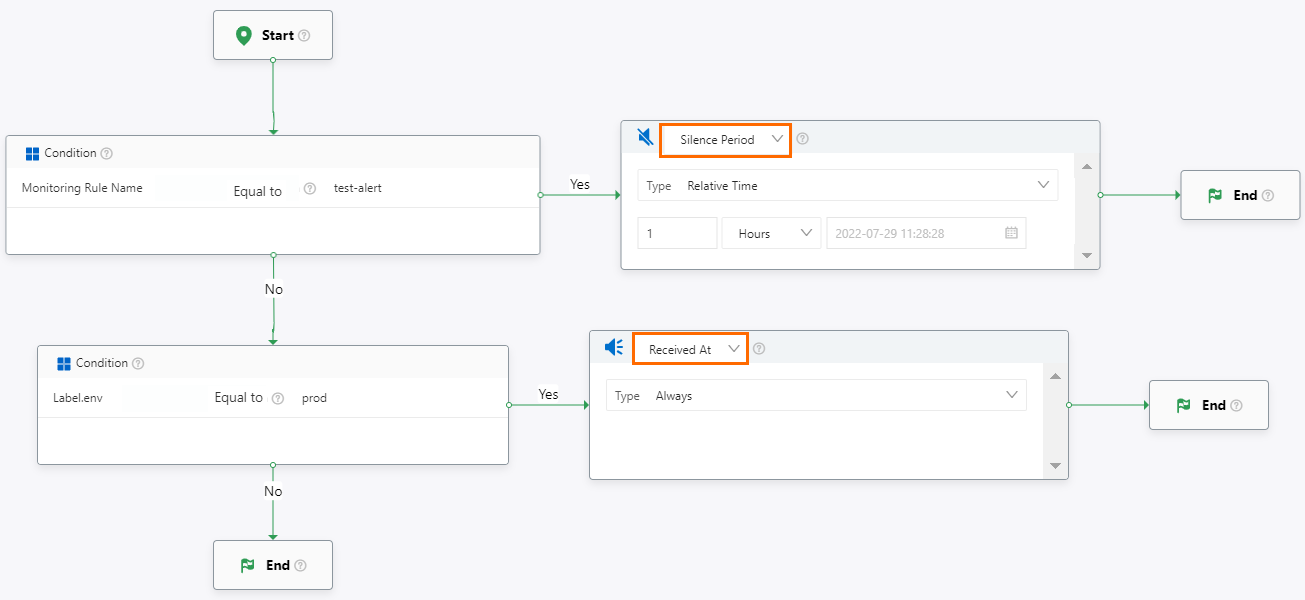
サイレントポリシーの設定

  • Simple Log Serviceコンソールでの設定Alert policy

  • DSL設定

    drop(end=1638189177) alert.alert_name == "test-alert"
    accept alert.labels.env == "prod"

    DSL設定の説明:

    • dropは、アラートをサイレントにすることを指定します。

    • acceptは、アラートをサイレントにしないことを指定します。

    • startendは、アラートがサイレントになる時間範囲を指定します。 値はUNIXタイムスタンプです。 単位は秒です。

      • 特定の時間範囲: 開始終了を設定する必要があります。

      • 時点の前: endのみを設定する必要があります。

      • 時間範囲: endのみを設定する必要があります。

      • Continuous: startまたはendを設定する必要はありません。

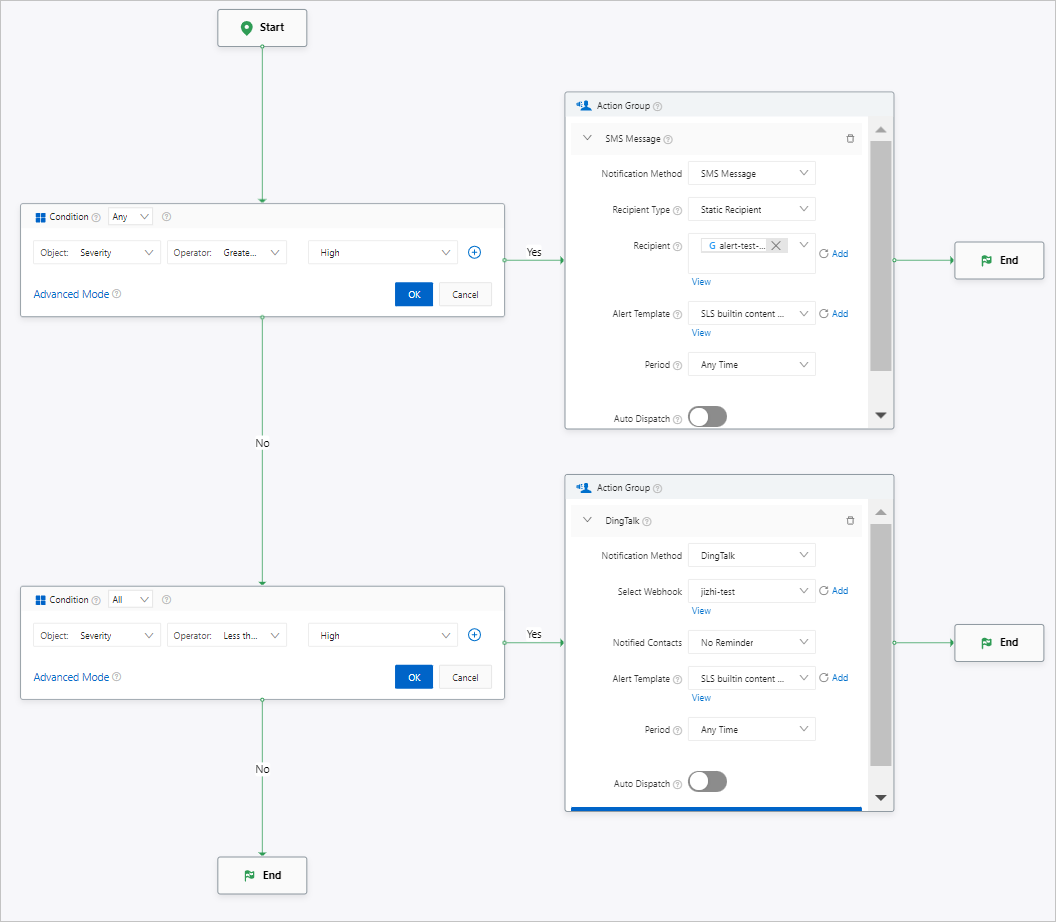
アクションポリシーの設定

  • Simple Log Serviceコンソールでの設定Action policy

  • DSL設定

    if alert.severity >= 8:
        fire(type="sms", users=[], groups=[], oncall_groups=["alert-test-oncall"], template_id="sls.builtin.cn", check_quota="true", period="any")
        stop()
    if alerts.severity < 8:
        fire(type="webhook_integration", integration_type="dingtalk", webhook_id="jizhi-test", template_id="sls.builtin.cn", period="any")
        stop()
    重要
    • if alert.xxxは、条件を満たすアラートがある場合にアクションポリシーを実行することを指定します。

    • if alerts.xxxは、すべてのアラートが条件を満たす場合にのみアクションポリシーが実行されることを指定します。

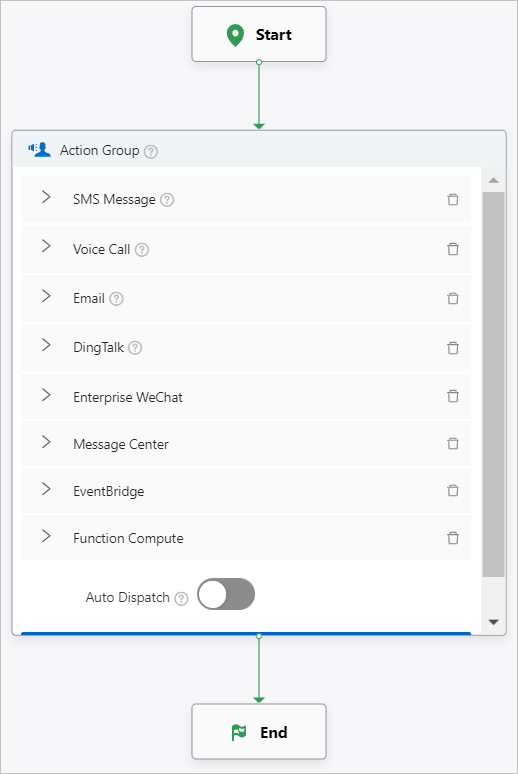
次の図とコードは、アクションポリシーの構成例を示しています。 各通知方法の構成が提供される。

  • Simple Log Serviceコンソールでの設定Action policy

  • DSL設定

    fire(type="sms", users=["jizhi"], groups=[], oncall_groups=[], template_id="sls.builtin.cn", check_quota="true", period="workday")
    fire(type="voice", users=[], groups=[], oncall_groups=["alert-test-oncall"], template_id="sls.builtin.cn", check_quota="true", period="worktime")
    fire(type="email", users=[], groups=["alert-test"], oncall_groups=[], template_id="sls.builtin.cn", check_quota="true", period="any")
    fire(type="webhook_integration", integration_type="dingtalk", webhook_id="jizhi-test", template_id="sls.builtin.cn", period="any")
    fire(type="webhook_integration", integration_type="wechat", webhook_id="wechat-test", template_id="sls.builtin.cn", period="any")
    fire(type="message_center", template_id="sls.builtin.cn", check_quota="true", period="any")
    fire(type="event_bridge", region="cn-hangzhou", bus_name="bus-demo", template_id="sls.builtin.cn", period="any")
    fire(type="fc", region="cn-shanghai", service="jizhi-test", qualifier="LATEST", function="sls-ops-1", template_id="sls.builtin.cn", period="any")
    fire(type="set_ticket_owner", choice="random", users=[], groups=[], oncall_groups=["alert-test-oncall"])

    DSL設定の説明:

    fire() は、通知方法を指定する。 詳細については、「通知方法」をご参照ください。