このトピックでは、Maven プロジェクトで Java Database Connectivity (JDBC) を使用して ApsaraDB for ClickHouse クラスターに接続する方法について説明します。
前提条件
ご利用のアプリケーションが配置されているサーバーの IP アドレスが、ApsaraDB for ClickHouse クラスターのホワイトリストに追加済みである必要があります。詳細については、「ホワイトリストの設定」をご参照ください。
説明ご利用のアプリケーションサーバーと ApsaraDB for ClickHouse クラスターが同一 VPC にない場合、ネットワーク接続の問題を解決する必要があります。詳細については、「送信先クラスターとデータソース間のネットワーク接続の問題を解決するにはどうすればよいですか?」をご参照ください。または、パブリックエンドポイントを申請し、それを使用して接続することもできます。詳細については、「パブリックエンドポイントの申請およびリリース」をご参照ください。
データベースアカウントおよびパスワードが作成済みである必要があります。詳細については、「アカウントの作成」をご参照ください。
操作手順
以下の手順では、新規または既存の Maven プロジェクトで JDBC を使用して ApsaraDB for ClickHouse クラスターに接続する方法について説明します。また、完全なプロジェクトサンプルをダウンロードすることもできます。
ステップ 1:Maven プロジェクトの作成
既存の Maven プロジェクトがある場合は、このステップをスキップしてください。
Eclipse または他の統合開発環境 (IDE) を使用して、Maven プロジェクトを作成します。
ステップ 2:ClickHouse ドライバー依存関係パッケージのインポート
pom.xml ファイルに以下の構成を追加します。
<dependency>
    <groupId>com.zaxxer</groupId>
    <artifactId>HikariCP</artifactId>
    <version>3.4.5</version>
</dependency>
<dependency>
    <groupId>com.clickhouse</groupId>
    <artifactId>clickhouse-jdbc</artifactId>
    <version>0.4.6</version>
</dependency>
<dependency>
    <groupId>org.lz4</groupId>
    <artifactId>lz4-java</artifactId>
    <version>1.8.0</version>
</dependency>
<dependency>
    <groupId>org.apache.httpcomponents.client5</groupId>
    <artifactId>httpclient5</artifactId>
    <version>5.2.1</version>
</dependency>
ステップ 3:アプリケーションコードの記述
コードフロー
以下は、JDBC を使用して ApsaraDB for ClickHouse クラスターに接続および使用するための主な手順です。

パラメーターにはクラスター情報およびその他の接続設定が含まれます。以下の表にパラメーターを示します。
パラメーター | 説明 | 例 |
YOUR_INSTANCE_PROTOCOL | 接続プロトコル。値は "http" に固定されます。 | http |
YOUR_INSTANCE_ENDPOINT | エンドポイント。 形式: |
|
DATABASE | 接続先のデータベース。 | testDB |
YOUR_INSTANCE_USER | データベースアカウント。 | test |
YOUR_INSTANCE_PASSWORD | データベースアカウントのパスワード。 | Password**** |
INSERT_BATCH_SIZE | バッチで挿入するデータ行数。単位:行。 | 10000 |
INSERT_BATCH_NUM | 各スレッドで挿入するバッチ数。単位:バッチ。 | 10 |
ENTERPRISE | 使用するテーブルエンジン。テーブルエンジンはクラスターエディションによって異なります。
| true |
INSERT_OPTIMIZE_LEVEL | 挿入パフォーマンスの最適化レベル。有効な値:1、2、3。 挿入速度の順位:3 > 2 > 1。 | 3 |
完全なサンプルコード
以下のサンプルコードは、Enterprise Edition クラスターのデフォルトデータベースに test という名前のテーブルを作成し、10 バッチのデータを同時に挿入する方法(1 バッチあたり 10,000 行)を示しています。
コードを実行する前に、ビジネスシナリオに応じて必要なパラメーターを変更してください。コードフローセクションのパラメーター表を参照してください。
このコードの主要なロジックおよびエントリーポイントは main メソッドです。
package com.aliyun;

import com.clickhouse.jdbc.ClickHouseDataSource;
import com.clickhouse.data.ClickHouseOutputStream;
import com.clickhouse.data.ClickHouseWriter;
import com.zaxxer.hikari.HikariConfig;
import com.zaxxer.hikari.HikariDataSource;

import java.io.IOException;
import java.nio.ByteBuffer;
import java.nio.ByteOrder;
import java.sql.Connection;
import java.sql.PreparedStatement;
import java.sql.ResultSet;
import java.sql.Statement;
import java.util.Properties;
import java.util.concurrent.CountDownLatch;
import java.util.concurrent.ExecutorService;
import java.util.concurrent.Executors;

public class Main {
    private final static String YOUR_INSTANCE_PROTOCOL = "http";
    private final static String YOUR_INSTANCE_ENDPOINT = "VPC_ENDPOINT:8123"; // YOUR CONFIG HERE
    private final static String DATABASE = "default"; // YOUR CONFIG HERE
    private final static String YOUR_INSTANCE_USER = "USER"; // YOUR CONFIG HERE
    private final static String YOUR_INSTANCE_PASSWORD = "PASSWORD"; // YOUR CONFIG HERE
    private final static String JDBC_URL = "jdbc:clickhouse:%s://%s/%s";
    private final static Integer INSERT_BATCH_SIZE = 10000;
    private final static Integer INSERT_BATCH_NUM = 10;
    private final static boolean ENTERPRISE = true; // YOUR CONFIG HERE
    private final static Integer INSERT_OPTIMIZE_LEVEL = 3;

    public static void main(String[] args) {
        try {
            HikariConfig conf = buildHikariDataSource();
            try(HikariDataSource ds = new HikariDataSource(conf)) {
                // Create a table.
                Connection conn = ds.getConnection();
                createTable(conn);
                conn.close();

                // Concurrently insert data.
                int concurrentNum = 5;
                CountDownLatch countDownLatch = new CountDownLatch(concurrentNum);
                ExecutorService executorService = Executors.newFixedThreadPool(concurrentNum);
                for (int i = 0; i < concurrentNum; i++) {
                    executorService.submit(() -> {
                        System.out.printf("[%d] Thread starts inserting\n", Thread.currentThread().getId());
                        try(Connection connection = ds.getConnection()) {
                            batchInsert(connection, INSERT_OPTIMIZE_LEVEL);
                        } catch (Exception e) {
                            e.printStackTrace();
                        } finally {
                            System.out.printf("[%d] Thread stops inserting\n", Thread.currentThread().getId());
                            countDownLatch.countDown();
                        }
                    });
                }
                // Wait for all threads to finish.
                countDownLatch.await();

                // Count the table.
                conn = ds.getConnection();
                count(conn);
                conn.close();
            }
        } catch (Exception e) {
            e.printStackTrace();
        }
    }

    /**
     * Generate the JDBC URL.
     * @param protocol The protocol. Supported protocols include http, https, and grpc.
     * @param endpoint The endpoint.
     * @return The JDBC URL.
     */
    public static String getJdbcUrl(String protocol, String endpoint, String database) {
        return String.format(JDBC_URL, protocol, endpoint, database);
    }

    /**
     * Build HikariDataSource.
     * @return The HikariConfig.
     */
    public static HikariConfig buildHikariDataSource() throws Exception {
        HikariConfig conf = new HikariConfig();

        // Properties
        Properties properties = new Properties();
        /// Socket keepalive
        properties.setProperty("socket_keepalive", "true");
        properties.setProperty("http_connection_provider", "APACHE_HTTP_CLIENT");
        /// Socket timeout
        properties.setProperty("socket_timeout", "120000");
        /// Timezone
        properties.setProperty("use_server_time_zone", "true");

        // Data source configuration
        conf.setDataSource(new ClickHouseDataSource(getJdbcUrl(YOUR_INSTANCE_PROTOCOL, YOUR_INSTANCE_ENDPOINT, DATABASE), properties));
        conf.setUsername(YOUR_INSTANCE_USER);
        conf.setPassword(YOUR_INSTANCE_PASSWORD);

        // Connection pool configuration
        conf.setMaximumPoolSize(10);
        conf.setMinimumIdle(5);
        conf.setIdleTimeout(30000);
        conf.setMaxLifetime(60000);
        conf.setConnectionTimeout(30000);
        conf.setPoolName("HikariPool");

        return conf;
    }

    /**
     * Create a table.
     * @param conn The ClickHouse connection.
     * @throws Exception
     */
    public static void createTable(Connection conn) throws Exception {
        try(Statement statement = conn.createStatement()) {
            if (ENTERPRISE) {
                statement.execute("CREATE TABLE IF NOT EXISTS `default`.`test` ON CLUSTER default (id Int64, name String) ENGINE = MergeTree() ORDER BY id;");
            } else {
                // Create a local table.
                statement.execute("CREATE TABLE IF NOT EXISTS `default`.`test_local` ON CLUSTER default (id Int64, name String) ENGINE = MergeTree() ORDER BY id;");
                // Create a distributed table.
                statement.execute("CREATE TABLE IF NOT EXISTS `default`.`test` ON CLUSTER default (id Int64, name String) ENGINE = Distributed(default, default, test_local, rand());");
            }
        }
    }

    /**
     * Insert data in batches.
     * @param conn The ClickHouse connection.
     * @param optimizeLevel The insert optimization level. 3 is faster than 2, and 2 is faster than 1.<br/>
     *                      1: insert into `default`.`test` (id, name) values(?, ?) -- with an additional query to get the table structure.
     *                         This is portable.<br/>
     *                      2: insert into `default`.`test` select id, name from input('id Int64, name String') -- effectively converts and inserts data sent to the server
     *                         with a given structure into the table with another structure. This is NOT portable because it is limited to ClickHouse.<br/>
     *                      3: insert into `default`.`test` format RowBinary -- fastest (close to the Java client) with streaming mode but requires manual serialization.
     *                         This is NOT portable because it is limited to ClickHouse.
     * @throws Exception
     */
    public static void batchInsert(Connection conn, int optimizeLevel) throws Exception {
        PreparedStatement preparedStatement = null;
        try {
            // Prepared statement
            switch (optimizeLevel) {
                case 1:
                    preparedStatement = conn.prepareStatement("insert into `default`.`test` (id, name) values(?, ?)");
                    break;
                case 2:
                    preparedStatement = conn.prepareStatement("insert into `default`.`test` select id, name from input('id Int64, name String')");
                    break;
                case 3:
                    preparedStatement = conn.prepareStatement("insert into `default`.`test` format RowBinary");
                    break;
                default:
                    throw new IllegalArgumentException("optimizeLevel must be 1, 2 or 3");
            }

            // Insert data.
            long randBase = (long) (Math.random() * 1000000); // A random number to prevent data duplication and loss.
            for (int i = 0; i < INSERT_BATCH_NUM; i++) {
                long insertStartTime = System.currentTimeMillis();
                switch (optimizeLevel) {
                    case 1:
                    case 2:
                        for (int j = 0; j < INSERT_BATCH_SIZE; j++) {
                            long id = (long) i * INSERT_BATCH_SIZE + j + randBase;
                            preparedStatement.setLong(1, id);
                            preparedStatement.setString(2, "name" + id);
                            preparedStatement.addBatch();
                        }
                        preparedStatement.executeBatch();
                        break;
                    case 3:
                        class MyClickHouseWriter implements ClickHouseWriter {
                            int batchIndex = 0;
                            public MyClickHouseWriter(int batchIndex) {
                                this.batchIndex = batchIndex;
                            }
                            @Override
                            public void write(ClickHouseOutputStream clickHouseOutputStream) throws IOException {
                                for (int j = 0; j < INSERT_BATCH_SIZE; j++) {
                                    long id = (long) batchIndex * INSERT_BATCH_SIZE + j + randBase;
                                    // Write id (Int64).
                                    ByteBuffer buffer = ByteBuffer.allocate(Long.BYTES);
                                    buffer.order(ByteOrder.LITTLE_ENDIAN);
                                    buffer.putLong(id);
                                    clickHouseOutputStream.write(buffer.array());
                                    // Write name (String).
                                    clickHouseOutputStream.writeUnicodeString("name" + id);
                                }
                            }
                        }
                        preparedStatement.setObject(1, new MyClickHouseWriter(i));
                        preparedStatement.executeUpdate();
                        break;
                }

                System.out.printf("[%d] optimizeLevel=%d, insert batch [%d/%d] succeeded, cost %d ms\n",
                        Thread.currentThread().getId(), optimizeLevel, i + 1, INSERT_BATCH_NUM, System.currentTimeMillis() - insertStartTime);
            }
        } finally {
            if (preparedStatement != null) {
                preparedStatement.close();
            }
        }

    }

    /**
     * Count the table.
     * @param conn The ClickHouse connection.
     * @throws Exception
     */
    public static void count(Connection conn) throws Exception {
        try(Statement statement = conn.createStatement()) {
            ResultSet resultSet = statement.executeQuery("SELECT count() as cnt FROM `default`.`test`");
            if (resultSet.next()) {
                System.out.printf("Table `default`.`test` has %d rows\n", resultSet.getInt("cnt"));
            } else {
                throw new RuntimeException("Failed to count table `default`.`test`");
            }
        }
    }
}
完全なプロジェクトサンプルの説明
awesome-clickhouse-jdbc-0.2.1.zip をクリックして、サンプルコードをダウンロードします。
プロジェクト環境
Maven バージョン:3.9.6
JDK バージョン:1.8
プロジェクト構造
以下の表に、このサンプルプロジェクトの構造を示します。
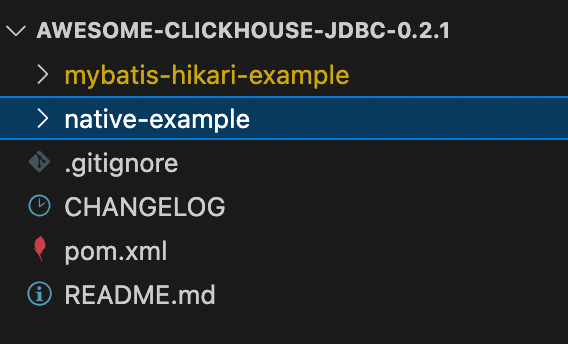
ファイル名 | 説明 |
awesome-clickhouse-jdbc-0.2.1 | プロジェクト名。 |
mybatis-hikari-example | サブプロジェクト名。
|
native-example | サブプロジェクト名。
|
使用方法
mybatis-hikari-example
このプロジェクトの全体的なコードロジックは native-example プロジェクトと一致しています。コードを使用する際は、以下のパラメーターおよびコードエントリーポイントに注意してください。
データベースパラメーター構成:
src/main/resources/application.ymlコードエントリーポイントおよびその他のパラメーター構成:
src/main/java/com/aliyun/Main.java
以下の表にパラメーターを示します。
変更場所 | パラメーター | 説明 | 例 |
| url | エンドポイント。 形式: |
|
username | データベースアカウント。 | test | |
password | データベースアカウントのパスワード。 | Password**** | |
| INSERT_BATCH_SIZE | バッチで挿入するデータ行数。単位:行。 | 10000 |
INSERT_BATCH_NUM | 挿入するバッチ数。単位:バッチ。 | 10 | |
ENTERPRISE | 使用するテーブルエンジン。 `true`:Enterprise Edition クラスター。 `false`:Community Edition クラスター。 | true | |
INSERT_OPTIMIZE_LEVEL | 挿入パフォーマンスの最適化レベル。有効な値:1、2、3。 挿入速度の順位:3 > 2 > 1。 | 3 |
native-example
このプロジェクトのコードエントリーポイントおよびすべてのパラメーター構成は src/main/java/com/aliyun/Main.java にあります。詳細については、「ステップ 3:アプリケーションコードの記述」をご参照ください。
参考資料
他のツールを使用してクラスターにログインするには、以下のドキュメントをご参照ください。
よくある質問
Q:プログラムを起動した後、「connect timed out」エラーが発生しました。
A:以下の手順でトラブルシューティングを行ってください。
ホワイトリストを確認します:プログラムが配置されているサーバーの IP アドレスが、送信先クラスターのホワイトリストに追加されていることを確認してください。詳細については、「ホワイトリストの設定」をご参照ください。
ネットワークを確認します:
アプリケーションと送信先クラスターは同一 VPC 内にありますか?
同一の場合、内部ネットワークを使用してクラスターにアクセスします。VPC エンドポイントを使用してクラスターに接続してください。
異なる場合、ネットワーク接続の問題を解決してください。詳細については、「送信先クラスターとデータソース間のネットワーク接続の問題を解決するにはどうすればよいですか?」をご参照ください。または、パブリックエンドポイントを申請し、それを使用してクラスターに接続してください。詳細については、「パブリックエンドポイントの申請およびリリース」をご参照ください。
構成されたエンドポイントを確認します:
VPC エンドポイントまたはパブリックエンドポイントが正しいことを確認してください。
ポートが正しいことを確認してください。デフォルトポートは 8123 です。
Q:プログラムを起動した後、「java.sql.SQLException: Read timed out」エラーが発生しました。この問題を解決するにはどうすればよいですか?
A:オペレーティングシステムの TCP キープアライブパラメーターを構成し、native-example プロジェクトに示されているように、socket_keepalive=true や http_connection_provider=APACHE_HTTP_CLIENT などの JDBC プロパティを設定してください。詳細については、「Troubleshooting」をご参照ください。
Q:クライアントで「java.sql.SQLException: HikariPool-1 - Connection is not available」と類似したエラーが発生しました。この問題を解決するにはどうすればよいですか?
A:使用後は接続を閉じてください。詳細については、「完全なプロジェクトサンプル」をご参照ください。