This topic describes how to use Terraform as a Resource Access Management (RAM) user to call the API operations of ApsaraDB for Hbase to create an ApsaraDB for HBase cluster.
You can run the sample code with a few clicks. Run the sample code
Prerequisites
An Alibaba Cloud account has all permissions on resources within the account. If an Alibaba Cloud account is leaked, the resources are exposed to major risks. We recommend that you use a RAM user and create an AccessKey pair for the RAM user. For more information, see Create a RAM user and Create an AccessKey pair.
The AliyunHBaseFullAccess and AliyunVPCFullAccess permissions are granted to the RAM user. The AliyunHBaseFullAccess permission is used to manage ApsaraDB for HBase, and the AliyunVPCFullAccess permission is used to manage virtual private clouds (VPCs). The following sample code shows how to grant the permissions to the RAM user. For more information, see Grant permissions to a RAM user
{
    "Version": "1",
    "Statement": [
        {
            "Action": [
                "vpc:CreateVpc",
                "vpc:DescribeVpc",
                "vpc:ModifyVpcAttribute",
                "vpc:DeleteVpc",
                "vpc:CreateVSwitch",
                "vpc:DescribeVSwitch",
                "vpc:ModifyVSwitchAttribute",
                "vpc:DeleteVSwitch"
            ],
            "Resource": "*",
            "Effect": "Allow"
        },
        {
            "Action": "hbase:*",
            "Resource": "*",
            "Effect": "Allow"
        }
    ]
}
Prepare the runtime environment for Terraform by using one of the following methods:
Use Terraform in Terraform Explorer: Alibaba Cloud provides Terraform Explorer, an online runtime environment for Terraform. You can use Terraform after you log on to Terraform Explorer without the need to install Terraform. This method is suitable for scenarios in which you want to use and debug Terraform in a fast and convenient manner at no additional costs.
Use Terraform in Cloud Shell: Terraform is preinstalled in Cloud Shell and identity credentials are configured. You can directly run Terraform commands in Cloud Shell. This method is suitable for scenarios in which you want to use and debug Terraform in a fast and convenient manner at low costs.
Install and configure Terraform on your on-premises machine: This method is suitable for scenarios in which network connections are unstable or a custom development environment is required.
You must install Terraform 0.12.28 or later. You can run the terraform --version command to query the Terraform version.
Fees are generated for specific resources in this example. Unsubscribe from the resources when you no longer need them.
Required resources
alicloud_hbase_instance: creates an ApsaraDB for HBase cluster.
alicloud_vpc: creates a VPC.
alicloud_vswitch: creates a vSwitch.
Use Terraform to create an ApsaraDB for HBase cluster
Create a working directory and a configuration file named
main.tfin the directory. main.tf is the main file of Terraform and defines the resources that you want to deploy.variable "region" { default = "cn-qingdao" } provider "alicloud" { region = var.region } data "alicloud_hbase_zones" "default" {} variable "instance_type" { default = "hbase.sn2.large" } variable "name" { default = "hbasetest" } # Create a VPC. resource "alicloud_vpc" "vpc1" { vpc_name = var.name cidr_block = "172.16.0.0/12" } # Create a vSwitch in the VPC in the zone specified by the local.zone_id parameter. resource "alicloud_vswitch" "default" { vswitch_name = var.name cidr_block = "172.16.20.0/24" vpc_id = alicloud_vpc.vpc1.id zone_id = data.alicloud_hbase_zones.default.zones[0].id } resource "alicloud_hbase_instance" "default" { # (Required) The name of the ApsaraDB for HBase instance. The name must be 2 to 128 characters in length and can contain letters, digits, periods (.), underscores (_), and hyphens (-). name = var.name # (Optional) The zones where the ApsaraDB for HBase instance is enabled. zone_id = data.alicloud_hbase_zones.default.zones[0].id # (Optional) vswitch_id = alicloud_vswitch.default.id # (Optional. This parameter is available from v1.185.0) The ID of the VPC. vpc_id = alicloud_vpc.vpc1.id # (Optional,) Valid values: hbase, hbaseue, and bds. hbaseue and bds are supported by v1.73.0 and later versions. For a single ApsaraDB for HBase instance, you must set engine to hbase and core_instance_quantity to 1. engine = "hbaseue" # (Required) The major version of ApsaraDB for HBase. Valid values for hbase: 1.1 and 2.0. Set this parameter to 2.0 if you use hbaseue. Set this parameter to 1.0 if you use bds. Other engines are not supported. engine_version = "2.0" # (Required) The instance type. master_instance_type = var.instance_type # (Required) The instance type. core_instance_type = var.instance_type # (Optional) The default value is 2, and the valid values are 1 to 200. If the value of core_instance_quantity is greater than 1, a cluster is created. If the value of core_instance_quantity is 1, a single instance is created. core_instance_quantity = "2" # (Optional) The valid values are cloud_ssd, cloud_essd_pl1, cloud_efficiency, local_hdd_pro, and local_ssd_pro. The size of local_disk is fixed. If engine is set to bds, you do not need to specify the disk type. You can also specify an empty string. core_disk_type = "cloud_ssd" # (Optional) The storage for each core node of the ApsaraDB for HBase instance. This parameter is valid only if engine is set to hbase or hbaseue. You do not need to set core_disk_size if engine is set to bds. Unit: GB. Value values: # For custom storage, the valid values are 20 to 64000. # For a cluster, the valid values are 400 to 64000. The step size is 40 GB. # For a single instance, the valid values are 20 to 500. The step size is 1 GB. core_disk_size = 400 # Optional. Valid values: PrePaid and PostPaid. Default value: PostPaid. You can change from PostPaid to PrePaid. You can change from PrePaid to PostPaid in v1.115.0 and later. pay_type = "PostPaid" # (Optional) 0 or 800 to 100000000. Step size: 10 GB. 0 specifies that cold storage is not used. A value between 800 and 100000000 specifies the size of code storage. cold_storage_size = 0 # (Optional. Available from 1.109.0) The immediate deletion feature. True: immediately deletes a cluster. False: deletes a cluster with a delay. You cannot find the deleted cluster regardless of whether the parameter is set to true or false. immediate_delete_flag = true # (Optional) Valid values: 1, 2, 3, 4, 5, 6, 7, 8, 9, 12, 24, and 36. This parameter is valid only when pay_type is set to PrePaid. Unit: months. 12, 24, and 36 specifies 1, 2, and 3 years. duration = 1 # (Optional. Available from 1.73.0) The deletion protection feature. True: enables deletion protection. False: disables deletion protection. If you want to delete a cluster, you must set this parameter to false. deletion_protection = false }Run the following command to initialize
Terraform:terraform initIf the following information is returned, Terraform is initialized.
Initializing the backend...

Initializing provider plugins...
- Finding latest version of hashicorp/alicloud...
- Installing hashicorp/alicloud v1.234.0...
- Installed hashicorp/alicloud v1.234.0 (signed by HashiCorp)

Terraform has created a lock file .terraform.lock.hcl to record the provider
selections it made above. Include this file in your version control repository
so that Terraform can guarantee to make the same selections by default when
you run "terraform init" in the future.

Terraform has been successfully initialized!

You may now begin working with Terraform. Try running "terraform plan" to see
any changes that are required for your infrastructure. All Terraform commands
should now work.

If you ever set or change modules or backend configuration for Terraform,
rerun this command to reinitialize your working directory. If you forget, other
commands will detect it and remind you to do so if necessary.
Create an execution plan and preview the changes.
terraform planRun the following command to create an ApsaraDB for HBase cluster:
terraform applyType
yes, press Enter, and wait until the command execution is completed. If the following information is displayed, the cluster is created.Plan: 3 to add, 0 to change, 0 to destroy. Do you want to perform these actions? Terraform will perform the actions described above. Only 'yes' will be accepted to approve. Enter a value: yes alicloud_vpc.vpc1: Creating... alicloud_vpc.vpc1: Creation complete after 6s [id=vpc-m5ecf5pojlcjkolx7u***] alicloud_vswitch.default: Creating... alicloud_vswitch.default: Creation complete after 4s [id=vsw-m5ehryjeb8rs3bm56j***] alicloud_hbase_instance.default: Creating... alicloud_hbase_instance.default: Still creating... [10s elapsed] alicloud_hbase_instance.default: Still creating... [20s elapsed] alicloud_hbase_instance.default: Still creating... [30s elapsed] alicloud_hbase_instance.default: Still creating... [40s elapsed] alicloud_hbase_instance.default: Still creating... [50s elapsed] alicloud_hbase_instance.default: Still creating... [1m0s elapsed] alicloud_hbase_instance.default: Still creating... [1m10s elapsed] alicloud_hbase_instance.default: Still creating... [1m20s elapsed] ... alicloud_hbase_instance.default: Still creating... [16m30s elapsed] alicloud_hbase_instance.default: Still creating... [16m40s elapsed] alicloud_hbase_instance.default: Still creating... [16m50s elapsed] alicloud_hbase_instance.default: Creation complete after 16m57s [id=ld-m5ezvi1qi8tkbu***] Apply complete! Resources: 3 added, 0 changed, 0 destroyed.Verify the result.
Run the terraform show command
Run the following command to query the resources that are created by Terraform:
terraform show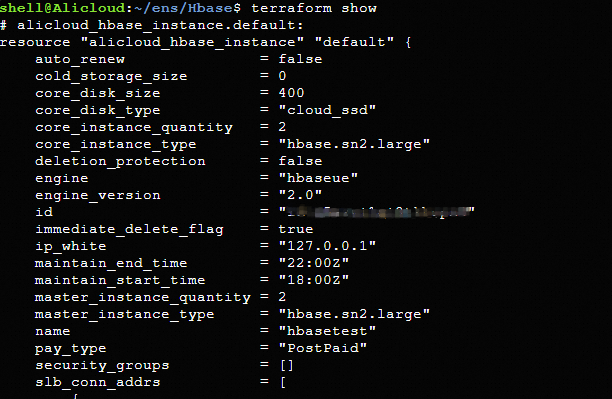
Log on to the ApsaraDB for HBase console
After the ApsaraDB for HBase cluster is created, you can log on to the ApsaraDB for HBase console to check whether the cluster is created.

Release resources
If you no longer require the preceding resources that are created or managed by using Terraform, run the following command to release the resources. For more information about the terraform destroy command, see Common commands.
terraform destroySample code
You can run the sample code with a few clicks. You can run the sample code in this topic with a few clicks.
Examples
If you want to view more complete examples, visit the directory of the corresponding service on the More Complete Examples page.