Alibaba Cloud CLI is a command-line tool that allows you to call Alibaba Cloud API operations in a terminal or on a command-line interface to create, configure, and manage Alibaba Cloud resources. This topic describes how to use Alibaba Cloud CLI to call ROS API operations to manage ROS.
For more information about Alibaba Cloud CLI, see What is Alibaba Cloud CLI?
Use Alibaba Cloud CLI
Install and configure Alibaba Cloud CLI
Install Alibaba Cloud CLI.
You can install Alibaba Cloud CLI on Windows, Linux, and macOS. Download an installation package that is suitable for the OS that runs on your computer. For more information about how to install Alibaba Cloud CLI on different OSs, see the following topics:
Configure Alibaba Cloud CLI.
Configure information that is required to call ROS resources. The information includes the credential, region, and language. For more information about how to configure the information, see Identity credential types.
ImportantTo ensure the security of your Alibaba Cloud account, we recommend that you create a Resource Access Management (RAM) user that is used only for API calls and create an AccessKey pair for the RAM user. For more information, see Identity management.
Use Alibaba Cloud CLI to call ROS API operations
After you install and configure Alibaba Cloud CLI, you can use the following syntax to run commands to call ROS API operations:
For more information about the command syntax, see Syntax.
aliyun ros <API operation name> --<Parameter 1 Value 1> --<Parameter 2 Value 2> ...Go to the ROS API debugging page in OpenAPI Explorer.
Select the API operation for which you want to generate a CLI command and specify parameters.
Click the CLI Example tab in the right of the page to view the CLI command that is generated together with the specified parameters.
aliyun ros CreateStack --region cn-hangzhou --RegionId 'cn-hangzhou' --StackName stack_name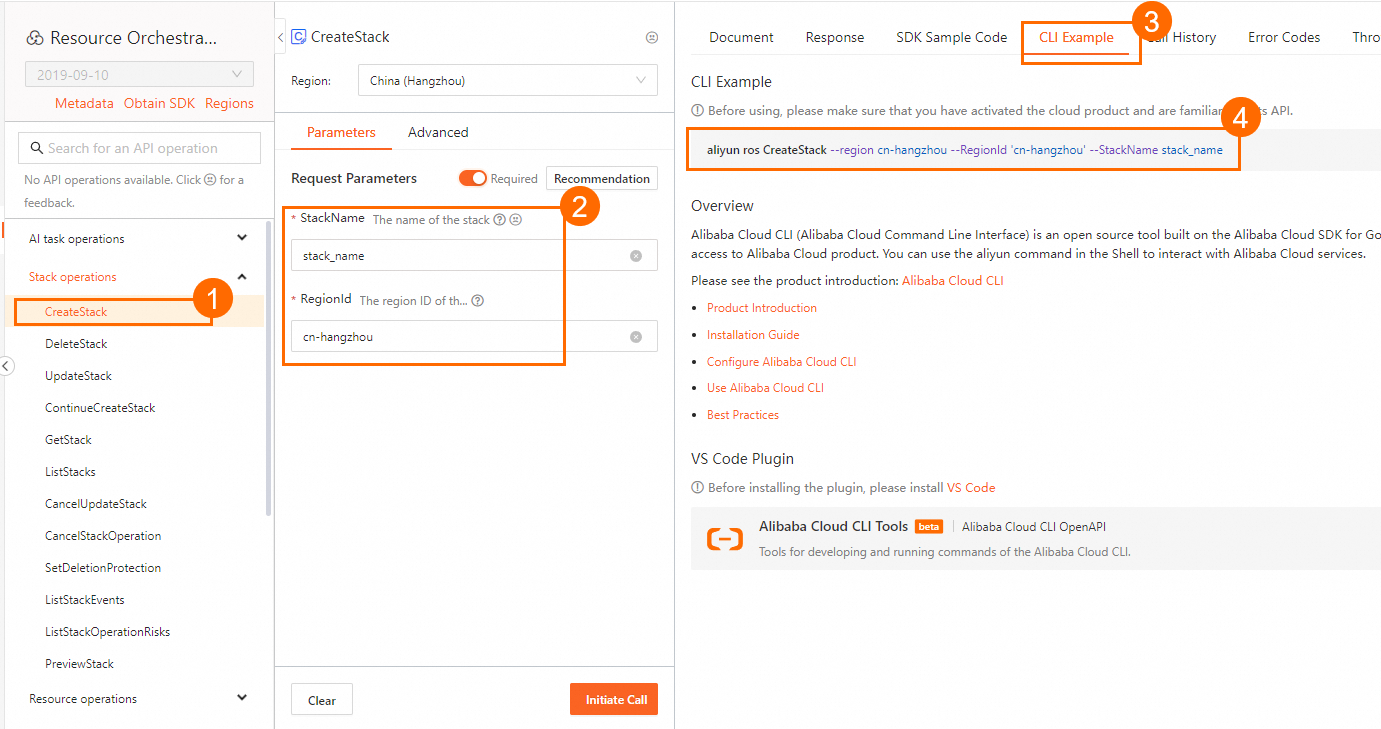
Usage examples
The following section provides examples on how to use Alibaba Cloud CLI to call ROS API operations.
The following sample requests are for reference only. Modify the CLI commands based on your business requirements.
In the examples, only part of ROS API operations are called. For more information about ROS API operations, see List of API operations by function.