Problem description
When I delete an account from my ApsaraDB RDS for PostgreSQL instance, an error is reported.
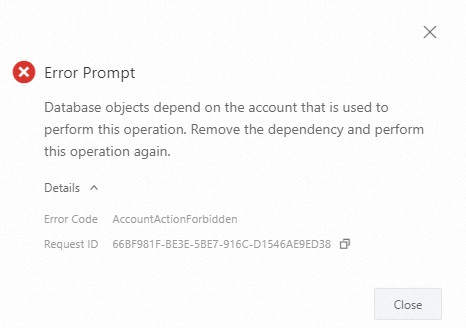
When I delete the account in the ApsaraDB RDS console, an error message is displayed.
The error message indicates that database objects depend on the account and the account can be deleted only after the dependency is removed.
The error code is
AccountActionForbidden.
When I execute SQL statements to delete the account, the following error message is displayed:
ERROR: role "<username>" cannot be dropped because some objects depend on it.
Causes
If you delete the account on which database objects of the RDS instance depend, the deletion fails.
You create an account named user_to_be_dropped on the RDS instance and create objects by using the account. Sample SQL statements:
Use the privileged account to create a test database named
testdb01.CREATE DATABASE testdb01;Use the privileged account to log on to the
testdb01database, create a test account nameduser_to_be_dropped, and then grant the required permissions to the test account.CREATE USER user_to_be_dropped WITH PASSWORD 'your_password' CREATEROLE CREATEDB; GRANT ALL ON SCHEMA public TO user_to_be_dropped; GRANT ALL ON DATABASE testdb01 TO user_to_be_dropped;Use the
user_to_be_droppedaccount to log on to thetestdb01database and create objects and a test database namedtestdb02.CREATE SCHEMA test_nsp; CREATE TABLE test_nsp.test_tbl(a1 int); CREATE TABLE test_tbl(a2 int); CREATE DATABASE testdb02;Use the
user_to_be_droppedaccount to log on to thetestdb02database and create objects and a test account nameduser_to_be_dropped_2. Then, grant the permissions of the privileged account to the test account. In this example, the privileged account is named testdbuser.CREATE SCHEMA testnsp; CREATE TABLE testnsp.tbl(a3 int); CREATE USER user_to_be_dropped_2 WITH PASSWORD 'your_password'; GRANT user_to_be_dropped_2 TO testdbuser;
When you delete the user_to_be_dropped account, an error occurs because objects that depend on the account exist.
The following figure shows the error message that is displayed in the ApsaraDB RDS console.
SQL statements:
NoteThe sample SQL statements are executed to delete an account from the default database named postgres.
DROP USER user_to_be_dropped;
ERROR:  role "user_to_be_dropped" cannot be dropped because some objects depend on it
DETAIL:  privileges for database testdb01
owner of database testdb02
privileges for membership of role testdbuser in role user_to_be_dropped_2
4 objects in database testdb01
2 objects in database testdb02
Solutions
Batch processing. This method is coarse-grained, concise, and efficient. If you execute the required SQL statement to delete an account and an error message is displayed, you can transfer the objects of the account to another account in batches as prompted. Then, you can revoke all permissions from the account that you want to delete.
Fine-grained processing. Each permission and object are transparent and controllable. You can query the objects that depend on the account that you want to delete and delete the objects one by one.
Batch processing
Confirm the objects and permissions of the account that you want to delete based on the error message. In this example, the sample issue is used.
DROP USER user_to_be_dropped;
ERROR:  role "user_to_be_dropped" cannot be dropped because some objects depend on it
DETAIL:  privileges for database testdb01
owner of database testdb02
privileges for membership of role testdbuser in role user_to_be_dropped_2
4 objects in database testdb01
2 objects in database testdb02
The error message shows that objects in the testdb01 and testdb02 databases depend on the
user_to_be_droppedaccount.In the testdb01 database, the account has privileges on four objects.
The account is the owner of the testdb02 database.
Use the privileged account to log on to the databases that are involved in the error message, transfer the objects of the account that you want to delete to another account, and then delete the permissions on the objects from the account that you want to delete. In this example, the testdbuser account is used as the privileged account and objects are transferred to the account.
Log on to the testdb01 database and delete the objects of the
user_to_be_droppedaccount.DROP OWNED BY user_to_be_dropped;Log on to the testdb02 database, transfer the database ownership to another account, and then delete the objects of the
user_to_be_droppedaccount.-- Transfer the database ownership. REASSIGN OWNED BY user_to_be_dropped TO testdbuser; -- Delete the objects of the account. DROP OWNED BY user_to_be_dropped;
Fine-grained processing
Step 1: Query dependent objects
The pg_shdepend system table records the dependencies of objects in a single database on global objects. You can query the objects that depend on the account you want to delete. In this example, the objects that depend on the user_to_be_dropped account are queried.
Use the privileged account to log on to the RDS instance and query the objects that depend on the
user_to_be_droppedaccount.WITH role as (SELECT oid FROM pg_roles WHERE rolname = 'user_to_be_dropped') SELECT db.datname AS database, pg_class.relname AS classname, shp.objid AS oid, CASE WHEN shp.deptype = 'o' THEN 'Object Owner' WHEN shp.deptype = 'a' THEN 'In Access Control List' WHEN shp.deptype = 'r' THEN 'Policy Object' ELSE 'CANNOT HAPPEN' END FROM pg_shdepend shp LEFT JOIN pg_database db ON shp.dbid = db.oid JOIN pg_class ON shp.classid = pg_class.oid WHERE shp.refclassid = 1260 AND shp.refobjid IN (SELECT oid FROM role);The following results are returned:
 database |    classname    |  oid  |          case
----------+-----------------+-------+------------------------
 testdb01 | pg_namespace    |  2200 | In Access Control List
          | pg_database     | 16399 | In Access Control List
 testdb01 | pg_namespace    | 16402 | Object Owner
 testdb01 | pg_class        | 16403 | Object Owner
 testdb01 | pg_class        | 16406 | Object Owner
          | pg_database     | 16409 | Object Owner
 testdb02 | pg_namespace    | 16410 | Object Owner
 testdb02 | pg_class        | 16411 | Object Owner
          | pg_auth_members | 16416 | In Access Control List
The following table describes the fields in the results.
Field
Description
databaseThe database in which the dependent object resides. If this field is empty, the dependent object is a global object.
classnameThe name of the system table.
oidThe object identifier (OID) of the dependent object.
caseThe dependency type. The following common dependency types are provided:
Owner: The account that you want to delete is the owner of the object.
ACL: The account that you want to delete is in the access control list (ACL).
Use the privileged account to log on to a database in which the dependent object resides and query the object name in the corresponding system table based on the
OIDof the object in the query results.Dependencies of global objects
If the
databasefield is empty, the dependent object is a global object.Query the object whose oid is
16399. The result indicates that theuser_to_be_droppedaccount is in the ACL of thetestdb01database.SELECT datname, datdba::regrole, datacl FROM pg_database WHERE oid = 16399; datname | datdba | datacl ----------+------------+------------------------------------------------------------------------------ testdb01 | testdbuser | {=Tc/testdbuser,testdbuser=CTc/testdbuser,user_to_be_dropped=CTc/testdbuser} (1 row)Query the object whose oid is
16409. The result indicates that theuser_to_be_droppedaccount is the owner of thetestdb02database.SELECT datname, datdba::regrole, datacl FROM pg_database WHERE oid = 16409; datname | datdba | datacl ----------+--------------------+-------- testdb02 | user_to_be_dropped | (1 row)Query the object whose oid is
16416. The result indicates that the role membership of thepg_auth_memberstable records the permissions granted to theuser_to_be_droppedaccount.SELECT oid, roleid::regrole, member::regrole, grantor::regrole FROM pg_auth_members WHERE oid = 16416; oid | roleid | member | grantor -------+----------------------+------------+-------------------- 16416 | user_to_be_dropped_2 | testdbuser | user_to_be_dropped (1 row)
Dependencies of objects in a single database
If the
databasefield is not empty, dependent objects exist in the database.Query the object whose oid is
2200. The result indicates that theuser_to_be_droppedaccount is in the ACL ofpublic schemain thetestdb01database.SELECT nspname, nspowner::regrole, nspacl FROM pg_namespace WHERE oid = 2200; nspname | nspowner | nspacl ---------+------------+--------------------------------------------------------------------------- public | testdbuser | {testdbuser=UC/testdbuser,=U/testdbuser,user_to_be_dropped=UC/testdbuser} (1 row)Query the object whose oid is
16403setting. The result indicates that theuser_to_be_droppedaccount is the owner of thetest_nsp.test_tbltable in thetestdb01database.SELECT relname, relnamespace::regnamespace, relowner::regrole, relacl FROM pg_class WHERE oid = 16403; relname | relnamespace | relowner | relacl ----------+--------------+--------------------+-------- test_tbl | test_nsp | user_to_be_dropped | (1 row)
Step 2: Handle dependent objects
You can use the following methods based on your business requirements:
If the dependency type is ACL, you can revoke the corresponding permissions.
If the dependency type is Owner, you can transfer the ownership to another account or remove the dependencies on the account.
Examples:
ACL-type dependencies
Query the object whose oid is
2200and revoke the permissions onpublic schemain thetestdb01database.SELECT nspname, nspowner::regrole, nspacl FROM pg_namespace WHERE oid = 2200; nspname | nspowner | nspacl ---------+------------+--------------------------------------------------------------------------- public | testdbuser | {testdbuser=UC/testdbuser,=U/testdbuser,user_to_be_dropped=UC/testdbuser} (1 row) REVOKE ALL ON SCHEMA public FROM user_to_be_dropped;Query the object whose oid is
16399and revoke the permissions on thetestdb01database.SELECT datname, datdba::regrole, datacl FROM pg_database WHERE oid = 16399; datname | datdba | datacl ----------+------------+------------------------------------------------------------------------------ testdb01 | testdbuser | {=Tc/testdbuser,testdbuser=CTc/testdbuser,user_to_be_dropped=CTc/testdbuser} (1 row) REVOKE ALL ON DATABASE testdb01 from user_to_be_dropped;Query the object whose oid is
16416. If the role membership is involved and your RDS instance runs PostgreSQL 16 or later, you must use theuser_to_be_droppedaccount to revoke the permissions of the privileged account for theuser_to_be_dropped_2account. In this example, the privileged account is named testdbuser.\c testdb01 user_to_be_dropped; You are now connected to database "testdb01" as user "user_to_be_dropped". REVOKE user_to_be_dropped_2 FROM testdbuser cascade;
Owner-type dependencies
Log on to the database in which the dependent object resides by using the privileged account.
Transfer the ownership of the object to another account.
Query the object whose oid is
16403and transfer the ownership of thetest_nsp.test_tbltable in thetestdb01database to another account. In this example, the ownership is transferred to the account named testdbuser.SELECT relname, relnamespace::regnamespace, relowner::regrole, relacl FROM pg_class WHERE oid = 16403; relname | relnamespace | relowner | relacl ----------+--------------+--------------------+-------- test_tbl | test_nsp | user_to_be_dropped | (1 row) ALTER TABLE test_nsp.test_tbl OWNER TO testdbuser;Delete dependent objects
Delete the testdb02 database.
DROP DATABASE testdb02;Delete the object whose oid is
16402.SELECT nspname, nspowner::regrole, nspacl FROM pg_namespace WHERE oid = 16402; nspname | nspowner | nspacl ----------+--------------------+-------- test_nsp | user_to_be_dropped | (1 row) DROP SCHEMA test_nsp cascade;Delete the object whose oid is
16406.SELECT relname, relnamespace::regnamespace, relowner::regrole, relacl FROM pg_class WHERE oid = 16406; relname | relnamespace | relowner | relacl ----------+--------------+--------------------+-------- test_tbl | public | user_to_be_dropped | (1 row) DROP TABLE public.test_tbl;
The following result is returned:
 database | classname | oid | case
----------+-----------+-----+------
(0 rows)
Step 3: Delete the account
Delete the required account in the ApsaraDB RDS console or by executing an SQL statement. Sample SQL statement:
DROP USER user_to_be_dropped;Delete an account
Delete the required account in the ApsaraDB RDS console or by executing an SQL statement. Sample SQL statement:
DROP USER user_to_be_dropped;