ApsaraDB RDS for PostgreSQL supports sparse backups in addition to regular backups. Sparse backup lets you configure backup policies more flexibly and retain a minimum number of backup sets. This feature shortens the time required to restore data from backup sets and reduces backup storage costs. This topic describes how to configure sparse backups.
Differences between regular and sparse backups
Item | Regular backup | Sparse backup |
Data retention policy | Backup sets are retained based on the configured data retention policy. You must retain 2 to 7 backup sets per week. For example, you can configure a policy to retain one backup set every Monday and Sunday for 365 days. | You can configure backup policies more flexibly and retain the minimum number of backup sets. For example, you can retain one backup set every Monday and Sunday for 7 days, and retain one backup set on the last day of each month for a long term. |
Storage cost | Regular backups generate many backup sets, which results in high storage costs. | Sparse backups let you configure backup policies more flexibly. You can retain the minimum number of backup sets, which lowers storage costs. |
Prerequisites
The RDS instance uses cloud disks.
If you are using the RDS backup service for the first time, you must use your Alibaba Cloud account to authorize the service-linked role for Data Disaster Recovery (AliyunServiceRoleForDBS). For more information, see Authorize the service-linked role for Data Disaster Recovery.
You can view this information on the Basic Information page of the instance.
Usage notes
After you configure a sparse backup policy, the policy takes effect in about 10 to 15 minutes.
The backup policy in the first row is fixed and cannot be deleted. You must set its backup cycle to Every Week (on at least two days) or High-frequency.
If multiple sparse backup policies are scheduled for the same day, the system generates only one backup set for that day. The backup set is retained for the longest retention period specified in these policies.
After you delete a sparse backup policy, any backup sets generated by that policy are still retained for the original retention period.
After you configure a sparse backup policy, if a backup set fails to be generated or dumped within the backup window on a specific day, the backup for that day is skipped. No extra backup set is retained. Examples of failures include a failed backup, a locked instance, or a dump that is not completed before the level-1 backup expires.
For example, you set a policy to perform a backup on the first day of each month and retain the backup set for 30 days. If the backup fails within the backup window on December 1, no backup set is retained for December 1.
Billing
You receive a free quota for backup storage. You are not charged for backup storage if the total size of your backup sets does not exceed the free quota. If the free quota is exceeded, you are charged for the excess backup storage. For more information about the free quota and billing details, see Backup fees.
Switch to the advanced backup policy
Switch to the advanced backup policy page to configure backup policies for sparse backups. If you have already switched, skip this section.
Go to the Instances page. In the top navigation bar, select the region in which the RDS instance resides. Then, find the RDS instance and click the ID of the instance.
In the left-side navigation pane, click Backup and Restoration.
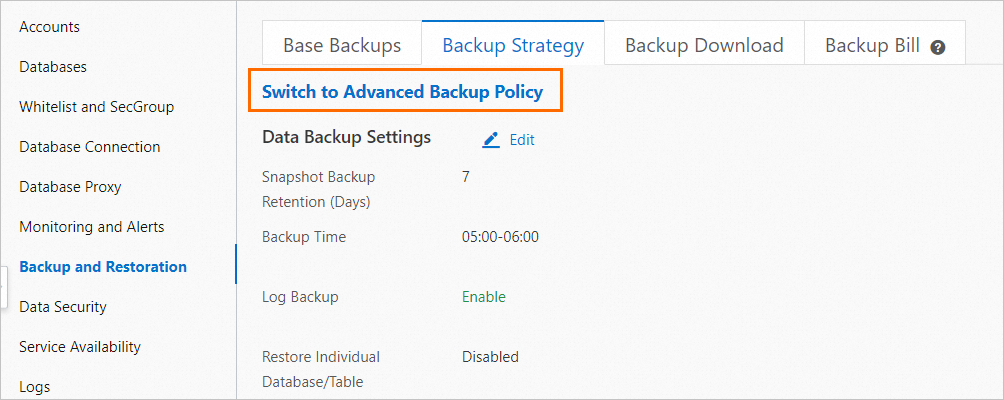
On the Backup and Restoration page, click the Backup Strategy tab, and then click Switch to Advanced Backup Policy.
 Important
If the Switch to Advanced Backup Policy button is not displayed on the page, submit an application. After your application is approved, refresh the page and proceed.
In the dialog box that appears, select Understood, and then click OK.
ImportantThe backup settings page for the instance is switched to the advanced version. You cannot switch back to the previous backup settings page.
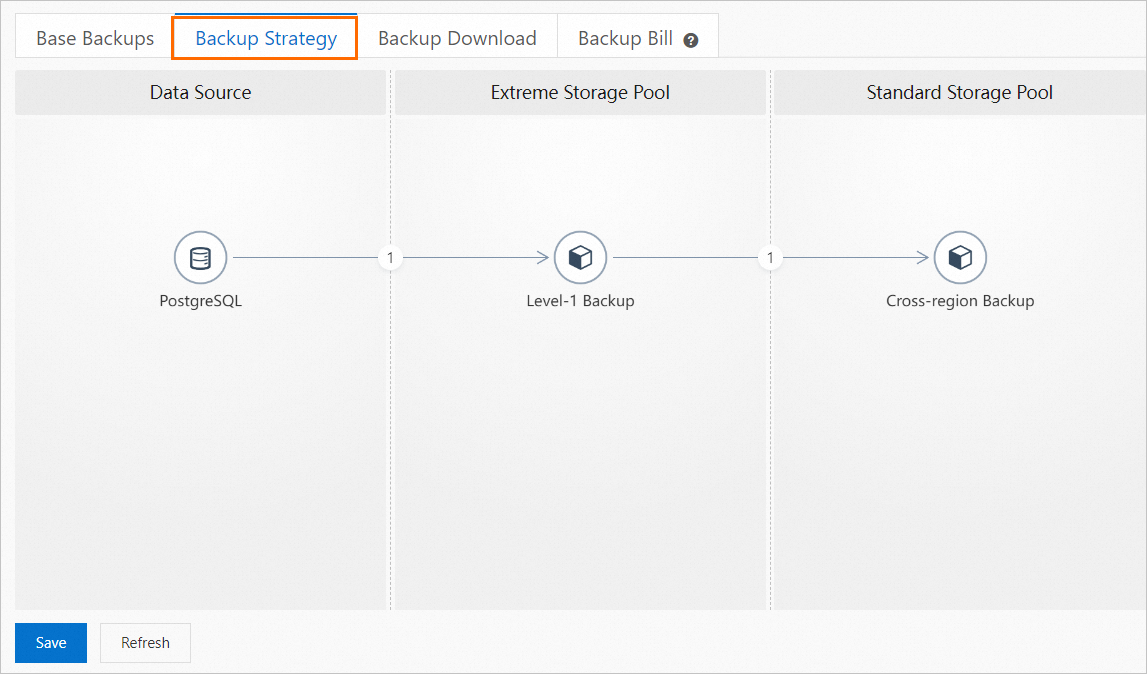
The Backup Strategy page appears as shown in the following figure. This indicates that you have switched to the advanced backup settings page. You can now configure sparse backup policies on this page. For more information, see Configure a sparse backup policy.
Configure a sparse backup policy
Manually configure one or more backup policies to retain a minimum number of backup sets. This is known as sparse backup.
Go to the Instances page. In the top navigation bar, select the region in which the RDS instance resides. Then, find the RDS instance and click the ID of the instance.
In the left-side navigation pane, click Backup and Restoration.
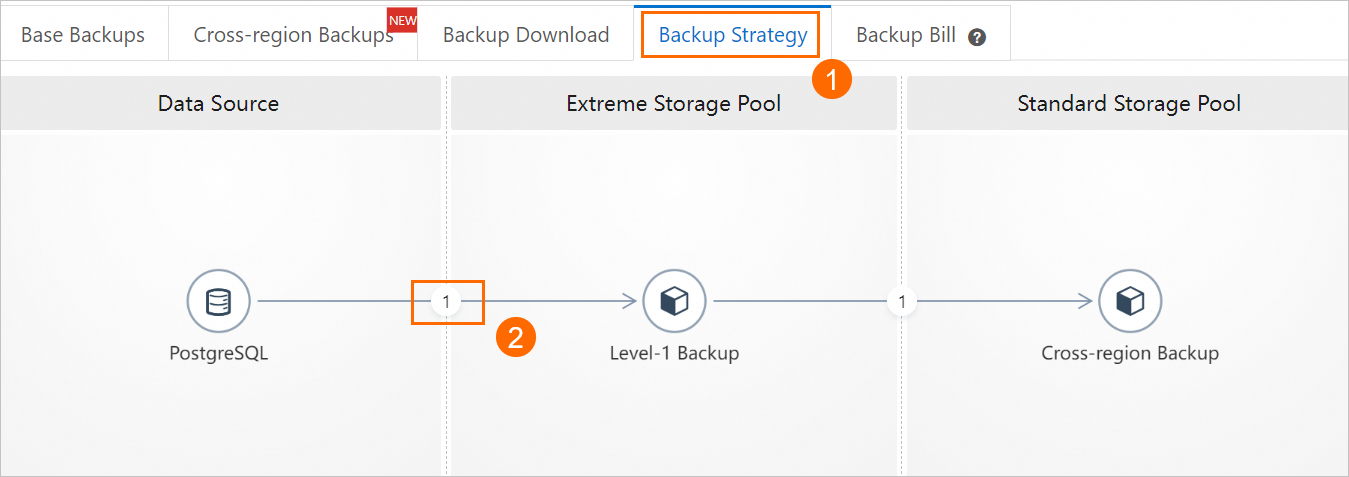
On the Backup and Restoration page, click the Backup Strategy tab and click the circled number between PostgreSQL and level-1 Backup.
In the dialog box that appears, click Add Backup Policy. Configure the sparse backup policy and click OK.
Backup Cycle
Backup Time
Retention Period
15 minutes to 12 hours
You can set the backup frequency to a value from 15 minutes to 12 hours.
NoteYou can click the backup policy in the first row and change Every Week to High-frequency.
For more information, see High-frequency snapshot backup.
You can set a different retention period for each policy. The retention period can range from 7 to 7,300 days.
NoteYou can also select Long-term Retention for a backup policy to retain backup sets for a long term.
Every Week
You can select one or more days of the week.
Every Month
You can select one or more days of the month or Last Day of Each Month.
Every Year
You can select a specific day of the year. For example, you can select January 1 of each year.
NoteFor information about how to configure other parameters, see Back up data of an ApsaraDB RDS for PostgreSQL instance.
The backup policy in the first row is fixed and cannot be deleted. You must set its backup cycle to Every Week (on at least two days) or High-frequency.
In the lower-left corner of the Backup Strategy tab, click Save.
Configuration example
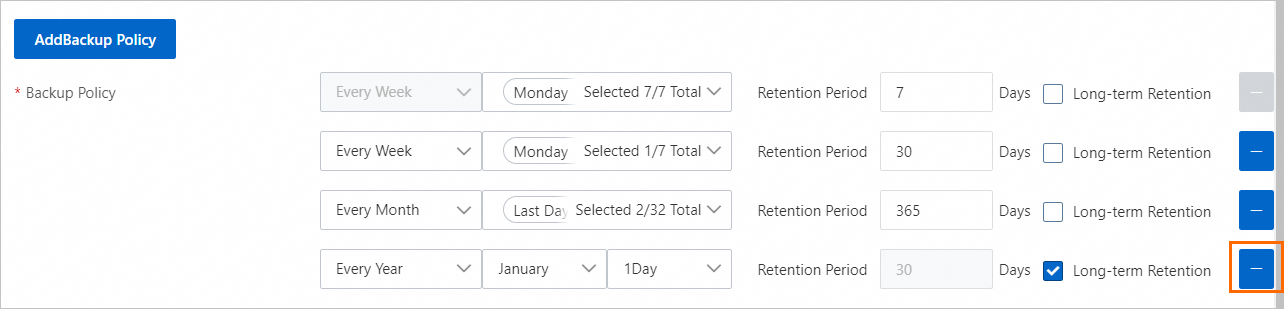
The following list describes the parameter configurations in the preceding figure:
①: Data is backed up daily. Each backup set is retained for 7 days.
②: Data is backed up every Monday. The backup set is retained for 30 days.
③: Data is backed up on the first and last day of each month. The backup set is retained for 365 days.
④: Data is backed up on January 1 of each year. The backup set is retained for long-term retention.
What to do next
View backup policies
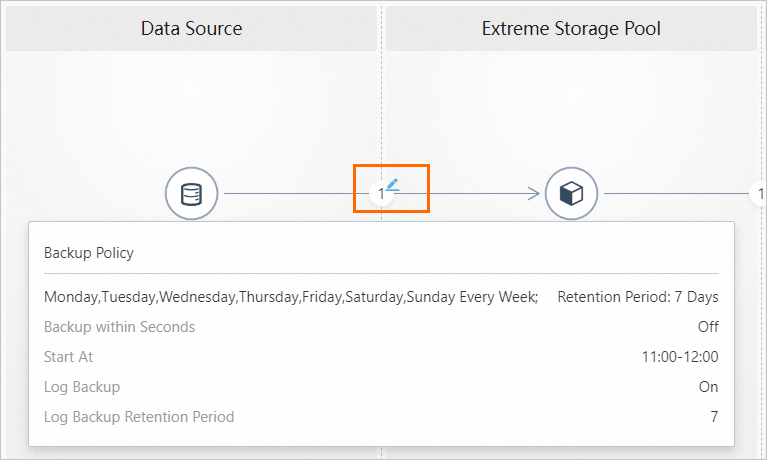
On the Backup Strategy page, move the pointer over the circled number to view the configured backup policies.
The number in the circle indicates the number of configured backup policies.
Delete a backup policy
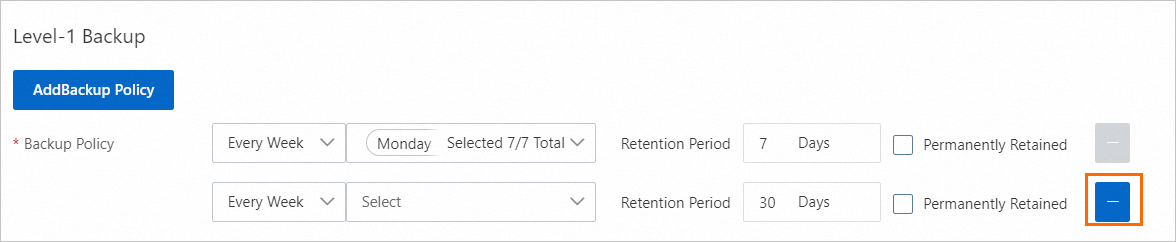
On the Level-1 Backup page, click the  icon to delete a backup policy.
The backup policy in the first row is fixed and cannot be deleted. You must set its backup cycle to Every Week (on at least two days) or High-frequency.