This topic answers frequently asked questions about Resource Access Management (RAM) roles and Security Token Service (STS) tokens.
Why do I get the "You are not authorized..." error when calling AssumeRole?
When you call the AssumeRole API operation, you might receive the following error message:
Error message: You are not authorized to do this action. You should be authorized by RAM.This error can occur for the following reasons:
You are calling the operation as the Alibaba Cloud account.
The AssumeRole API operation cannot be called by an Alibaba Cloud account. You must call it as a RAM user or role.
The calling identity does not have permissions to assume the role.
To grant the necessary permissions, attach the AliyunSTSAssumeRoleAccess policy or a custom policy to the calling identity (the RAM user or role making the call). The custom policy must include a statement with the Allow effect on the sts:AssumeRole action. For an example, see Policy example.
The role's trust policy does not include the calling identity as a principal.
Update the trust policy of the target role to allow the calling identity to assume it. For more information, see Modify the trust policy of a RAM role.
Who can call the AssumeRole API operation?
The AssumeRole API operation, which is used to obtain temporary security credentials for a RAM role, can only be called by a RAM user or role. It cannot be called by an Alibaba Cloud account.
What types of RAM roles are there and who can assume them?
RAM provides the following role types based on the principal:
Type | Description | Common use cases |
Alibaba Cloud account | An account itself or RAM users or other RAM roles within that account—can assume the role. The account can be the same one that owns the role or a different one. | A RAM user switches identity in the console or call the |
Alibaba Cloud service | A specified cloud service can assume the role. This type of role is called a service role. | Delegate a cloud service to act on your behalf. For example, assign an instance RAM role to an ECS instance so applications running on it can access data in an Object Storage Service (OSS) bucket. Many cloud services also use a service-linked role—a predefined role linked to the service—to enable its functionality. |
Identity provider (IdP) | Users from a specified IdP (supporting SAML 2.0 or OIDC) can assume the role. This enables identity federation. | Users from your corporate IdP can use role-based single sign-on (SSO) to log on to the Alibaba Cloud console. Federated users can call the |
How do I restrict a specific RAM user from assuming a specific RAM role?
Update the RAM role's trust policy.
In the trust policy of the RAM role, use the
Principalelement to specify the RAM user that is allowed to assume the role. In the policy, replace<account-id>with the ID of your Alibaba Cloud account, and<user-name>with the name of the RAM user. For more information, see Modify the trust policy of a RAM role.Policy example:
{
    "Statement": [
        {
            "Action": "sts:AssumeRole",
            "Effect": "Allow",
            "Principal": {
                "RAM": [
                    "acs:ram::<account-id>:user/<user-name>"
                ]
            }
        }
    ],
    "Version": "1"
}
Grant the RAM user permission to assume the role.
Attach the AliyunSTSAssumeRoleAccess policy or a custom policy to the RAM user. A custom policy allows you to restrict which roles the user can assume.
In the custom policy, use the
Resourceelement to specify the ARN of the RAM role that can be assumed. In the policy, replace<account-id>with the ID of your Alibaba Cloud account, and<role-name>with the name of the RAM role. For more information, see Create a custom policy and Grant permissions to a RAM user.Policy example:
{
    "Statement": [
        {
            "Action": "sts:AssumeRole",
            "Effect": "Allow",
            "Resource": "acs:ram:*:<account-id>:role/<role-name>"
        }
    ],
    "Version": "1"
}
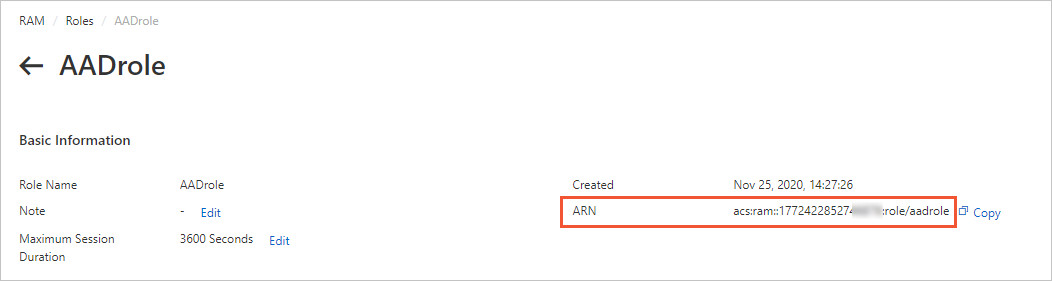
How do I view the ARN of a RAM role?
Log on to the RAM console.
In the left-side navigation pane, choose .
Click the name of the target RAM role.
In the Basic Information section, find and copy the role's ARN.
Are there API request limits for STS?
The AssumeRole API operation is throttled at 100 requests per second. This limit applies to the entire Alibaba Cloud account, including all RAM users and roles within it.
If you exceed this limit, STS returns one of the following error messages:
Error messages
Error code
Error message
Throttling.Api
Request was denied due to api flow control.
Throttling.User
Request was denied due to user flow control.
Throttling
Request was denied due to flow control.
A
302status code
If you receive these errors, reduce your request rate. If your application requires a higher request rate, you can request a quota increase by submitting a ticket. If your application requires a higher request rate, you can request a quota increase by submitting a ticket.
What are the permission limits of an STS token?
The permissions of an STS token are the intersection of the role's identity-based policies and the session policy that you pass in the Policy parameter of the AssumeRole call.
If you do not specify a session policy when calling AssumeRole, the returned STS token has the same permissions as the role.
How long is an STS token valid?
By default, an STS token is valid for 3,600 seconds (1 hour). You can specify a duration from a minimum of 900 seconds (15 minutes) to a maximum defined by the role's maximum session duration setting.
You can use the DurationSeconds parameter of the AssumeRole API operation to set the validity period of an STS token.
To configure the maximum session duration for a role, see Specify the maximum session duration for a RAM role.
Are multiple STS tokens for the same role valid simultaneously?
Yes. Multiple STS tokens for the same role can be valid at the same time. Each token is valid until it expires, and creating a new token does not affect existing ones.
What do I do if an STS token is leaked?
If you suspect that an STS token has been compromised, you can immediately invalidate all active tokens for that RAM role. To do this, you must either remove all permissions from the role or delete it entirely.
Log on to the RAM console.
To revoke permissions, detach all policies from the RAM role.
For more information, see Revoke permissions from a RAM role.
To revoke permissions, delete the RAM role.
For more information, see Delete a RAM role.
This action immediately invalidates all unexpired STS tokens for that role.
If you still need to use the RAM role, you can create a new role with the same name and attach the same policies to it.
Is there a maximum length for an STS token?
No. The length of STS tokens is variable. In your code, do not make assumptions about the maximum length of a token. Always allow for tokens of variable length.