The Persistent Buffer Pool (PBP) feature lets you use the shared buffer pool that existed before a cluster unexpectedly shut down or restarted.
Applicability
This feature is available for the following versions of PolarDB for PostgreSQL:
PostgreSQL 14 (minor engine version 2.0.14.5.2.0 or later)
PostgreSQL 11 (minor engine version 2.0.11.2.1.0 or later)
You can view the minor engine version number in the console or run the SHOW polardb_version; statement. If your cluster does not meet the version requirement, you can upgrade the minor engine version.
Background information
The memory of a PolarDB for PostgreSQL or cluster consists of three parts: a shared buffer pool, dynamic shared memory areas, and process private memory.
Shared buffer pool: A large segment of shared memory that is pre-allocated when the cluster starts. Offsets determine the usage ranges for various functional modules.
Dynamic shared memory areas: The shared memory area in PostgreSQL that is designed to implement inter-process parallel computing. It can be dynamically expanded.
The Process Global Area is the memory area that a process uses for its operations. This area consists of the following two parts.
Memory Context.
Memory directly controlled by logic.
The following figure shows how the memory is divided.
The shared buffer pool uses the most memory in a PolarDB for PostgreSQL or cluster and directly affects performance. In native PostgreSQL, the shared buffer pool is cleared and reinitialized when the cluster restarts or unexpectedly shuts down. When the cluster restarts and enters a fault recovery state, data pages are modified based on Write-Ahead Logging (WAL) logs. This requires reloading or even modifying data, which affects the available time of the cluster. In addition, reinitializing the shared buffer pool causes the data required by business services to be reloaded, which leads to severe performance jitter.
To solve these problems, PolarDB for PostgreSQL and added the PBP feature. This feature allows the cluster to use the shared buffer pool from before an unexpected shutdown or restart. This feature provides the following benefits:
Reduces fault recovery time and improves system availability.
Performance exhibits no significant jitter before and after a node leaves the cluster.
How it works
PolarDB for PostgreSQL and convert a portion of the shared buffer pool into a pod-level lifecycle PBP. For performance reasons, PolarDB for PostgreSQL and primarily place the buffer pool and buffer descriptors into the PBP. Other memory components retain an instance-level lifecycle.
Pod-level lifecycle: PolarDB for PostgreSQL and are deployed on Kubernetes. Shared memory with a pod-level lifecycle is not destroyed when the cluster shuts down.
Instance-level lifecycle: Cluster-level shared memory that is cleared when the cluster shuts down or restarts after an abnormal shutdown.
The following figure shows how the memory is divided.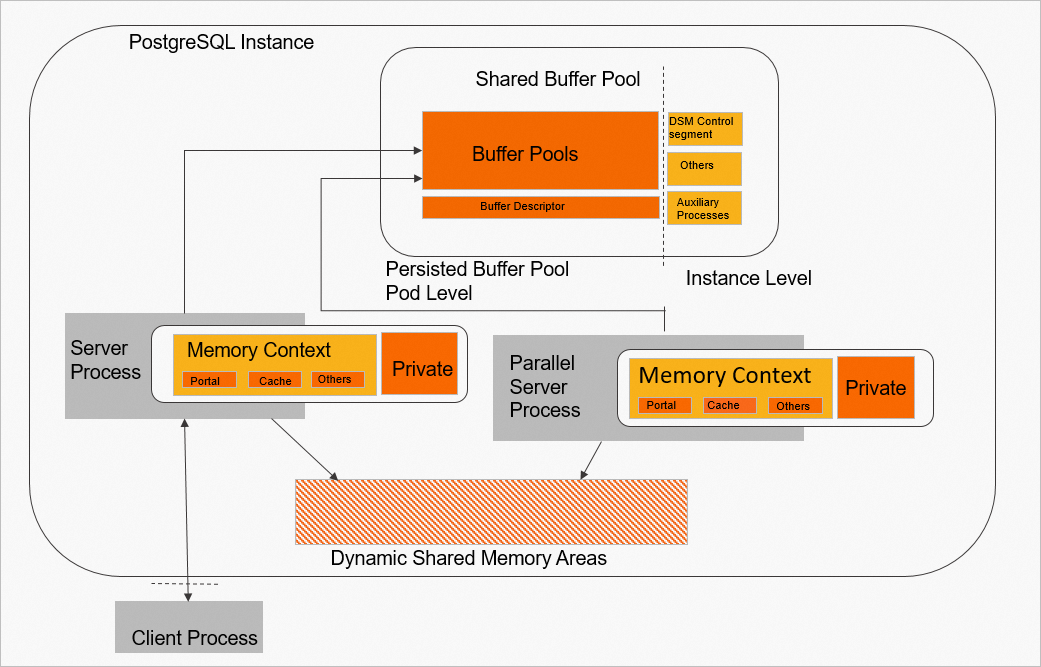
Metrics that affect PBP availability
The PBP from before a cluster shutdown is not available in all scenarios. When the cluster starts, the PBP cannot be used in the following situations.
The cluster specifications change, requiring a buffer pool of a different size.
The current PBP was not created by this cluster.
The control information in the current PBP is invalid.
In addition to checking the overall availability of the PBP, each page in the PBP must also be checked for availability. A page cannot be used in the following situations.
The page contains uncommitted transactions.
The descriptor information for the page is invalid.
The page contains an invalid Log Sequence Number (LSN).
The page properties are incorrect or invalid.
The following figure shows the metrics that affect PBP availability.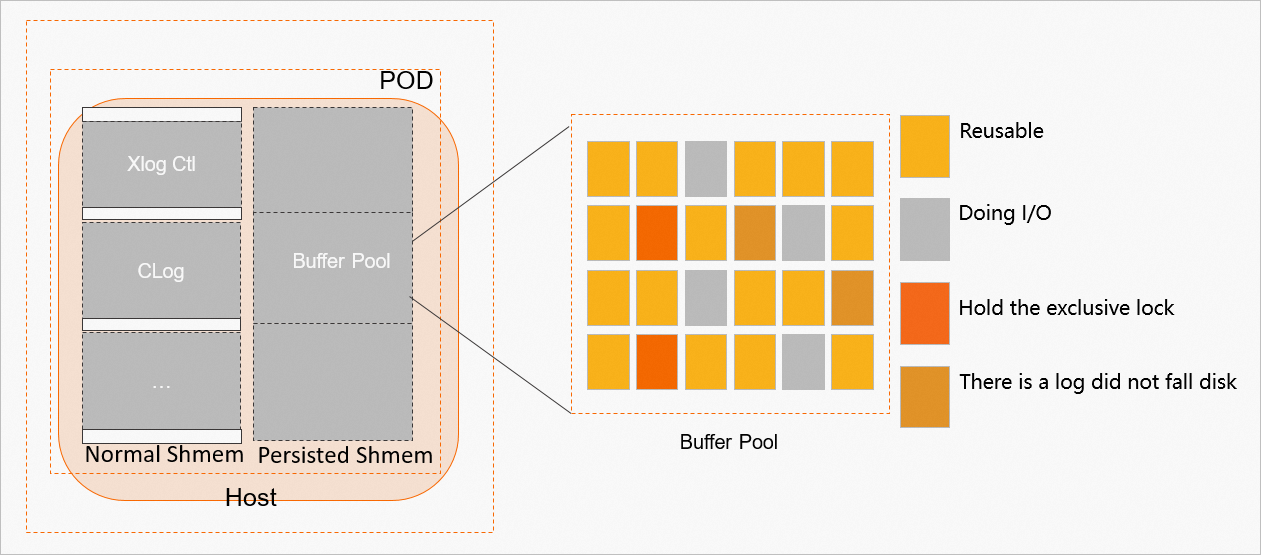
PBP performance benefits
The PBP allows the database to use the buffer pool from before a restart. This lets you quickly use cached data to improve performance in both recovery and business scenarios. The following figure shows an example.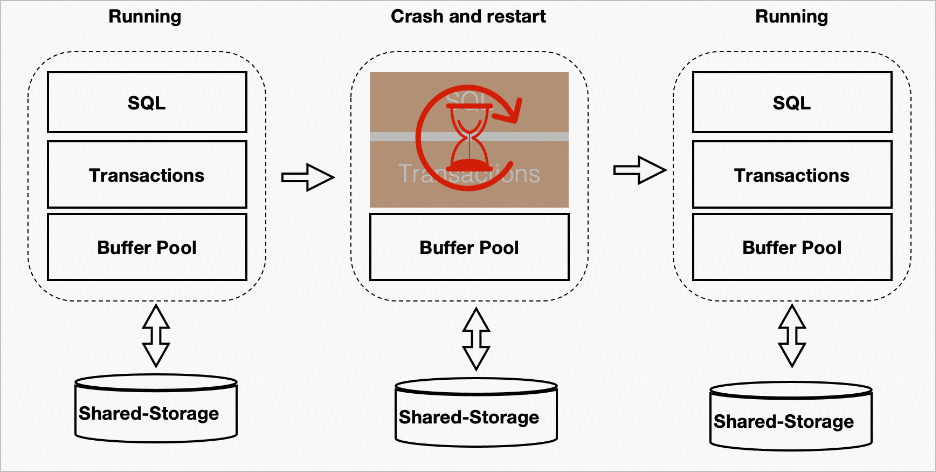
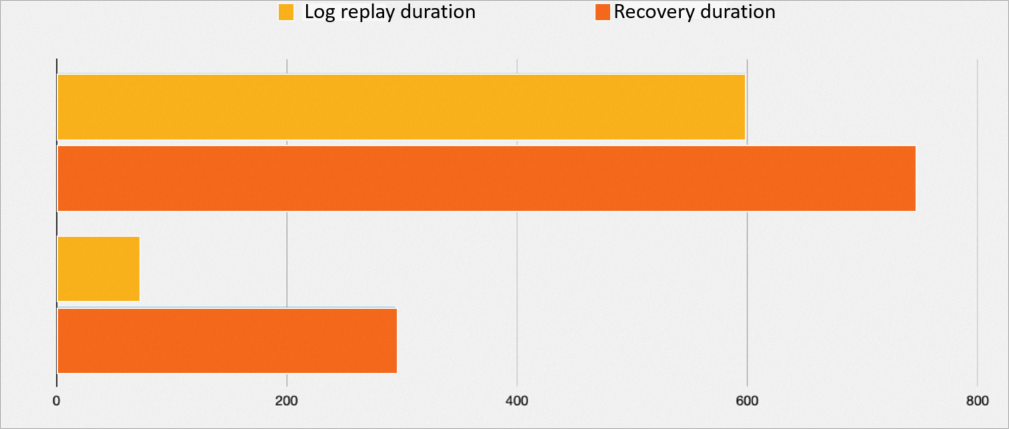
Recovery performance comparison.
In a simulated scenario of an abnormal shutdown, a total of 2093 MB of logs are replayed:
Parameter
Log replay duration
Fault recovery duration
PBP disabled
598s
746s
Using PBP
68s
294s
The following figure shows a comparison of the time taken.
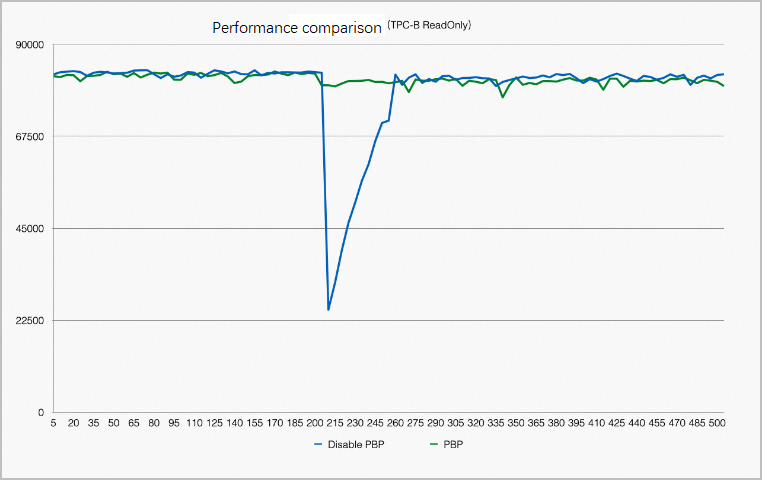
Performance comparison before and after restart.
Not all pages in the buffer pool can be reused. For example, a process may place an X lock on a page before the system goes down. After the breakdown, no process is available to release the lock. Therefore, after a breakdown and restart, all pages in the buffer pool must be traversed to remove pages that cannot be reused. The reclamation of the buffer pool also depends on Kubernetes. This optimization helps stabilize performance before and after a restart. The following figure shows a comparison of performance before and after a restart.
Usage guide
To use this feature, enable the following parameter.
polar_enable_persisted_buffer_pool = ONA cluster restart is required for this parameter change to take effect.