The Flink CDC connector compatible with PolarDB for PostgreSQL (Compatible with Oracle) (PolarDBO Flink CDC) reads full snapshot data and change data from PolarDB for PostgreSQL (Compatible with Oracle) databases. For specific features and usage, see the community Postgres CDC documentation.
Because PolarDB for PostgreSQL (Compatible with Oracle) differs from community PostgreSQL in only a few data types and built-in object handling, this topic explains how to adapt and package a PolarDBO Flink CDC connector that supports PolarDB for PostgreSQL (Compatible with Oracle), based on the community PostgreSQL CDC, with minimal code changes.
The DATE type in PolarDB for PostgreSQL (Compatible with Oracle) is 64-bit, while the DATE type in community PostgreSQL is 32-bit. Therefore, PolarDBO Flink CDC adapts the handling of DATE type data.
Package the PolarDBO Flink CDC connector
The PolarDBO Flink CDC connector is developed based on the community Postgres CDC. Alibaba Cloud does not provide Service-Level Agreement (SLA) guarantees for the PolarDBO Flink CDC connector, whether you package it yourself or use the JAR package provided in this topic.
Prerequisites
Determine the Flink-CDC version.
If you use Alibaba Cloud Realtime Compute for Apache Flink, determine the community Flink-CDC version compatible with the corresponding Ververica Runtime (VVR) version. For details, see CDC and VVR version mapping.
NoteFor the Flink-CDC code repository, see Flink-CDC.
Determine the Debezium version.
In the
pom.xmlfile of the corresponding Flink-CDC version, search for the keyworddebezium.versionto determine the Debezium version.NoteFor the Debezium code repository, see Debezium.
Determine the PgJDBC version.
In the
pom.xmlfile of the corresponding Postgres-CDC version, search for the keywordorg.postgresqlto determine the PgJDBC version.NoteFor versions earlier than release-3.0, the file path is:
flink-connector-postgres-cdc/pom.xml.For release-3.0 and later versions, the file path is:
flink-cdc-connect/flink-cdc-source-connectors/flink-connector-postgres-cdc/pom.xml.For the PgJDBC code repository, see PgJDBC.
Procedure
Package release-3.5
Community Flink-CDC release-3.5 is compatible with vvr-11.4-jdk11-flink-1.20 of Alibaba Cloud Realtime Compute for Apache Flink.
To package the corresponding version of the PolarDB Flink CDC connector, follow these steps:
Clone the source code for Flink-CDC, Debezium, and PgJDBC at the specified versions.
git clone -b release-3.5 --depth=1 https://github.com/apache/flink-cdc.git
git clone -b REL42.7.3 --depth=1 https://github.com/pgjdbc/pgjdbc.git
git clone -b v1.9.8.Final --depth=1 https://github.com/debezium/debezium.git
Copy selected files from Debezium and PgJDBC into Flink-CDC.
mkdir -p flink-cdc/flink-cdc-connect/flink-cdc-source-connectors/flink-connector-postgres-cdc/src/main/java/org/postgresql/core/v3
mkdir -p flink-cdc/flink-cdc-connect/flink-cdc-source-connectors/flink-connector-postgres-cdc/src/main/java/org/postgresql/jdbc
cp pgjdbc/pgjdbc/src/main/java/org/postgresql/core/v3/ConnectionFactoryImpl.java flink-cdc/flink-cdc-connect/flink-cdc-source-connectors/flink-connector-postgres-cdc/src/main/java/org/postgresql/core/v3
cp pgjdbc/pgjdbc/src/main/java/org/postgresql/core/v3/QueryExecutorImpl.java flink-cdc/flink-cdc-connect/flink-cdc-source-connectors/flink-connector-postgres-cdc/src/main/java/org/postgresql/core/v3
cp pgjdbc/pgjdbc/src/main/java/org/postgresql/jdbc/PgDatabaseMetaData.java flink-cdc/flink-cdc-connect/flink-cdc-source-connectors/flink-connector-postgres-cdc/src/main/java/org/postgresql/jdbc
cp pgjdbc/pgjdbc/src/main/java/org/postgresql/core/Oid.java flink-cdc/flink-cdc-connect/flink-cdc-source-connectors/flink-connector-postgres-cdc/src/main/java/org/postgresql/core
cp debezium/debezium-connector-postgres/src/main/java/io/debezium/connector/postgresql/TypeRegistry.java flink-cdc/flink-cdc-connect/flink-cdc-source-connectors/flink-connector-postgres-cdc/src/main/java/io/debezium/connector/postgresql
Go to the Flink-CDC directory. Apply the timestamp conversion bug fix and the implicit behavior (SELECT *) bug fix. These fixes will be merged into the community 3.6 release.
cd flink-cdc

# Apply the timestamp conversion bug fix. It will be merged into the community 3.6 release.
git fetch origin 2f32836a783f80f295c9dce339c11afec2a32dc2
git cherry-pick 2f32836a783f80f295c9dce339c11afec2a32dc2

git fetch origin 0d86de24494a855c2d83f9b1052c2e888e182cb1
git cherry-pick 0d86de24494a855c2d83f9b1052c2e888e182cb1
Apply the patch file that adds support for PolarDB for PostgreSQL (Compatible with Oracle).
git apply release-3.5_support_polardbo.patchNoteThe patch file used above is: release-3.5_support_polardbo.patch.
Use Maven to package the PolarDB for PostgreSQL Flink CDC connector.
mvn clean install -DskipTests -Dcheckstyle.skip=true -Dspotless.check.skip

# After packaging, find the JAR file in flink-cdc-connect/flink-cdc-pipeline-connectors/flink-cdc-pipeline-connector-postgres/target.
Following the above procedure, build a JAR package for the PolarDBO Flink CDC connector using JDK 11: flink-cdc-pipeline-connector-polardbo-3.5-SNAPSHOT-20260212.jar.
Package release-3.1
Community Flink-CDC release-3.1 is compatible with vvr-8.0.x-flink-1.17 of Alibaba Cloud Realtime Compute for Apache Flink.
To package the corresponding version of the PolarDB Flink CDC connector, follow these steps:
Clone the code files for Flink-CDC, Debezium, and PgJDBC.
git clone -b release-3.1 --depth=1 https://github.com/apache/flink-cdc.git
git clone -b REL42.5.1 --depth=1 https://github.com/pgjdbc/pgjdbc.git
git clone -b v1.9.8.Final --depth=1 https://github.com/debezium/debezium.git
Copy specific files from Debezium and PgJDBC to Flink-CDC.
mkdir -p flink-cdc/flink-cdc-connect/flink-cdc-source-connectors/flink-connector-postgres-cdc/src/main/java/org/postgresql/core/v3
mkdir -p flink-cdc/flink-cdc-connect/flink-cdc-source-connectors/flink-connector-postgres-cdc/src/main/java/org/postgresql/jdbc
cp pgjdbc/pgjdbc/src/main/java/org/postgresql/core/v3/ConnectionFactoryImpl.java flink-cdc/flink-cdc-connect/flink-cdc-source-connectors/flink-connector-postgres-cdc/src/main/java/org/postgresql/core/v3
cp pgjdbc/pgjdbc/src/main/java/org/postgresql/core/v3/QueryExecutorImpl.java flink-cdc/flink-cdc-connect/flink-cdc-source-connectors/flink-connector-postgres-cdc/src/main/java/org/postgresql/core/v3
cp pgjdbc/pgjdbc/src/main/java/org/postgresql/jdbc/PgDatabaseMetaData.java flink-cdc/flink-cdc-connect/flink-cdc-source-connectors/flink-connector-postgres-cdc/src/main/java/org/postgresql/jdbc
cp debezium/debezium-connector-postgres/src/main/java/io/debezium/connector/postgresql/TypeRegistry.java flink-cdc/flink-cdc-connect/flink-cdc-source-connectors/flink-connector-postgres-cdc/src/main/java/io/debezium/connector/postgresql
Apply the patch file to support PolarDB for PostgreSQL (Compatible with Oracle).
git apply release-3.1_support_polardbo.patchNoteThe patch file for PolarDBO Flink CDC compatibility is release-3.1_support_polardbo.patch.
Package the PolarDBO Flink CDC connector using Maven.
mvn clean install -DskipTests -Dcheckstyle.skip=true -Dspotless.check.skip -Drat.skip=true

# After the packaging is complete, find the JAR package in the target folder of flink-sql-connector-postgres-cdc
Follow the process described above to package the JAR file for the PolarDB Flink CDC connector using JDK 8: flink-sql-connector-postgres-cdc-3.1-SNAPSHOT.jar.
Package release-2.3
Community Flink-CDC release-2.3 is compatible with vvr-4.0.15-flink-1.13 to vvr-6.0.2-flink-1.15 of Alibaba Cloud Realtime Compute for Apache Flink.
To package the corresponding version of the PolarDB-O Flink CDC connector, follow these steps:
Clone the source code for Flink-CDC, Debezium, and PgJDBC at the corresponding versions.
git clone -b release-2.3 --depth=1 https://github.com/apache/flink-cdc.git
git clone -b REL42.2.26 --depth=1 https://github.com/pgjdbc/pgjdbc.git
git clone -b v1.6.4.Final --depth=1 https://github.com/debezium/debezium.git
Copy selected files from Debezium and PgJDBC into Flink-CDC.
mkdir -p flink-cdc/flink-connector-postgres-cdc/src/main/java/org/postgresql/core/v3
mkdir -p flink-cdc/flink-connector-postgres-cdc/src/main/java/org/postgresql/jdbc
mkdir -p flink-cdc/flink-connector-postgres-cdc/src/main/java/io/debezium/connector/postgresql
cp pgjdbc/pgjdbc/src/main/java/org/postgresql/core/v3/ConnectionFactoryImpl.java flink-cdc/flink-connector-postgres-cdc/src/main/java/org/postgresql/core/v3
cp pgjdbc/pgjdbc/src/main/java/org/postgresql/core/v3/QueryExecutorImpl.java flink-cdc/flink-connector-postgres-cdc/src/main/java/org/postgresql/core/v3
cp pgjdbc/pgjdbc/src/main/java/org/postgresql/jdbc/PgDatabaseMetaData.java flink-cdc/flink-connector-postgres-cdc/src/main/java/org/postgresql/jdbc
cp debezium/debezium-connector-postgres/src/main/java/io/debezium/connector/postgresql/TypeRegistry.java flink-cdc/flink-connector-postgres-cdc/src/main/java/io/debezium/connector/postgresql
Apply the patch file for compatibility with PolarDB for PostgreSQL (Compatible with Oracle).
git apply release-2.3_support_polardbo.patchNoteThe patch file used above is: release-2.3_support_polardbo.patch.
Package the PolarDB for PostgreSQL Flink CDC connector using Maven.
mvn clean install -DskipTests -Dcheckstyle.skip=true -Dspotless.check.skip -Drat.skip=true

# After packaging completes, find the JAR file in the target folder of flink-sql-connector-postgres-cdc
Following the above steps, package the PolarDBO Flink CDC connector JAR using JDK 8: flink-sql-connector-postgres-cdc-2.3-SNAPSHOT.jar.
Usage instructions
The PolarDBO Flink CDC connector reads change stream data using logical replication from PolarDB for PostgreSQL (Compatible with Oracle) databases. It requires the following conditions:
Set the
wal_levelparameter tological. This adds information required for logical replication support in the write-ahead logging (WAL).NoteYou can set the wal_level parameter in the console. For detailed operations, see Set cluster parameters. The cluster restarts after modifying this parameter. Plan your business operations before modifying the parameter, and proceed with caution.
Execute the
ALTER TABLE schema.table REPLICA IDENTITY FULL;command to set theREPLICA IDENTITYof the subscribed table toFULL. This ensures data synchronization consistency for the table, as emitted insert and update events include the old values of all columns in the table.NoteREPLICA IDENTITY is a unique table-level setting in PostgreSQL. It determines whether the logical decoding plugin includes the old values of affected table columns during INSERT and UPDATE events. For details on value meanings, see REPLICA IDENTITY.
Setting the
REPLICA IDENTITYof the subscribed table toFULLmight lock the table, which could affect business operations. Plan your business operations before modifying the parameter. Check if the current configuration isFULLusing the following command:SELECT relreplident = 'f' FROM pg_class WHERE relname = 'tablename';
Ensure that the values of both `max_wal_senders` and `max_replication_slots` parameters are greater than the current number of used database replication slots plus the number of slots required by the Flink job.
Use a privileged account or an account with both LOGIN and REPLICATION permissions, and SELECT permission on the subscribed table for full data queries.
Connect only to the primary endpoint of the PolarDB cluster. Cluster endpoints do not support logical replication.
Release-3.5 and later versions support direct synchronization of parent tables for partitioned tables. Configure as follows. For specific operations, see the Postgres CDC community documentation.
Set
scan.include-partitioned-tables.enabledtotrue.Manually create a
PUBLICATIONin the database with thepublish_via_partition_root=trueoption. Also, specify thetable-nameusing thedebezium.publication.nameparameter.table-namecan only specify parent tables. Regular expressions must not match child tables; otherwise, full data will be duplicated.
In addition, release-3.5 and later versions support Pipeline connectors, which allow reading snapshot data and incremental data, providing end-to-end full database data synchronization capabilities. However, note that Pipeline connectors currently do not support synchronizing table schema changes. For details, see the Postgres CDC Pipeline connector community documentation.
PolarDBO Flink CDC connector vs. Postgres CDC
The PolarDBO Flink CDC connector is packaged based on Postgres CDC. For specific syntax and parameters, see Postgres CDC. However, there are the following key differences:
The connector parameter in WITH must be set to the static field:
polardbo-cdc.PolarDBO Flink CDC is compatible with all versions of PolarDB for PostgreSQL, PolarDB for PostgreSQL (Compatible with Oracle) 1.0, and PolarDB for PostgreSQL (Compatible with Oracle) 2.0.
NoteIf you use PolarDB for PostgreSQL, we recommend using the community Postgres CDC directly.
For columns of
DATEtype in PolarDB for PostgreSQL (Compatible with Oracle) 1.0 and PolarDB for PostgreSQL (Compatible with Oracle) 2.0, the corresponding types for source and sink tables in Flink SQL must be specified asTIMESTAMP.Set the
decoding.plugin.nameparameter topgoutput. Otherwise, incremental parsing might result in garbled characters for non-UTF-8 encoded databases. For a detailed introduction, see the community documentation.
Type mapping
The field type mappings between PolarDB PostgreSQL and Flink are identical to those of the community version of PostgreSQL, with the exception of the DATE type. The specific mappings are as follows:
PolarDB for PostgreSQL field type | Flink field type |
SMALLINT | SMALLINT |
INT2 | |
SMALLSERIAL | |
SERIAL2 | |
INTEGER | INT |
SERIAL | |
BIGINT | BIGINT |
BIGSERIAL | |
REAL | FLOAT |
FLOAT4 | |
FLOAT8 | DOUBLE |
DOUBLE PRECISION | |
NUMERIC(p, s) | DECIMAL(p, s) |
DECIMAL(p, s) | |
BOOLEAN | BOOLEAN |
DATE |
|
TIME [(p)] [WITHOUT TIMEZONE] | TIME [(p)] [WITHOUT TIMEZONE] |
TIMESTAMP [(p)] [WITHOUT TIMEZONE] | TIMESTAMP [(p)] [WITHOUT TIMEZONE] |
CHAR(n) | STRING |
CHARACTER(n) | |
VARCHAR(n) | |
CHARACTER VARYING(n) | |
TEXT | |
BYTEA | BYTES |
Usage examples
Source connector
The following example illustrates how to synchronize the `shipments` table from the `flink_source` database in a PolarDB for PostgreSQL (Compatible with Oracle) 2.0 cluster to the `shipments_sink` table in the `flink_sink` database using PolarDBO Flink CDC.
This example only verifies that the packaged PolarDBO Flink CDC can run on PolarDB for PostgreSQL (Compatible with Oracle). For production use, configure parameters as needed by referring to the community Postgres CDC documentation.
Prerequisites
PolarDB for PostgreSQL (Compatible with Oracle) preparation
Purchase a PolarDB for PostgreSQL (Compatible with Oracle) 2.0 cluster on the PolarDB cluster purchase page.
View the cluster's primary endpoint. If the PolarDB cluster and Realtime Compute for Apache Flink are in the same virtual private cloud (VPC), you can directly use the private endpoint. Otherwise, request a public endpoint.
Set the cluster whitelist: Add the Flink instance address to the PolarDB cluster whitelist.
Create source database `flink_source` and target database `flink_sink` in the console. For detailed steps, see Create a database.
Execute the following statement to create the `shipments` table in the source database `flink_source` and insert data.
CREATE TABLE public.shipments (
  shipment_id INT,
  order_id INT,
  origin TEXT,
  destination TEXT,
  is_arrived BOOLEAN,
  order_time DATE,
  PRIMARY KEY (shipment_id)
);
ALTER TABLE public.shipments REPLICA IDENTITY FULL;
INSERT INTO public.shipments SELECT 1, 1, 'test1', 'test1', false, now();
Execute the following statement to create the `shipments_sink` table in the target database `flink_sink`.
CREATE TABLE public.shipments_sink (
   shipment_id INT,
   order_id INT,
   origin TEXT,
   destination TEXT,
   is_arrived BOOLEAN,
   order_time TIMESTAMP,
   PRIMARY KEY (shipment_id)
 );
Realtime Compute for Apache Flink Preparation
Log on to the Realtime Compute console and purchase a Realtime Compute for Apache Flink instance. For more information, see Purchase Realtime Compute for Apache Flink.
NoteWe recommend that the Realtime Compute for Apache Flink Region and Virtual Private Cloud (VPC) be consistent with those of the PolarDB cluster. You can directly use the private endpoint of the PolarDB cluster's primary endpoint as the connection address.
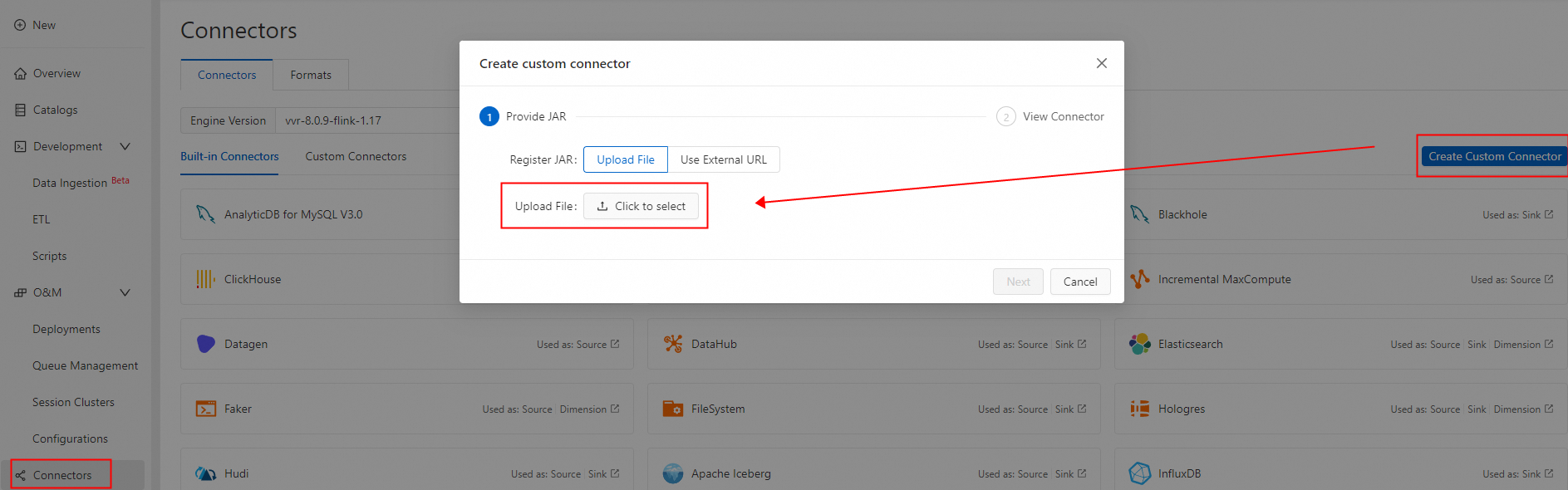
Create a custom connector and upload the packaged PolarDBO Flink CDC. Set Formats to debezium-json. For detailed steps, see Create a custom connector.
-
Create a Flink job
-
Log on to the Realtime Compute console. Create a new SQL job draft. For guidance, see the job development map. Use the following Flink SQL statements. Replace the PolarDB cluster primary endpoint, port, username, and password with your values.
NoteThe DATE type in PolarDB for PostgreSQL (Compatible with Oracle) is 64-bit. In contrast, the DATE type in Flink SQL and most databases is 32-bit. Therefore, columns of type DATE in the source table must be defined as TIMESTAMP in both the source and sink tables in Flink SQL. Otherwise, the job fails with a type mismatch error, such as:
“java.time.DateTimeException: Invalid value for EpochDay (valid values -365243219162 - 365241780471): 1720891573000”.CREATE TEMPORARY TABLE shipments ( shipment_id INT, order_id INT, origin STRING, destination STRING, is_arrived BOOLEAN, order_time TIMESTAMP, PRIMARY KEY (shipment_id) NOT ENFORCED ) WITH ( 'connector' = 'polardbo-cdc', 'hostname' = '<yourHostname>', 'port' = '<yourPort>', 'username' = '<yourUserName>', 'password' = '<yourPassWord>', 'database-name' = 'flink_source', 'schema-name' = 'public', 'table-name' = 'shipments', 'decoding.plugin.name' = 'pgoutput', 'slot.name' = 'flink' ); CREATE TEMPORARY TABLE shipments_sink ( shipment_id INT, order_id INT, origin STRING, destination STRING, is_arrived BOOLEAN, order_time TIMESTAMP, PRIMARY KEY (shipment_id) NOT ENFORCED ) WITH ( 'connector' = 'jdbc', 'url' = 'jdbc:postgresql://<yourHostname>:<yourPort>/flink_sink', 'table-name' = 'shipments_sink', 'username' = '<yourUserName>', 'password' = '<yourPassWord>' ); INSERT INTO shipments_sink SELECT * FROM shipments; -
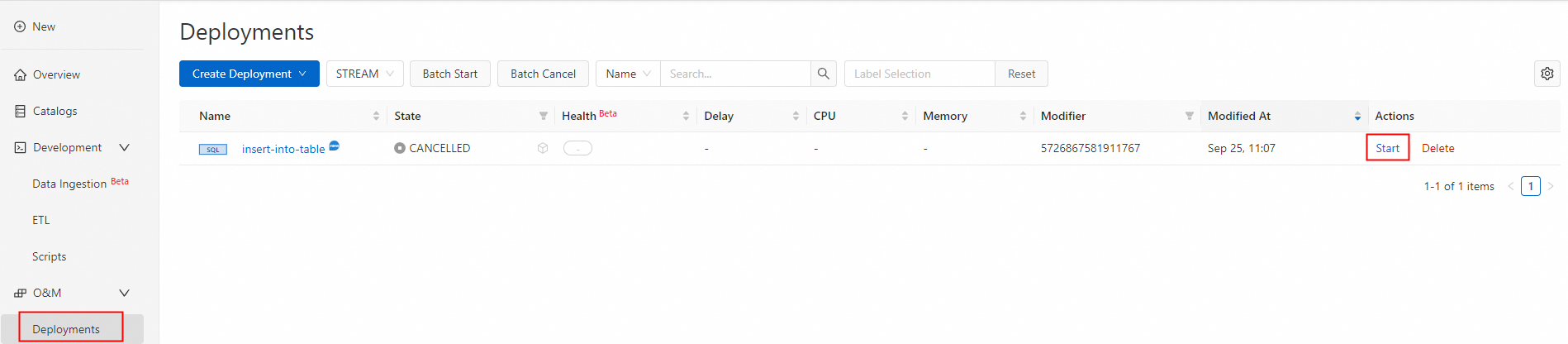
Deploy and start the job.

-
Test and validate.
-
After the job deploys successfully and its status changes to running, data from the shipments table is synced to the shipments_sink table in the destination database flink_sink.
SELECT * FROM public.shipments_sink;The result is as follows:
shipment_id | order_id | origin | destination | is_arrived | order_time -------------+----------+--------+-------------+------------+--------------------- 1 | 1 | test1 | test1 | f | 2024-09-18 05:45:08 (1 row) -
Run DML statements on the shipments table in the source database flink_source. New inserts and updates sync in real time.
INSERT INTO public.shipments SELECT 2, 2, 'test2', 'test2', false, now();
UPDATE public.shipments SET is_arrived = true WHERE shipment_id = 1;
DELETE FROM public.shipments WHERE shipment_id = 2;
INSERT INTO public.shipments SELECT 3, 3, 'test3', 'test3', false, now();
UPDATE public.shipments SET is_arrived = true WHERE shipment_id = 3;
Data in the shipments table is now synced to the shipments_sink table in the destination database flink_sink.
SELECT * FROM public.shipments_sink;The result is as follows:
 shipment_id | order_id | origin | destination | is_arrived |     order_time
-------------+----------+--------+-------------+------------+---------------------
           1 |        1 | test1  | test1       | t          | 2024-09-18 05:45:08
           3 |        3 | test3  | test3       | t          | 2024-09-18 07:33:23
(2 rows)
-
-
Pipeline connector
The following example illustrates how to synchronize the `shipments1` and `shipments2` tables from the `flink_source` database in a PolarDB for PostgreSQL (Compatible with Oracle) 2.0 cluster using the PolarDBO Flink CDC Pipeline connector. During debugging, use the Print connector. In a production environment, choose the appropriate connector as needed.
This example only verifies that the packaged PolarDBO Flink CDC can run on PolarDB for PostgreSQL (Compatible with Oracle). For production use, configure relevant parameters to meet actual business needs by referring to the community Postgres CDC Pipeline connector documentation.
Prerequisites
PolarDB for PostgreSQL (Compatible with Oracle) preparation
Purchase a PolarDB for PostgreSQL (Compatible with Oracle) 2.0 cluster on the PolarDB cluster purchase page.
View the cluster's primary endpoint. If the PolarDB cluster and Realtime Compute for Apache Flink are in the same virtual private cloud (VPC), you can directly use the private endpoint. Otherwise, request a public endpoint.
Set the cluster whitelist: Add the Flink instance address to the PolarDB cluster whitelist.
Create source database `flink_source` in the console. For detailed steps, see Create a database.
Execute the following statement to create the `shipments1` and `shipments2` tables in the source database `flink_source` and insert data.
CREATE TABLE public.shipments1 (
  shipment_id INT,
  order_id INT,
  origin TEXT,
  destination TEXT,
  is_arrived BOOLEAN,
  order_time DATE,
  PRIMARY KEY (shipment_id)
);
ALTER TABLE public.shipments1 REPLICA IDENTITY FULL;
INSERT INTO public.shipments1 SELECT 1, 1, 'test1', 'test1', false, now();

CREATE TABLE public.shipments2 (
  shipment_id INT,
  order_id INT,
  origin TEXT,
  destination TEXT,
  is_arrived BOOLEAN,
  order_time DATE,
  PRIMARY KEY (shipment_id)
);
ALTER TABLE public.shipments2 REPLICA IDENTITY FULL;
INSERT INTO public.shipments2 SELECT 1, 1, 'test1', 'test1', false, now();
Realtime Compute for Apache Flink preparation
Log on to the Realtime Compute console and purchase a Realtime Compute for Apache Flink instance. For detailed operations, see Enable Realtime Compute for Apache Flink.
NoteWe recommend that the region and virtual private cloud (VPC) of Realtime Compute for Apache Flink match those of the PolarDB cluster. The connection address can directly use the private endpoint of the PolarDB cluster's primary endpoint.
Create a Flink job.
Log on to the Realtime Compute console and create a new data ingestion draft. See Flink CDC Data Ingestion Job Quick Start. Use the following data ingestion configuration, modifying the PolarDB cluster's primary endpoint, port, account, and password.
source:
   type: polardbo
   name: PolarDB Oracle Source
   hostname: '<yourHostname>'
   port: '<yourPort>'
   username: '<yourUserName>'
   password: '<yourPassWord>'
   tables: flink_source.public.shipments[12]
   decoding.plugin.name:  pgoutput
   slot.name: pgtest

sink:
  type: values
  name: values Sink
  print.enabled: true
Add the successfully packaged Pipeline connector in the More Configurations on the left.

Deploy and start the job.
Click Deploy in the upper right corner.

Go to the job O&M page and click Start.

Test and verify.
After the job is successfully deployed and running, you can see `CreateTableEvent` and `DataChangeEvent` for the full data phase in the logs.
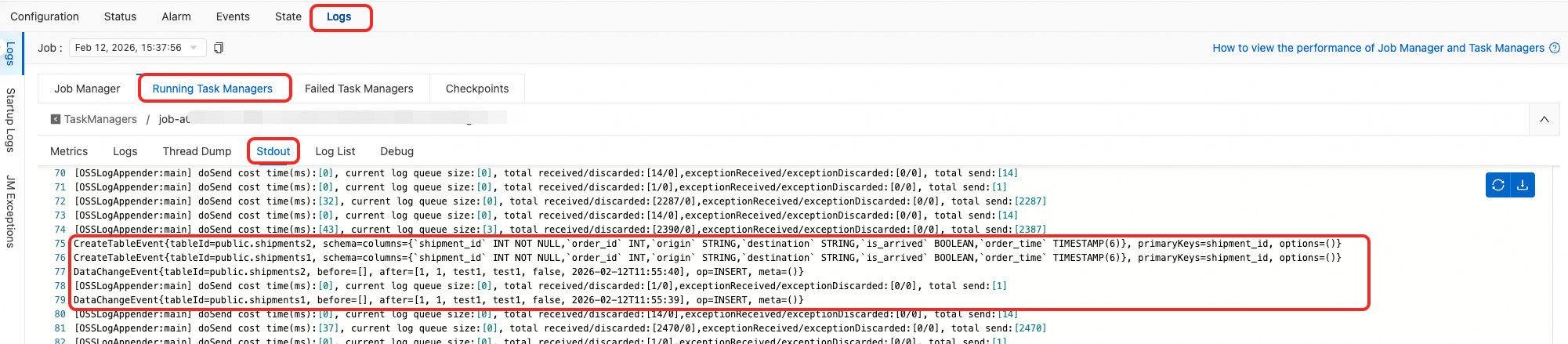
CreateTableEvent{tableId=public.shipments2, schema=columns={`shipment_id` INT NOT NULL,`order_id` INT,`origin` STRING,`destination` STRING,`is_arrived` BOOLEAN,`order_time` TIMESTAMP(6)}, primaryKeys=shipment_id, options=()}
CreateTableEvent{tableId=public.shipments1, schema=columns={`shipment_id` INT NOT NULL,`order_id` INT,`origin` STRING,`destination` STRING,`is_arrived` BOOLEAN,`order_time` TIMESTAMP(6)}, primaryKeys=shipment_id, options=()}
DataChangeEvent{tableId=public.shipments2, before=[], after=[1, 1, test1, test1, false, 2026-01-07T16:30:44], op=INSERT, meta=()}
DataChangeEvent{tableId=public.shipments1, before=[], after=[1, 1, test1, test1, false, 2026-01-07T16:30:44], op=INSERT, meta=()}
Execute DML on the `shipments1` and `shipments2` tables in the source database `flink_source`. New additions and modifications will also be synchronized in real time.
INSERT INTO public.shipments1 SELECT 2, 2, 'test2', 'test2', false, now();
UPDATE public.shipments1 SET is_arrived = true WHERE shipment_id = 1;
DELETE FROM public.shipments1 WHERE shipment_id = 2;
INSERT INTO public.shipments1 SELECT 3, 3, 'test3', 'test3', false, now();
UPDATE public.shipments1 SET is_arrived = true WHERE shipment_id = 3;

INSERT INTO public.shipments2 SELECT 2, 2, 'test2', 'test2', false, now();
UPDATE public.shipments2 SET is_arrived = true WHERE shipment_id = 1;
DELETE FROM public.shipments2 WHERE shipment_id = 2;
INSERT INTO public.shipments2 SELECT 3, 3, 'test3', 'test3', false, now();
UPDATE public.shipments2 SET is_arrived = true WHERE shipment_id = 3;
You can see `DataChangeEvent` for the incremental data phase in the logs:
DataChangeEvent{tableId=public.shipments1, before=[], after=[2, 2, test2, test2, false, 2026-01-07T16:44:50], op=INSERT, meta=()}
DataChangeEvent{tableId=public.shipments1, before=[1, 1, test1, test1, false, 2026-01-07T16:30:44], after=[1, 1, test1, test1, true, 2026-01-07T16:30:44], op=UPDATE, meta=()}
DataChangeEvent{tableId=public.shipments1, before=[2, 2, test2, test2, false, 2026-01-07T16:44:50], after=[], op=DELETE, meta=()}
DataChangeEvent{tableId=public.shipments1, before=[], after=[3, 3, test3, test3, false, 2026-01-07T16:44:50], op=INSERT, meta=()}
DataChangeEvent{tableId=public.shipments1, before=[3, 3, test3, test3, false, 2026-01-07T16:44:50], after=[3, 3, test3, test3, true, 2026-01-07T16:44:50], op=UPDATE, meta=()}
DataChangeEvent{tableId=public.shipments2, before=[], after=[2, 2, test2, test2, false, 2026-01-07T16:44:50], op=INSERT, meta=()}
DataChangeEvent{tableId=public.shipments2, before=[1, 1, test1, test1, false, 2026-01-07T16:30:44], after=[1, 1, test1, test1, true, 2026-01-07T16:30:44], op=UPDATE, meta=()}
DataChangeEvent{tableId=public.shipments2, before=[2, 2, test2, test2, false, 2026-01-07T16:44:50], after=[], op=DELETE, meta=()}
DataChangeEvent{tableId=public.shipments2, before=[], after=[3, 3, test3, test3, false, 2026-01-07T16:44:50], op=INSERT, meta=()}
DataChangeEvent{tableId=public.shipments2, before=[3, 3, test3, test3, false, 2026-01-07T16:44:50], after=[3, 3, test3, test3, true, 2026-01-07T16:44:50], op=UPDATE, meta=()}