PolarSearch is a distributed search service from PolarDB that supports full-text search and vector search. It is built on OpenSearch, is compatible with the Elasticsearch ecosystem, and is tightly integrated with the PolarDB database. PolarSearch offers a one-stop solution for your data retrieval needs through simple operations.
This topic assumes you have some knowledge of Elasticsearch or OpenSearch. For more information, see OpenSearch Documentation.
This feature is currently in beta. If you need this feature, you can submit a ticket to contact us to have it enabled.
Applicability
Cluster configuration requirements
Product version: Enterprise Edition.
Database engine: MySQL 8.0.1, MySQL 8.0.2.
NoteSpecific minor versions are not required for the database engines.
For more information, see Query the engine version.
Series: Cluster Edition.
PolarSearch is not supported for serverless clusters. For more information, see Serverless.
Supported regions and zones
PolarSearch is supported in the following zones:
Region | Zone |
China (Hangzhou) | Zone K |
China (Shanghai) | Zone E, Zone L, Zone N |
China (Shenzhen) | Zone C, Zone D |
China (Qingdao) | Zone C |
China (Beijing) | Zone K |
China (Zhangjiakou) | Zone B |
Japan (Tokyo) | Zone A, Zone C |
Mexico | Zone A |
Billing
PolarSearch uses separate search nodes to provide search features. These nodes are billed in the same way as regular compute nodes. The indexes and data on the search nodes also consume storage space, which incurs storage fees.
Add PolarSearch search nodes
For an existing cluster that meets the applicability requirements, you can add search nodes.
Log on to the PolarDB console. In the navigation pane on the left, click Clusters. Select the region where your cluster is located, and then locate the cluster.
Click the cluster ID to open the Basic Information page.
In the Database Nodes area, click Add/Remove Node.

In the Add/Remove Node dialog box, choose to add search nodes.
Create search node accounts
Set the administrator account
The account that you add is a standard database account.
This standard account serves as the administrator account for the PolarSearch feature.
Log on to the PolarDB console. In the navigation pane on the left, click Clusters. Select the region where your cluster is located, and then locate the cluster.
Click the cluster ID to open the Basic Information page.
In the Database Nodes area, hover over Search Node, and click Set Database Account.
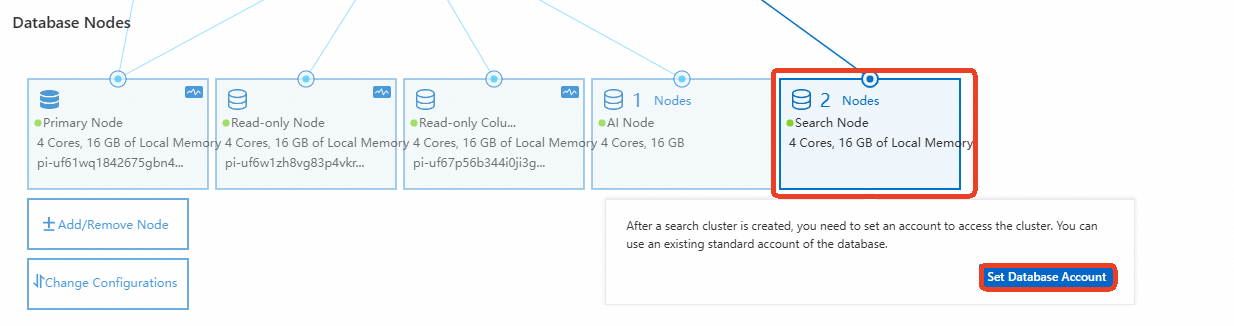
In the dialog box, select an existing standard database account or create a new one, and then enter the password.
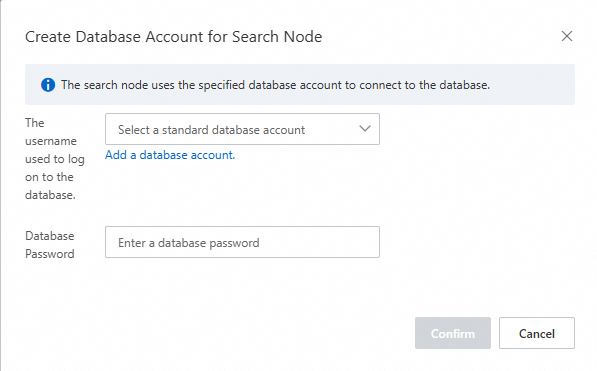
Set a standard account
For a standard account, you can control which indexes the account can access.
You can use APIs to implement complete access control for search nodes. For more information, see the OpenSearch API documentation.
Log on to the Kibana-compatible PolarSearch console and create an account using the security plug-in.
Get connection endpoints
Search endpoint
In the Database Nodes area, hover over Search Node. Obtain the private or public endpoint based on your environment.
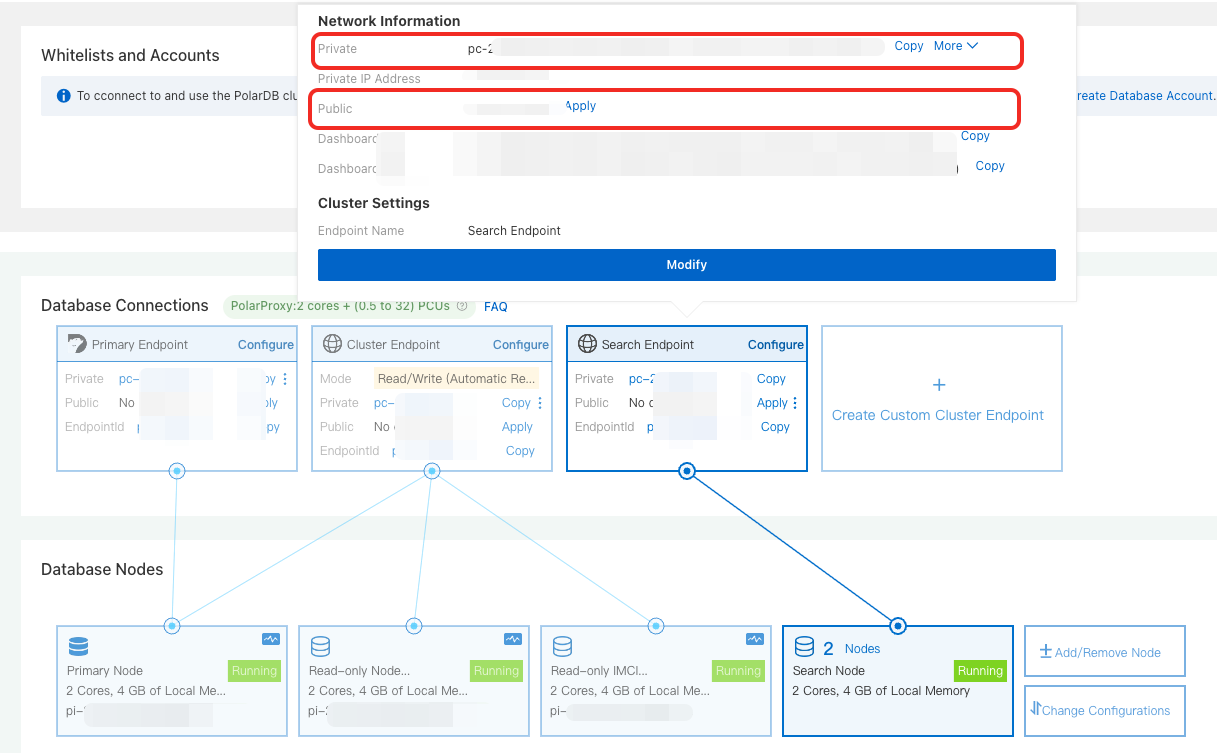
Dashboard address
In the Database Nodes area, hover over Search Node. Obtain the private or public Dashboard address based on your environment.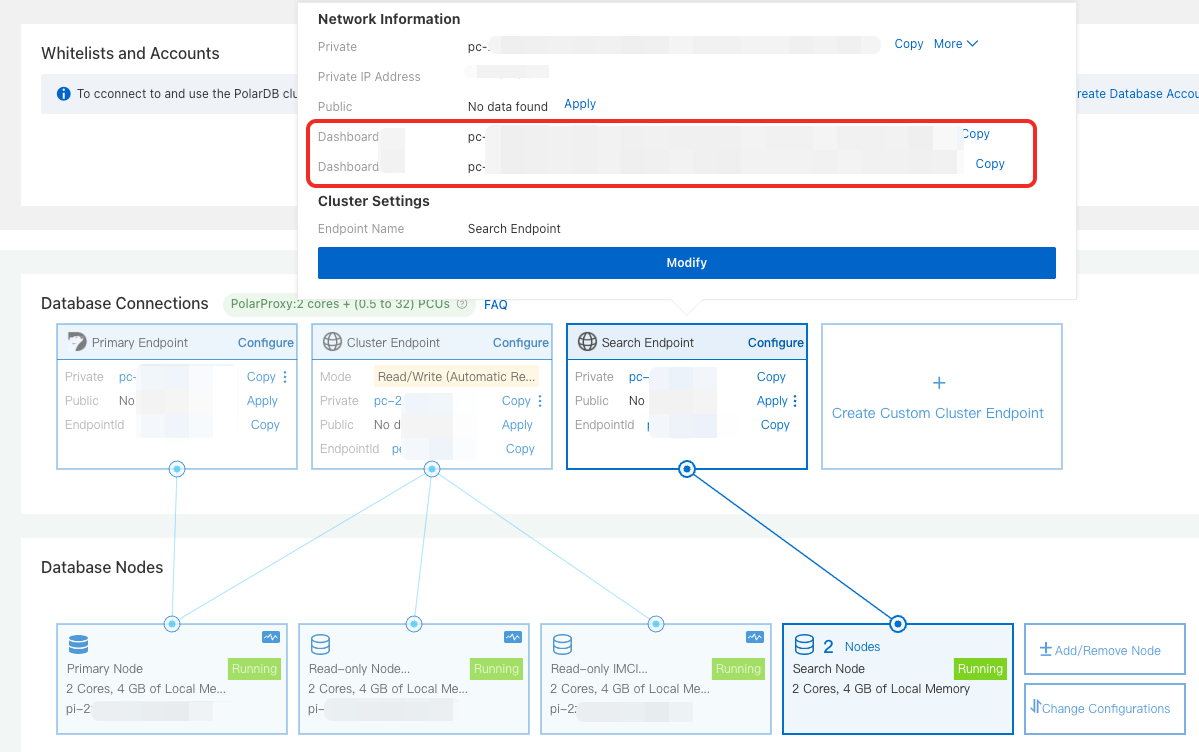
Log on to PolarSearch
Access using the search endpoint
If you prefer to use APIs to manage indexes and data, you can access PolarSearch using its API. This section uses an ECS instance as an example:
Configure a cluster whitelist: Add the IP address of your ECS instance to the whitelist of the PolarDB for MySQL cluster.
NoteIf the ECS instance and the PolarDB for MySQL cluster are in the same virtual private cloud (VPC), add the private IP address of the ECS instance.
If the ECS instance and the PolarDB for MySQL cluster are not in the same VPC, add the public IP address of the ECS instance.
Connect to PolarSearch: Run the following command. If the command returns cluster information, the connection is successful. Replace
<endpoint>:<port>with the search endpoint of PolarSearch. Replace<user_name>:<passwd>with the administrator account of PolarSearch.curl http://<endpoint>:<port>/ -u <user_name>:<passwd>
Access using the Dashboard
If you want to use a graphical user interface (GUI) to manage PolarSearch, you can access it using the Dashboard (console). This section uses a browser in a local environment as an example:
Configure a cluster whitelist: Add the IP address of your local environment to the whitelist of the PolarDB for MySQL cluster.
Log on to the PolarSearch console in a browser:
In the address bar of your browser, enter
http://<endpoint>:<port>and press Enter. Replace<endpoint>:<port>with the public Dashboard address of PolarSearch.On the console logon page, enter the administrator account for PolarSearch to log on to the Kibana-compatible PolarSearch console.
Examples
All examples in this section use the command line on an ECS instance.
PolarSearch is fully compatible with the software development kits (SDKs) and REST APIs of OpenSearch 2.10.0. Compatibility issues may occur with other versions. For more information, see OpenSearch.
Create an index
An index on a search node is similar to a table in a relational database. You can use the Elasticsearch-compatible REST API to create an index, as shown in the following example:
curl -X PUT "http://<endpoint>:<port>/articles" -H "Content-Type:application/json" -d '
{
  "settings": {
    "number_of_shards": 1,
    "number_of_replicas": 1
  },
  "mappings": {
    "properties": {
      "title": {
        "type": "text"  // Full-text search field (Explanatory comment. Delete before testing.)
      },
      "content": {
        "type": "text"
      },
      "author": {
        "type": "keyword"  // Exact match field (Explanatory comment. Delete before testing.)
      }
    }
  }
}
'
Import data
curl -X POST "http://<endpoint>:<port>/articles/_bulk" -H "Content-Type:application/json" -d '
{"index": {}}
{"title": "Introduction to PolarSearch", "content": "PolarSearch is a powerful search engine.", "author": "Allen"}
{"index": {}}
{"title": "Advanced Search Techniques", "content": "Learn how to use full-text search and filters in PolarDB.", "author": "Lang"}
{"index": {}}
{"title": "Elasticsearch vs PolarSearch", "content": "A comparison of Elasticsearch and PolarSearch features.", "author": "Zhao"}
'
Execute a search query
After the data is imported, you can perform a full-text search using an SDK or REST API, as shown in the following example:
curl -X GET "http://<endpoint>:<port>/articles/_search" -H "Content-Type:application/json" -d '
{
  "query": {
    "match": {
      "content": "PolarSearch"
    }
  }
}'For more information about search query syntax, see OpenSearch.
Create a vector index
curl -X PUT "http://<endpoint>:<port>/my-vector-index" -H "Content-Type:application/json" -d '
{
  "settings": {
    "index": {
      "knn": true
    }
  },
  "mappings": {
    "properties": {
      "vector_field": {
        "type": "knn_vector",
        "dimension": 4
      },
      "metadata": {
        "type": "text"
      }
    }
  }
}
'
Insert vector data
curl -X POST "http://<endpoint>:<port>/my-vector-index/_bulk" -H "Content-Type:application/json" -d '
{"index": {}}
{"vector_field": [0.1, 0.5, -0.3, 0.8], "metadata": "Document 1"}
{"index": {}}
{"vector_field": [-0.2, 0.7, 0.4, -0.1], "metadata": "Document 2"}
'
Perform vector retrieval
curl -X GET "http://<endpoint>:<port>/my-vector-index/_search" -H "Content-Type:application/json" -d '
{
  "size": 2,
  "query": {
    "knn": {
      "vector_field": {
        "vector": [0.1, 0.5, -0.3, 0.8],
        "k": 2
      }
    }
  }
}
'