PolarDB for MySQL provides free disk encryption. This feature uses Elastic Block Storage to encrypt your entire data disk. Even if a data backup is leaked, it cannot be decrypted. Disk encryption protects your data security. You do not need to modify your existing applications. Your snapshots automatically inherit the encryption setting.
Applicable Scenarios
Cluster configuration:
Edition: Standard Edition.
Instance type: General-purpose or Dedicated.
CPU architecture: Yitian ARM or x86.
Storage class: PL0 ESSD, PL1 ESSD, PL2 ESSD, PL3 ESSD, or ESSD AutoPL disk.
NoteYou can enable disk encryption only when you purchase a cluster. You cannot enable it after purchase.
Key: Only the default service CMK is supported. Custom KMS keys are not supported.
Create a PolarDB service-linked role.
With your Alibaba Cloud account, go to the Identity Management > Roles page in the RAM console.
Check if a service-linked role named AliyunServiceRoleForPolarDB exists in the list of roles:

If it exists, skip this step.
If it does not exist, perform the following steps.
Click Create Role. On the Create Role page that appears, click Create Service Linked Role in the upper-right corner.
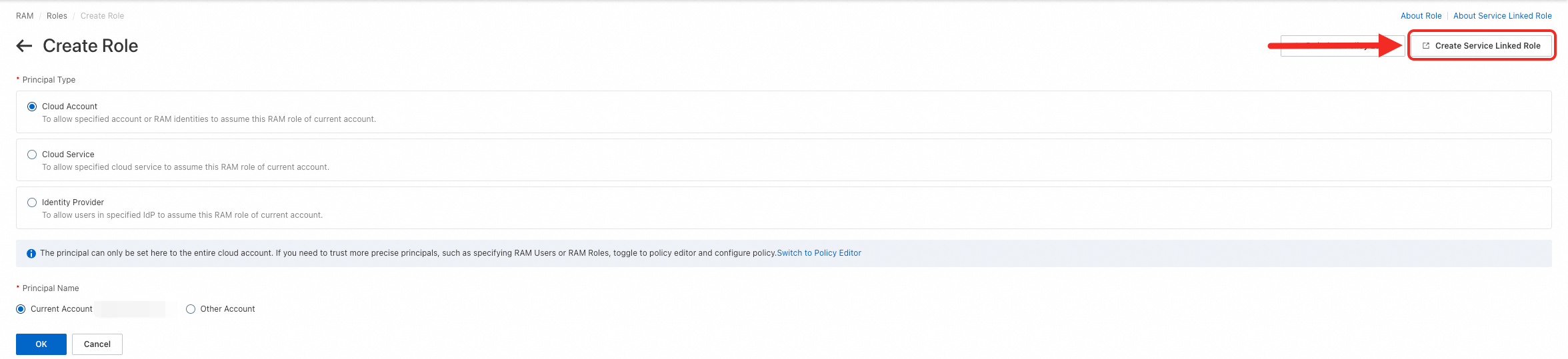
On the Create Service Linked Role page that appears, set Trusted Service to AliyunServiceRoleForPolarDB and click Create Service Linked Role to create the role.

Important Notes
You cannot disable disk encryption after enabling it.
Disk encryption does not affect your business. You do not need to modify your applications.
After you enable disk encryption, all snapshots created by the cluster and all Standard Edition clusters created from those snapshots automatically inherit the encryption setting.
Billing Information
Disk encryption is free. You incur no additional charges for any read or write operations on encrypted disks.
Enable Disk Encryption
When you purchase a cluster, if the cluster meets the requirements listed in Applicable Scenarios, select a storage class and then select Enable Disk Encryption. Then select the default key (Default Service CMK).

Check Whether Disk Encryption Is Enabled
Log on to the PolarDB console. In the navigation pane on the left, click Clusters. Select the region where your cluster resides. Click the ID of your target cluster to go to its product page.
In the navigation pane on the left, click .
Click the Cloud Drive Encryption tab. If Data disk encryption status: shows Encrypted, disk encryption is enabled for the cluster.