This topic describes the solutions used by traditional database systems to handle large tables and analyzes the large table optimization methods provided by PolarDB.
Optimize DDL O&M capabilities
Parallel DDL
Traditional DDL operations are designed based on a single core and traditional hard disks. As a result, an extended period of time is required to execute DDL operations on large tables and the latency is high. For example, when you perform DDL operations to create secondary indexes, subsequent DML queries that depend on these indexes are blocked due to the high latency of the DDL operations. The development of multi-core processors provides more powerful hardware support for the use of parallel DDL. At the same time, SSDs are widely used, which significantly narrows the gap between random access latency and sequential access latency. Therefore, using the parallel DDL technology to accelerate the creation of indexes on large tables is particularly important.
The parallel DDL feature of PolarDB can maximize the usage of hardware resources to significantly reduce the execution time of DDL operations. This prevents the blockage of subsequent DML operations and shortens the windows of DDL operations.
The release of the parallel DDL feature has allowed a large number of users to successfully address the challenges encountered when they create indexes for large tables. User cases show that secondary indexes can be created for a large table that is 5 TB in size and has 6 billion rows within only one hour after the parallel DDL feature is enabled.
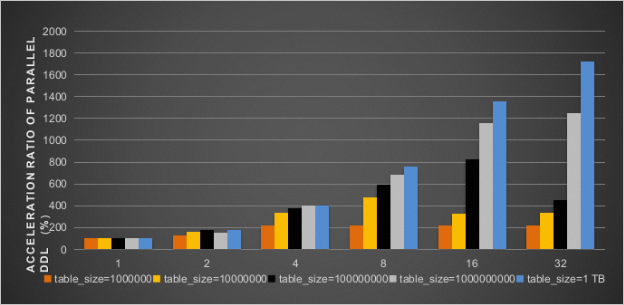
The following figure shows the increased rates of execution efficiency of the DDL operations that create secondary indexes on the b field of the INT type for tables of various sizes after the parallel DDL feature is enabled. Different numbers of parallel threads are used. The results show that a performance boost of up to 2000% can be achieved when 32 threads are enabled.
Fast DDL operations within seconds (when you add columns)
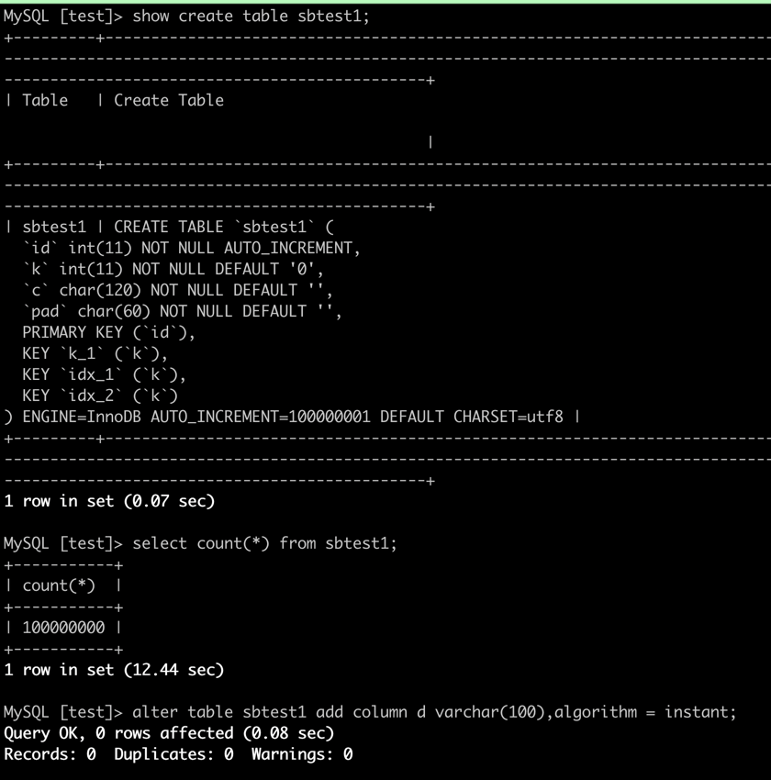
If you use traditional methods to add columns to a table, you need to rebuild the entire table in most cases, which consumes a large amount of system resources. The instant ADD COLUMN feature of PolarDB allows you to change only the definition of the table when you add columns, without affecting existing data.
Character set conversion within seconds
The UTF-8 encoding format is a widely used character encoding method. By default, the utf8mb3 character set is used as the UTF-8 encoding format in MySQL Community Edition. This character set uses up to 3 bytes per character. To store information such as emojis, you must convert the character set from utf8mb3 into utf8mb4 in most cases. However, character set conversion involves table rebuilding, which may require an extended period of time and affect your business. PolarDB supports character set conversion from utf8mb3 into utf8mb4 within seconds. This feature allows you to easily convert the character set and to use a variety of characters and symbols.
ALTER TABLE tablename MODIFY COLUMN test_column varchar(60) CHARACTER SET utf8mb4, ALGORITHM = INPLACE;If the ERROR 1846 (0A000): ALGORITHM=INPLACE is not supported. Reason: Cannot change column type INPLACE. Try ALGORITHM=COPY. error message is returned after you execute the preceding statement, it indicates that the current operation cannot be performed by using an in-place algorithm. We recommend that you carefully check relevant usage limits.
If you set the ALGORITHM parameter to DEFAULT or do not specify the ALGORITHM parameter, PolarDB automatically selects the most efficient algorithm to convert the character set of a column. Character set conversion from utf8mb3 into utf8mb4 can be completed within seconds regardless of the table size. Sample statements:
ALTER TABLE tablename MODIFY COLUMN test_column varchar(60) CHARACTER SET utf8mb4, ALGORITHM = DEFAULT;
ALTER TABLE tablename MODIFY COLUMN test_column varchar(60) CHARACTER SET utf8mb4;
Faster TRUNCATE/DROP TABLE
When you execute the TRUNCATE TABLE and DROP TABLE statements in MySQL Community Edition 5.7, the entire buffer pool is scanned and all data pages corresponding to the tablespace are removed from the LRU list and FLUSH list. When the buffer pool is large, this process takes an extended period of time. PolarDB optimizes the buffer pool management mechanism for DDL statements to improve the scan efficiency of buffer pools and the execution efficiency of the TRUNCATE TABLE and DROP TABLE statements.
Usage
You can specify the loose_innodb_flush_pages_using_space_id parameter to enable the faster TRUNCATE/DROP TABLE feature.
Effects
For clusters of different specifications, record the amount of time (in seconds) required to execute the TRUNCATE TABLE statement on the t1 and t2 tables after you enable and disable the faster TRUNCATE/DROP TABLE feature. In this example, 8,196 rows of data are inserted into the t1 table to simulate the TRUNCATE operation on a small table and 2,097,152 rows of data are inserted into the t2 table to simulate the TRUNCATE operation on a large table. The following table lists the execution results.
Cluster specifications | Buffer pool (GB) | t1 | t2 | ||||
ON | OFF | Improvement percentage | ON | OFF | Improvement percentage | ||
64 cores, 512 GB memory | 374 | 0.01 | 5.2 | 99.81% | 0.11 | 9.48 | 98.84% |
32 cores, 256 GB memory | 192 | 0.02 | 2.45 | 99.18% | 0.1 | 2.65 | 96.23% |
16 cores, 128 GB memory | 96 | 0.01 | 1.73 | 99.42% | 0.12 | 1.86 | 93.55% |
8 cores, 64 GB memory | 42 | 0.01 | 0.73 | 98.63% | 0.12 | 0.79 | 84.81% |
4 cores, 32 GB memory | 24 | 0.02 | 0.45 | 95.56% | 0.13 | 0.53 | 75.47% |
4 cores, 16 GB memory | 12 | 0.03 | 0.23 | 86.96% | 0.12 | 0.35 | 65.71% |
The preceding table shows that the execution efficiency of the TRUNCATE TABLE statement can be significantly improved after you enable the faster TRUNCATE/DROP TABLE feature.
Nonblocking DDL statements
If a blocking DDL statement is submitted and the table it affects has uncommitted transactions or queries, the DDL statement keeps waiting for the MDL-X lock. When the DDL statement waits, transactions that operate on the same table may still be submitted. However, because MDL-X locks have the highest priority in PolarDB, the new transactions must wait until the execution of this blocking DDL statement is complete. As a result, the connections are congested, which may cause the entire business system to fail.
PolarDB allows you to enable the nonblocking DDL feature for DDL operations. If you enable the nonblocking DDL feature, the locking policies of DDL statements are the same as those of the tools that allow you to perform lock-free DDL operations, such as Data Management (DMS) and gh-ost. This ensures that business operations are executed without locks or data loss. Additionally, the performance of PolarDB significantly surpasses that of external tools because the DDL processes of PolarDB are natively implemented in the kernel. The nonblocking DDL feature is similar to the lossless feature of external tools while maintaining the high performance of the kernel, which significantly reduces the impact on your business.
Usage
You can specify the loose_polar_nonblock_ddl_mode parameter to enable the nonblocking DDL feature. After you enable the nonblocking DDL feature, your business is not affected by DDL operations during peak hours even if no locks are obtained.
Effects
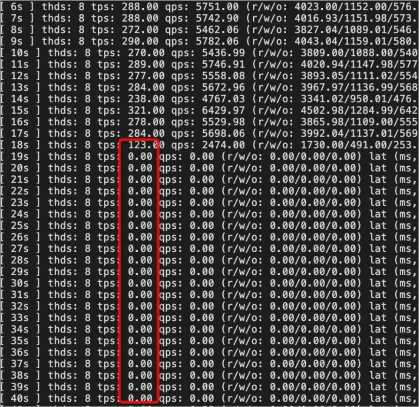
When the nonblocking DDL feature is disabled, the number of transactions per second (TPS) gradually decreases to zero and stays at zero for an extended period of time. The default timeout period is 31,536,000 seconds. The business is severely affected.
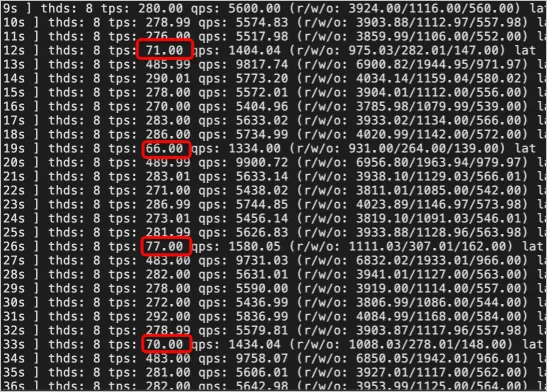
When the nonblocking DDL feature is enabled, the number of TPS periodically decreases but never decreases to zero. The lock wait only slightly affects the business and the system runs stably.
When gh-ost is used to perform lock-free DDL operations on the table schema, the number of TPS periodically decreases to zero. In this case, the business is severely affected due to the temporary table lock in the cut-over step.
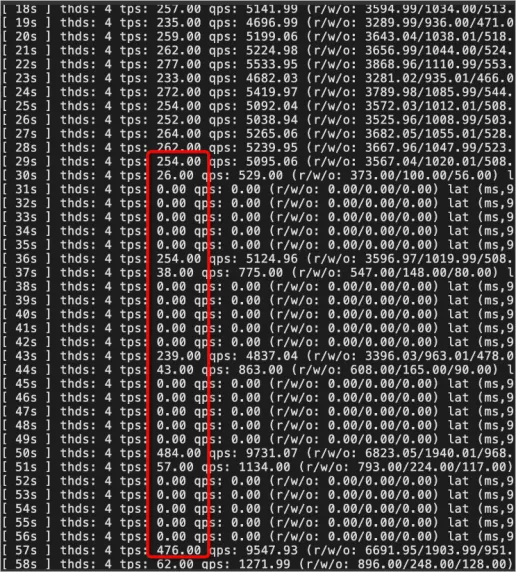
When the oltp_read_write script of Sysbench is used to simulate business workloads, nonblocking DDL statements with the INSTANT, INPLACE, and COPY keywords specified are still faster than the gh-ost tool.
Summary

Most major cloud service providers have launched highly compatible solutions and positioned them as core products of their cloud platforms.
Compatibility is one of the most important requirements for cloud service providers. For many small and medium-sized customers, 100% compatibility is a critical reference indicator. When customers migrate services to the cloud, they consider existing technology stacks and code. Incompatibility can impose additional learning costs on developers and increase the costs of transforming existing businesses, resulting in additional expenses. In the future, as your business grows, large tables may affect business development, performance may no longer meets your requirements, and no data cleanup solutions are available. You can consider related issues at that time.