All Products
Search
Document Center

Drive and Photo Service:Scenarios

Last Updated:Mar 20, 2025

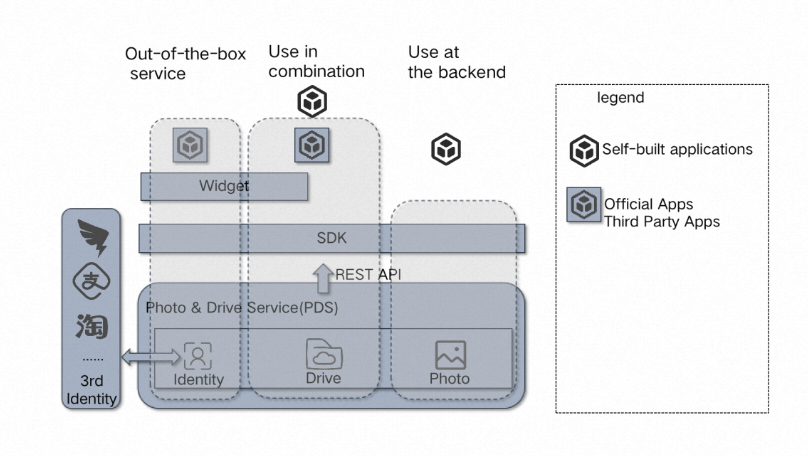
Photo and Drive Service (PDS) offers three methods of use: out-of-the-box, combined, and backend. You can select one or a combination of these methods to meet your business requirements. The out-of-the-box method is ideal for users seeking to quickly establish their own cloud drive service without any development. The combined method enables integration of PDS features with minimal development, while the backend method is tailored for backend access and offers a fully customized user experience. Each method caters to various development needs and scenarios, including enterprise file management, video editing and distribution, and note-taking applications.

usageguide

PDS can be utilized in three distinct methods. These methods are not mutually exclusive and may be combined. The table below describes the three methods across multiple dimensions to help you make an informed decision.

Out-of-the-box

Combined use

Backend use

Items used

Official applications

Widgets and SDKs

SDKs and API

Benefits

No development workloads are required. You can build a cloud drive service of your brand after simple configurations.

You can integrate the features of PDS with a few development workloads.

You can integrate your self-managed applications with PDS at the backend. The applications provide custom features for users. This way, PDS is imperceptible to users.

Integrated development

Configure the name, logo, and custom domain name.

By using programming methods, you can obtain an access token and specify the access token as the value of relevant parameters when you use a widget or an SDK.

Use PDS SDKs or the PDS API by using your AccessKey ID and AccessKey secret.

Scenarios

File management for your enterprise

Video editing and distribution

Note-taking software

References

Disk setup for existing user system