Qwen2.5-Coder is Alibaba Cloud’s latest large language model (LLM) series optimized for code tasks and also known as CodeQwen. This series includes six model sizes: 0.5B, 1.5B, 3B, 7B, 14B, and 32B, supporting diverse needs across developer teams. Trained on massive code datasets, Qwen2.5-Coder maintains strong mathematical and reasoning capabilities while significantly improving performance in code-related scenarios. PAI fully supports this model series. This topic uses the Qwen2.5-Coder-32B-Instruct model to demonstrate how to deploy, fine-tune, evaluate, and compress models in the Model Gallery.
Overview
Qwen2.5-Coder is a high-performance coding model launched by Alibaba Cloud. It supports up to 128K tokens of context length and works with 92 programming languages. The model excels at multiple code tasks, including multilingual code generation, code completion, and code repair. Based on Qwen2.5-Coder, Alibaba Cloud released Qwen2.5-Coder-Instruct through instruction tuning. This version further improves task performance and demonstrates strong generalization ability.
-
Multilingual coding support
Qwen2.5-Coder-Instruct delivers outstanding multilingual coding capability. McEval, a broad evaluation benchmark covering more than 40 programming languages—including niche ones—shows strong performance across multilingual tasks.
-
Code reasoning
Qwen2.5-Coder-Instruct performs exceptionally well on code reasoning tasks. Using CRUXEval as the benchmark, the model demonstrates robust reasoning ability. As code reasoning improves, performance on complex instruction execution also increases. This provides new insights into how code capability affects general reasoning.
-
Mathematical ability
Qwen2.5-Coder-Instruct excels at both math and code tasks. Because math underpins coding, strong performance in both areas reflects solid scientific and technical competence.
-
Core capabilities
In general capability evaluations, Qwen2.5-Coder-Instruct retains the strengths of Qwen2.5. This confirms its broad applicability and stability across many tasks.
Together, these features make the Qwen2.5-Coder series a powerful tool for multilingual development and complex task handling.
Environment requirements
-
This example currently runs in the following regions using the Model Gallery module: China (Beijing), China (Shanghai), China (Shenzhen), China (Hangzhou), China (Ulanqab), and Singapore.
-
Resource requirements:
Model size
Resource requirements
Qwen2.5-Coder-0.5B/1.5B
-
Training: Use GPUs with at least 16 GB VRAM, such as T4, P100, or V100.
-
Deployment: Minimum GPU is a single P4. Recommended GPUs include a single GU30, A10, V100, or T4.
Qwen2.5-Coder-3B/7B
-
Training: Use GPUs with at least 24 GB VRAM, such as A10 or T4.
-
Deployment: Minimum GPU is a single P100, T4, or V100 (gn6v). Recommended GPUs include a single GU30 or A10.
Qwen2.5-Coder-14B
-
Training: Use GPUs with at least 32 GB VRAM, such as V100.
-
For deployment, the minimum card configurations are single-card L20, single-card GU60, and dual-card GU30. The recommended deployment models are dual-card GU60 and dual-card L20.
Qwen2.5-Coder-32B
-
Training: Use GPUs with at least 80 GB VRAM, such as A800 or H800.
-
Deployment: Minimum configuration is two GU60 GPUs, two L20 GPUs, or four A10 GPUs. Recommended configurations include four GU60 GPUs, four L20 GPUs, or eight V100-32G GPUs.
-
Use the model with PAI-Model Gallery
Deploy and invoke the model
-
Go to the Model Gallery page.
-
Log on to the PAI console.
-
In the top-left corner, select your region.
-
In the navigation pane on the left, click Workspaces. Then click the name of your workspace.
-
In the navigation pane on the left, click Getting Started > Model Gallery.
-
-
In the model list on the right side of the Model Gallery page, click the Qwen2.5-Coder-32B-Instruct model card to open the model details page.
-
In the upper-right corner, click Deploy. Configure the deployment method, inference service name, and resource settings. The model deploys to the EAS inference service platform. For this solution, set vLLM accelerated deployment as the deployment method.
-
Use the inference service.
After successful deployment, use the inference method shown on the model details page to call the model service and verify its performance.

Fine-tune the model
The Model Gallery includes built-in supervised fine-tuning (SFT) and direct preference optimization (DPO) algorithms for the Qwen2.5-Coder-32B-Instruct model. You can fine-tune the model out of the box.
SFT supervised fine-tuning
The SFT training algorithm accepts JSON-formatted input. Each sample contains an instruction and an output, represented by the "instruction" and "output" fields. For example:
[
  {
    "instruction": "Create a function to calculate the sum of a sequence of integers.",
    "output": "# Python code\ndef sum_sequence(sequence):\n  sum = 0\n  for num in sequence:\n    sum += num\n  return sum"
  },
  {
    "instruction": "Generate a Python code for crawling a website for a specific type of data.",
    "output": "import requests\nimport re\n\ndef crawl_website_for_phone_numbers(website):\n    response = requests.get(website)\n    phone_numbers = re.findall('\\d{3}-\\d{3}-\\d{4}', response.text)\n    return phone_numbers\n    \nif __name__ == '__main__':\n    print(crawl_website_for_phone_numbers('www.example.com'))"
  }
]
DPO direct preference optimization
The DPO training algorithm accepts JSON-formatted input. Each sample contains a prompt, a preferred response, and a rejected response, represented by the "prompt", "chosen", and "rejected" fields. For example:
[
  {
    "prompt": "Create a function to calculate the sum of a sequence of integers.",
    "chosen": "# Python code\ndef sum_sequence(sequence):\n  sum = 0\n  for num in sequence:\n    sum += num\n  return sum",
    "rejected": "[x*x for x in [1, 2, 3, 5, 8, 13]]"
  },
  {
    "prompt": "Generate a Python code for crawling a website for a specific type of data.",
    "chosen": "import requests\nimport re\n\ndef crawl_website_for_phone_numbers(website):\n    response = requests.get(website)\n    phone_numbers = re.findall('\\d{3}-\\d{3}-\\d{4}', response.text)\n    return phone_numbers\n    \nif __name__ == '__main__':\n    print(crawl_website_for_phone_numbers('www.example.com'))",
    "rejected": "def remove_duplicates(string): \n    result = \"\" \n    prev = '' \n\n    for char in string:\n        if char != prev: \n            result += char\n            prev = char\n    return result\n\nresult = remove_duplicates(\"AAABBCCCD\")\nprint(result)"
  }
]-
In the model list on the right side of the Model Gallery page, click the Qwen2.5-Coder-32B-Instruct model card to open the model details page.
-
On the model details page, click Train in the upper-right corner. Key configurations are as follows:
-
Dataset configuration: After preparing your dataset, upload it to an OSS bucket. Or select a dataset object stored on NAS or CPFS. You can also use public datasets preloaded in PAI to test the algorithm.
-
Compute resource configuration: The algorithm requires GPUs with at least 80 GB VRAM. Make sure your resource quota has enough compute resources. For other model sizes, see Environment requirements.
-
Hyperparameter configuration: The table below lists supported hyperparameters. Adjust them based on your dataset and compute resources—or use the default values.
Hyperparameter
Type
Default value
Required
Description
training_strategy
string
sft
Yes
Training algorithm. Valid values: sft or dpo.
learning_rate
float
5e-5
Yes
Learning rate. Controls how much to adjust model weights during training.
num_train_epochs
int
1
Yes
Number of times to iterate over the training dataset.
per_device_train_batch_size
int
1
Yes
Number of samples processed per GPU in one training iteration. Larger batch sizes improve efficiency but increase VRAM usage.
seq_length
int
128
Yes
Sequence length. Maximum number of tokens processed in one training step.
lora_dim
int
32
No
LoRA dimension. When lora_dim > 0, LoRA or QLoRA lightweight training is used.
lora_alpha
int
32
No
LoRA weight. Takes effect when lora_dim > 0 and LoRA or QLoRA lightweight training is used.
dpo_beta
float
0.1
No
Degree to which the model relies on preference signals during training.
load_in_4bit
bool
false
No
Whether to load the model in 4-bit precision.
When lora_dim > 0, load_in_4bit is true, and load_in_8bit is false, 4-bit QLoRA lightweight training is used.
load_in_8bit
bool
false
No
Whether to load the model in 8-bit precision.
When lora_dim > 0, load_in_4bit is false, and load_in_8bit is true, 8-bit QLoRA lightweight training is used.
gradient_accumulation_steps
int
8
No
Number of steps to accumulate gradients before updating weights.
apply_chat_template
bool
true
No
Whether to apply the model’s default chat template to training data. For Qwen2-series models, the format is:
-
Problem:
<|im_end|>\n<|im_start|>user\n + instruction + <|im_end|>\n -
Response:
<|im_start|>assistant\n + output + <|im_end|>\n
system_prompt
string
You are a helpful assistant
No
System prompt used during model training.
-
-
-
Click Train. The Model Gallery automatically opens the task details page and starts training. You can monitor the training job status and logs.
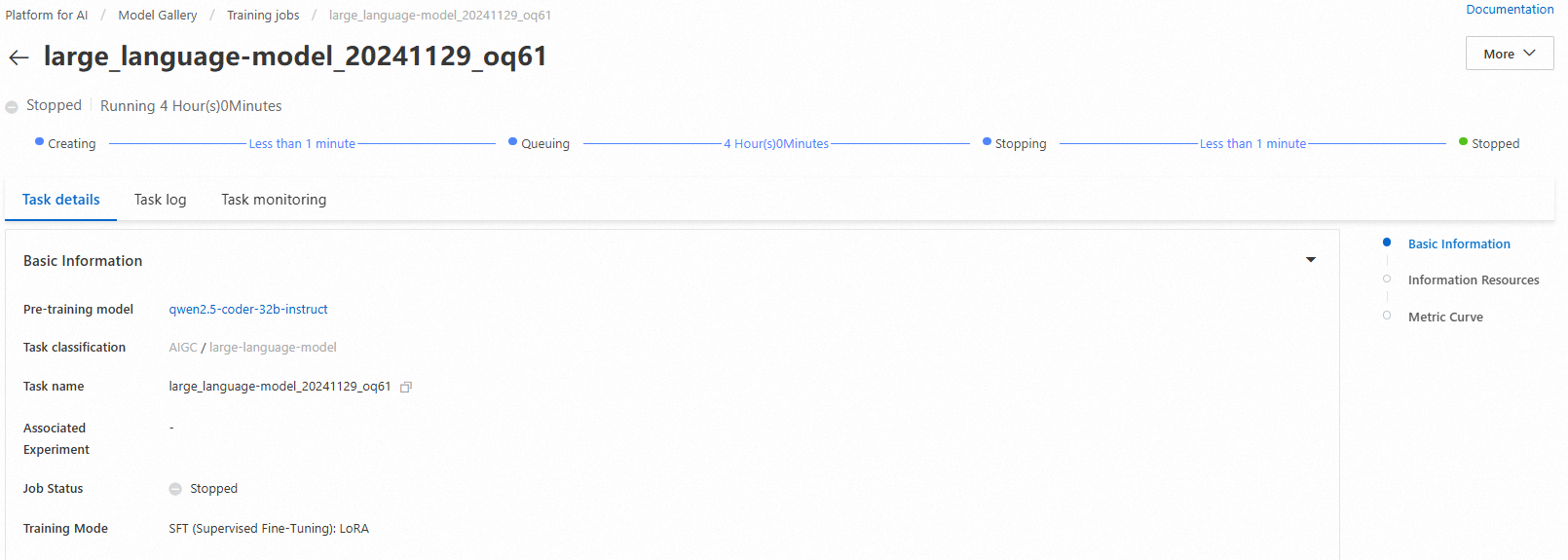
The trained model registers automatically in AI Assets > Model Management. You can view or deploy it. For details, see Register and manage models.
Evaluate the model
Scientific and efficient model evaluation helps developers measure and compare model performance. It also guides precise model selection and optimization, speeding up AI innovation and real-world adoption.
The Model Gallery includes built-in evaluation algorithms for the Qwen2.5-Coder-32B-Instruct model. You can evaluate this model—or a fine-tuned version—out of the box. For full instructions, see Model evaluation and Large Language Model Evaluation Best Practices.
Compress the model
Before deployment, you can quantize and compress trained models to reduce storage and compute resource usage. For full instructions, see Model compression.