Alibaba Collective Communication Library (ACCL) is a collective communication library built on NVIDIA NCCL, enhanced with Alibaba Cloud's networking capabilities and large-scale optimization expertise. ACCL delivers superior communication performance for distributed training jobs with built-in fault diagnosis and self-recovery capabilities. This topic describes ACCL's key features and installation procedures.
Enhanced features supported by ACCL
ACCL supports enhanced features that can be enabled or disabled using environment variables:
-
Fixes bugs found in the corresponding open-source NCCL version.
-
Optimizes collective communication operators and message sizes, delivering superior performance compared to open-source NCCL.
-
Provides statistical analysis of collective communication during training to diagnose slowdowns and hangs caused by device faults. When integrated with PAI's AIMaster: Elastic automatic fault tolerance engine and C4D: Model training job diagnosis tool, enables rapid anomaly detection and automatic fault tolerance.
-
Supports multi-path transmission and load balancing to mitigate or eliminate training cluster congestion caused by uneven hashing, enhancing overall training throughput.
Limits
ACCL must be installed when submitting DLC jobs with Lingjun resources and custom images in regions where Lingjun resources are available.
Install the ACCL library
Official Lingjun images are pre-installed with ACCL. If you use official Lingjun images for DLC jobs, skip the following installation steps.
Step 1: Verify NCCL dynamic linking in PyTorch
In a custom image container, follow these steps:
-
Determine the location of the PyTorch library.
If you know the PyTorch installation path, search within that location. For example, if PyTorch is in
/usr/local/lib, locate thelibtorch.sofile:find /usr/local/lib -name "libtorch*" # Example results: /usr/local/lib/python3.10/dist-packages/torch/lib/libtorchcuda.so /usr/local/lib/python3.10/dist-packages/torch/lib/libtorch.so /usr/local/lib/python3.10/dist-packages/torch/lib/libtorchbindtest.so -
Check PyTorch's NCCL library dependency using the
lddcommand:ldd libtorch.so | grep nccl-
If similar output appears, the NCCL library is dynamically linked and you can proceed to install ACCL:
libnccl.so.2=>/usr/lib/x86_64-linux-gnu/libnccl.so.2(0x00007feab3b27000) -
If no result appears, NCCL is statically linked and ACCL cannot be installed. Create a custom image based on the official NVIDIA NGC image or use a PyTorch version with dynamic NCCL linking.
-
Step 2: Check the CUDA version
In a custom image container, verify the CUDA version:
nvidia-smiThe output below indicates CUDA version 12.2. Use the version shown in your output.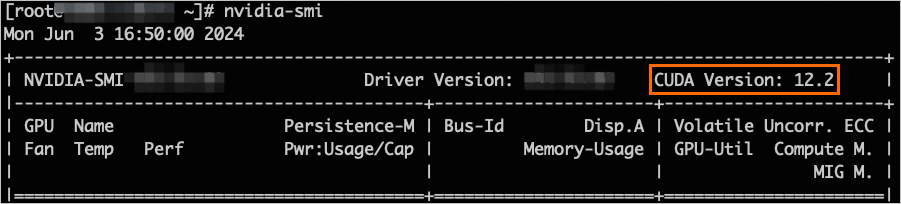
Step 3: Download ACCL for your CUDA version
Download links for ACCL:
|
CUDA version |
ACCL download link |
|
12.8 |
http://accl-n.oss-cn-beijing.aliyuncs.com/cuda12.8/lib/libnccl.so.2 |
|
12.6 |
http://accl-n.oss-cn-beijing.aliyuncs.com/cuda12.6/lib/libnccl.so.2 |
|
12.5 |
http://accl-n.oss-cn-beijing.aliyuncs.com/cuda12.5/lib/libnccl.so.2 |
|
12.4 |
http://accl-n.oss-cn-beijing.aliyuncs.com/cuda12.4/lib/libnccl.so.2 |
|
12.3 |
http://accl-n.oss-cn-beijing.aliyuncs.com/cuda12.3/lib/libnccl.so.2 |
|
12.2 |
http://accl-n.oss-cn-beijing.aliyuncs.com/cuda12.2/lib/libnccl.so.2 |
|
12.1 |
http://accl-n.oss-cn-beijing.aliyuncs.com/cuda12.1/lib/libnccl.so.2 |
|
11.8 |
http://accl-n.oss-cn-beijing.aliyuncs.com/cuda11.8/lib/libnccl.so.2 |
|
11.7 |
http://accl-n.oss-cn-beijing.aliyuncs.com/cuda11.7/lib/libnccl.so.2 |
|
11.4 |
http://accl-n.oss-cn-beijing.aliyuncs.com/cuda11.4/lib/libnccl.so.2 |
To download ACCL for your CUDA version in a custom image container, use the following command. This example uses CUDA 12.3:
wget http://accl-n.oss-cn-beijing.aliyuncs.com/cuda12.3/lib/libnccl.so.2Step 4: Install ACCL
Before installing ACCL, verify whether NCCL is installed. Check if libnccl.so.2 exists:
sudo find / -name "libnccl.so.2"Based on the query results, take one of the following actions:
-
If
libnccl.so.2is not found, or is located in system directories/usr/lib64or/lib64, copy the downloadedlibnccl.so.2to the system directory:sudo cp -f ./libnccl.so.2 /usr/lib64 -
If libnccl.so.2 is found in a non-standard directory such as /opt/xxx/, this indicates a custom NCCL installation path. Overwrite the existing file with the downloaded
libnccl.so.2:sudo cp -f libnccl.so.2 /opt/xxx/
Step 5: Refresh dynamic library cache
Refresh the dynamic library cache:
sudo ldconfigStep 6: Verify ACCL is loaded
-
Submit a DLC job by using a custom image. For more information, see Create a training job.
-
Check the job log. If the startup log displays ACCL version information, the library is loaded. For instructions on viewing job logs, see View training details.
NoteEnsure the log includes the
accl-nidentifier. Otherwise, ACCL is not loaded.NCCL version 2.20.5.7-accl-n+cuda12.4, COMMIT_ID Zeaa6674c2f1f896e3a6bbd77e85231e0700****, BUILD_TIME 2024-05-10 15:40:56
Recommended environment variable configuration
Based on extensive ACCL experience, the PAI team recommends these environment variables to enhance communication throughput across various scenarios:
export NCCL_IB_TC=136
export NCCL_IB_SL=5
export NCCL_IB_GID_INDEX=3
export NCCL_SOCKET_IFNAME=eth
export NCCL_DEBUG=INFO
export NCCL_IB_HCA=mlx5
export NCCL_IB_TIMEOUT=22
export NCCL_IB_QPS_PER_CONNECTION=8
export NCCL_MIN_NCHANNELS=4
export NCCL_NET_PLUGIN=none
export ACCL_C4_STATS_MODE=CONN
export ACCL_IB_SPLIT_DATA_NUM=4
export ACCL_IB_QPS_LOAD_BALANCE=1
export ACCL_IB_GID_INDEX_FIX=1
export ACCL_LOG_TIME=1
The following table describes the key environment variables:
|
Environment variable |
Description |
|
NCCL_IB_TC |
Specifies network mapping rules for Alibaba Cloud. Incorrect or missing values may impact network performance. |
|
NCCL_IB_GID_INDEX |
The GID for RDMA protocol. Incorrect or missing values may cause NCCL errors. |
|
NCCL_SOCKET_IFNAME |
The port for NCCL connection establishment. Different specifications require different ports. Incorrect or missing values may cause connection failures. |
|
NCCL_DEBUG |
NCCL log level. Set to INFO for detailed logs and efficient troubleshooting. |
|
NCCL_IB_HCA |
Network interface card for RDMA communication. Incorrect or missing values may impact network performance. |
|
NCCL_IB_TIMEOUT |
RDMA connection timeout duration, enhancing fault tolerance during training. Incorrect or missing values may cause training interruptions. |
|
NCCL_IB_QPS_PER_CONNECTION |
Number of queue pairs per connection. Increase appropriately to significantly boost network throughput. |
|
NCCL_NET_PLUGIN |
Network plugin for NCCL. Set to none to prevent other plugins from loading and ensure optimal performance. |
|
ACCL_C4_STATS_MODE |
Granularity of ACCL statistics. Set to CONN to aggregate statistics by connection. |
|
ACCL_IB_SPLIT_DATA_NUM |
Specifies whether to split data across multiple queue pairs for transmission. |
|
ACCL_IB_QPS_LOAD_BALANCE |
Specifies whether to enable load balancing. |
|
ACCL_IB_GID_INDEX_FIX |
Automatically checks for and bypasses GID anomalies before job initiation. Set to 1 to enable. |
|
ACCL_LOG_TIME |
Prepends timestamps to log entries for troubleshooting. Set to 1 to enable. |