PAI integrates the responsible-ai-toolbox into DSW so you can detect and correct bias in AI models. Fairness analysis identifies whether models make unfair predictions based on sensitive attributes like gender or race.
Core principles
Fairness analysis helps ensure AI models treat all groups equitably. The core principles include:
-
Bias avoidance: Identify and reduce bias in data and algorithms to prevent unfair decisions based on personal characteristics.
-
Representative data: Use diverse datasets that accurately represent all user groups.
-
Transparency: Use explainable AI techniques to help users understand model decisions.
-
Continuous monitoring: Regularly evaluate models to identify and correct biases that may emerge over time.
-
Diversity and inclusion: Incorporate diverse perspectives in AI system design and development.
-
Compliance: Follow relevant laws, regulations, and ethical standards.
The following example evaluates whether an income prediction model (annual income >50K) exhibits bias related to gender and race.
Prerequisites
-
A DSW instance with the following configurations. For instructions, see Create a DSW instance.
-
Recommended instance type: ecs.gn6v-c8g1.2xlarge
-
Image: tensorflow-pytorch-develop:2.14-pytorch2.1-gpu-py311-cu118-ubuntu22.04 (Python 3.9 or later)
-
Supported frameworks: Scikit-learn, PyTorch, or TensorFlow (regression and binary classification models)
-
-
A training dataset. You can use your own dataset or follow Step 3 to use the sample dataset.
-
An algorithm model. You can use your own model or follow Step 5 to train a sample model.
Step 1: Open the DSW Gallery notebook
-
Log on to the PAI console.
-
In the upper-left corner, select a region.
-
In the left navigation pane, choose QuickStart > Notebook Gallery. Search for Responsible AI-Fairness Analysis and click Open in DSW.
-
Select a DSW instance and click Open Notebook.
Step 2: Install dependencies
Install the responsible-ai-toolbox package (raiwidgets):
!pip install raiwidgets==0.34.1Step 3: Load the dataset
Load dataset 1590 from OpenML:
from raiutils.common.retries import retry_function
from sklearn.datasets import fetch_openml

class FetchOpenml(object):
    def __init__(self):
        pass
    # Get the OpenML dataset with data_id = 1590
    def fetch(self):
        return fetch_openml(data_id=1590, as_frame=True)

fetcher = FetchOpenml()
action_name = "Dataset download"
err_msg = "Failed to download openml dataset"
max_retries = 5
retry_delay = 60
data = retry_function(fetcher.fetch, action_name, err_msg,
                      max_retries=max_retries,
                      retry_delay=retry_delay)
Alternatively, load your own dataset in CSV format:
import pandas as pd

# Load your own dataset in CSV format.
# Use pandas to read the CSV file.
data = pd.read_csv(filename)
Step 4: Preprocess the data
Extract feature and target variables
In this example:
-
Target variable (class): Whether annual income exceeds 50K
-
Sensitive features: sex, race
-
Other features: age and additional attributes
Read the feature variables:
# Get the feature variables, excluding the target variable.
X_raw = data.data
# Display the first 5 rows of feature variables, excluding the target variable.
X_raw.head(5)
Set the target variable values. A value of "1" indicates income >50K, and "0" indicates income ≤50K:
from sklearn.preprocessing import LabelEncoder

# Transform the target variable into a binary classification target.
# data.target is the target variable 'class'.
y_true = (data.target == '>50K') * 1
y_true = LabelEncoder().fit_transform(y_true)

import matplotlib.pyplot as plt
import numpy as np

# View the distribution of the target variable.
counts = np.bincount(y_true)
classes = ['<=50K', '>50K']
plt.bar(classes, counts)
Define sensitive features
Set gender and race as sensitive features. The toolbox evaluates whether model predictions are biased with respect to these features:
# Define 'sex' and 'race' as sensitive information.
# First, select the columns related to sensitive information from the dataset to form a new DataFrame named `sensitive_features`.
sensitive_features = X_raw[['sex','race']]
sensitive_features.head(5)
Remove sensitive features from the feature set:
# Remove the sensitive features from the feature variables.
X = X_raw.drop(labels=['sex', 'race'],axis = 1)
X.head(5)
Encode and standardize features
Standardize the data for compatibility with the toolbox:
import pandas as pd
from sklearn.preprocessing import StandardScaler

# One-hot encode the data.
X = pd.get_dummies(X)

# Standardize (scale) the features of dataset X.
sc = StandardScaler()
X_scaled = sc.fit_transform(X)
X_scaled = pd.DataFrame(X_scaled, columns=X.columns)

X_scaled.head(5)
Split into training and test sets
Split the data with 20% for testing:
from sklearn.model_selection import train_test_split

# Split the feature variables X and target variable y into training and test sets according to the `test_size` ratio.
X_train, X_test, y_train, y_test = \
    train_test_split(X_scaled, y_true, test_size=0.2, random_state=0, stratify=y_true)

# Use the same random seed to split the sensitive features into training and test sets to ensure consistency with the previous split.
sensitive_features_train, sensitive_features_test = \
    train_test_split(sensitive_features, test_size=0.2, random_state=0, stratify=y_true)
View the dataset sizes:
print("Training dataset size:", len(X_train))
print("Test dataset size:", len(X_test))
Reset the index:
# Reset the DataFrame index to avoid index errors.
X_train = X_train.reset_index(drop=True)
sensitive_features_train = sensitive_features_train.reset_index(drop=True)
X_test = X_test.reset_index(drop=True)
sensitive_features_test = sensitive_features_test.reset_index(drop=True)
Step 5: Train the model
Train a logistic regression model using the training data:
Scikit-learn
from sklearn.linear_model import LogisticRegression

# Create a logistic regression model.
sk_model = LogisticRegression(solver='liblinear', fit_intercept=True)
# Train the model.
sk_model.fit(X_train, y_train)
PyTorch
import torch
import torch.nn as nn
import torch.optim as optim

# Define the logistic regression model.
class LogisticRegression(nn.Module):
    def __init__(self, input_size):
        super(LogisticRegression, self).__init__()
        self.linear = nn.Linear(input_size, 1)

    def forward(self, x):
        outputs = torch.sigmoid(self.linear(x))
        return outputs

# Instantiate the model.
input_size = X_train.shape[1]
pt_model = LogisticRegression(input_size)

# Loss function and optimizer.
criterion = nn.BCELoss()
optimizer = optim.SGD(pt_model.parameters(), lr=5e-5)

# Train the model.
num_epochs = 1
X_train_pt = X_train
y_train_pt = y_train
for epoch in range(num_epochs):
    # Forward propagation.
    # Convert DataFrame to Tensor.
    if isinstance(X_train_pt, pd.DataFrame):
        X_train_pt = torch.tensor(X_train_pt.values)
        X_train_pt = X_train_pt.float()
    outputs = pt_model(X_train_pt)
    outputs = outputs.squeeze()
    # Convert ndarray to Tensor.
    if isinstance(y_train_pt, np.ndarray):
        y_train_pt = torch.from_numpy(y_train_pt)
        y_train_pt = y_train_pt.float()
    loss = criterion(outputs, y_train_pt)

    # Backward propagation and optimization.
    optimizer.zero_grad()
    loss.backward()
    optimizer.step()
TensorFlow
import tensorflow as tf
from tensorflow.keras import layers

# Define the logistic regression model.
tf_model = tf.keras.Sequential([
    layers.Dense(units=1, input_shape=(X_train.shape[-1],), activation='sigmoid')
])

# Compile the model using binary cross-entropy loss and stochastic gradient descent optimizer.
tf_model.compile(optimizer='sgd', loss='binary_crossentropy', metrics=['accuracy'])

# Train the model.
tf_model.fit(X_train, y_train, epochs=1, batch_size=32, verbose=0)
Step 6: Evaluate model fairness
Use `FairnessDashboard` to evaluate the model's predictions on the test dataset and generate a fairness report.
The dashboard groups prediction results by sensitive features and compares metrics (such as accuracy and selection rate) across different groups.
Scikit-learn
from raiwidgets import FairnessDashboard
import os
from urllib.parse import urlparse
# Make predictions based on the test dataset.
y_pred_sk = sk_model.predict(X_test)

# Use the responsible-ai-toolbox to calculate data information for each sensitive group.
metric_frame_sk = FairnessDashboard(sensitive_features=sensitive_features_test,
                  y_true=y_test,
                  y_pred=y_pred_sk)

# Set the URL for redirection.
metric_frame_sk.config['baseUrl'] =  'https://{}-proxy-{}.dsw-gateway-{}.data.aliyun.com'.format(
    os.environ.get('JUPYTER_NAME').replace("dsw-",""),
    urlparse(metric_frame_sk.config['baseUrl']).port,
    os.environ.get('dsw_region') )
print(metric_frame_sk.config['baseUrl'])
PyTorch
from raiwidgets import FairnessDashboard
import torch
import os
from urllib.parse import urlparse
# Test the model and evaluate fairness.
pt_model.eval()  # Set the model to evaluation mode.
X_test_pt = X_test
with torch.no_grad():
    X_test_pt = torch.tensor(X_test_pt.values)
    X_test_pt = X_test_pt.float()
    y_pred_pt = pt_model(X_test_pt).numpy()

# Use the responsible-ai-toolbox to calculate data information for each sensitive group.
metric_frame_pt = FairnessDashboard(sensitive_features=sensitive_features_test,
                           y_true=y_test,
                           y_pred=y_pred_pt.flatten().round())

# Set the URL for redirection.
metric_frame_pt.config['baseUrl'] =  'https://{}-proxy-{}.dsw-gateway-{}.data.aliyun.com'.format(
    os.environ.get('JUPYTER_NAME').replace("dsw-",""),
    urlparse(metric_frame_pt.config['baseUrl']).port,
    os.environ.get('dsw_region') )
print(metric_frame_pt.config['baseUrl'])
TensorFlow
from raiwidgets import FairnessDashboard
import os
from urllib.parse import urlparse
# Test the model and evaluate fairness.
y_pred_tf = tf_model.predict(X_test).flatten()

# Use the responsible-ai-toolbox to calculate data information for each sensitive group.
metric_frame_tf = FairnessDashboard(
                           sensitive_features=sensitive_features_test,
                           y_true=y_test,
                           y_pred=y_pred_tf.round())

# Set the URL for redirection.
metric_frame_tf.config['baseUrl'] =  'https://{}-proxy-{}.dsw-gateway-{}.data.aliyun.com'.format(
    os.environ.get('JUPYTER_NAME').replace("dsw-",""),
    urlparse(metric_frame_tf.config['baseUrl']).port,
    os.environ.get('dsw_region') )
print(metric_frame_tf.config['baseUrl'])
Key parameters:
-
sensitive_features: The sensitive features to analyze.
-
y_true: The ground truth labels from the test dataset.
-
y_pred: The model's prediction results.
-
locale (optional): Dashboard language. Supports "zh-Hans" (Simplified Chinese), "zh-Hant" (Traditional Chinese), or "en" (English, default).
Step 7: View the fairness report
Click the URL to view the full report.

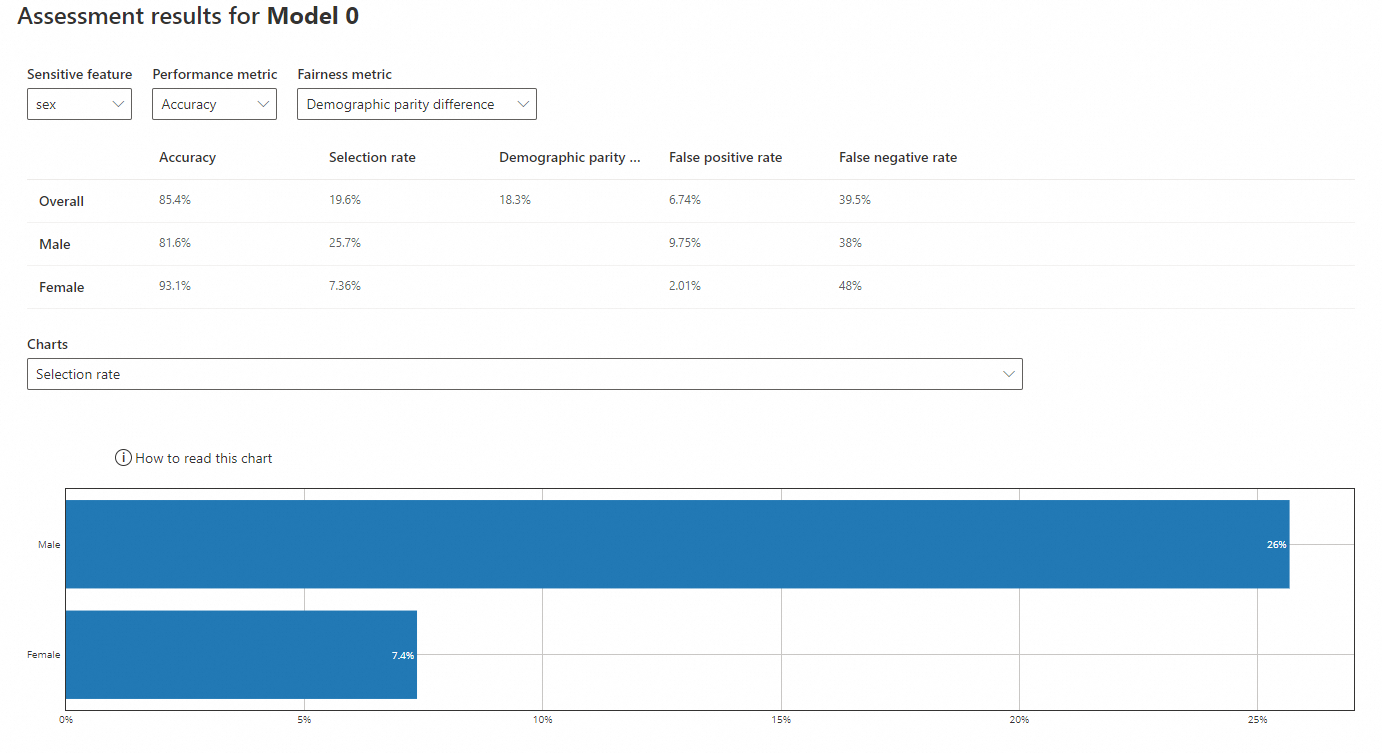
On the Fairness dashboard page, click Get started. Configure the sensitive features, performance metrics, and fairness metrics to analyze how predictions differ across groups.
Sensitive feature: sex
-
Sensitive feature: sex
-
Performance metric: Accuracy
-
Fairness metric: Demographic parity difference
-
Accuracy: The proportion of correct predictions. The model's accuracy for males (81.6%) is lower than for females (93.1%), but both are close to the overall accuracy (85.4%).
-
Selection rate: The probability of predicting a positive outcome (income >50K). The rate for males (25.7%) is higher than for females (7.36%), which is much lower than the overall rate (19.6%).
-
Demographic parity difference: The difference in positive prediction rates between groups. A value closer to 0 indicates less bias. The overall difference is 18.3%.
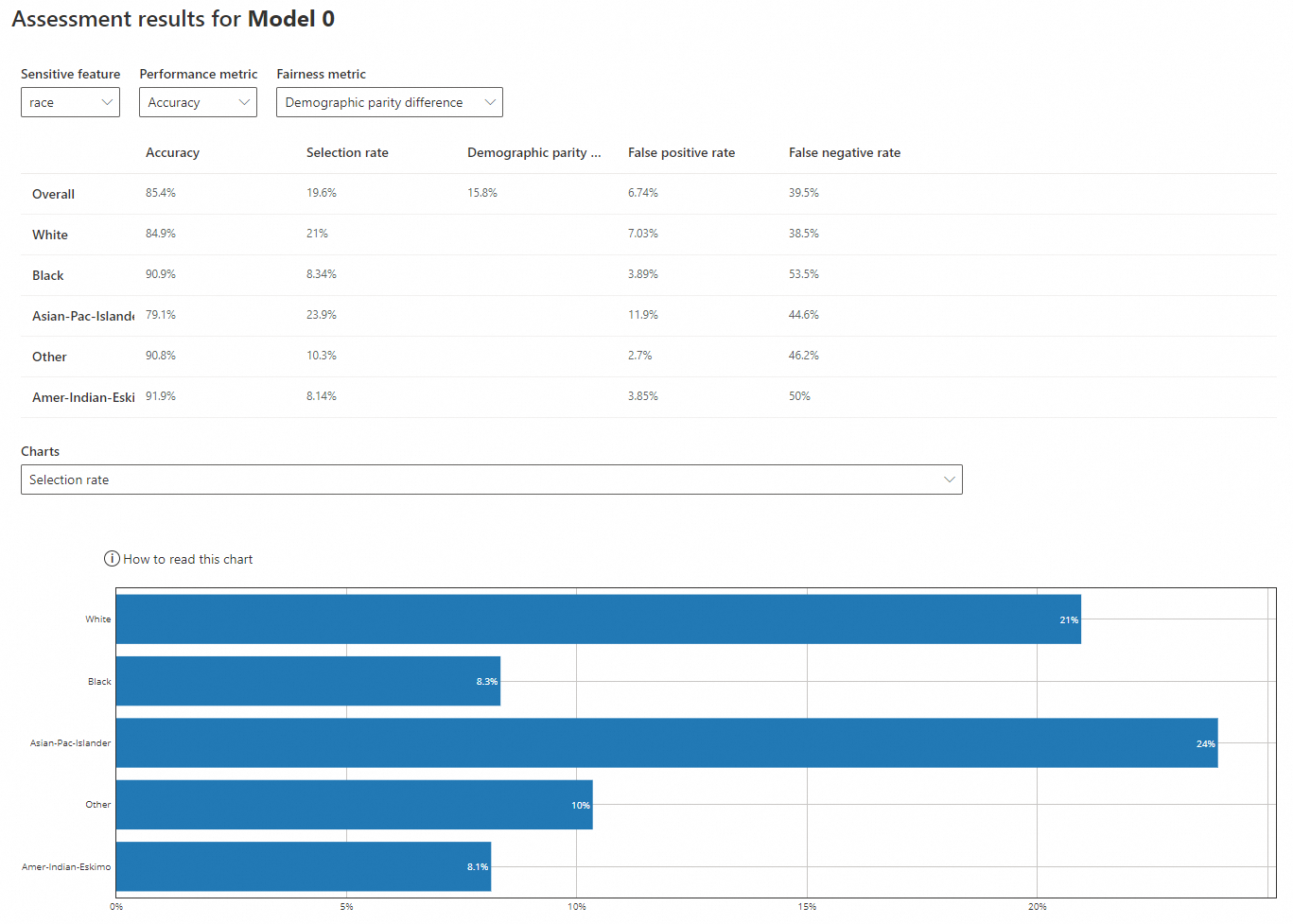
Sensitive feature: race
-
Sensitive feature: race
-
Performance metric: Accuracy
-
Fairness metric: Demographic parity difference
-
Accuracy: The model's accuracy for 'White' (84.9%) and 'Asian-Pac-Islander' (79.1%) is lower than for 'Black' (90.9%), 'Other' (90.8%), and 'Amer-Indian-Eskimo' (91.9%). All values are close to the overall accuracy (85.4%).
-
Selection rate: The rate for 'White' (21%) and 'Asian-Pac-Islander' (23.9%) is higher than for 'Black' (8.34%), 'Other' (10.3%), and 'Amer-Indian-Eskimo' (8.14%). The latter three are much lower than the overall rate (19.6%).
-
Demographic parity difference: The overall difference is 15.8%.