When an Object Storage Service (OSS) bucket is under attack or is used to distribute illegal content, OSS automatically moves the bucket to the sandbox. Sandboxed buckets remain accessible, but service degradation may occur — network availability may be affected and requests may time out.
OSS moves the bucket to the sandbox automatically. What you need to do depends on the reason for sandboxing:
Attack-related sandboxing: Configure OSS DDoS protection to prevent future attacks and restore the bucket.
Illegal content: You are liable for any legal violations.
Usage notes
Cost liability: If OSS sandboxes your bucket due to an attack, you are responsible for all costs incurred during the attack.
Legal liability: If OSS sandboxes your bucket for distributing illegal content (pornography, political biases, or terrorism-related material), you are liable for any legal violations.
Protect your bucket against attacks
To prevent OSS from sandboxing your bucket due to DDoS or Challenge Collapsar (CC) attacks, configure one of the following solutions.
Choose a solution
| Solution 1: OSS DDoS protection | Solution 2: ECS reverse proxy + Anti-DDoS Proxy | |
|---|---|---|
| How it works | A proxy-based service that integrates OSS with Anti-DDoS Proxy. During a DDoS attack, traffic is diverted to an Anti-DDoS Proxy instance for scrubbing, then redirected to your bucket. | A static IP address is assigned to your bucket via an NGINX reverse proxy on an Elastic Compute Service (ECS) instance. The ECS instance's elastic IP address (EIP) is then associated with an Anti-DDoS Proxy instance. |
| Best for | Buckets accessed through public endpoints or custom domain names | Buckets that require a static IP address for access |
| Complexity | Low — configure in the OSS console | High — requires manual NGINX configuration |
| Cost | Charged by Anti-DDoS Proxy instance count, protected traffic, and API request count | Higher — requires purchasing an ECS instance |
| Limit | Up to 10 buckets per Anti-DDoS Proxy instance, and only 1 instance per region | — |
Which solution to use:
Start with Solution 1 if you access your buckets through public endpoints or custom domain names.
Use Solution 2 if you need a static IP address to access OSS.
Solution 1: Configure OSS DDoS protection
Solution 1 supports up to 10 buckets per region (1 Anti-DDoS Proxy instance per region).
OSS DDoS protection covers access through public endpoints (for example, oss-cn-hangzhou.aliyuncs.com) and custom domain names mapped to a bucket.
OSS DDoS protection cannot protect the following endpoint types:
OSS-accelerated domain names:
oss-accelerate.aliyuncs.com,oss-accelerate-overseas.aliyuncs.comAccess point endpoints: for example,
ap-01-3b00521f653d2b3223680ec39dbbe2****-ossalias.oss-cn-hangzhou.aliyuncs.comObject FC Access Point endpoints: for example,
fc-ap-01-3b00521f653d2b3223680ec39dbbe2****-opapalias.oss-cn-hangzhou.aliyuncs.comIPv6 endpoints: for example,
cn-hangzhou.oss.aliyuncs.comAmazon Simple Storage Service (S3) endpoints: for example,
s3.oss-cn-hongkong.aliyuncs.com
Steps:
Create an Anti-DDoS Proxy instance.
Attach the bucket to the Anti-DDoS Proxy instance.
After attaching the bucket, the Anti-DDoS Proxy instance starts protecting access through the bucket's public endpoint.
For detailed configuration steps, see OSS DDoS protection.
Solution 2: Configure an ECS reverse proxy and Anti-DDoS Proxy
OSS bucket domain names resolve to a random IP address on each request by design. To associate a static IP address with your bucket — which is required for Anti-DDoS Proxy — set up an NGINX reverse proxy on an ECS instance.
If your bucket experiences traffic bursts or access spikes, upgrade the ECS instance hardware or use an ECS cluster to handle the load.
Steps:
Configure the ECS reverse proxy:
Create an ECS instance running CentOS or Ubuntu. For more information, see Create an instance on the Custom Launch tab.
Configure NGINX on the ECS instance as a reverse proxy for your bucket. For more information, see Use ECS instances to configure a reverse proxy to access OSS.
Configure the Anti-DDoS Proxy instance:
Purchase an Anti-DDoS Proxy instance based on your business requirements.buy page of Anti-DDoS Proxy (Outside Chinese Mainland)
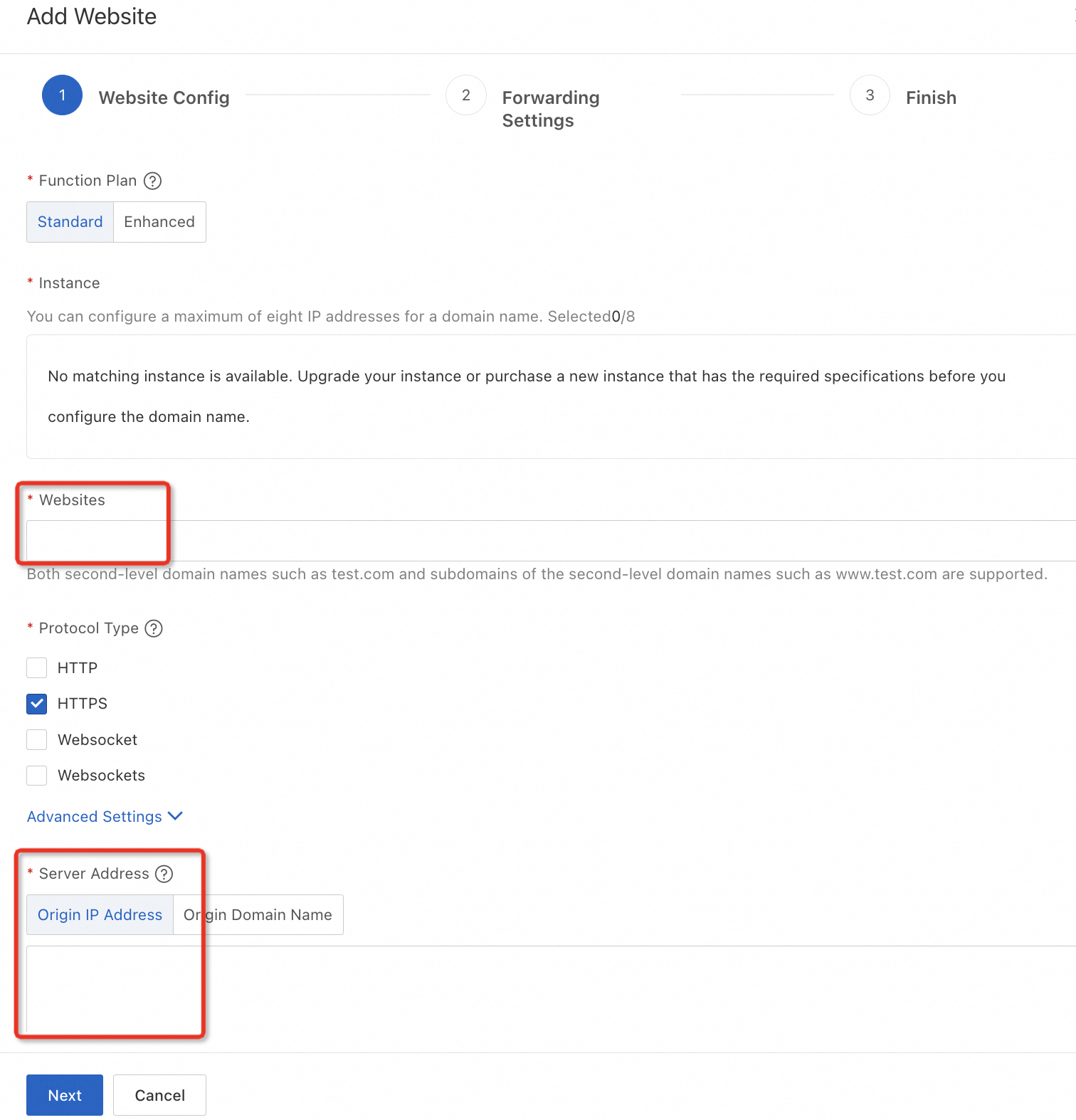
Add your bucket as a protected website: enter the bucket endpoint in Websites, select Origin IP Address for server address, and enter the ECS instance's public IP address.
Remove buckets from the sandbox
Alibaba Cloud does not allow you to directly remove attack-sandboxed buckets from the sandbox. Configure OSS DDoS protection to remove buckets that were sandboxed for either of the following reasons:
The bucket was sandboxed after suffering multiple attacks.
The bucket was sandboxed because other buckets in the same account suffered multiple attacks.
For configuration steps, see Configure OSS DDoS protection. After configuration, sandboxed buckets are automatically restored and remain accessible through their original IP addresses or DDoS-protected IP addresses.