Background information
The current filtering mechanism for vector retrieval involves calculating the filter results after each vector is traversed to determine whether the vector meets the filter conditions. Vectors that fail to meet the filter conditions are discarded. This ensures that only vectors that meet the filter conditions are retrieved after the traversal is complete. However, the vector retrieval process scans a fixed number of vectors. By default, 1% of the vectors are scanned. This may lead to a small number of results, or even no results at all, if only a few documents meet the filter conditions. To improve retrieval outcomes, you need to adjust the scanning ratio. In some cases, it is necessary to scan all the data to obtain retrieval results. However, increasing the scanning ratio significantly lengthens the query time.
Optimization principle
To resolve the issue of obtaining no results from vector retrieval when only a few documents meet the filter conditions, you can start by estimating the number of documents that meet the filter conditions. If the number is small, you can directly use the filter results to calculate vector similarity. If the number is large, perform vector retrieval again. The following figure shows the retrieval process.
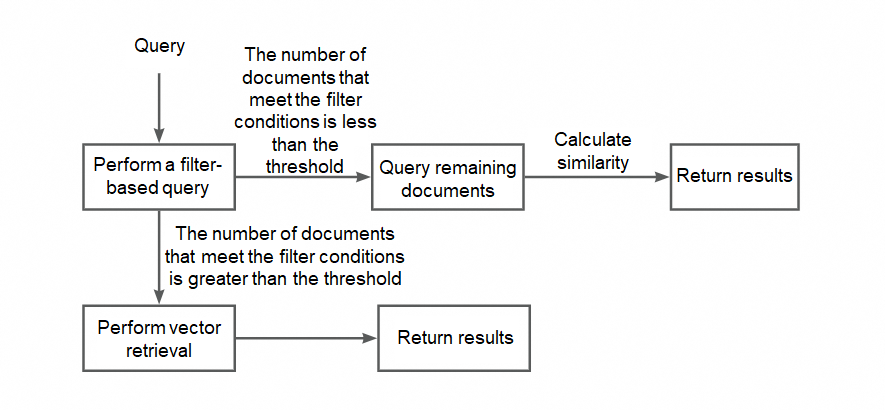
Description: Build inverted indexes, parse filter expressions, and then optimize queries.
Build single-field inverted indexes for all fields, except text fields.
Parse filter expressions and traverse the syntax tree for inverted processing.
For the filter condition attrName = constValue, if attrName is an attribute field for which an inverted index is built and constValue is a constant, rewrite the filter condition as the following inverted query condition: attrName: constValue.
AND condition: Separately process the filter expressions before and after the AND condition. If a filter expression can be rewritten as an inverted query condition, rewrite it. If a filter expression cannot be rewritten as an inverted query condition, retain the original filter expression.
OR condition: If one of the filter expressions before and after the OR condition cannot be rewritten as an inverted query condition, the query fails to be rewritten. In this case, directly perform vector retrieval.
Special processing for some functions:
in/contain: Rewrite the function as an OR index query.
range: Rewrite the function as a range index query. This feature is not supported in the current version.
After inverted processing is complete, the system fetches a customizable number of results, such as 500, based on the query and filter conditions.
If fewer than 500 results are returned, they are directly used to calculate vector similarity.
If 500 or more results are returned, the system evaluates the proportion of the entire document set that the document ID of the last result represents.
If the document ID of the last result accounts for more than a customizable proportion, such as 80%, of all documents, the system infers that only a few results match and continues to query the remaining documents. Finally, the system calculates vector similarity.
If the document ID of the last result accounts for no more than 80% of all documents, the vector retrieval results are used.
Sample code
For example, you have 1 million documents, of which 600 documents meet the count=1 condition. After filter optimization is enabled, set prefetch_size to 500 and prefetch_coverage to 0.8. Perform the following query:
{
    "vector": [0.1, 0.2, 0.3],
    "topK": 10,
    "namespace": "123",
    "filter": "count = 1 ",
    "searchParams": "{\"vector_service.search.enable_filter_optimize\":true}"
}
Pre-query: The system fetches 600 documents by using count=1 as an inverted query condition. The number 600 is greater than 500. In this case, the system proceeds with proportion calculation.
Proportion calculation: The system evaluates the proportion of the entire document set that the document ID of the 500th result represents. If the proportion exceeds 80%, the system continues to query the remaining documents. If the proportion does not exceed 80%, the vector retrieval results are used.
Parameters
The system needs to perform a query to use inverted indexes for filtering. If only a few documents that do not meet the conditions are filtered out, the query time is lengthened. To resolve this issue, a parameter is used to specify whether to enable filter optimization.
Parameter | Default value | Description |
vector_service.search.enable_filter_optimize | false | Specifies whether to enable filter optimization. Default value: false. A value of true specifies that filter optimization is enabled. A value of false specifies that filter optimization is disabled. |
vector_service.search.filter_optimize_prefetch_size | 500 | Default value: 500. The number of results to be prefetched for judgment. |
vector_service.search.filter_optimize_prefetch_coverage | 0.8 | Default value: 0.8. The threshold of the proportion of the entire document set that the document ID of the last prefetched result represents. If the proportion is greater than or equal to the threshold, the inverted processing results are used. |
Sample code:
{
    "vector": [0.1, 0.2, 0.3],
    "topK": 10,
    "namespace": "123",
    "filter": "count = 1 AND tag=\"text\"",
    "searchParams": "{\"vector_service.search.enable_filter_optimize\":true}"
}
Filter parsing
AND
count = 1 AND tag = "text"Rewriting result (represented by using a query string, which is actually a syntax tree)
QUERY: count:'1' AND tag:'text'
FILTER: None
AND part
tag = 'text' AND count > 1Rewrite to
QUERY: tag:'text'
FILTER: count > 1
OR
count = 1 OR tag = "text"Rewrite to
QUERY: count:'1' OR tag:'text'
FILTER: None
OR part
tag = 'text' OR count > 1Rewriting failed.
in/contain
in(tag, 'text|image')Rewrite to
QUERY: tag:'text' OR tag:'image'