The console provides a built-in Q&A Test page for users to perform Q&A tests. When you enter a question, the model matches it with corresponding results to provide an answer. After you purchase and configure an instance, you can configure different parameters to test Q&A effects for different scenarios and requirements. Then, you can select the optimal parameter configuration based on the results. This topic describes how to perform a Q&A test in the console and explains the customizable parameters.
Prerequisites
An OpenSearch-LLM Intelligent Edition instance is created. For more information, see Create an instance.
Data configuration is completed. For more information, see Data configuration.
Procedure
The following procedure uses a video file as an example to demonstrate the complete process from uploading a video to automatic parsing by the knowledge base, and then performing a Q&A test based on the video content to return relevant results.
Log on to the OpenSearch console and select LLM-Based Conversational Search Edition. In the left-side navigation pane, click Instance Management. Find the instance that you want to manage and click Manage in the Actions column. On the Instance Details page, click Configuration Center, and then click Data Configuration. Click File Import, select the file that you want to upload, and then click Upload File to import the file to the knowledge base.
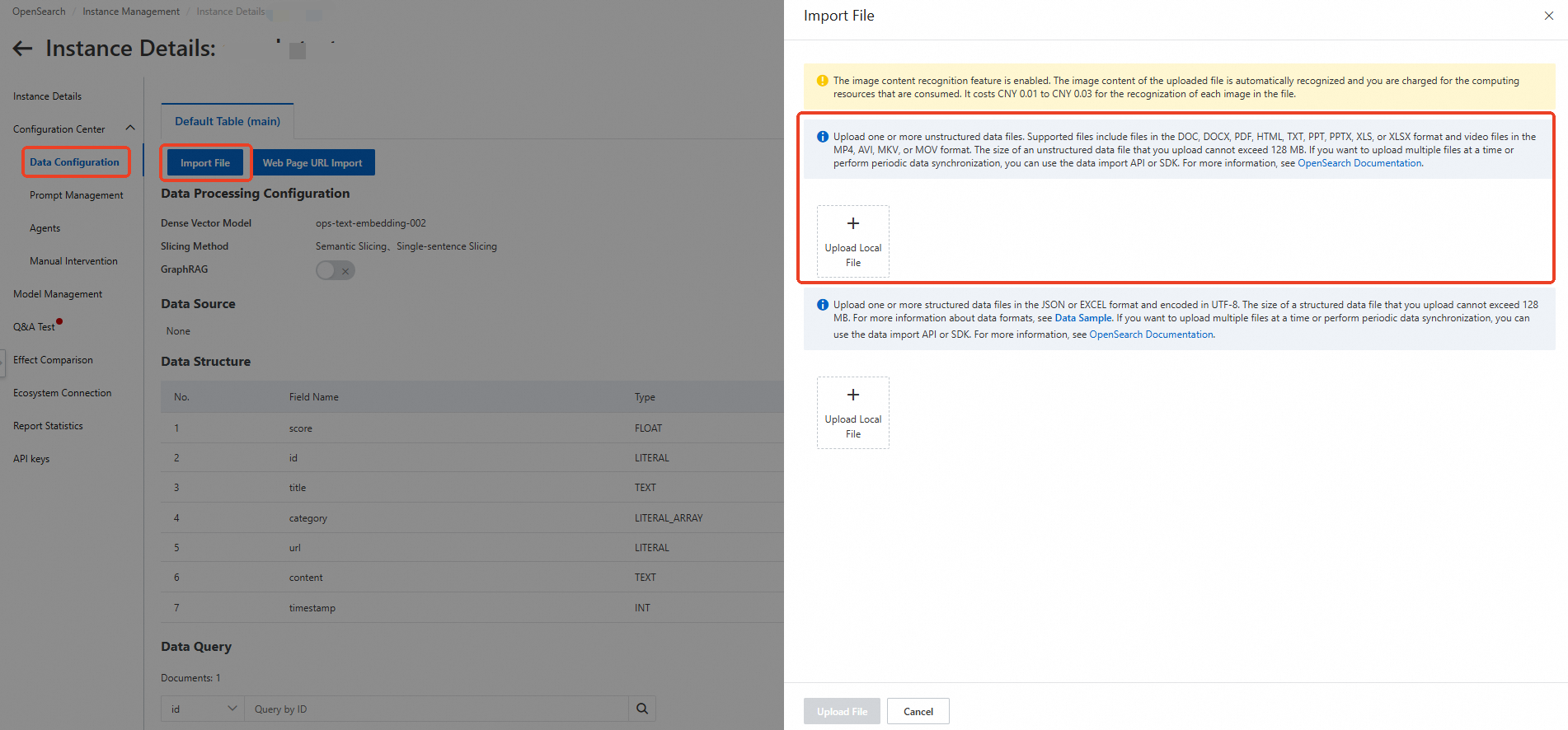
Wait for the file to be uploaded successfully. When the data query status shows as completed, click Q&A Test in the left-side navigation pane to ask questions to the model.

After you enter the Q&A test page, click Model Configuration in the upper-right corner. You can configure Q&A parameters, Prompt parameters, Document retrieval parameters, Reference image parameters, Query understanding parameters, Manual intervention parameters, and Other parameters based on your search requirements. Then, enter your question in the dialog box and click Send..
View the Q&A test results, which will be returned based on the content in your uploaded knowledge base.
Parameters
Q&A parameters | ||||
Parameter | Type | Required | Default value | Description |
options.chat.model | String | Yes | opensearch-qwen | The LLM that is used for the Q&A test. The supported context length and the maximum number of input and output tokens vary based on the LLM: |
Prompt | String | No | Default prompt template | The prompt template that is used for the Q&A test. For information about the prompt templates that are supported, see Manage prompts |
question.session | Boolean | No | true |
|
options.chat.enable_deep_search | Boolean | No | false | Specifies whether to enable deep search.
|
options.retrieve.web_search.enable | Boolean | No | false | Specifies whether to enable the Internet search feature.
|
options.chat.stream | Boolean | No | true | Specifies whether to enable HTTP chunked transfer encoding.
|
Prompt parameters | |||
Parameter | Type | Required | Description |
options.chat.prompt_config.attitude | String | No |
|
options.chat.prompt_config.rule | String | No | The detail level of the conversation. Default value: detailed.
|
options.chat.prompt_config.noanswer | String | No | The information returned if the system fails to find an answer to the question. Default value: sorry.
|
options.chat.prompt_config.language | String | No | The language of the answer. Default value: Chinese
|
options.chat.prompt_config.role | Boolean | No | Specifies whether to enable a custom role to answer the question. |
options.chat.prompt_config.role_name | String | No | The name of the custom role. Example: AI Assistant. |
options.chat.prompt_config.out_format | String | No | The format of the answer. Default value: text.
|
Document retrieval parameters | |||
Parameter | Type | Required | Description |
options.retrieve.doc.filter | String | No | The filter that is used to filter documents in the knowledge base based on a specific field during document retrieval. By default, this parameter is left empty. For examples of how to use filters, see Filter parameters. The following fields are supported:
Example: |
options.retrieve.doc.top_n | Integer | No | The number of documents to be retrieved. Valid values: (0, 50]. Default value: 5. |
options.retrieve.doc.sf | Float | No | The threshold of the vector score for document retrieval.
|
options.retrieve.doc.dense_weight | Float | The weight of the dense vector during document retrieval if the sparse vector model is enabled. Valid values: (0.0, 1.0). Default value: 0.7. | |
options.retrieve.doc.formula | String | No | The formula based on which the retrieved documents are sorted. Note For information about the syntax, see Fine sort functions. Algorithm relevance and geographical location relevance are not supported. |
options.retrieve.doc.operator | String | No | The operator between terms obtained after text segmentation during document retrieval. This parameter takes effect only if the sparse vector model is disabled.
|
Reference image parameters | ||||
Parameter | Type | Required | Default value | Description |
options.retrieve.image.sf | Float | No | 1 | The threshold of the vector score for document retrieval.
|
options.retrieve.image.dense_weight | Float | No | 0.7 | The weight of the dense vector during image retrieval if the sparse vector model is enabled. Valid values: (0.0, 1.0). Default value: 0.7. |
Query understanding parameters | ||||
Parameter | Type | Required | Valid range | Description |
options.retrieve.qp.query_extend | Boolean | No | - | Specifies whether to extend queries. The extended queries are used to retrieve document segments in OpenSearch. Default value: false.
|
options.retrieve.qp.query_extend_num | Integer | No | (0, +∞) | The maximum number of queries to be extended if the query extension feature is enabled. Default value: 5. |
Manual intervention parameters | |||
Parameter | Type | Required | Description |
options.retrieve.entry.sf | Float | No | The threshold of the vector score for manual intervention. Valid values: [0, 2.0]. Default value: 0.3. The smaller the value, the higher the document relevance but the fewer the retrieved documents. Conversely, less relevant documents may be retrieved. |
Deep search parameters | |||
Parameter | Type | Required | Description |
options.chat.agent.think_process | Boolean | No | Specifies whether to display the thinking process. |
options.chat.agent.max_think_round | Integer | No | The number of thinking rounds (maximum 20). |
options.chat.agent.language | String | No | The language for thinking process and answer. AUTO: choose Chinese or English by query. CN: Chinese. EN: English. |
Other parameters | |||
Parameter | Type | Required | Description |
options.retrieve.return_hits | Boolean | No | Specifies whether to return document retrieval results. If you set this parameter to true, the search_hits parameter is returned in the response. |
options.chat.history_max | Integer | No | The maximum number of rounds of conversations based on which the system returns results. Maximum value: 20. Default value: 1. |
options.chat.link | Boolean | No | Specifies whether to return the URL of the reference source. To be specific, this parameter specifies whether the reference source is included in the content generated by the model. Valid values:
Sample response if you set this parameter to true:
|
options.chat.rich_text_strategy | String | No | The processing method of rich text. If this parameter does not exist or is left empty, rich text is not enabled, and the default processing method is used:
For more information, see Rich text. |
options.retrieve.graph | Boolean | No | Specifies whether to perform query association and retrieval based on graph relationships. This parameter takes effect only if GraphRAG is enabled in data configurations. |
options.chat.enable_llm_knowledge | Boolean | No | Specifies whether to use an LLM to return an answer if no search results are obtained. true false |
You can perform Q&A tests by calling API operations or using OpenSearch SDKs.