To access OpenSearch LLM-Based Conversational Search Edition using the API or SDKs, you need authorization. This topic describes the authorization and authentication methods by OpenSearch LLM-Based Conversational Search Edition, and how to manage API keys.
API call authorization
OpenSearch LLM-Based Conversational Search Edition uses API keys to authorize API calls. A maximum of 10 API keys can be created and enabled for each instance.
To protect API keys, please:
Do not expose API keys in any way. This prevents security risks or financial loss due to unauthorized use.
Make sure that all API calls are initiated only from servers. API calls initiated from a client, such as a browser, app, or mini program, may cause the disclosure of API keys.
If suspicious API key disclosure is detected, log on to the OpenSearch console to disable and then delete the disclosed API key. After an API key is disabled, you cannot call the OpenSearch LLM-Based Conversational Search Edition API by using the API key.
API call authentication
OpenSearch LLM-Based Conversational Search Edition uses AccessKey pairs to authenticate API calls. An AccessKey pair is a permanent credential provided by Alibaba Cloud and consists of an AccessKey ID and an AccessKey secret.
AccessKey pairs are not used to log on to the Alibaba Cloud Management Console. They are used to access Alibaba Cloud services by using development tools such as APIs, CLI, SDKs, and Terraform. For each request, a signature is generated based on the request content that is encrypted by using an AccessKey ID and an AccessKey secret. The signature is used to verify the identity of the caller and the request validity.
We recommend that you create a Resource Access Management (RAM) user for calling API operations, create an AccessKey pair for the RAM user, and then grant permissions to the RAM user based on the principle of least privilege. Then, the RAM user can call API operations to perform service development. For more information, see Create RAM users and grant permissions.
Procedure
Log on to the OpenSearch console.
In the top navigation bar, select the region in which your instance resides. In the upper-left corner, select OpenSearch LLM-Based Conversational Search Edition.
On the Instance Management page, find the instance that you want to manage and click Manage in the Actions column. In the left-side pane, click API keys.
Click Create API Key. The system generates an API key. Click Copy to save the API key or Download CSV File to download the API key as a CSV file.
After you save the API key, select I have saved my API KEY and click OK.
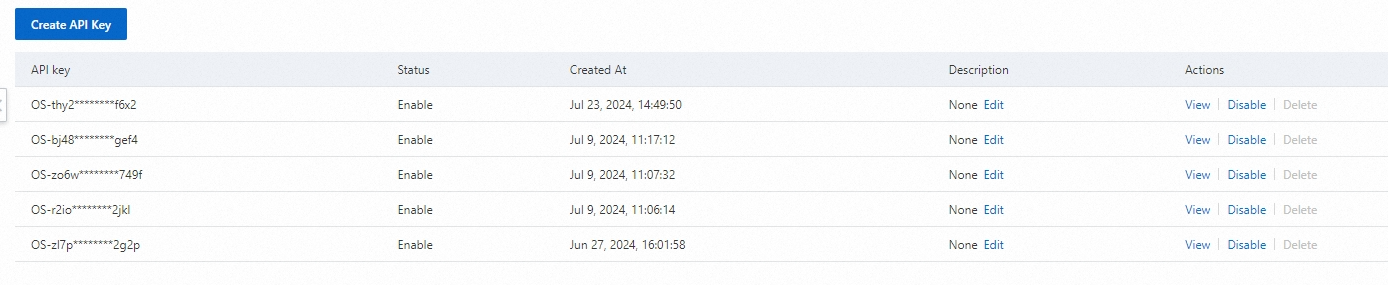
Edit: Add a description for the API key.
View: View the API key.
Disable or Enable: Disable or enable the API key. An API key that is disabled cannot be used to call the OpenSearch LLM-Based Conversational Search Edition API.
Delete: Delete the API key that is disabled.
Example of API key-based authorization
Use API keys to authorize API calls. The following sample shows how to use an API key to authorize a curl request. Initiate the request after you specify the URL and API key.
curl --location 'http://***.opensearch-cn-shanghai.aliyuncs.com/v3/openapi/apps/[app_group_identity]/knowledge/entries' \
--header 'Authorization: Bearer Your API key' \
--header 'Content-Type: application/json' \
Sample response:
{
  "request_id":"4F6F9BDC-740F-4FC1-B976-74CAFCBF1333",
  "status":"OK",
  "total_count":2,
  "latency":0.0,
  "result":[
    {
      "entry_id":"ca0c8c1cec7c41a280c76c16f0db79f6",
      "create_time":1718188424000,
      "update_time":1718188424000,
      "questions":[
          "Where is the office address for withdrawing housing provident funds to purchase owner-occupied housing in Hangzhou?"
      ],
      "answer":"\"The office address is ****. The phone number of the office is 0571-12329-1.\""
      },
    {
      "entry_id":"2f4c7350a7104f029f316706b61b6eb2",
      "create_time":1718193627000,
      "update_time":1718193627000,
      "questions":[
          "Can an agent apply for the cancellation of a domestic branch on behalf of others?"
      ],
      "answer":"Yes, an agent can apply for the cancellation of a domestic branch on behalf of others. The agent must submit the authorization materials at the on-site window. ***** The materials must be signed by the authorizer in person."
    }
    ],
    "errors":[]
}