When your ACK cluster nodes have no public IP addresses, certain workloads still need to reach external APIs or services. Routing all outbound traffic through a single managed exit point gives you one place to enforce access control, throttling, and traffic policies -- without granting Internet access to every pod.
This guide covers how to set up a Microservices Engine (MSE) cloud-native gateway as an egress gateway for a Container Service for Kubernetes (ACK) cluster. It walks through installing the controller, creating the gateway, routing traffic to external services, and verifying the setup.
When to use an egress gateway
Private clusters that need selective Internet access. Your ACK cluster nodes have no public IPs, but certain workloads must reach external APIs or services. Route outbound traffic through the MSE cloud-native gateway and enable Source Network Address Translation (SNAT) only on the gateway's vSwitch. No cluster-wide Internet access required.
Centralized egress policy enforcement. All outbound traffic must pass through a controlled chokepoint for throttling or IP whitelisting. The MSE cloud-native gateway provides Layer-7 HTTP governance without changes to application pods.
Benefits
| Benefit | Details |
|---|---|
| Managed and independent | Deployed in standalone mode, separate from the ACK cluster. A cluster issue does not affect the gateway. |
| Layer-7 traffic governance | IP address blacklists and whitelists, throttling, load balancing, Transport Layer Security (TLS) offloading, traffic mirroring, and header control. |
| Minimal exposure | Only the gateway needs Internet access (via SNAT on its vSwitch), not every pod in the cluster. |
Architecture
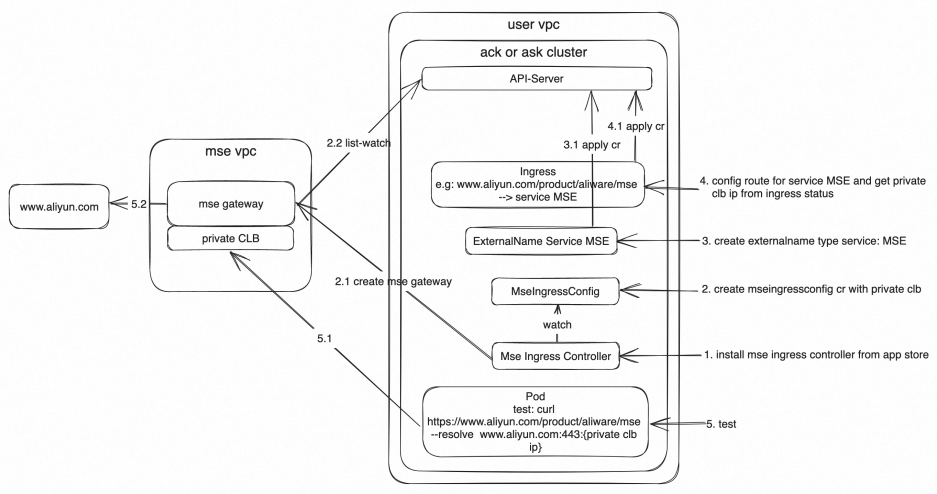
The MSE cloud-native gateway sits between your ACK cluster and external services. Pods send outbound requests to the gateway's internal Classic Load Balancer (CLB) endpoint. The gateway forwards requests to external destinations through a NAT gateway with SNAT enabled on its vSwitch.
Prerequisites
Before you begin, ensure that you have:
An ACK cluster or ACK Serverless cluster (if you did not select Configure SNAT for VPC during cluster creation, the cluster cannot access the Internet by default)
Permissions to create Kubernetes resources (Services, Ingress) and Alibaba Cloud resources (MSE gateway, NAT gateway)
Install MSE Ingress Controller
Install MSE Ingress Controller in your ACK or ACK Serverless cluster. You can install it in an existing cluster or during cluster creation.
For instructions, see the "Install the MSE Ingress Controller component" section in Manage the MSE Ingress Controller component.
Create the gateway with MseIngressConfig
MseIngressConfig is a CustomResourceDefinition (CRD) provided by MSE Ingress Controller. Use it to create an MSE cloud-native gateway or bind it to an existing one.
For this egress use case, create only an internal-facing CLB instance:
apiVersion: mse.alibabacloud.com/v1alpha1
kind: MseIngressConfig
metadata:
  name: egress-gateway
spec:
  name: egress-gateway
  common:
    instance:
      spec: 2c4g
      replicas: 3
    network:
      vSwitches:
        - "vsw-xxxx" # The vSwitch ID for the gateway. Replace with your actual vSwitch ID.
      privateSLBSpec: slb.s2.small
Replace the following placeholder with your actual value:
| Placeholder | Description | Example |
|---|---|---|
vsw-xxxx | The ID of the vSwitch to attach to the MSE cloud-native gateway | vsw-bp1a4daz0e2a8xxxx |
For the full list of MseIngressConfig options, see the "Create a cloud-native gateway" section in Configure an MseIngressConfig.
The gateway's vSwitch needs SNAT for Internet access. Configure SNAT in the next step before testing external connectivity.
Configure SNAT for the gateway's vSwitch
If your cluster was created without selecting Configure SNAT for VPC, the gateway cannot reach the Internet until you add an SNAT entry.
Create a NAT gateway if you do not already have one. For instructions, see Use the SNAT feature of an Internet NAT gateway to access the Internet.
Create an SNAT entry (Step 3: Create an SNAT entry). Select Specify vSwitch and add the vSwitch ID from your MseIngressConfig resource (the same
vsw-xxxxvalue used in the previous step).
Create an ExternalName service for the target
A Kubernetes Service of type ExternalName maps an in-cluster DNS name to an external hostname. Pods call the in-cluster service name, and Kubernetes resolves it to the external endpoint. If the external service later moves into the cluster, update only the Service definition. No application code changes are needed.
The following example maps aliyun-svc-external to www.aliyun.com:
apiVersion: v1
kind: Service
metadata:
  name: aliyun-svc-external
  namespace: default
spec:
  externalName: www.aliyun.com
  ports:
    - name: port1
      port: 80
      protocol: TCP
      targetPort: 80
    - name: port2
      port: 443
      protocol: TCP
      targetPort: 443
  type: ExternalName
Verify: Run the following command and confirm the type is ExternalName with the correct hostname:
kubectl get svc aliyun-svc-externalCreate an Ingress routing rule
Create an Ingress resource to route traffic through the MSE cloud-native gateway to the ExternalName service.
Save the following as mse-ingress.yaml:
apiVersion: networking.k8s.io/v1
kind: Ingress
metadata:
  name: mse-ingress
  namespace: default
spec:
  ingressClassName: mse
  rules:
    - host: www.aliyun.com  # The domain name of the external service.
      http:
        paths:
          - backend:
              service:
                name: aliyun-svc-external  # The ExternalName service from the previous step.
                port:
                  number: 80
            path: /product/aliware/mse  # The path to route.
            pathType: Prefix
Apply the configuration:
kubectl apply -f mse-ingress.yamlVerify: Run the following command and check status.loadBalancer.ingress for the CLB IP address. Note this IP -- you need it for testing.
kubectl get ingress mse-ingress -o yamlRoute to an HTTPS backend
If the backend service uses HTTPS, add the backend protocol annotation and change the port to 443:
apiVersion: networking.k8s.io/v1
kind: Ingress
metadata:
  annotations:
    nginx.ingress.kubernetes.io/backend-protocol: HTTPS  # Route to the backend over HTTPS.
  name: mse-ingress
  namespace: default
spec:
  ingressClassName: mse
  rules:
    - host: www.aliyun.com
      http:
        paths:
          - backend:
              service:
                name: aliyun-svc-external
                port:
                  number: 443
            path: /product/aliware/mse
            pathType: Prefix
Test egress access from a pod
From a pod inside the cluster, use curl with the --resolve flag to direct the request to the gateway's CLB IP address:
curl http://www.aliyun.com/product/aliware/mse --resolve www.aliyun.com:80:<CLB-IP>Replace <CLB-IP> with the CLB IP address from status.loadBalancer.ingress in the Ingress resource output.
A successful response confirms that the pod's outbound traffic is routed through the MSE cloud-native gateway to the external service.
Additional considerations
Apply Layer-7 governance policies. Add throttling, IP whitelists, or header control to your egress gateway routes. See Advanced usage of MSE Ingress for configuration details.
Route additional external destinations. Add more ExternalName services and Ingress rules to route other external endpoints through the gateway.
Enforce egress through the gateway. Add Kubernetes network policies to block direct outbound traffic from pods, ensuring all egress flows through the gateway. Without network policies, pods can bypass the gateway and access external services directly if they have network connectivity.