Coding Plan gives you access to models including Qwen, GLM, Kimi, and MiniMax in popular AI coding tools. For a fixed monthly fee, it offers a cost-effective alternative to pay-as-you-go API billing.
Plan details
Note
- As of March 20, 2026, 00:00:00 (UTC+08:00), the Lite plan is no longer available for new subscriptions (see announcement). As of April 13, 2026, 18:00:00 (UTC+08:00), renewals and upgrades for the Lite plan have been discontinued (see announcement).
- The Lite plan supports all plan models, including Qwen, GLM, Kimi, and MiniMax, same as the Pro plan.
Pro | |
|---|---|
Supported models | Only the following exact model versions are supported: Recommended models: qwen3.7-plus (vision), qwen3.6-plus (vision), kimi-k2.5 (vision), glm-5, and MiniMax-M2.5 More models: Models not listed above are not supported. |
Price | $ 50/month |
Quota |
|
-
Limited availability: Slots are limited and available on a first-come, first-served basis. New slots are restocked daily at 00:00:00 (UTC+08:00). Go to the Coding Plan purchase page to subscribe.
-
Quota consumption: Each query consumes quota based on the number of model calls. Simple tasks typically use 5–10 calls, while complex tasks may use 10–30 or more. Actual consumption varies by task complexity, context, and tool usage. Check your usage on the Coding Plan page. The three limits above apply simultaneously as caps, and whichever is reached first takes effect. When any limit is reached, calls are paused. The limits are not cumulative and do not represent a guaranteed capacity distributed evenly over time.
-
Quota replenishment:
- 5-hour quota: Rolls over automatically, releasing usage from 5 hours ago each minute. For example, if you use 100 calls at 10:00, the 100 calls are restored at 15:00. If you use 50 calls at 10:30, the 50 calls are restored at 15:30.
- Weekly quota: Resets every Monday at 00:00:00 (UTC+08:00).
- Monthly quota: Resets at 00:00:00 (UTC+08:00) on your subscription renewal date each month.
Quick start
Step 1: Subscribe to a Coding Plan
Go to the Coding Plan purchase page, select a plan, and complete the subscription.
Subscribe directly with your Alibaba Cloud account. If you are a RAM user, your Alibaba Cloud account owner must grant you the necessary permissions before you can subscribe.
Authorize a RAM user
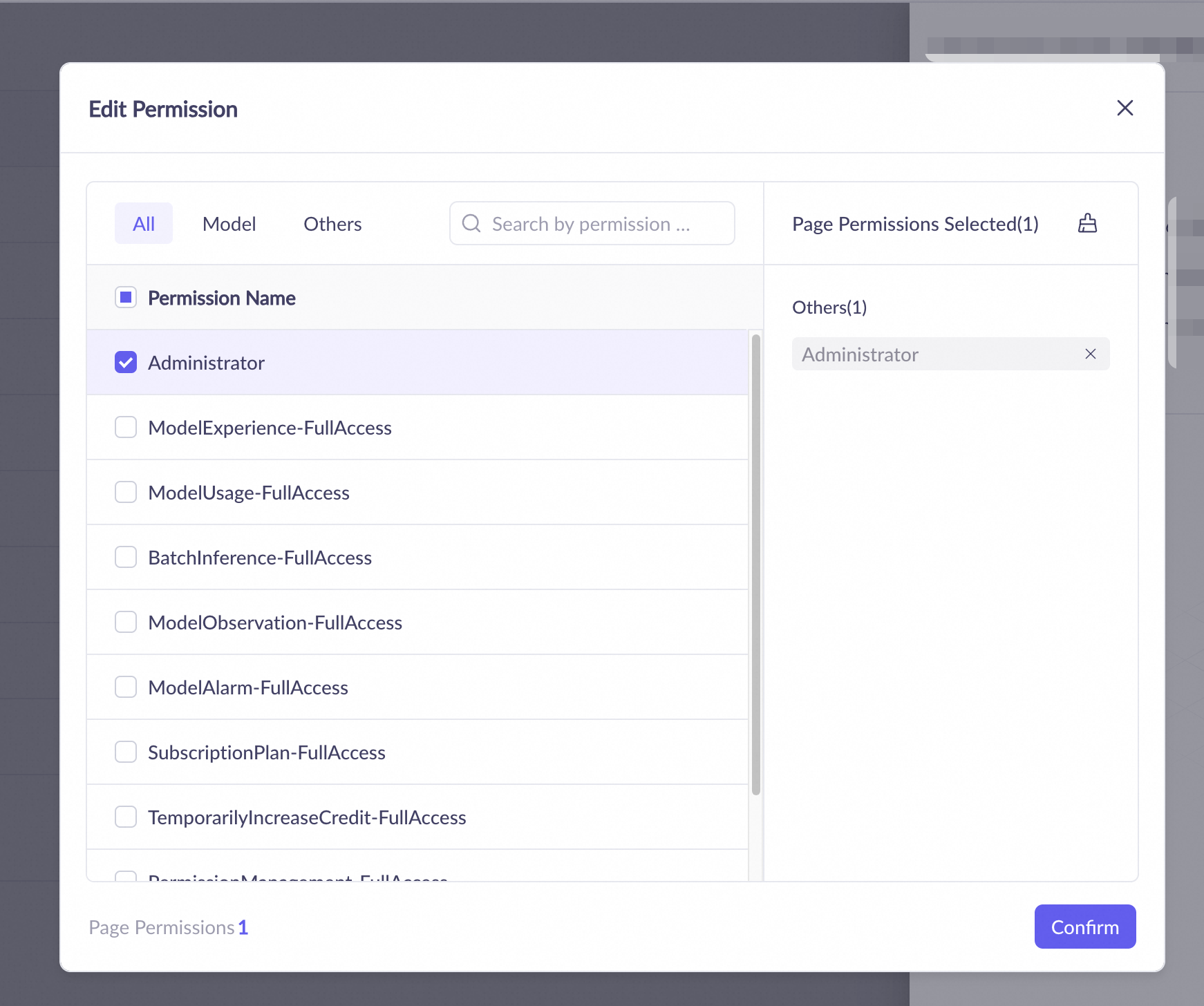
- Add a user: Log on to Alibaba Cloud Model Studio with your Alibaba Cloud account. Go to the Permissions page of your target workspace. Click Add User, specify a username for the RAM user, and click Confirm.

- Grant permissions: Find the user and click Permissions in the Actions column. Select the Administrator role and click Confirm to complete the authorization.
Step 2: Get plan-specific API key and base URL
You must use the plan-specific API key and base URL to ensure usage is correctly deducted from your plan's quota.
-
API key: On the Coding Plan page, get your Coding Plan-specific API key (in the format
sk-sp-xxxxx). -
Base URL: Configure one of the following base URLs in your AI tool. The URL depends on the tool. See your tool's documentation for details.
- OpenAI-compatible protocol:
https://coding-intl.dashscope.aliyuncs.com/v1 - Anthropic-compatible protocol:
https://coding-intl.dashscope.aliyuncs.com/apps/anthropic
- OpenAI-compatible protocol:
NoteWhich endpoint to use:
- Pay-as-you-go: Use your general Model Studio API key (in the format
sk-xxxxx) with the base URLhttps://{WorkspaceId}.ap-southeast-1.maas.aliyuncs.com/xxxxxx(OpenAI-compatible mode). - Coding Plan quota deduction: Use your Coding Plan API key (in the format
sk-sp-xxxxx) with the base URLhttps://coding-intl.dashscope.aliyuncs.com/v1.
The two sets of API keys and base URLs are not interchangeable. Do not mix them.
Step 3: Integrate with an AI tool
 OpenClaw OpenClawOpen-source, self-hosted personal AI assistant |  Hermes Agent Hermes AgentOpen-source AI agent framework with built-in self-learning loop |  Claude Code Claude CodeAI terminal coding assistant that supports natural language programming |
 OpenCode OpenCodeOpen-source AI programming agent tool |  Cursor CursorAI-native code editor |  Codex CodexCommand-line programming tool from OpenAI |
 Qwen Code Qwen CodeOpen-source CLI coding tool |  QwenPaw QwenPawOpen-source personal AI assistant with local and cloud deployment |  Cherry Studio Cherry StudioMulti-model desktop client |
 Chatbox ChatboxCross-platform AI desktop client |  Cline ClineVS Code extension for intelligent code completion and debugging |  Qoder QoderAgentic coding platform for real-world software development |
 Lingma LingmaIntelligent coding assistant with standalone IDE |  Kilo CLI Kilo CLILightweight, high-performance command-line programming tool |  WorkBuddy WorkBuddyDesktop AI agent workbench |
| More tools Other programming tools |
Before you subscribe
The Coding Plan service is non-refundable. Before you subscribe, note the following:
- Prohibition of API calls: This plan is for interactive use in programming tools such as Claude Code, Qoder, Qoder CN, and OpenClaw. Do not use the plan's API key for automated scripts, application backends, or other non-interactive scenarios. Using the API key outside the permitted scope is a violation that may result in subscription suspension or API key revocation.
- Account usage policy: The plan is for your use only and must not be shared. Account sharing may lead to restrictions on your subscription.
- Rate limits and resource scheduling: To ensure fair use for all users, in addition to the quota limits above, this service enforces technical limits on the number of concurrent requests and the request rate per account. When overall platform load is high, or when a single account consumes an unusually concentrated amount of resources within a short period, we may temporarily queue, throttle, or briefly interrupt requests from that account. Such adjustments are typically lifted automatically within minutes to hours. These adjustments are standard technical safeguards and are not considered a service interruption or a breach of contract. The specific thresholds are part of platform security and stability policies and may be adjusted dynamically based on operating conditions.
FAQ
Unexpected charges with a Coding Plan
This happens when you use the general Model Studio API key and base URL instead of your Coding Plan-specific ones. This usage is billed on a pay-as-you-go basis, resulting in extra charges. To resolve this, switch to your Coding Plan API key (starting with sk-sp-) and base URL (containing coding.dashscope.aliyuncs.com). See Get your plan-specific API key and base URL. To stop pay-as-you-go billing, go to the API Key management page in the Model Studio console and delete the general API key (starting with sk-), keeping only your Coding Plan API key. Subsequent calls are then deducted from your plan quota only and no longer incur pay-as-you-go charges.
Why is the Lite plan no longer available for new subscriptions?
Due to a product upgrade, the Coding Plan Lite plan stopped accepting new orders on March 20, 2026 (see discontinuation announcement), and renewals and upgrades were discontinued on April 13, 2026 (see renewal discontinuation announcement). Existing subscribers can continue using the service until it expires.
Are existing Lite plan subscribers affected?
Existing Coding Plan Lite subscribers can continue using the service until it expires. Renewals and upgrades for the Lite plan were discontinued on April 13, 2026. To continue using Coding Plan, subscribe to the Pro plan.
For more questions, refer to the FAQ.