This topic describes how to use gateway helper classes, including interceptor classes, MobileRpcHolder, and gateway error codes.
Implement interceptor features
Interceptors apply only to non-HTTP services.
The mobilegw-unify-spi-adapter.jar file uses Java reflection to call business methods specified by OperationType. This process lets you implement the interceptors defined in the Service Provider Interface (SPI) package to add extensions.
The gateway SPI package defines two interceptors: the AbstractMobileServiceInterceptor abstract class and the MobileServiceInterceptor interface.
AbstractMobileServiceInterceptor
The AbstractMobileServiceInterceptor class provides four main methods: beforeInvoke, afterInvoke, throwsInvoke, and getOrder. The afterInvoke method has two versions: one that accepts a business return object and another that accepts a JSON string converted from the object.
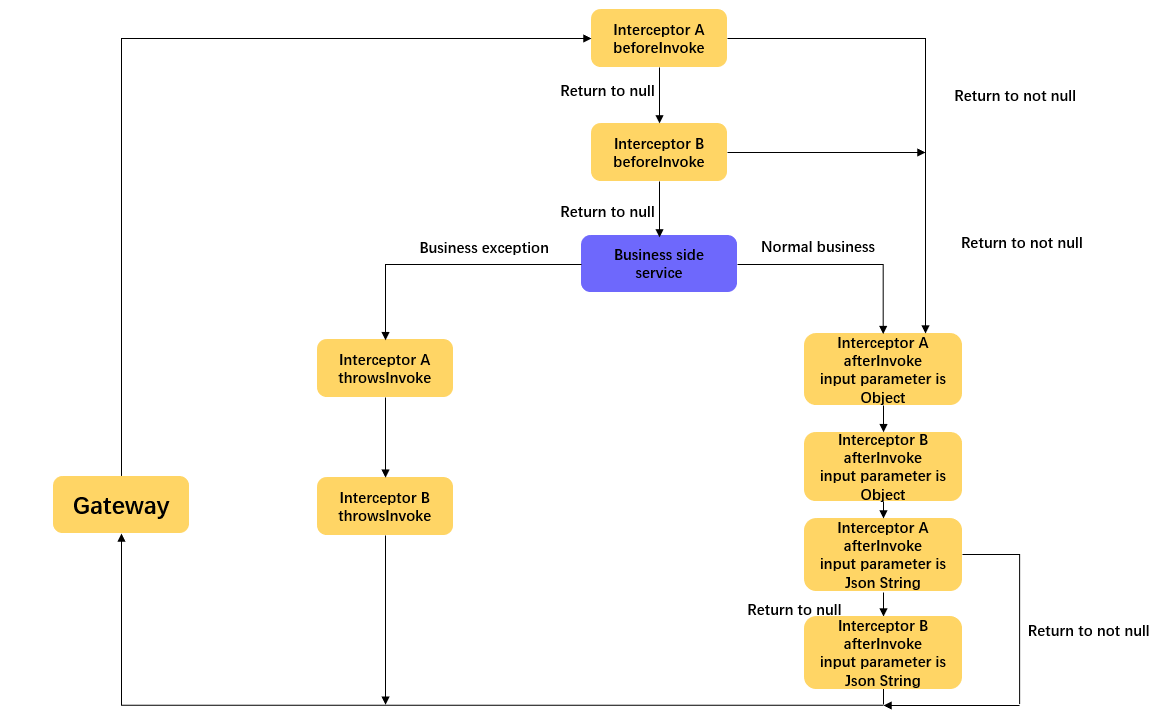
As shown in the preceding figure, the interceptor works in the following three scenarios:
Before the method is called: The
beforeInvokemethod has a return value. If this method returns a non-empty value, the gateway considers the interception successful. It then skips thebeforeInvokemethods of the remaining interceptors and the business method call, and proceeds directly to theafterInvokemethod of that interceptor.After the method is called: The
afterInvokemethod has two versions. The first version accepts an object returned by the business, has no return value, and is executed for all interceptors. The second version accepts a JSON string converted from the object, can modify the input JSON-formatted data, and can return the modified data. If this version returns a non-empty value, the gateway considers the interception successful and ignores subsequent interceptors.When an exception occurs in the method: The
throwsInvokemethod has no return value and is executed for all interceptors when an exception occurs in your business logic.
MobileServiceInterceptor
The MobileServiceInterceptor inherits the Ordered interface from the framework. Therefore, you can implement the getOrder method in your interceptor to specify the execution order. A smaller value indicates a higher priority, and a larger value indicates a lower priority.
Usage example
You can create your own interceptor class that inherits the
AbstractMobileServiceInterceptorclass or implements theMobileServiceInterceptorinterface.public class MyInterceptor implements MobileServiceInterceptor { /* Description of parameters method: The business method defined by @OperationType. args: An object array that contains the input parameters for the business method. The number of input parameters equals the size of the array. Perform type conversion as needed. target: The instance of the business interface. Description of the return value: Object: You can return data in the interceptor. If the return value is not empty, the gateway considers the call intercepted and does not call the business method. It also skips the beforeInvoke methods of other interceptors and directly executes the afterInvoke method. */ @Override public Object beforeInvoke(Method method, Object[] args, Object target) { //Do Something return null; } /* *Description of parameters *returnValue: The object returned by the business method. * Other parameters are the same as described previously. */ @Override public void afterInvoke(Object returnValue, Method method, Object[] args, Object target) { //Note: The input parameter here is the Object returned by your business. } @Override public String afterInvoke(String returnJsonValue, Method method, Object[] args, Object target) { //Note: The input parameter here is the JSON-formatted string converted from the object returned by your business. //You can return new JSON-formatted data. return null; } @Override public void throwsInvoke(Throwable t, Method method, Object[] args, Object target) { } @Override public int getOrder() { //The highest priority (smallest value) and the lowest priority (largest value). return 0; } }Publish the implemented class
MyInterceptoras a bean.For Spring Boot, add the
@Serviceannotation to the class.@Service public class MyInterceptor implements MobileServiceInterceptor{}For Spring, declare the bean in the
xmlconfiguration file.<bean id="myInterceptor" class="com.xxx.xxx.MyInterceptor"/>
MobileRpcHolder helper class
MobileRpcHolder is a static helper class provided in mobilegw-unify-spi-adapter.jar. This class holds information related to the request process. The main definitions are as follows:
Map<String, String> session;     // Stores the request session.
Map<String, String> header;      // Stores the request header information.
Map<String, String> context;     // Stores the context information for the gateway call.
String        operationType;     // Stores the operationType for this request.
Before the gateway calls your business service (specified by OperationType), it populates MobileRpcHolder with information from the MobileRpcRequest that it forwarded. This information is cleared after the business service call is complete.
The lifecycle of MobileRpcHolder persists throughout the service call process. It is cleared after the call is complete.
You can also set custom information in MobileRpcHolder. This information persists throughout the business service call, which allows the service to retrieve it at any time. You can also use an interceptor to dynamically modify the information in MobileRpcHolder before and after the method call.
The following example shows how to use MobileRpcHolder.
Usage example
This example shows how to modify and retrieve a session.
Modify the session. To modify the session, you can create an interceptor as described previously. The following code shows how to intercept the call before a method is executed:
 @Override
 public Object beforeInvoke(Method method, Object[] args, Object target) {
     Map<String, String> session = MobileRpcHolder.getSession();
     session.put("key_test", "value_test");
     MobileRpcHolder.setSession(session);
 }
This lets you modify the session information in
MobileRpcHolder.Retrieve the session. You can retrieve the session information from within your custom service.
 @OperationType("com.alipay.account.query")
 public String mock2(String s) {
     Map<String, String> session = MobileRpcHolder.getSession();
 }
The methods for modifying and retrieving other information, such as the header and context, are similar.
 // Get all header information.
 Map<String,String> headers = MobileRpcHolder.getHeaders();
 // The context information here refers to the context information in the request.
 Map<String,String> context = MobileRpcHolder.getRequestCtx();
 // Get the OperationType.
 String opt = MobileRpcHolder.getOperationType();
Use gateway error codes
Mobile Gateway Service has its own set of error code specifications. For more information, see Gateway result codes.
One notable error code is BizException 6666, which the gateway throws when a business exception occurs.
If you want to return a different error code for a specific error, you can throw an RpcException(ResultEnum resultCode) to control errors at the Remote Procedure Call (RPC) layer. For example, if resultCode=1001, "No permission to access" is returned to the client.
Code example
@Override
public String mock2(String s) throws RpcException {
    try{
        test();
    }catch (Exception e){
        throw new RpcException(IllegalArgument);
    }
    return "11111111";
}
Custom error codes
To use custom error codes, you must avoid throwing exceptions from your business methods.
This is because if an exception is thrown from a business method, the gateway returns the status code 6666. A client that receives this status code considers the service call to have failed and does not parse the returned business data. The client only parses the business data when it receives the success status code 1000.
To implement custom error codes, the server-side and the client must agree on a set of specific error codes. Then, in your business method, you must catch all exceptions and include the appropriate custom error code in the data you return. This approach ensures that the gateway always returns the success code 1000, even when a business exception occurs. The client can then parse the returned data to check for and handle the custom error code.