Older mPaaS baselines support `targetSdkVersion` up to 26. Support for `targetSdkVersion` 28 is available starting from mPaaS version 10.1.68.21. To upgrade your application to `targetSdkVersion` 28, use the mPaaS plugin to update the SDK to version 10.1.68.21 or later. After the update, follow the instructions in this document to adapt your code and perform regression testing.
Adapt for targetSdkVersion 28
Modify targetSdkVersion
AAR integration method
In the build.gradle file of the project's main module, change the `targetSdkVersion` property to 28.
Portal & Bundle integration method
In the
build.gradlefile of the Portal project's main module, change the `targetSdkVersion` property to 28.The `targetSdkVersion` in the Bundle project does not need to be changed, but it must not be higher than the `targetSdkVersion` of the Portal project.
General configurations
AAR integration method
In the project's AndroidManifest.xml file, add the following code under the `application` node:
<uses-library android:name="org.apache.http.legacy" android:required="false"/>Portal & Bundle integration method
In the Portal project's AndroidManifest.xml file, make the following changes:
Add the following code under the `application` node:
<uses-library android:name="org.apache.http.legacy" android:required="false"/>Remove the following property from `LauncherActivity`. The SDK now sets this property programmatically.
android:screenOrientation="portrait"
Other configurations
Allow HTTP requests
By default, Android 9.0 and later only allow HTTPS requests. Setting `targetSdkVersion` to 28 applies this restriction to your app on devices running Android 9.0 or later. To send HTTP requests, including those in miniapps, you must enable them by configuring networkSecurityConfig.
In the
res/xmldirectory of your project, create anetwork_security_config.xmlfile with the following content. For the Portal & Bundle integration method, create this file in the Portal project.<?xml version="1.0" encoding="utf-8"?> <network-security-config> <base-config cleartextTrafficPermitted="true"> <trust-anchors> <certificates src="system" /> </trust-anchors> </base-config> </network-security-config>In your project's
AndroidManifest.xmlfile, add the following property to the `application` node. For the Portal & Bundle integration method, modify the file in the Portal project.android:networkSecurityConfig="@xml/network_security_config"
For more information, see the official Google documentation.
Crash when setting screen orientation for an activity with a transparent background
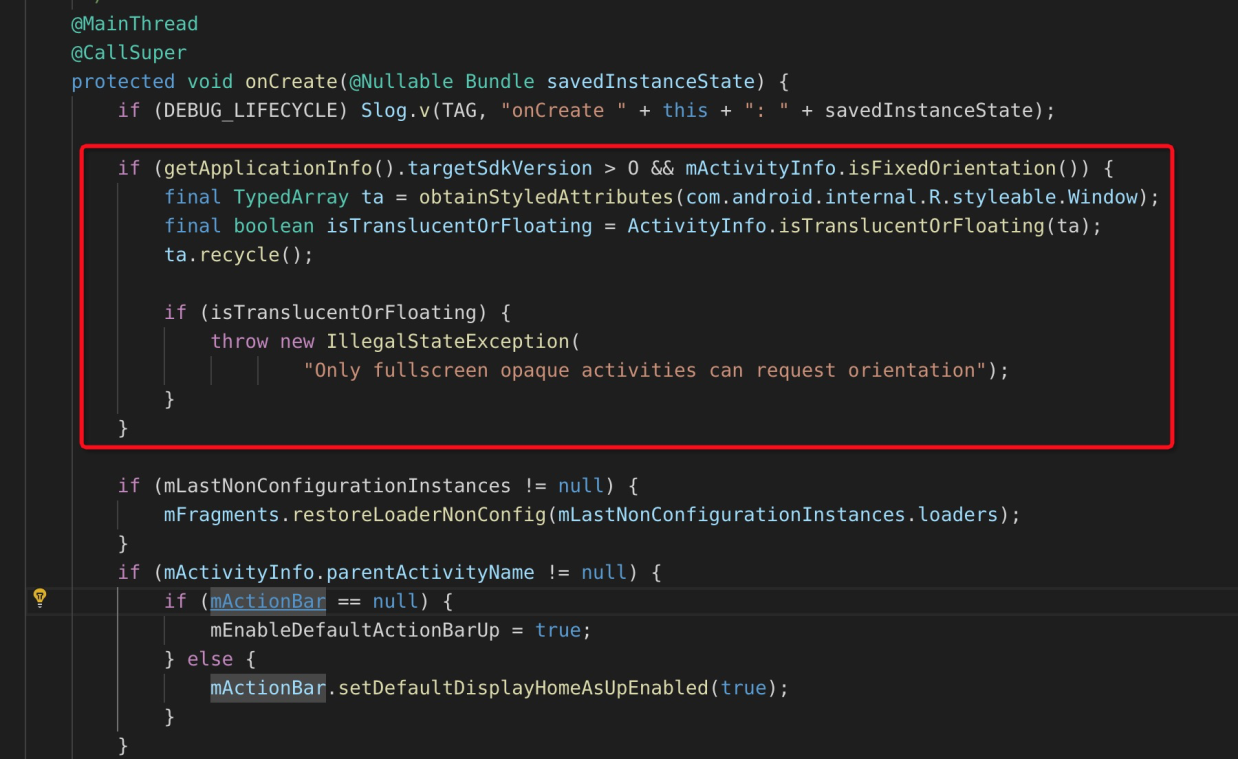
This section addresses a system bug in Android 8.0. On devices running Android 8.0, an app will crash if its `targetSdkVersion` is higher than 26 and it tries to open an activity that has both a transparent background and a fixed screen orientation. The specific conditions that trigger this crash are:
The attribute of
windowIsTranslucentorwindowIsFloatingof the theme used by the Activity is true.The
screenOrientationattribute is set inAndroidManifest.xml, or thesetRequestedOrientationmethod is called.
Check all activities to see if they meet these conditions. In addition to your custom styles, note that some common system themes also meet the conditions, such as:
@android:style/Theme.Translucent.NoTitleBar
@android:style/Theme.Dialog
Recommended solution:
For the Activity whose theme meets the condition, delete the
screenOrientationattribute inAndroidManifest.xmland call thesetRequestedOrientationmethod instead.Override the
setRequestedOrientationmethod in the corresponding Activity or parent class, withtry catch super.setRequestedOrientation()as the ground rule:@Override public void setRequestedOrientation(int requestedOrientation) { try { super.setRequestedOrientation(requestedOrientation); } catch (Exception ignore) { } }BaseActivity,BaseFragmentActivity, andBaseAppCompatActivtiyprovided by mPaaS were overwritten, withsetRequestedOrientationmethod as the ground rule.This workaround prevents the crash. However, the screen orientation lock may still fail on Android 8.0 devices. Ensure your Activity does not cause exceptions when the screen rotates, such as a lifecycle restart that results in null member variables.
Related Android 8.0 system source code:
Regression testing
Your full regression testing must include devices running Android 9.0 or later. For the crash issue involving transparent activities, you must perform specific tests on Android 8.0 devices.
During regression testing, pay close attention to the following component features if you use them:
Component | Validation items |
Mobile Gateway |
|
Scan |
|
Unified Storage |
|
Share | Check if sharing to Sina Weibo and QQ is successful. |