MaxCompute automatically backs up data each time it is modified and retains the backup for a configurable period. If data is accidentally deleted or overwritten, restore it to any previous version within the retention period.
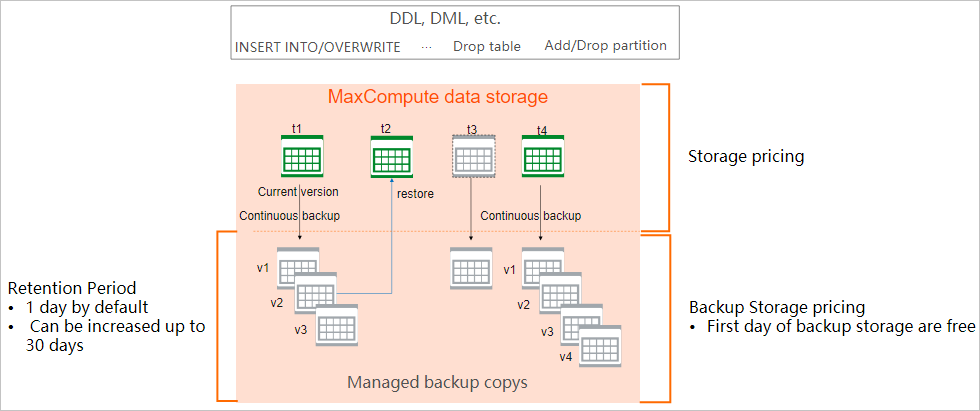
How it works
Always on -- Enabled by default with a 24-hour retention period. No external storage required and no additional cost.
Continuous -- Every modification triggers a backup, so no data change is missed between scheduled windows.
Fast restoration -- Restore operations do not consume extra computing resources. A single command restores a table, partition, or specific version.
Limitations
Materialized views, object tables, and external tables are not supported.
Clustered tables cannot be restored.
After
PURGE TABLEruns on a table, the purged data cannot be restored.A dropped table or partition (including Delta tables) cannot be restored directly to a specific Log Sequence Number (LSN). Restore the table first, then restore it to the target LSN.
Delta table limitations
A dropped Delta table or partition can be fully restored but not to a specific minor version. To query a specific minor version, use time travel.
After a dropped table is restored:
Querying the table at a time before the drop returns data as if the drop never happened.
Querying at a time between the drop and the restore returns no data (the system treats it as deleted).
Querying at a time after the restore returns data as if neither the drop nor the restore occurred. Restored data is not treated as incremental data.
Querying a dropped partition before it is restored returns no results (same as a normal query on a non-existent partition), rather than an error.
Each drop-and-restore cycle generates new commit timestamps and version numbers. When a partitioned table is restored, a separate version is created for each partition.
Configure the retention period
Set the number of days MaxCompute retains backup data. The valid range is 0--30. The default is 1 (24 hours). Setting it to 0 disables backup.
-- Set the retention period to 7 days
setproject odps.timemachine.retention.days=7;
Only Alibaba Cloud accounts or project administrators can change the retention period.
Behavior after changing the retention period:
| Change | Effect |
|---|---|
| Extend the period | Takes effect on the same day |
| Shorten the period | MaxCompute automatically deletes backup data that exceeds the new period |
To view the current setting, run setproject; on the MaxCompute client (odpscmd) and check the odps.timemachine.retention.days value.
View backup history
List all tables including dropped tables
SHOW HISTORY FOR tables;Filter by name:
SHOW HISTORY FOR tables LIKE test_restore_1;Sample output:
Name                	Id                              	Type            	IsPartitioned 	CreateTime         	DropTime
test_restore_1      	a0b06367bd054d17a55505aa31601b89	MANAGED_TABLE   	FALSE         	2025-07-18 16:32:13
Requires the List permission on the project. See MaxCompute permissions.
View version history of a table
SHOW HISTORY FOR TABLE <table_name> [LIMIT <n>] [LSN '<lsn>' | OFFSET <offset>];Example:
SHOW HISTORY FOR TABLE test_restore_1;Sample output:
ObjectType	ObjectId                        	ObjectName          	VERSION(LSN)    	Time               	Operation
TABLE     	a0b06367bd054d17a55505aa31601b89	test_restore_1      	0000000000000001	2025-07-18 16:32:14	CREATE
TABLE     	a0b06367bd054d17a55505aa31601b89	test_restore_1      	0000000000000002	2025-07-18 16:52:08	OVERWRITE
TABLE     	a0b06367bd054d17a55505aa31601b89	test_restore_1      	0000000000000003	2025-07-18 16:52:12	OVERWRITE
TABLE     	a0b06367bd054d17a55505aa31601b89	test_restore_1      	0000000000000004	2025-07-18 16:52:14	OVERWRITE
TABLE     	a0b06367bd054d17a55505aa31601b89	test_restore_1      	0000000000000005	2025-07-18 16:52:17	OVERWRITE
Requires the ShowHistory permission on the table. If the table has been dropped, this command returns an error. Use SHOW HISTORY FOR tables LIKE <table_name>; instead.
View version history of a dropped table
Use the table ID obtained from SHOW HISTORY FOR tables:
SHOW HISTORY FOR TABLE test_restore_2 ('id'='437b29466ba948b392b2090ec0a60fc2');Requires the List permission on the project.
View version history of a partition
-- By partition spec
SHOW HISTORY FOR TABLE test_restore_part_1 PARTITION(ds='20250701');

-- By partition ID (for dropped partitions)
SHOW HISTORY FOR TABLE test_restore_part_1 PARTITION('id'='271aebf3e17a4a8e9f6b35733bf63db4');
Requires the ShowHistory permission on the table.
To view multiple partitions at once:
SHOW HISTORY FOR TABLE test_restore_part_1 ('id'='fbee66b56cf544d2a9999d5d0ce5d352')
  PARTITION(ds='20250701') PARTITION(ds='20250702');
Restore a non-partitioned table
Restore a dropped table
RESTORE TABLE <table_name> ('id'='<table_id>');The table name must not conflict with an existing table. Rename the existing table first if needed.
Example:
-- Rename the conflicting table
ALTER TABLE test_restore_2 RENAME TO test_restore_2_rename;

-- Restore the dropped table
RESTORE TABLE test_restore_2 ('id'='437b29466ba948b392b2090ec0a60fc2');
Permissions:
Existing table: Update permission on the table.
Non-existing table: CreateTable permission on the project.
Restore a table to a specific version
RESTORE TABLE <table_name> TO LSN '<lsn>';Example:
RESTORE TABLE test_restore_1 TO LSN '0000000000000004';

SELECT * FROM test_restore_1;
-- Returns:
-- +------------+
-- | colname    |
-- +------------+
-- | 2          |
-- +------------+
Restore a table to a specific version as a new table
RESTORE TABLE <table_name> TO LSN '<lsn>' AS <new_table_name>;This command has three behaviors depending on the target table:
| Scenario | Behavior |
|---|---|
| Target table does not exist | Creates the new table with the restored data |
| Target table exists with the same schema | Overwrites the target table's data |
| Target table exists with a different schema | Fails with error ODPS-0110061 |
Example -- restore and rename:
RESTORE TABLE test_restore_2 TO LSN '0000000000000003' AS test_restore_new;

SELECT * FROM test_restore_new;
-- Returns:
-- +------------+
-- | colname    |
-- +------------+
-- | 1          |
-- +------------+
Restore a partitioned table
Restore a dropped partitioned table
RESTORE TABLE <table_name> ('id'='<table_id>');All partitions that existed at the time of the drop are restored.
Restore dropped partitions
Restore one or more dropped partitions to an existing table:
RESTORE TABLE <table_name> PARTITION('id'='<partition_id>') [PARTITION('id'='<partition_id>')];The table must exist. If the table was also dropped, restore the table first.
Example:
-- View partition IDs
SHOW HISTORY FOR TABLE test_restore_part_y;

-- Restore two dropped partitions
RESTORE TABLE test_restore_part_y
  PARTITION('id'='a14d6cb4ab0c46378a6e284b257bbfaa')
  PARTITION('id'='8c85184ec0b44fba8198274401df2519');
Restore partitions to a specific version
RESTORE TABLE <table_name>
  PARTITION(<partition_spec>) [PARTITION(<partition_spec>)]
  TO LSN '<lsn>';
When restoring multiple partitions to one LSN, each partition is restored to the specified LSN if that exact LSN exists for the partition. Otherwise, it is restored to the closest preceding LSN.
Example: Partition pt1 has LSNs 100, 102, 104, 106. Partition pt2 has LSNs 101, 103, 104, 105. Restoring both to LSN 102 restores pt1 to 102 and pt2 to 101.
RESTORE TABLE test_restore_part_y
  PARTITION(ds='20250701') PARTITION(ds='20250702')
  TO LSN '0000000000000010';
Restore partitions to a specific version as a new table
RESTORE TABLE <table_name>
  PARTITION(<partition_spec>) [PARTITION(<partition_spec>)]
  TO LSN '<lsn>' AS <new_table_name>;
Delta table examples
Create a Delta table, insert data, then drop and restore
-- Create a Delta table
CREATE TABLE mf_dt (pk BIGINT NOT NULL PRIMARY KEY,
                    val BIGINT NOT NULL)
                    PARTITIONED BY (dd STRING, hh STRING)
                    TBLPROPERTIES ("transactional"="true");

-- Insert data
INSERT OVERWRITE TABLE mf_dt PARTITION(dd='01', hh='01')
  VALUES (1, 1), (2, 2), (3, 3);

INSERT INTO TABLE mf_dt PARTITION(dd='01', hh='01')
  VALUES (3, 30), (4, 4), (5, 5);

SELECT * FROM mf_dt WHERE dd='01' AND hh='01';
-- Returns:
-- +----+-----+----+----+
-- | pk | val | dd | hh |
-- +----+-----+----+----+
-- | 1  | 1   | 01 | 01 |
-- | 4  | 4   | 01 | 01 |
-- | 5  | 5   | 01 | 01 |
-- | 2  | 2   | 01 | 01 |
-- | 3  | 30  | 01 | 01 |
-- +----+-----+----+----+
Get the table ID for restore
Run DESC EXTENDED mf_dt; and find the TableID field in the Extended Info section:
TableID: cd607cd938dc4ca6886dd12212995604Drop and restore the table
DROP TABLE mf_dt;

RESTORE TABLE mf_dt ('id' = 'cd607cd938dc4ca6886dd12212995604');

-- Verify the data
SELECT * FROM mf_dt WHERE dd='01' AND hh='01';
-- Returns the same data as before the drop.
Drop and restore a partition
-- Get partition IDs
SHOW HISTORY FOR TABLE mf_dt;

-- Drop the partition
ALTER TABLE mf_dt DROP PARTITION (dd = '01', hh = '01');

-- Restore the partition
RESTORE TABLE mf_dt PARTITION('id' = '51d38cc9ded344cf99188cd1a806e5d2');

-- Verify the data
SELECT * FROM mf_dt WHERE dd='01' AND hh='01';
-- Returns the same data as before the drop.
Time travel on a restored table
After restoring a Delta table, time travel queries still work:
-- Query a specific version
SELECT * FROM mf_dt version AS OF 2 WHERE dd = '01' AND hh = '01';
-- Returns:
-- +----+-----+----+----+
-- | pk | val | dd | hh |
-- +----+-----+----+----+
-- | 1  | 1   | 01 | 01 |
-- | 3  | 3   | 01 | 01 |
-- | 2  | 2   | 01 | 01 |
-- +----+-----+----+----+

-- Query the latest version
SELECT * FROM mf_dt version AS OF get_latest_version('mf_dt')
  WHERE dd = '01' AND hh = '01';
-- Returns the current data.
Data file cleanup (Delta tables)
Delta tables retain historical data within the time travel period, which incurs additional storage costs. The system automatically deletes unnecessary historical data within one day when all of the following conditions are met:
The data is older than the time travel period. (If time travel is disabled for the table, all historical data qualifies.)
The data has exceeded the lifecycle or was dropped, and has also exceeded the backup protection time.
"Historical data" refers to data files moved to the recycle bin directory. Operations such as exceeding the lifecycle, executing a drop, running compaction, or performing INSERT OVERWRITE all move data files to the recycle bin.Force cleanup with PURGE
In normal operations, let the system handle cleanup automatically. Use PURGE TABLE only in emergencies -- for example, when excessive files cause disk instability or when historical data causes unexpected cost spikes.
PURGE TABLE <table_name>;After running this command, time travel queries may no longer return historical data.
Example:
CREATE TABLE mf_ttt (pk BIGINT NOT NULL PRIMARY KEY,
                     val BIGINT NOT NULL)
                     TBLPROPERTIES ("transactional"="true");

INSERT INTO TABLE mf_ttt VALUES (1, 1), (2, 2);
INSERT INTO TABLE mf_ttt VALUES (2, 20), (3, 3);

-- Time travel returns version 2 data
SELECT * FROM mf_ttt version AS OF 2;
-- +----+-----+
-- | pk | val |
-- +----+-----+
-- | 1  | 1   |
-- | 2  | 2   |
-- +----+-----+

-- Run compaction, then time travel still works
ALTER TABLE mf_ttt compact major;
SELECT * FROM mf_ttt version AS OF 2;
-- Same result as above

-- After purge, time travel returns different data
PURGE TABLE mf_ttt;
SELECT * FROM mf_ttt version AS OF 2;
-- +----+-----+
-- | pk | val |
-- +----+-----+
-- | 1  | 1   |
-- | 3  | 3   |
-- | 2  | 20  |
-- +----+-----+
Command reference
| Scenario | Command | Description |
|---|---|---|
| Configure retention | setproject odps.timemachine.retention.days=<days>; | Set the retention period (0--30 days). Default: 1. |
setproject; | View current project settings including the retention period. | |
| View backup history | SHOW HISTORY FOR tables [LIKE <name>]; | List all tables including dropped tables. Requires List permission. |
SHOW HISTORY FOR TABLE <name> [LIMIT <n>] [LSN '<lsn>' | OFFSET <n>]; | View version history of a table. Requires ShowHistory permission. | |
SHOW HISTORY FOR TABLE <name> ('id'='<id>'); | View version history of a dropped table by its ID. Requires List permission. | |
SHOW HISTORY FOR TABLE <name> <partition_spec>; | View version history of a partition. Requires ShowHistory permission. | |
SHOW HISTORY FOR TABLE <name> PARTITION('id'='<id>'); | View version history of a dropped partition by its ID. | |
| Restore data | RESTORE TABLE <name> ('id'='<id>'); | Restore a dropped table or partition. |
RESTORE TABLE <name> TO LSN '<lsn>'; | Restore a table to a specific version. | |
RESTORE TABLE <name> TO LSN '<lsn>' AS <new_name>; | Restore a table to a version and save as a new (or existing) table. | |
RESTORE TABLE <name> PARTITION('id'='<id>') [...]; | Restore one or more dropped partitions. | |
RESTORE TABLE <name> <partition_spec> [...] TO LSN '<lsn>'; | Restore partitions to a specific version. | |
RESTORE TABLE <name> <partition_spec> [...] TO LSN '<lsn>' AS <new_name>; | Restore partitions to a version and save as a new table. | |
| Cleanup | PURGE TABLE <name>; | Force-delete historical data in the recycle bin. |
Usage notes
Use the latest version of the MaxCompute client to access all backup and restoration commands.
Backup tables are created only when data is modified. No modification means no backup entry.
Backup data that exceeds the retention period is automatically deleted and cannot be restored or queried.
For information about required permissions, see MaxCompute permissions.