When to disable stream ingest
You can disable stream ingest in ApsaraVideo Live to meet security requirements. This feature is useful in scenarios such as when an authenticated ingest URL is exposed, a malicious stream is pushed to the URL, or your business requires you to block an ingest URL.
How to disable stream ingest
Disable stream ingest in the ApsaraVideo Live console
Find and disable an active ingest URL
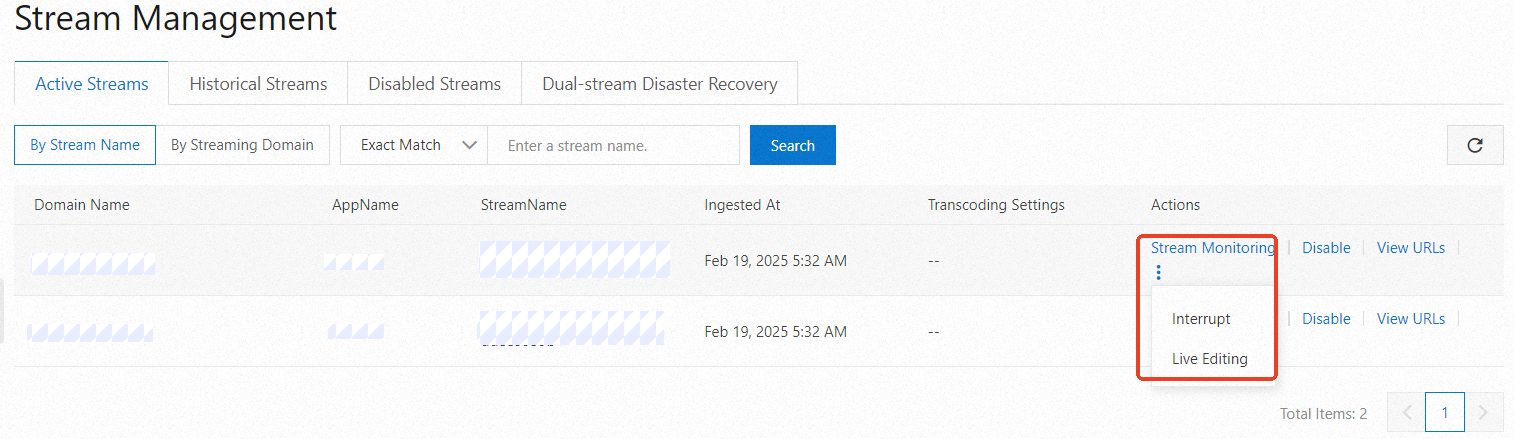
After a stream is successfully ingested, go to the page in the ApsaraVideo Live console. Select the domain name, click Search, and then click Disable for the ongoing stream.
Find and disable a historical ingest URL
After the stream ingest ends, go to the page in the ApsaraVideo Live console. Click the Historical Streams tab, select the domain name, and click Search. Find the stream and click Disable.
Disable stream ingest using an SDK
The ApsaraVideo Live APIs are based on Alibaba Cloud OpenAPI. The SDK acts as a wrapper for making OpenAPI calls. To download the server-side SDK, see Server-side SDK. For more information about how to use the SDK, see SDK instructions.
For example, to use the Java SDK, you can use Maven to manage project dependencies and add the following dependency to the pom.xml file:
<dependency> <groupId>com.aliyun</groupId> <artifactId>alibabacloud-live20161101</artifactId> <version>2.0.0</version> </dependency>NoteThe SDK version number is for reference only. To obtain the latest version, see Server-side SDK.
The main flow of the sample code is as follows:
Initialize the Client object.
The SDK uses an AsyncClient object to call OpenAPI operations.
Initialize the Request class.
The SDK provides Request and Response classes for each API operation. For more information about the request parameters for the Forbid Stream Ingest operation, see Forbid Stream Ingest API.
Send the request and retrieve the result.
Sample code:
// This file is auto-generated, don't edit it. Thanks.
package demo;

import com.aliyun.auth.credentials.Credential;
import com.aliyun.auth.credentials.provider.StaticCredentialProvider;
import com.aliyun.core.http.HttpClient;
import com.aliyun.core.http.HttpMethod;
import com.aliyun.core.http.ProxyOptions;
import com.aliyun.httpcomponent.httpclient.ApacheAsyncHttpClientBuilder;
import com.aliyun.sdk.service.live20161101.models.*;
import com.aliyun.sdk.service.live20161101.*;
import com.google.gson.Gson;
import darabonba.core.RequestConfiguration;
import darabonba.core.client.ClientOverrideConfiguration;
import darabonba.core.utils.CommonUtil;
import darabonba.core.TeaPair;

//import javax.net.ssl.KeyManager;
//import javax.net.ssl.X509TrustManager;
import java.net.InetSocketAddress;
import java.time.Duration;
import java.util.*;
import java.util.concurrent.CompletableFuture;
import java.io.*;

public class ForbidLiveStream {
    public static void main(String[] args) throws Exception {

        // HttpClient Configuration
        /*HttpClient httpClient = new ApacheAsyncHttpClientBuilder()
                .connectionTimeout(Duration.ofSeconds(10)) // Set the connection timeout time, the default is 10 seconds
                .responseTimeout(Duration.ofSeconds(10)) // Set the response timeout time, the default is 20 seconds
                .maxConnections(128) // Set the connection pool size
                .maxIdleTimeOut(Duration.ofSeconds(50)) // Set the connection pool timeout, the default is 30 seconds
                // Configure the proxy
                .proxy(new ProxyOptions(ProxyOptions.Type.HTTP, new InetSocketAddress("<YOUR-PROXY-HOSTNAME>", 9001))
                        .setCredentials("<YOUR-PROXY-USERNAME>", "<YOUR-PROXY-PASSWORD>"))
                // If it is an https connection, you need to configure the certificate, or ignore the certificate(.ignoreSSL(true))
                .x509TrustManagers(new X509TrustManager[]{})
                .keyManagers(new KeyManager[]{})
                .ignoreSSL(false)
                .build();*/

        // Configure Credentials authentication information, including ak, secret, token
        StaticCredentialProvider provider = StaticCredentialProvider.create(Credential.builder()
                // Please ensure that the environment variables ALIBABA_CLOUD_ACCESS_KEY_ID and ALIBABA_CLOUD_ACCESS_KEY_SECRET are set.
                .accessKeyId(System.getenv("ALIBABA_CLOUD_ACCESS_KEY_ID"))
                .accessKeySecret(System.getenv("ALIBABA_CLOUD_ACCESS_KEY_SECRET"))
                //.securityToken(System.getenv("ALIBABA_CLOUD_SECURITY_TOKEN")) // use STS token
                .build());

        // Configure the Client
        AsyncClient client = AsyncClient.builder()
                .region("<Your ReginId>") // Region ID
                //.httpClient(httpClient) // Use the configured HttpClient, otherwise use the default HttpClient (Apache HttpClient)
                .credentialsProvider(provider)
                //.serviceConfiguration(Configuration.create()) // Service-level configuration
                // Client-level configuration rewrite, can set Endpoint, Http request parameters, etc.
                .overrideConfiguration(
                        ClientOverrideConfiguration.create()
                                  // For the endpoint, see https://api.aliyun.com/product/live
                                .setEndpointOverride("live.aliyuncs.com")
                        //.setConnectTimeout(Duration.ofSeconds(30))
                )
                .build();

        // Parameter settings for API request
        ForbidLiveStreamRequest forbidLiveStreamRequest = ForbidLiveStreamRequest.builder()
                .regionId("<Your ReginId>")
                .domainName("<Your DomainName>")
                .appName("<Your AppName>")
                .streamName("<Your StreamName>")
                // Request-level configuration rewrite, can set Http request parameters, etc.
                // .requestConfiguration(RequestConfiguration.create().setHttpHeaders(new HttpHeaders()))
                .build();

        // Asynchronously get the return value of the API request
        CompletableFuture<ForbidLiveStreamResponse> response = client.forbidLiveStream(forbidLiveStreamRequest);
        // Synchronously get the return value of the API request
        ForbidLiveStreamResponse resp = response.get();
        System.out.println(new Gson().toJson(resp));
        // Asynchronous processing of return values
        /*response.thenAccept(resp -> {
            System.out.println(new Gson().toJson(resp));
        }).exceptionally(throwable -> { // Handling exceptions
            System.out.println(throwable.getMessage());
            return null;
        });*/

        // Finally, close the client
        client.close();
    }

}
How to view the stream ingest blacklist
View the stream ingest blacklist in the ApsaraVideo Live console
After you disable stream ingest, go to the page in the ApsaraVideo Live console. Select the domain name, click the Disabled Streams tab, and then click Search to view the disabled live streams.
Retrieve the stream ingest blacklist using an SDK
The ApsaraVideo Live APIs are based on Alibaba Cloud OpenAPI. The SDK acts as a wrapper for making OpenAPI calls. To download the server-side SDK, see Server-side SDK. For more information about how to use the SDK, see SDK instructions.
<dependency> <groupId>com.aliyun</groupId> <artifactId>alibabacloud-live20161101</artifactId> <version>2.0.0</version> </dependency>NoteThe SDK version number is for reference only. To obtain the latest version, see Server-side SDK.
The main flow of the sample code is as follows:
Initialize the Client object.
The SDK uses an AsyncClient object to call OpenAPI operations.
Initialize the Request class.
The SDK provides Request and Response classes for each operation. For more information about the request parameters for querying the blacklist of ingest URLs, see Query Stream Ingest Blacklist API.
Send the request and retrieve the result.
Sample code:
// This file is auto-generated, don't edit it. Thanks.
package demo;

import com.aliyun.auth.credentials.Credential;
import com.aliyun.auth.credentials.provider.StaticCredentialProvider;
import com.aliyun.core.http.HttpClient;
import com.aliyun.core.http.HttpMethod;
import com.aliyun.core.http.ProxyOptions;
import com.aliyun.httpcomponent.httpclient.ApacheAsyncHttpClientBuilder;
import com.aliyun.sdk.service.live20161101.models.*;
import com.aliyun.sdk.service.live20161101.*;
import com.google.gson.Gson;
import darabonba.core.RequestConfiguration;
import darabonba.core.client.ClientOverrideConfiguration;
import darabonba.core.utils.CommonUtil;
import darabonba.core.TeaPair;

//import javax.net.ssl.KeyManager;
//import javax.net.ssl.X509TrustManager;
import java.net.InetSocketAddress;
import java.time.Duration;
import java.util.*;
import java.util.concurrent.CompletableFuture;
import java.io.*;

public class DescribeLiveStreamsBlockList {
    public static void main(String[] args) throws Exception {

        // HttpClient Configuration
        /*HttpClient httpClient = new ApacheAsyncHttpClientBuilder()
                .connectionTimeout(Duration.ofSeconds(10)) // Set the connection timeout time, the default is 10 seconds
                .responseTimeout(Duration.ofSeconds(10)) // Set the response timeout time, the default is 20 seconds
                .maxConnections(128) // Set the connection pool size
                .maxIdleTimeOut(Duration.ofSeconds(50)) // Set the connection pool timeout, the default is 30 seconds
                // Configure the proxy
                .proxy(new ProxyOptions(ProxyOptions.Type.HTTP, new InetSocketAddress("<YOUR-PROXY-HOSTNAME>", 9001))
                        .setCredentials("<YOUR-PROXY-USERNAME>", "<YOUR-PROXY-PASSWORD>"))
                // If it is an https connection, you need to configure the certificate, or ignore the certificate(.ignoreSSL(true))
                .x509TrustManagers(new X509TrustManager[]{})
                .keyManagers(new KeyManager[]{})
                .ignoreSSL(false)
                .build();*/

        // Configure Credentials authentication information, including ak, secret, token
        StaticCredentialProvider provider = StaticCredentialProvider.create(Credential.builder()
                // Please ensure that the environment variables ALIBABA_CLOUD_ACCESS_KEY_ID and ALIBABA_CLOUD_ACCESS_KEY_SECRET are set.
                .accessKeyId(System.getenv("ALIBABA_CLOUD_ACCESS_KEY_ID"))
                .accessKeySecret(System.getenv("ALIBABA_CLOUD_ACCESS_KEY_SECRET"))
                //.securityToken(System.getenv("ALIBABA_CLOUD_SECURITY_TOKEN")) // use STS token
                .build());

        // Configure the Client
        AsyncClient client = AsyncClient.builder()
                .region("<Your ReginId>") // Region ID
                //.httpClient(httpClient) // Use the configured HttpClient, otherwise use the default HttpClient (Apache HttpClient)
                .credentialsProvider(provider)
                //.serviceConfiguration(Configuration.create()) // Service-level configuration
                // Client-level configuration rewrite, can set Endpoint, Http request parameters, etc.
                .overrideConfiguration(
                        ClientOverrideConfiguration.create()
                                  // For the endpoint, see https://api.aliyun.com/product/live
                                .setEndpointOverride("live.aliyuncs.com")
                        //.setConnectTimeout(Duration.ofSeconds(30))
                )
                .build();

        // Parameter settings for API request
        DescribeLiveStreamsBlockListRequest describeLiveStreamsBlockListRequest = DescribeLiveStreamsBlockListRequest.builder()
                .domainName("<Your DomainName>")
                // Request-level configuration rewrite, can set Http request parameters, etc.
                // .requestConfiguration(RequestConfiguration.create().setHttpHeaders(new HttpHeaders()))
                .build();

        // Asynchronously get the return value of the API request
        CompletableFuture<DescribeLiveStreamsBlockListResponse> response = client.describeLiveStreamsBlockList(describeLiveStreamsBlockListRequest);
        // Synchronously get the return value of the API request
        DescribeLiveStreamsBlockListResponse resp = response.get();
        System.out.println(new Gson().toJson(resp));
        // Asynchronous processing of return values
        /*response.thenAccept(resp -> {
            System.out.println(new Gson().toJson(resp));
        }).exceptionally(throwable -> { // Handling exceptions
            System.out.println(throwable.getMessage());
            return null;
        });*/

        // Finally, close the client
        client.close();
    }

}
How to resume a blacklisted stream ingest URL
Resume a stream in the ApsaraVideo Live console
After a stream is disabled, go to the page in the ApsaraVideo Live console, select the domain name, click the Disabled Streams tab, and then click Enable.
SDK Recovery
The ApsaraVideo Live APIs are based on Alibaba Cloud OpenAPI. The SDK acts as a wrapper for making OpenAPI calls. To download the server-side SDK, see Server-side SDK. For more information about how to use the SDK, see SDK instructions.
For example, to use the Java SDK, you can use Maven to manage project dependencies and add the following dependency to the pom.xml file:
<dependency> <groupId>com.aliyun</groupId> <artifactId>alibabacloud-live20161101</artifactId> <version>2.0.0</version> </dependency>NoteThe SDK version number is for reference only. To obtain the latest version, see Server-side SDK.
The main flow of the sample code is as follows:
Initialize the Client object.
The SDK uses an AsyncClient object to call OpenAPI operations.
Initialize the Request class.
The SDK provides a Request class and a Response class for each API operation. For more information about the request parameters for resuming stream ingest, see Resume Live Stream Ingest API.
Send the request and retrieve the result.
Sample code:
// This file is auto-generated, don't edit it. Thanks.
package demo;

import com.aliyun.auth.credentials.Credential;
import com.aliyun.auth.credentials.provider.StaticCredentialProvider;
import com.aliyun.core.http.HttpClient;
import com.aliyun.core.http.HttpMethod;
import com.aliyun.core.http.ProxyOptions;
import com.aliyun.httpcomponent.httpclient.ApacheAsyncHttpClientBuilder;
import com.aliyun.sdk.service.live20161101.models.*;
import com.aliyun.sdk.service.live20161101.*;
import com.google.gson.Gson;
import darabonba.core.RequestConfiguration;
import darabonba.core.client.ClientOverrideConfiguration;
import darabonba.core.utils.CommonUtil;
import darabonba.core.TeaPair;

//import javax.net.ssl.KeyManager;
//import javax.net.ssl.X509TrustManager;
import java.net.InetSocketAddress;
import java.time.Duration;
import java.util.*;
import java.util.concurrent.CompletableFuture;
import java.io.*;

public class ResumeLiveStream {
    public static void main(String[] args) throws Exception {

        // HttpClient Configuration
        /*HttpClient httpClient = new ApacheAsyncHttpClientBuilder()
                .connectionTimeout(Duration.ofSeconds(10)) // Set the connection timeout time, the default is 10 seconds
                .responseTimeout(Duration.ofSeconds(10)) // Set the response timeout time, the default is 20 seconds
                .maxConnections(128) // Set the connection pool size
                .maxIdleTimeOut(Duration.ofSeconds(50)) // Set the connection pool timeout, the default is 30 seconds
                // Configure the proxy
                .proxy(new ProxyOptions(ProxyOptions.Type.HTTP, new InetSocketAddress("<YOUR-PROXY-HOSTNAME>", 9001))
                        .setCredentials("<YOUR-PROXY-USERNAME>", "<YOUR-PROXY-PASSWORD>"))
                // If it is an https connection, you need to configure the certificate, or ignore the certificate(.ignoreSSL(true))
                .x509TrustManagers(new X509TrustManager[]{})
                .keyManagers(new KeyManager[]{})
                .ignoreSSL(false)
                .build();*/

        // Configure Credentials authentication information, including ak, secret, token
        StaticCredentialProvider provider = StaticCredentialProvider.create(Credential.builder()
                // Please ensure that the environment variables ALIBABA_CLOUD_ACCESS_KEY_ID and ALIBABA_CLOUD_ACCESS_KEY_SECRET are set.
                .accessKeyId(System.getenv("ALIBABA_CLOUD_ACCESS_KEY_ID"))
                .accessKeySecret(System.getenv("ALIBABA_CLOUD_ACCESS_KEY_SECRET"))
                //.securityToken(System.getenv("ALIBABA_CLOUD_SECURITY_TOKEN")) // use STS token
                .build());

        // Configure the Client
        AsyncClient client = AsyncClient.builder()
                .region("<Your RegionId>") // Region ID
                //.httpClient(httpClient) // Use the configured HttpClient, otherwise use the default HttpClient (Apache HttpClient)
                .credentialsProvider(provider)
                //.serviceConfiguration(Configuration.create()) // Service-level configuration
                // Client-level configuration rewrite, can set Endpoint, Http request parameters, etc.
                .overrideConfiguration(
                        ClientOverrideConfiguration.create()
                                  // For the endpoint, see https://api.aliyun.com/product/live
                                .setEndpointOverride("live.aliyuncs.com")
                        //.setConnectTimeout(Duration.ofSeconds(30))
                )
                .build();

        // Parameter settings for API request
        ResumeLiveStreamRequest resumeLiveStreamRequest = ResumeLiveStreamRequest.builder()
                .domainName("<Your DomainName>")
                .liveStreamType("<Your LiveStreamType>")
                .appName("<Your AppName>")
                .streamName("<Your StreamName>")
                // Request-level configuration rewrite, can set Http request parameters, etc.
                // .requestConfiguration(RequestConfiguration.create().setHttpHeaders(new HttpHeaders()))
                .build();

        // Asynchronously get the return value of the API request
        CompletableFuture<ResumeLiveStreamResponse> response = client.resumeLiveStream(resumeLiveStreamRequest);
        // Synchronously get the return value of the API request
        ResumeLiveStreamResponse resp = response.get();
        System.out.println(new Gson().toJson(resp));
        // Asynchronous processing of return values
        /*response.thenAccept(resp -> {
            System.out.println(new Gson().toJson(resp));
        }).exceptionally(throwable -> { // Handling exceptions
            System.out.println(throwable.getMessage());
            return null;
        });*/

        // Finally, close the client
        client.close();
    }

}